Acer Recovery

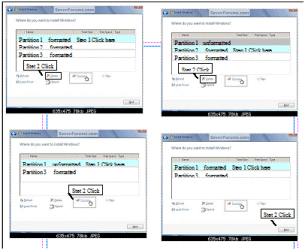
Did you use the Drive Options (Advanced) to Delete all partitions, create New, then Format before install?

Do you still have the utility partitions which will not work now that you clean reinstalled?

This is why I recommended that you clean the disk using DISKPART, since you have the Recovery disks. At the very least you need to Delete, Repartition and Format using the Drive Options which Theog displays in post #77.

Please post back a screenshot of your full Disk Mgmt drive map.

No i didn't do what you recommended as i wasn't confident doing it.
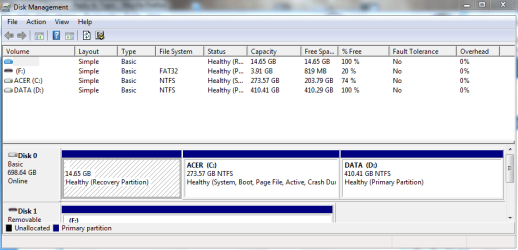
disk management.PNG
Is this the screenshot you mean?
 

My Computer My Computer

Computer Manufacturer/Model Number
Acer
OS
Windows 7
CPU
Intel(R) Core(TM)2 Quad CPU Q9300 @ 2.50GHz 2.50 GHz
Memory
4 GB
Graphics Card(s)
GeForce GTX 470
Sound Card
Realtek Digital Output (Realtek High Definition Audio)
Monitor(s) Displays
24" samsung
Screen Resolution
1920 x 1080
Case
Aspire M7711
Keyboard
Razer Lycosa
Mouse
Logitech G9
Internet Speed
20 MB
Did you use the Drive Options (Advanced) to Delete all partitions, create New, then Format before install?

Do you still have the utility partitions which will not work now that you clean reinstalled?

This is why I recommended that you clean the disk using DISKPART, since you have the Recovery disks. At the very least you need to Delete, Repartition and Format using the Drive Options which Theog displays in post #77.

Please post back a screenshot of your full Disk Mgmt drive map.

No i didn't do what you recommended as i wasn't confident doing it.

View attachment 81828
Is this the screenshot you mean?

This is the best way of cleaning all the junk.
 

My Computer My Computer

OS
ME/XP/Vista/Win7
You can delete the first 2 partitions & leave third.
 
Last edited:

My Computer My Computer

OS
ME/XP/Vista/Win7
Can you try here?:
http://www.sevenforums.com/tutorials/19151-windows-old-folder-delete.html

Wipe those .old folders, then do your things.

Thanks alot, thats is exactly what i was looking for.

This will not clean all the junk out.

I think the OP doesn't want straight away a Final Solution...He needs himself a go step by step carefully, wanted seeing what's happen next, every step he made.:)

He might go on your side when ready...
 

My Computer My Computer

Computer type
PC/Desktop
Computer Manufacturer/Model Number
Custom Build
OS
Windows 7 Professional SP1 - x64 [Non-UEFI Boot]
CPU
Ivy Bridge Core i5 3570K (Delidded)
Motherboard
Asus P8Z77-V LE PLUS
Memory
G.Skill "Ares" DDR3 PC3-12800 - 1600MHz (16Gb)
Graphics Card(s)
Asus Dual-RX480-O4G
Sound Card
Creative Sound Blaster Z w/5.1 sound system
Monitor(s) Displays
Asus IPS 23"
Screen Resolution
16/9
Hard Drives
Internal:
500Go Sata 6Gb/s (x2)
500Go Sata 3Gb/s (x2)
SSD 60Go Sata 6Gb/s
PSU
In Win C 900W Series 80+ Platinum
Case
Thermaltake Chaser A71
Cooling
Custom Water Cooling Loop
Keyboard
Cooler Master QuickFire XTi
Mouse
Razer Imperator 2012 (4G)
Antivirus
MSE
Browser
IE 11.0.xxx Rtm
Other Info
"Raid0" with Intel Smart Response Technology (HDD/SSD)
Well, if you weren't confident enough to follow steps given to clean your HD, then you did not get the cleanest possible reinstall this time. And you have the windows.old folder because you didn't even format the partition you reinstalled Win7 to. After making sure you have all of the files you need from it, you can delete it using Disk Cleanup.

So how is the performance of your reinstall? I suggest you install Microsoft Security Essentials for the most effective lightweight free AV, check Optional Windows Updates for newer drivers, then check your Device Manager for missing drivers which you can find on the Acer Support Downloads webpage for your model.

Install programs slowly over time so you can check performance after each. Don't let any programs freeload on your Startup which is the biggest cause of peformance lag - I uncheck all but AV and gadgets in msconfig>startup tab (type msconfig in Start Search box).

When it is set up as you wish, run the CCleaner "Run Cleaner" and Registry tab, then the Auslogics Disk and Registry defraggers to clean and order your HD perfectly. Then save a Win7 backup image.

If you find performance lags any after all of this then consider wiping the HD as suggested to get the cleanest possible reinstall. I only suggested this as I know first-hand it works best with Acers since I have two at home.
 
Well, if you weren't confident enough to follow steps given to clean your HD, then you did not get the cleanest possible reinstall this time. And you have the windows.old folder because you didn't even format the partition you reinstalled Win7 to. After making sure you have all of the files you need from it, you can delete it using Disk Cleanup.

So how is the performance of your reinstall? I suggest you install Microsoft Security Essentials for the most effective lightweight free AV, check Optional Windows Updates for newer drivers, then check your Device Manager for missing drivers which you can find on the Acer Support Downloads webpage for your model.

Install programs slowly over time so you can check performance after each. Don't let any programs freeload on your Startup which is the biggest cause of peformance lag - I uncheck all but AV and gadgets in msconfig>startup tab (type msconfig in Start Search box).

When it is set up as you wish, run the CCleaner "Run Cleaner" and Registry tab, then the Auslogics Disk and Registry defraggers to clean and order your HD perfectly. Then save a Win7 backup image.

If you find performance lags any after all of this then consider wiping the HD as suggested to get the cleanest possible reinstall. I only suggested this as I know first-hand it works best with Acers since I have two at home.

I have adjusted my startup programs so that only the essentials are starting up when i turn on my computer. My computer is running fine but there is just one problem, i had this problem before when i had 64 bit but now the solution i had before does not work anymore. My problem is directX. Here is the link: http://www.sevenforums.com/installation-setup/93318-directx.html

I fixed it before by downloading directx from this link: Download details: DirectX End-User Runtime

If i try to download it from this now i get the same problem as before.

EDIT: I tryed 6 times to install it and on the 6th it just randomly worked.
Every thing is fine now. Thank you for all of your help. I repped you all last night :D
 

My Computer My Computer

Computer Manufacturer/Model Number
Acer
OS
Windows 7
CPU
Intel(R) Core(TM)2 Quad CPU Q9300 @ 2.50GHz 2.50 GHz
Memory
4 GB
Graphics Card(s)
GeForce GTX 470
Sound Card
Realtek Digital Output (Realtek High Definition Audio)
Monitor(s) Displays
24" samsung
Screen Resolution
1920 x 1080
Case
Aspire M7711
Keyboard
Razer Lycosa
Mouse
Logitech G9
Internet Speed
20 MB

My Computer My Computer

Computer Manufacturer/Model Number
Acer
OS
Windows 7
CPU
Intel(R) Core(TM)2 Quad CPU Q9300 @ 2.50GHz 2.50 GHz
Memory
4 GB
Graphics Card(s)
GeForce GTX 470
Sound Card
Realtek Digital Output (Realtek High Definition Audio)
Monitor(s) Displays
24" samsung
Screen Resolution
1920 x 1080
Case
Aspire M7711
Keyboard
Razer Lycosa
Mouse
Logitech G9
Internet Speed
20 MB

My Computer My Computer

Computer type
PC/Desktop
Computer Manufacturer/Model Number
Custom Build
OS
Windows 7 Professional SP1 - x64 [Non-UEFI Boot]
CPU
Ivy Bridge Core i5 3570K (Delidded)
Motherboard
Asus P8Z77-V LE PLUS
Memory
G.Skill "Ares" DDR3 PC3-12800 - 1600MHz (16Gb)
Graphics Card(s)
Asus Dual-RX480-O4G
Sound Card
Creative Sound Blaster Z w/5.1 sound system
Monitor(s) Displays
Asus IPS 23"
Screen Resolution
16/9
Hard Drives
Internal:
500Go Sata 6Gb/s (x2)
500Go Sata 3Gb/s (x2)
SSD 60Go Sata 6Gb/s
PSU
In Win C 900W Series 80+ Platinum
Case
Thermaltake Chaser A71
Cooling
Custom Water Cooling Loop
Keyboard
Cooler Master QuickFire XTi
Mouse
Razer Imperator 2012 (4G)
Antivirus
MSE
Browser
IE 11.0.xxx Rtm
Other Info
"Raid0" with Intel Smart Response Technology (HDD/SSD)

My Computer My Computer

Computer Manufacturer/Model Number
Acer
OS
Windows 7
CPU
Intel(R) Core(TM)2 Quad CPU Q9300 @ 2.50GHz 2.50 GHz
Memory
4 GB
Graphics Card(s)
GeForce GTX 470
Sound Card
Realtek Digital Output (Realtek High Definition Audio)
Monitor(s) Displays
24" samsung
Screen Resolution
1920 x 1080
Case
Aspire M7711
Keyboard
Razer Lycosa
Mouse
Logitech G9
Internet Speed
20 MB
Just a quick question. I have an acer 8735G it has two hard disks. I have put all the data on the secondary disk. If I choose complete recovery do I loose the data on the second hard disk as well? Thanks.
 

My Computer My Computer

OS
Windows 7
Do you have two partitions or two HD Drives?
 

My Computer My Computer

OS
ME/XP/Vista/Win7
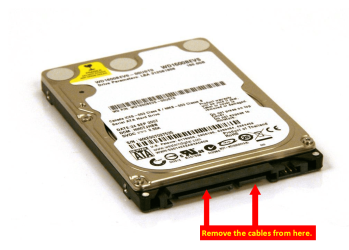
I have two HD Drives how do I unplug it please
 

My Computer My Computer

OS
Windows 7
I'd not unplug it if you're not familar with the notebook HD bays and plugging or unplugging them.

Instead after copying the data to second HD I'd disable it in BIOS setup while running Recovery.

But first look at the Recovery options when running Recovery from boot to see if it offers an option to not include the second HD.
 
As pasted here in acer erecovery it says all the data on the c: will be deleted. D: is not mentioned. I wil try to save important docs. on a pen drive and try to do the complete recovery.
 

My Computer My Computer

OS
Windows 7
Sorry about that! Thanks for your help I manually unplugged the hard disk (after checking that physically there were two 500Gb hard disk - that is not a partition) and then succesfully done a recovery. All the data on the second hard disk was still there when I plugged again the hard disk.

Actually, I have done this because I had some trouble with Acer Cyrstal Eye Webcam. The webcam sometimes did not respond, or it went black/white or even a message pops up saying 'no camer found'. I have read many posts all saying that this was a driver problem and I installed many drivers but without sucess. Today I decided to remove the 6 screws off the laptop screen and see if the cable was actually plugged in correctly to the inbuilt camera. The cable was ok but as soon as I put everything back to its place the camera worked just fine. So anyone who has this problem it might not be necessarily a driver problem. Thanks.
 

My Computer My Computer

OS
Windows 7
Back
Top