Solved AcerTravelMate unable to restore to factory settings

Wint3rNights

New member
Local time
10:18 PM
Messages
3
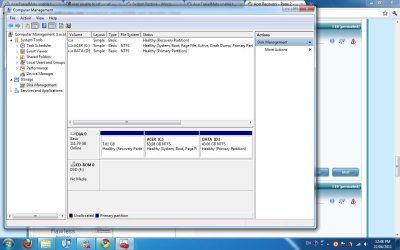
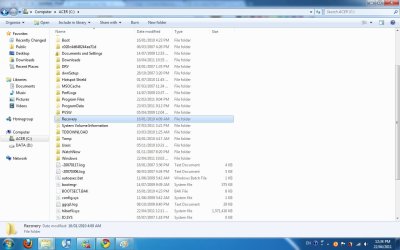
Hello everyone, I bought my Acer from school which was running on Windows Vista, I then upgraded it to Windows 7 and I want to reformat it now and using Alt F10 would not work. I would like to restore it back to Vista, as i have no Windows 7 disc as this was done via school portal. How can i do this? I have read some post previously and this is a screen shot of my C:Recovery. When i click on it, it says Access denied.
 

Attachments
  • Untitled.jpg
    Untitled.jpg
    92 KB · Views: 27

My Computer My Computer

At a glance

Windows 7 32 bit
OS
Windows 7 32 bit
Another screen shot of my Disc Mgt fyi
 

Attachments

  • Untitled2.jpg
    Untitled2.jpg
    94.4 KB · Views: 28

My Computer My Computer

At a glance

Windows 7 32 bit
OS
Windows 7 32 bit
It's likely your Recovery partition lost its hotkey to boot when you clean installed Win7.

Using free Partition Wizard bootable CD, you can mark Recovery partition Active to see if it will boot. If not, mark Win7 partition Active again - this may require Startup Repair from the Repair CD, which you should make first in Backup and Recovery Center.

Otherwise you can reinstall using any Vista installer for your version with the Product Key on the COA sticker, or order Recovery Disks from Acer.
 
Couple of ways you can try.

1) If you havent deleted the windows.old folder created by the upgrade, you can use it to restore vista.

How to restore a Windows 7-based computer to a previous Windows installation by using the Windows.old folder

2) In disk management try to mark that recovery partition active. Click once on the partition, then right click to see available options. Click Active if avaialable. Then reboot (if required keep tapping Alt F10 at reboot).

3) Since this is a school computer, I'm not sure but check if theres a sticker on it with a vista product key. If there is, you can reinstall the same edition with a borrowed disk and use that key to activate. Or even order recovery disks from Acer. But a school computer is more likely to have some academic license.
 

My Computer My Computer

At a glance

Windows 7 x64 pro/ Windows 7 x86 Pro/ XP SP3 x86
Computer Manufacturer/Model Number
Too many to describe...
OS
Windows 7 x64 pro/ Windows 7 x86 Pro/ XP SP3 x86
Thanks alot gregrocker and Bill2. For my case I used the Partition Wizard and it worked for me. Now my laptop is back to its factory settings with Windows Vista! Once again thank you for your help!
 

My Computer My Computer

At a glance

Windows 7 32 bit
OS
Windows 7 32 bit

My Computer My Computer

At a glance

ME/XP/Vista/Win7
OS
ME/XP/Vista/Win7
Back
Top