Acronis 2012

Wishmaster

New member
Guru
Gold Member
VIP
Local time
12:34 AM
Messages
4,513
Location
Southern Ohio
Acronis 2012 is out. I decided to go ahead and upgrade, since I was still using 2010.

The interface looks good, but I find it more difficult to find what I want.
For example, in 2010, Disk/Partition backups were in seperate areas of the UI.
By simply pressing the Files/Folder tab I could see just those backups.

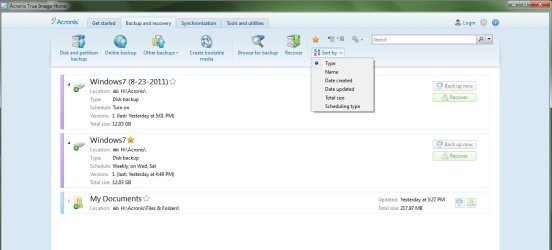
2012 groups them all together on the same screen. You can sort them, by Type, date created etc, but it seems to be a bit buggy.
If I add a backup that was made by 2010, it automatically puts it at the top of the list regardless what sort method is used.
And sometimes, it just decides to organize them however it decides to.

Here is the main BackUp/Recovery Screen. (Bit empty right now still testing)
main.jpg

You can back up Files and folders by clicking the "Other BackUps button which also offers, email backup and Non-stop Backup options.

This bothers me a bit, because in 2010, if I wanted to back up a single file or folder somewhere, I could simply right click the file or folder and choose BackUp.
This option is no longer in the right click context menu. You must launch Acronis directly to get to it.


IMAGING:

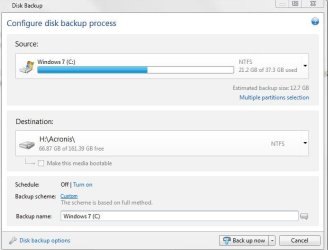
To start A Imaging task, you just press the Disk and partition backup button.
Capture.JPG

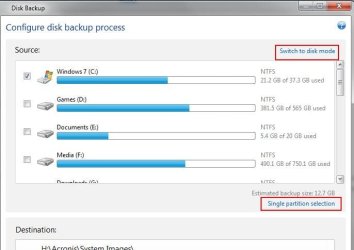
By default, its set to Incremental and Single Partition. Single partition is only the C Partition Windows is installed On.

You can also choose multiple partitions if you want to or, a Full disc image (my prefered method)
You can cycle through the modes and check the partions or discs you want to back up.
multiple part.JPG disk mode.JPG

Perhaps Its just me, but I found 2010 to be a bit more user friendly when setting backup options.

Also, for Desination, you can not set a default destination as in 2010. You must choose it with each new back up you create. Unless Im missing something here.


There are also Cleanup options (how long to keep, Consolodate etc) as well as a Schedule that can be set.
schedule.JPG backupoption.JPG


Acronis also will integrate onto the Control panel.
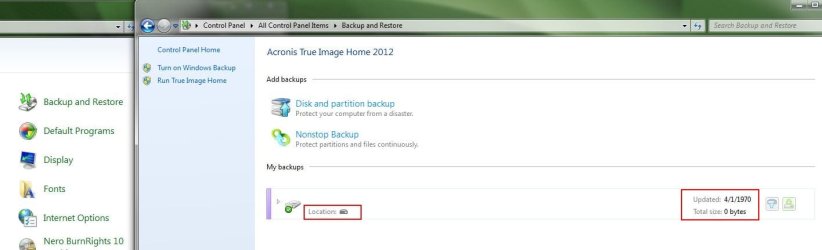
When you go to Control panel / backUp restore, you will find Windows BackUp has been disbaled and replaced with Acronis.
CP.JPG

This wouldn't be such a bad thing, if it worked. It's been nothing but a headache.
Notice the Date and time of the test images I ran?
Also, the options to the right do not work. If you attempt to open the location you get an error.
You can however, launch Acronis from here by Pressing the Disk Partiton backup button at the top.

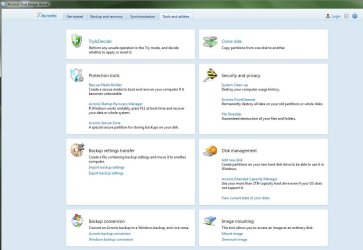
It also has the typical Tools and Utilities from previous versions:
tools.JPG


Theres also a Sync option, which I think uses the Online backUp??? Im not sure about this as I have yet to test it out.


Overall, the 2012 version looks OK. But it is a bit buggy. It tends to freeze and crash sometimes over the most simple of tasks.
Deleting the task log for example will cause it.


So, my thoughts overall about it are pretty simple.
Personally, I find the 2010 version to be much more user friendly.
Its easier to organize everything & find what you're looking for.

Also, advanced options are much easier to set in 2010 vs 2012, its stable and reliable.


Im sure these issues in 2012 will be resolved after a few updates, but for now... best to pass up until it is.
Its still buggy ATM, and that is NOT something you want from the app thats handling critical BackUps.
 

My Computer

Computer Manufacturer/Model Number
Custom (Self Build)
OS
Windows 7 Home Premium 64bit
CPU
Intel Core i7 2700k
Motherboard
eVGA P67 SLI
Memory
8GB Mushkin Redline Ridgebacks @1866
Graphics Card(s)
EVGA GTX570 SC
Sound Card
XiFi Titanium HD
Monitor(s) Displays
LG W2453V
Screen Resolution
1920x1080
Hard Drives
Intel 320 80GB -- Intel X25-V 40GB --WD Black 1TB x2 -- WD Blue 640GB
PSU
Seasonic x750
Case
Corsair 600T SE White
Cooling
eVGA Superclocked CPU Cooler
Keyboard
Saitek Cyborg
Antivirus
Kaspersky
Browser
IE
Other Info
LG BD/DVD
Thanks for the report especially all the screenshots. I too have 2010 so don't know how radical the UI changes are from 2011, but like many (most?) ATI users I do wish Acronis would pick a GUI style and stay with it. Can't help but have bugs in a completely redesigned interface. But one would hope-and-expect that the underlying mechanisms for creating images (and restoring them) do not change and are as reliable as they've been tweaked forever since v1.

Their business model these days must insist on annual upgrade revenues as well as snagging new users to their "latest/greatest brand-spanking new" program(s).

:confused:
 

My Computer

Computer type
Laptop
Computer Manufacturer/Model Number
Dell Latitude E6540 Laptop
OS
Windows 7 Professional 64bit
CPU
Intel Core i7 4600M @ 2.90GHz
Motherboard
Dell Inc. 0CYT5F (SOCKET 0)
Memory
16.0GB Dual-Channel DDR3 @ 797MHz (11-11-11-28)
Graphics Card(s)
Intel HD Graphics 4600 (Dell) 2048MB ATI AMD Radeon HD 8790M
Sound Card
Realtek High Definition Audio
Monitor(s) Displays
HP ZR30w (2560x1600@60Hz)
Hard Drives
256GB LITEONIT LMT-256M6M-41 mm SATA (SSD)
1TB Samsung SSD 860 EVO mSATA SATA (SSD)
2TB USB 3.0 USB Device
115GB SanDisk Ultra Fit USB
Other Info
Multiple Dell E-Port Plus II Port Replicator/Docking Stations 0Y72NH USB 3.0 + 130W AC Adapters
Never use the first release of a new version of ATI. My experience has been to wait. The interface looks much like 2011 and I agree that neither 2011 nor 2012 is easier to use than 2010. They should follow the KISS model. Keep It Simple Stupid.
 

My Computer

Computer Manufacturer/Model Number
Home Built
OS
Windows 7 SP1 x64
CPU
AMD 9850 X4
Motherboard
ASUS
Memory
Corsair
Graphics Card(s)
ATI Radeon
Sound Card
Sigmatel
Monitor(s) Displays
Dell
Screen Resolution
1600X900
Hard Drives
(1) WD 1TB
Cooling
Corsair H60
Internet Speed
UVerse 12MB
I just wanted other ATI users to know, right now its buggy & not worth upgrading to until they get it patched.
I should have waited :(

As far as doing a simple backup, it does fine. But it is buggy and hangs up at times.
For example it will crash, with the Acronis has stopped working message and you must force it closed. As everything will be locked up.
Yet, the back up continues to run in the background.


I just rolled back to a system image before upgrading and will stick with 2010 for the time being.
Hopefully they get some patches out to remedy the issues it has, and with any luck it'll be soon.


As far as the GUI, I think the idea was to make it as simple as possible for those who may not be so tech savy.
But IMHO, it just the opposite. Unless you just click BackUp and Spam the next button until it starts, it can be difficult to locate what you're looking for.
 

My Computer

Computer Manufacturer/Model Number
Custom (Self Build)
OS
Windows 7 Home Premium 64bit
CPU
Intel Core i7 2700k
Motherboard
eVGA P67 SLI
Memory
8GB Mushkin Redline Ridgebacks @1866
Graphics Card(s)
EVGA GTX570 SC
Sound Card
XiFi Titanium HD
Monitor(s) Displays
LG W2453V
Screen Resolution
1920x1080
Hard Drives
Intel 320 80GB -- Intel X25-V 40GB --WD Black 1TB x2 -- WD Blue 640GB
PSU
Seasonic x750
Case
Corsair 600T SE White
Cooling
eVGA Superclocked CPU Cooler
Keyboard
Saitek Cyborg
Antivirus
Kaspersky
Browser
IE
Other Info
LG BD/DVD
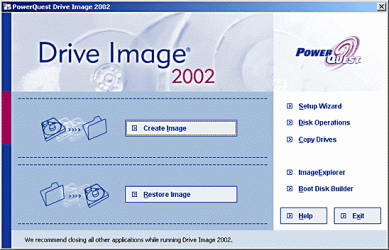
Oh no, they changed UI again! I missed Powerquest Drive Image so much.
 

Attachments

  • ji_20201714_20201715_pc_01.gif
    ji_20201714_20201715_pc_01.gif
    51.6 KB · Views: 31

My Computer

OS
Windows 7 Professional 64bit
Hmmmm........ my first entry into the realms of drive imaging was through Power Quest's Drive Image 2002. Me too loved it and used it for years. It was so simple and never stupid.

What we get now is bloated and buggy software which even for geeks is a nightmare, forget about new entrants.
 

My Computer

OS
Windows 7 Home Premium 32 bit
EaseUS Todo Backup Free 3.0 is was I use now instead of Acronis it's very simple and has many tools for a free program you can't beat it and thanks Wishmaster for your time and effort into this informative post...:D
 

My Computer

Computer Manufacturer/Model Number
Alienware
OS
Windows 7 Ultimate x64
CPU
I7
Motherboard
GA-X58-USB3
Memory
6 x 1.5V DDR3 DIMM sockets supporting up to 24 GB of system
Graphics Card(s)
GeForce GTX 580
Sound Card
Realtek ALC892 codec 2/4/5.1/7.1-channel
Monitor(s) Displays
NEC Display Solutions E321 Black 32"
Screen Resolution
1366 x 768
Hard Drives
OCZ Colossus LT Series OCZSSD2-1CLSLT1T 3.5" 1TB SATA II MLC Internal Solid State Drive
PSU
XFX Black Edition XPS-850W-BES 850W ATX12V
Case
Antec
Cooling
Zalman
Keyboard
Microsoft
Mouse
Microsoft
Thanks for the very useful and informative post Wishmaster

I really like Acronis for years but it has become bloatware trying to be an all-in-one solution.

EaseUS todo Backup was a favorite until it failed me with version 2.5.

Paragon has been great and it's "Migrate to SSD" module is a great tool.
 

My Computer

Computer Manufacturer/Model Number
My Build
OS
win7 Ult 64
CPU
i7 3930K & 3960X
Motherboard
ASUS P9X79 Deluxe
Memory
16GB G-Skill 2133MHz
Graphics Card(s)
Sapphire HD 7970
Sound Card
On-board
Monitor(s) Displays
ASUS 27 inch
Screen Resolution
1920X1080
Hard Drives
Crucial M4 256GB, 1.5TB WD Black for Data/Images
PSU
Corsair AX1200
Case
NZXT 810
Cooling
Custom Loop, Swiftech HDBlock
Keyboard
Mionix
Mouse
Mionix
Internet Speed
Cable
I've used the new version twice to create images from production workstations with a simple RAID array (Dells) and on both it killed the W7 boot upon restart once the image was complete. Had to run a chkdsk from the actual install disk to fix it. Just a heads up.

Seems to be okay with a single disk, and does provide the updated NIC drivers I needed. I far prefer 9.7 though.
 

My Computer

OS
W7 Pro 64, W7 pro 32,
GUI looks a bit similar to ATI Home 2011..made it bigger but I think the same.

This bothers me a bit, because in 2010, if I wanted to back up a single file or folder somewhere, I could simply right click the file or folder and choose BackUp.
-- Yeah. That would be nice. Don't know why they removed that one. My first experience with Acronis was DiscWizard and ATI-WD who both lack capabilities but was downright easy to use/straight to the point.

Am using ATI Home 2011 and I really haven't checked it all out. I still am confused since my transition from Paragon. I see a tab in the "Properties" and was wondering if that particular tab searches for folder or file backup rather than "a version" inside an archive I created. See image.


My Computer

Computer type
PC/Desktop
Computer Manufacturer/Model Number
Custom Build
OS
Win7 Ultimate 64bit
CPU
AMD A8 5600K APU
Motherboard
Gigabyte F2A75MD3H
Memory
16gb DDR3
Graphics Card(s)
Radeon 7560
Sound Card
onboard
Monitor(s) Displays
kingston lcd 23inch wide
Hard Drives
WD 500gb (2)
WD 1TB
Antivirus
EAM + Online Armor Premium -- desktop
For years, I too relied on ATI to do all my backup and restores, but then, I started experiencing what so many other have recently -- first couple of releases of their "new" versions were very buggy. Visiting the (now defunct) Acronis support forum revealed that many others felt the same way -- stay away from a new version until at least the second upgrade came out. With their policy now of a new version every year, that means waiting MONTHS to upgrade.

Which is part of the reason I switched over to Macrium Reflect a while back. And yes, their new versions are buggy as well, and folks don't like THEIR UI changes, either, but at least they mostly work.
 

My Computer

Computer type
PC/Desktop
Computer Manufacturer/Model Number
Custom
OS
Win7 Pro 32-bit, Win8 Pro 32-bit
CPU
AMD Phenom II X6 1090T
Motherboard
Gigabyte
Memory
4GB ddr3 1300
Graphics Card(s)
AMD HD 4290 onboard
Sound Card
Builtin Realtek HD Audio
Monitor(s) Displays
Samsung 24" widescreen, LG 23" widescreen
Screen Resolution
1920x1200/1920x1080
Hard Drives
Kingston 256GB SSD
Keyboard
Logitech Illuminated Keyboard
Mouse
Logitech M705 wireless mouse
Antivirus
Norton Av 2013
Browser
IE v10
That is why I have simply stayed with Acronis True Image Home 2010. I bought it a few years ago, and it's been solid for me. I didn't see any reason to upgrade to 2011...it provided no features that I needed, and I didn't see a reason to pay for a rearranged GUI interface...especially with the complaints that it was generating on the web.

I now feel the same way about 2012. Until there is something that I cannot do with ATI 2010 that a newer version fixes, I don't see the point in paying for the upgrade.

For me personally, ATI 2010 has been solid, no problems backing up or restoring. I use Macrium Reflect Free at work and it's been troublefree for me. And I've started using EaseUs ToDoBackup v3 at work and recommending to friends and it's been fine in all of my testing as well.
 

My Computer

Computer Manufacturer/Model Number
Self-Built in July 2009
OS
Windows 7 Ultimate x64
CPU
Intel Q9550 2.83Ghz OC'd to 3.40Ghz
Motherboard
Gigabyte GA-EP45-UD3R rev. 1.1, F12 BIOS
Memory
8GB G.Skill PI DDR2-800, 4-4-4-12 timings
Graphics Card(s)
EVGA 1280MB Nvidia GeForce GTX570
Sound Card
Realtek ALC899A 8 channel onboard audio
Monitor(s) Displays
23" Acer x233H
Screen Resolution
1920x1080
Hard Drives
Intel X25-M 80GB Gen 2 SSD
Western Digital 1TB Caviar Black, 32MB cache. WD1001FALS
PSU
Corsair 620HX modular
Case
Antec P182
Cooling
stock
Keyboard
ABS M1 Mechanical
Mouse
Logitech G9 Laser Mouse
Internet Speed
15/2 cable modem
Other Info
Windows and Linux enthusiast. Logitech G35 Headset.
That is why I have simply stayed with Acronis True Image Home 2010. I bought it a few years ago, and it's been solid for me. I didn't see any reason to upgrade to 2011...it provided no features that I needed, and I didn't see a reason to pay for a rearranged GUI interface...especially with the complaints that it was generating on the web.

I now feel the same way about 2012. Until there is something that I cannot do with ATI 2010 that a newer version fixes, I don't see the point in paying for the upgrade.

For me personally, ATI 2010 has been solid, no problems backing up or restoring.

My exact thoughts, if it's not broke don't fix it.
 

My Computer

Computer type
PC/Desktop
Computer Manufacturer/Model Number
Self Built Custom Computer.
OS
Windows 10 Pro x64
CPU
i7-4770K
Motherboard
Asus Z87 Sabertooth
Memory
16Gig DDR3-2400
Graphics Card(s)
Gigabyte GT740
Sound Card
Onboard
Monitor(s) Displays
Benq 27" - Dell 23' - Benq 22"
Screen Resolution
1680x1050
Hard Drives
Samsung 840 Pro 128g SSD
1xWestern Digital Caviar Green 1tb
2xWestern Digital Caviar Green 2 tb
PSU
Seasonic 760 watt Platinum
Case
Coolermaster Haf - X
Cooling
Noctua NH-C12P CPU Cooler
Keyboard
Logitech illuminated keyboard
Mouse
Logitech Perfomance MX
Internet Speed
Cable = speeds to 20Mbps downsteam and 512kbps upsteam
Antivirus
Avast Internet Security
Browser
Firefox
Is ATI 2010 compatible with win7, and does it support proper alignment?
 

My Computer

OS
Windows 7 Professional 64bit
I have heard of, and seen myself once, alignment issues if restoring a partition image from a mechanical HD to a new SSD. Things get wierd here sometimes for some reason.


However, restoring Images made of the SSD, partiton or full disc, have been problem free.
At least for me.
 

My Computer

Computer Manufacturer/Model Number
Custom (Self Build)
OS
Windows 7 Home Premium 64bit
CPU
Intel Core i7 2700k
Motherboard
eVGA P67 SLI
Memory
8GB Mushkin Redline Ridgebacks @1866
Graphics Card(s)
EVGA GTX570 SC
Sound Card
XiFi Titanium HD
Monitor(s) Displays
LG W2453V
Screen Resolution
1920x1080
Hard Drives
Intel 320 80GB -- Intel X25-V 40GB --WD Black 1TB x2 -- WD Blue 640GB
PSU
Seasonic x750
Case
Corsair 600T SE White
Cooling
eVGA Superclocked CPU Cooler
Keyboard
Saitek Cyborg
Antivirus
Kaspersky
Browser
IE
Other Info
LG BD/DVD

My Computer

Computer type
Laptop
Computer Manufacturer/Model Number
Dell Latitude E6540 Laptop
OS
Windows 7 Professional 64bit
CPU
Intel Core i7 4600M @ 2.90GHz
Motherboard
Dell Inc. 0CYT5F (SOCKET 0)
Memory
16.0GB Dual-Channel DDR3 @ 797MHz (11-11-11-28)
Graphics Card(s)
Intel HD Graphics 4600 (Dell) 2048MB ATI AMD Radeon HD 8790M
Sound Card
Realtek High Definition Audio
Monitor(s) Displays
HP ZR30w (2560x1600@60Hz)
Hard Drives
256GB LITEONIT LMT-256M6M-41 mm SATA (SSD)
1TB Samsung SSD 860 EVO mSATA SATA (SSD)
2TB USB 3.0 USB Device
115GB SanDisk Ultra Fit USB
Other Info
Multiple Dell E-Port Plus II Port Replicator/Docking Stations 0Y72NH USB 3.0 + 130W AC Adapters
Might take a look at it.

Do you have to register to get a trial version?

Seems odd to me.
 

My Computers

System One System Two

  • Computer type
    PC/Desktop
    OS
    7 X64
    CPU
    i5 8400
    Motherboard
    gigabyte b365m ds3h
    Memory
    2x8gb 3200mhz
    Hard Drives
    various
    PSU
    pure power 11 400w cm
    Case
    Coolermaster
    Cooling
    cryorig m9i
  • Computer type
    PC/Desktop
    OS
    7x64
    CPU
    g5400
    Motherboard
    ga b365m ds3h
    Memory
    8gb ddr4 2400
    PSU
    xfx pro 450w
Might take a look at it.

Do you have to register to get a trial version?

Seems odd to me.

For a trial of ATI 2012? I think you just need to supply a email to get it.
 

My Computer

Computer Manufacturer/Model Number
Custom (Self Build)
OS
Windows 7 Home Premium 64bit
CPU
Intel Core i7 2700k
Motherboard
eVGA P67 SLI
Memory
8GB Mushkin Redline Ridgebacks @1866
Graphics Card(s)
EVGA GTX570 SC
Sound Card
XiFi Titanium HD
Monitor(s) Displays
LG W2453V
Screen Resolution
1920x1080
Hard Drives
Intel 320 80GB -- Intel X25-V 40GB --WD Black 1TB x2 -- WD Blue 640GB
PSU
Seasonic x750
Case
Corsair 600T SE White
Cooling
eVGA Superclocked CPU Cooler
Keyboard
Saitek Cyborg
Antivirus
Kaspersky
Browser
IE
Other Info
LG BD/DVD
I also like and use Acronis 2010. I bought several copies and I install them on my machines and client computers, has saved my banannas several times. I don't like the 2011 version. I just bought a copy of 2012 to see if it is any better than 2011 (only cost $25 from the ugr.com store) so it is not a lot of money wasted.
I will report back my results after testing it.

Rich
 

My Computer

Computer type
Laptop
Computer Manufacturer/Model Number
Toshiba Laptop Qosimo X870
OS
Windows 7 Pro x64 SP1
CPU
Intel Core I7
Motherboard
Toshiba Qosmio
Memory
16 Gigs
Graphics Card(s)
NVIDIA GeForce GTX 670M
Monitor(s) Displays
17.7" laptop
Screen Resolution
1600 x 900
Hard Drives
256 Gig SanDisk SSD for C
256 Gig Intel SSD for D
Internet Speed
50/25 FIOS
Antivirus
Vipre (all you can eat for 10 machines)
Browser
IE and FF
Other Info
I have dos 6.22, wfwg 3.11, win98, 2000 and xp VHD's available for testing. MS's Virtual PC works great.
Look forward to seeing what you think.
 

My Computer

Computer Manufacturer/Model Number
Custom (Self Build)
OS
Windows 7 Home Premium 64bit
CPU
Intel Core i7 2700k
Motherboard
eVGA P67 SLI
Memory
8GB Mushkin Redline Ridgebacks @1866
Graphics Card(s)
EVGA GTX570 SC
Sound Card
XiFi Titanium HD
Monitor(s) Displays
LG W2453V
Screen Resolution
1920x1080
Hard Drives
Intel 320 80GB -- Intel X25-V 40GB --WD Black 1TB x2 -- WD Blue 640GB
PSU
Seasonic x750
Case
Corsair 600T SE White
Cooling
eVGA Superclocked CPU Cooler
Keyboard
Saitek Cyborg
Antivirus
Kaspersky
Browser
IE
Other Info
LG BD/DVD
Back
Top