Activate Windows 7 by Phone

How to Activate Windows 7 by Phone

   Information
Activation is the required process of ensuring that Windows 7 on your computer is genuine and used according to the Microsoft Software License Terms.

If you are unable to activate Windows 7 online or do not have the internet, then this will show you how to activate Windows 7 by phone instead with your entered product key number.
   Note
Genuine Windows is a recurring process that checks your product key to ensure it's being used with the hardware it was paired with during activation. If the product key is found to be non-genuine, or not valid, it's likely that the product key is either being used on another computer or is counterfeit. Try doing the Diagnostics and Validate Windows options. For more information about genuine Windows, go to the genuine Windows website for FAQ's.

  • A Windows 7 product key number can only be used to activate the same edition of Windows 7 that it was for, and cannot be used to activate a different edition of Windows 7.
  • A Family Pack Windows 7 product key number can be used to activate the Family Pack Windows 7 copy on up to 3 computers at any one time.
  • A OEM Windows 7 product key number can only be used to activate a OEM Windows 7 copy on the same computer that it was first activated on, and no other computer.
  • A retail Windows 7 product key number can be used to activate a retail Windows 7 copy on any computer, but only on up to one computer at any one time.
You might have to activate Windows 7 again if:
  • You uninstall Windows 7 on one computer and then install it on another. During installation, enter the product key that came with Windows. If automatic activation fails, follow the instructions that walk you through activating Windows by phone. You will have 30 days to activate Windows.
  • You make a significant hardware change to your computer, such as upgrading the hard disk and memory at the same time. If a major hardware change requires activating Windows again, you will be notified and will have three days to activate Windows.
  • You reformat your hard disk. Reformatting erases your activation status. In this case, you’ll have 30 days to activate Windows again.
  • A virus or malware infects your computer and deletes your activation status.

   Warning

  • You must activate Windows 7 within the 30 days grace period after installation before it expires. When Windows 7 is activated, you'll be able to use every feature of Windows 7.
  • If you chose to Automatically activate Windows when I'm online when you set up your computer, automatic activation begins trying to activate your copy of Windows 7 three days after you log on for the first time. See METHOD ONE below.
  • If you install Windows 7 on a second computer, you must buy an additional product key number to activate the second installation to continue using Windows 7 on both computers.
What happens if you don't activate Windows 7?


Despite what you may have read elsewhere, there's no "reduced functionality mode" in Windows 7 like there was in Vista. If the 30-day trial or activation key expires:
  • Your desktop background goes black. You can change it, but every 60 minutes, it will return to black until you activate Windows.
  • You will have a "This copy of windows is not genuine" watermark on the bottom right corner of your desktop.
  • You will get a notification balloon stating that you may be a victim of software piracy.
  • You will be prompted to activate Windows every time you log in.
  • You will receive periodic reminders to activate Windows.
  • Windows Updates will be limited, but you will still be able to get critical security updates. However, access to optional updates or benefits available exclusively to genuine Windows customers, such as Microsoft Security Essentials, might be restricted.
See also: Genuine Windows: frequently asked questions - Microsoft Windows


Here's How:
NOTE: This is only for the retail version of Windows 7.
1. If Online Activation Failed First
NOTE: This is if you have tried to activate Windows 7 online and it failed. Otherwise, go to step 2.
A) Select the Use the automated phone system to activate option.

B) Go to step 3.
2. To Activate by Phone
A) Open the Start Menu, and type slui.exe 4 and press Enter.
3. If prompted by UAC, then click on Yes.

4. Click on the drop down menu and select the nearest location to you for a toll free number to call, then click on the Next button. (See screenshot below)
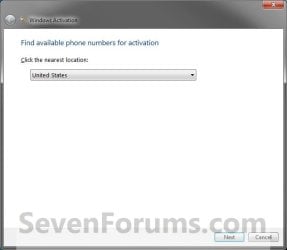
Step1.jpg
5. A local phone number should apear under the Step 1 section with a set of installation ID numbers generated by Windows and displayed on your screen under the 1 to 9 in the Step 2 section. (See screenshot below)

   Tip
If needed, Microsoft Activation Centers Worldwide Telephone Numbers lists toll and toll-free telephone numbers for worldwide Microsoft activation centers that you can call to get your Windows 7 activated as well.

Step2.jpg
6. Call the "Microsoft activation phone number" (Under Step 1 in screenshot above).

7. At first, the activation line will be automated, so you will be asked to enter or speak the installation ID numbers displayed on your screen into the phone. (See screenshot below step 5)

   Tip
If you want to speak to an activation operator and bypass the automated service, then do nothing instead until you are transferred automatically to an available operator.


8. If Automated Service is Successful
NOTE: Usually this is not always successful.
A) The automated service will issue you a confirmation ID number.
NOTE: Have a pen and paper handy to write these numbers down.

B) Go to step 10.
9. If Automated Service is Unsuccessful
A) If the automated activation service informs you that it was unsuccessful and cannot help you with activation, then STAY ON THE LINE and your call will be transferred to an activation operator who will assist you in activating your copy of Windows 7. If you get hanged up on while waiting, then phone back, but this time DO NOT respond when the ansafone requests which service you require (twice). This puts you in the queue to speak to an operator, and doesn't seem to time out so quickly. The operator will give you a confirmation ID number if they agree your copy of Windows 7 is legitimate.
NOTE: Just explain to the operator your situation and what you did to require activation. (EX: hardware upgrade, installed Windows 7 on a new computer after uninstalling it from the old one, etc...)
10. Type in the confirmation ID number given to you into the Step 3 section to be able to activate Windows 7, and click on Next. (See screenshot below step 5)
NOTE: You will get these numbers from the phone automated system or operator after they have confirmed the numbers you gave them in step 8 above.

11. If Activation is Successful
A) When you get the Activation was successful window, click on Close to finish. (See screenshot below)
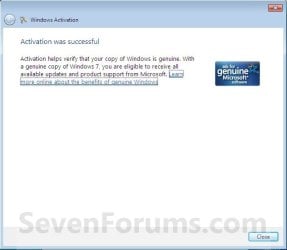
Step3.jpg
12. If Activation Failed
A) If you got an activation error code, then look it up at the link below to see what it means.
Activation Error Codes


That's it,
Shawn


Last edited:
Hi Ron

that link is coming back as "invalid attachment"

can you also download and run Kb947821 as well, if it also reports as clean your best bet is a repair install
Repair Install

The Macrium activated OS is a great back-up option
 

My Computer My Computer

Computer type
PC/Desktop
Computer Manufacturer/Model Number
medionl/Aspire 6930G/acer x55a
OS
W7 home premium 32bit/W7HP 64bit/w10 tp insider ring
CPU
E5300 dual core
Motherboard
medion MS7366
Memory
3gb
Graphics Card(s)
Nvidia Geforce 7100 Nforce 630i
Monitor(s) Displays
avixc
Internet Speed
n (isp resticted to 72)
Antivirus
mse/pands
Browser
palemoon
Other Info
Belkin Fd7050 n USB using Railink RT2870 drivers, more upto date
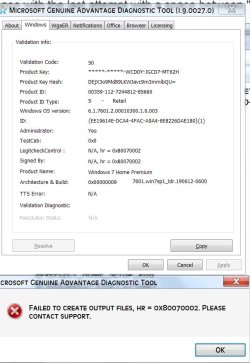
Here's the MGADiag error message when I clicked the copy button:

MGADiag error.jpg

Re the Macrium backup question, what I'm getting at is if I could solve this reactivation issue by reverting the current W7 OS to an earlier state before the black screens / faulty MB issue of last week. I have a few Macrium image files from early April [each of which of course is of an activated W7] that I could use. [Remember, I replaced the MB with the exact same model so I don't believe there'd be a compatibility problem]. Or is MS too clever for that to happen?

I know where the System Update Readiness Tool logs are stored, but I don't have a clue how to read the results :-).

Your suggestion of a Repair Install is intriguing. I understand that no files or programs, etc. will be changed, but can the same be said of any of the minor tweaks / customizations I've done over the years?

R.
 

My Computer My Computer

Computer type
PC/Desktop
Computer Manufacturer/Model Number
custom
OS
Win 7
CPU
AMD FX 6100
Motherboard
Asus M5A97 EVO
Memory
16GB
Graphics Card(s)
AMD Radeon R7 200 series
Sound Card
none - see "other info"
Monitor(s) Displays
Acer
Screen Resolution
1920x1080
Hard Drives
Samsung SSD 120GB
PSU
Enermax TriAthlor 650 watt
Keyboard
Happy Hacking Professional 2
Mouse
Logitech MX Revolution [bluetooth]
Antivirus
Bitdefender
Browser
Waterfox & Chrome
Other Info
I use the following DAC's:
Benchmark DAC1 USB [via Coax] to splitter with Teac A-H01 [via optical]

Hugo2 [connected via USB]
If you restore an image then hopefully the restored os will not be corrupt as your current os seems to be.

As it is a different motherboard you will probably need to reactivate after restoring the image.
 

My Computers My Computers

System One System Two

  • Computer type
    PC/Desktop
    OS
    7 X64
    CPU
    i5 8400
    Motherboard
    gigabyte b365m ds3h
    Memory
    2x8gb 3200mhz
    Hard Drives
    various
    PSU
    pure power 11 400w cm
    Case
    Coolermaster
    Cooling
    cryorig m9i
  • Computer type
    PC/Desktop
    OS
    7x64
    CPU
    g5400
    Motherboard
    ga b365m ds3h
    Memory
    8gb ddr4 2400
    PSU
    xfx pro 450w
SIW2,

Right you are. Reverting to a pre-black screen/faulty MB W7 Macrium image resulted in a couple of minor changes. The Control Panel > System > Windows Activation area previously read as: "you must activate Windows now." It currently states: "3 days to activate. Also, there is no desktop warning stating "This copy of Windows in not genuine."

However, previous behaviors exist. 1] clicking on the "activate now" blue link on the System page results in nothing [no panel with activation options]; 2] typing slui.exe in the Start Search windows also results in nothing; 3] running MGADiag results in the same error message; 4] running the CD and REN lines of code did NOT this time result in the error message "The system cannot find the file specified" so this time I was able to finish entering the remaining lines of code. However, the hoped for Windows Activation dialog did NOT appear.

So, this is all to say that I appear to be a little better off than before, but not much. As Brink has made clear at the top of this thread, the penalty for an unactivated W7 is a black screen desktop. If in fact that's true -- and assuming that I'd still be able to access the Task Bar -- then this will only be a minor inconvenience as I don't use the desktop for much of anything anyway.

I was hoping the "CD + REN" lines of code fix would do the trick, but sadly no panel with activation options. . . .

Well, there's the update. I'm open to additional suggestions but hope is running out :-)

R.


My Computer My Computer

Computer type
PC/Desktop
Computer Manufacturer/Model Number
custom
OS
Win 7
CPU
AMD FX 6100
Motherboard
Asus M5A97 EVO
Memory
16GB
Graphics Card(s)
AMD Radeon R7 200 series
Sound Card
none - see "other info"
Monitor(s) Displays
Acer
Screen Resolution
1920x1080
Hard Drives
Samsung SSD 120GB
PSU
Enermax TriAthlor 650 watt
Keyboard
Happy Hacking Professional 2
Mouse
Logitech MX Revolution [bluetooth]
Antivirus
Bitdefender
Browser
Waterfox & Chrome
Other Info
I use the following DAC's:
Benchmark DAC1 USB [via Coax] to splitter with Teac A-H01 [via optical]

Hugo2 [connected via USB]
Hi
as its a different image
please rerun sfc /scannow and KB947821 again

something has changed, your now in the grace period default state, hence the 3 day message

please run Mgadiag again, can you view the licencing tab page - are the last 5 characters the same as your product code
i dont believe they will be
if the above is true -- from an elevated command type
slmgr.vbs /ipk (your product key)
enter


really silly question now --- are you fully updated, including Netframework
 

My Computer My Computer

Computer type
PC/Desktop
Computer Manufacturer/Model Number
medionl/Aspire 6930G/acer x55a
OS
W7 home premium 32bit/W7HP 64bit/w10 tp insider ring
CPU
E5300 dual core
Motherboard
medion MS7366
Memory
3gb
Graphics Card(s)
Nvidia Geforce 7100 Nforce 630i
Monitor(s) Displays
avixc
Internet Speed
n (isp resticted to 72)
Antivirus
mse/pands
Browser
palemoon
Other Info
Belkin Fd7050 n USB using Railink RT2870 drivers, more upto date
@torchwood,

Thanks for getting back to me.

- sfc /scannow returned with this: Windows Resource Protection did not find any integrity violations. Same result as with the previous W7 image.

- KB947821: I have the log results, but don't have a clue as to how to read them. Please inform.

-
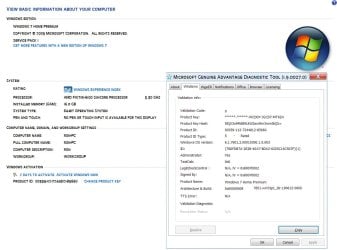
Mgadiag results: For better or worse, the product key is a match with my retail DVD. And the product ID as shown on the Mdadiag page matches that shown on the Control Panel > System page. Here's a composite image of both:

System page + MGADiag results.jpg

- No, I'm afraid I'm NOT fully updated. I lagged behind that process some time ago.

- I ran
slmgr.vbs /ipk + product key and received this message: "Error: 0xc004f050 The Software Licensing Service reported that the product key is invalid"

Hope the above helps. Continued thanks for your efforts.

- Ron

 
Last edited:

My Computer My Computer

Computer type
PC/Desktop
Computer Manufacturer/Model Number
custom
OS
Win 7
CPU
AMD FX 6100
Motherboard
Asus M5A97 EVO
Memory
16GB
Graphics Card(s)
AMD Radeon R7 200 series
Sound Card
none - see "other info"
Monitor(s) Displays
Acer
Screen Resolution
1920x1080
Hard Drives
Samsung SSD 120GB
PSU
Enermax TriAthlor 650 watt
Keyboard
Happy Hacking Professional 2
Mouse
Logitech MX Revolution [bluetooth]
Antivirus
Bitdefender
Browser
Waterfox & Chrome
Other Info
I use the following DAC's:
Benchmark DAC1 USB [via Coax] to splitter with Teac A-H01 [via optical]

Hugo2 [connected via USB]
Hi

please ensure you have these updates installed

2019 servicing stack update (SSU) (​
KB4490628
).​
The latest SHA-2 update (​
KB4474419
)​

now that your activation system is "cleaner" i'm hoping its in whats called a "race condition" and that after a cople of days it will untangle itself...

i would also like you to do this

from an elevated command

slmgr /rearm

this will give you another 30 days grace
 

My Computer My Computer

Computer type
PC/Desktop
Computer Manufacturer/Model Number
medionl/Aspire 6930G/acer x55a
OS
W7 home premium 32bit/W7HP 64bit/w10 tp insider ring
CPU
E5300 dual core
Motherboard
medion MS7366
Memory
3gb
Graphics Card(s)
Nvidia Geforce 7100 Nforce 630i
Monitor(s) Displays
avixc
Internet Speed
n (isp resticted to 72)
Antivirus
mse/pands
Browser
palemoon
Other Info
Belkin Fd7050 n USB using Railink RT2870 drivers, more upto date
torchwood,

- KB4490628: installed successfully.
- KB4474419: Windows informed me that this update was already installed.
- slmgr /rearm: done. 30 day grace period activated.

Just asking, but how will I know when the OS has become "untangled" ? Again, thanks for your continued help,

R.


My Computer My Computer

Computer type
PC/Desktop
Computer Manufacturer/Model Number
custom
OS
Win 7
CPU
AMD FX 6100
Motherboard
Asus M5A97 EVO
Memory
16GB
Graphics Card(s)
AMD Radeon R7 200 series
Sound Card
none - see "other info"
Monitor(s) Displays
Acer
Screen Resolution
1920x1080
Hard Drives
Samsung SSD 120GB
PSU
Enermax TriAthlor 650 watt
Keyboard
Happy Hacking Professional 2
Mouse
Logitech MX Revolution [bluetooth]
Antivirus
Bitdefender
Browser
Waterfox & Chrome
Other Info
I use the following DAC's:
Benchmark DAC1 USB [via Coax] to splitter with Teac A-H01 [via optical]

Hugo2 [connected via USB]
torchwood, et al.,

After a couple of 30-day extensions and further struggles, I was finally able to activate Windows. I stumbled across a fix from another thread. I wasn't optimistic given the promise and failure of the many I've so far tired. But I'll be damned, it worked. Don't know if it'll work for anyone else, but it's certainly worth a try. Here:

Type into the Start. slmgr.vbs -ato wait for the popup to say your activated.

Thanks for your efforts. Hope the above is helpful to someone else in need.
 

My Computer My Computer

Computer type
PC/Desktop
Computer Manufacturer/Model Number
custom
OS
Win 7
CPU
AMD FX 6100
Motherboard
Asus M5A97 EVO
Memory
16GB
Graphics Card(s)
AMD Radeon R7 200 series
Sound Card
none - see "other info"
Monitor(s) Displays
Acer
Screen Resolution
1920x1080
Hard Drives
Samsung SSD 120GB
PSU
Enermax TriAthlor 650 watt
Keyboard
Happy Hacking Professional 2
Mouse
Logitech MX Revolution [bluetooth]
Antivirus
Bitdefender
Browser
Waterfox & Chrome
Other Info
I use the following DAC's:
Benchmark DAC1 USB [via Coax] to splitter with Teac A-H01 [via optical]

Hugo2 [connected via USB]
Back
Top