Solved Activation issue after clean install on new hard drive

mrbongo

New member
Power User
Local time
6:37 PM
Messages
120
Location
Edinburgh, UK
Code:
-----------------------------------------
Windows Validation Data-->

Validation Code: 0
Cached Online Validation Code: N/A, hr = 0xc004f012
Windows Product Key: *****-*****-PWB9R-4K7W4-2BT4J
Windows Product Key Hash: jlJIE69lzaXsu5B+X11cktZP6u8=
Windows Product ID: 00359-OEM-8992687-00015
Windows Product ID Type: 2
Windows License Type: OEM SLP
Windows OS version: 6.1.7600.2.00010300.0.0.003
ID: {C5A7CD95-BE28-4AF4-816E-8C06F3ED5C91}(3)
Is Admin: Yes
TestCab: 0x0
LegitcheckControl ActiveX: N/A, hr = 0x80070002
Signed By: N/A, hr = 0x80070002
Product Name: Windows 7 Home Premium
Architecture: 0x00000000
Build lab: 7600.win7_rtm.090713-1255
TTS Error: 
Validation Diagnostic: 
Resolution Status: N/A

Vista WgaER Data-->
ThreatID(s): N/A, hr = 0x80070002
Version: N/A, hr = 0x80070002

Windows XP Notifications Data-->
Cached Result: N/A, hr = 0x80070002
File Exists: No
Version: N/A, hr = 0x80070002
WgaTray.exe Signed By: N/A, hr = 0x80070002
WgaLogon.dll Signed By: N/A, hr = 0x80070002

OGA Notifications Data-->
Cached Result: N/A, hr = 0x80070002
Version: N/A, hr = 0x80070002
OGAExec.exe Signed By: N/A, hr = 0x80070002
OGAAddin.dll Signed By: N/A, hr = 0x80070002

OGA Data-->
Office Status: 109 N/A
OGA Version: N/A, 0x80070002
Signed By: N/A, hr = 0x80070002
Office Diagnostics:  025D1FF3-364-80041010_025D1FF3-229-80041010_025D1FF3-230-1_025D1FF3-517-80040154_025D1FF3-237-80040154_025D1FF3-238-2_025D1FF3-244-80070002_025D1FF3-258-3

Browser Data-->
Proxy settings: N/A
User Agent: Mozilla/4.0 (compatible; MSIE 8.0; Win32)
Default Browser: C:\Program Files\Mozilla Firefox\firefox.exe
Download signed ActiveX controls: Prompt
Download unsigned ActiveX controls: Disabled
Run ActiveX controls and plug-ins: Allowed
Initialize and script ActiveX controls not marked as safe: Disabled
Allow scripting of Internet Explorer Webbrowser control: Disabled
Active scripting: Allowed
Script ActiveX controls marked as safe for scripting: Allowed

File Scan Data-->
File Mismatch: C:\Windows\system32\wat\watadminsvc.exe[Hr = 0x80070003]
File Mismatch: C:\Windows\system32\wat\npwatweb.dll[Hr = 0x80070003]
File Mismatch: C:\Windows\system32\wat\watux.exe[Hr = 0x80070003]
File Mismatch: C:\Windows\system32\wat\watweb.dll[Hr = 0x80070003]

Other data-->
Office Details:  <GenuineResults><MachineData><UGUID>{C5A7CD95-BE28-4AF4-816E-8C06F3ED5C91}</UGUID><Version>1.9.0027.0</Version><OS>6.1.7600.2.00010300.0.0.003</OS><Architecture>x32</Architecture><PKey>*****-*****-*****-*****-2BT4J</PKey><PID>00359-OEM-8992687-00015</PID><PIDType>2</PIDType><SID>S-1-5-21-3399798490-3251741481-2428518751</SID><SYSTEM><Manufacturer>SAMSUNG   ELECTRONICS CO.,  LTD.</Manufacturer><Model>R530/R730                   </Model></SYSTEM><BIOS><Manufacturer>Phoenix  Technologies  Ltd.</Manufacturer><Version>02JD.M006.20091222.KSJ</Version><SMBIOSVersion  major="2"  minor="5"/><Date>20091222000000.000000+000</Date></BIOS><HWID>5CBA3607018400F8</HWID><UserLCID>0809</UserLCID><SystemLCID>0409</SystemLCID><TimeZone>GMT   Standard  Time(GMT+00:00)</TimeZone><iJoin>0</iJoin><SBID><stat>3</stat><msppid></msppid><name></name><model></model></SBID><OEM><OEMID>SECCSD</OEMID><OEMTableID>LH43STAR</OEMTableID></OEM><GANotification/></MachineData><Software><Office><Result>109</Result><Products/><Applications/></Office></Software></GenuineResults>    

Spsys.log Content: 0x80070002

Licensing Data-->
Software licensing service version: 6.1.7600.16385

Name: Windows(R) 7, HomePremium edition
Description: Windows Operating System - Windows(R) 7, OEM_SLP channel
Activation ID: d2c04e90-c3dd-4260-b0f3-f845f5d27d64
Application ID: 55c92734-d682-4d71-983e-d6ec3f16059f
Extended PID: 00359-00178-926-800015-02-2057-7600.0000-2172012
Installation ID: 017874826854179051943466968402715996997316217672586160
Processor Certificate URL: [URL]http://go.microsoft.com/fwlink/?LinkID=88338[/URL]
Machine Certificate URL: [URL]http://go.microsoft.com/fwlink/?LinkID=88339[/URL]
Use License URL: [URL]http://go.microsoft.com/fwlink/?LinkID=88341[/URL]
Product Key Certificate URL: [URL]http://go.microsoft.com/fwlink/?LinkID=88340[/URL]
Partial Product Key: 2BT4J
License Status: Initial grace period
Time remaining: 42420 minute(s) (29 day(s))
Remaining Windows rearm count: 3
Trusted time: 04/08/2012 10:22:20

Windows Activation Technologies-->
HrOffline: 0x00000000
HrOnline: N/A
HealthStatus: 0x0000000000000000
Event Time Stamp: N/A
ActiveX: Not Registered - 0x80040154
Admin Service: Not Registered - 0x80040154
HealthStatus Bitmask Output:


HWID Data-->
HWID Hash Current: MgAAAAEAAgABAAIAAAACAAAAAgABAAEAeqi0p/615jZ6f3TNYjY23Ui11F/OsWbTRso=

OEM Activation 1.0 Data-->
N/A

OEM Activation 2.0 Data-->
BIOS valid for OA 2.0: yes
Windows marker version: 0x20001
OEMID and OEMTableID Consistent: yes
BIOS Information: 
  ACPI Table Name    OEMID Value    OEMTableID Value
  APIC            PTLTD              APIC  
  FACP            INTEL         CRESTLNE
  HPET            INTEL         CRESTLNE
  BOOT            PTLTD         $SBFTBL$
  MCFG            INTEL         CRESTLNE
  SLIC            SECCSD        LH43STAR
  SSDT            BrtRef        DD01BRT
  SSDT            BrtRef        DD01BRT
  SSDT            BrtRef        DD01BRT
  SSDT            BrtRef        DD01BRT
 

My Computer My Computer

At a glance

Windows 7 Home Premium 32bitPentium Dual-Core CPU T4300 2.10GHz3.00GB
Computer Manufacturer/Model Number
Samsung R530
OS
Windows 7 Home Premium 32bit
CPU
Pentium Dual-Core CPU T4300 2.10GHz
Memory
3.00GB
Hard Drives
Hitachi Travelstar SATA 2.5" 750GB
Hello again - you'll get eactly the same answer here as I gave you in teh Answers forums :)

Computers that come pre-installed with Windows from large manufacturers usually come with two Product Keys.

OEM SLP: This is the key that came in Windows (from the factory). It works by connecting to a BIOS flag (the SLIC table) found only on computers from that Manufacturer. Once it sees the correct BIOS flag, it self activates.

COA SLP: This is the key seen on the sticker located on the side, bottom or in the battery compartment of your machine. The purpose of this key is to be used in the case the OEM SLP self-activation stops working for whatever reason.

the Key you need to enter is the one from the COA sticker on the case - see here for examples...http://www.microsoft.com/en-gb/howtotell/Hardware.aspx

The way to enter it into your current install is either
1) use the Change Product Key link at the bottom of the System Properties page.
or
2) Click on the Start button, then type in the Search box, SLUI 3 and hit the Enter Key.
both will bring up the change key wizard which will take you through the process, and attempt to activate.

You may need to activate by phone....

telephone activation (operator calls)
Click on the Start button
in the Search box, type
SLUI 4
and hit the Enter key
follow the instructions, but when asked which service you require by the telephone ansafone, do NOT reply - this should force an operator to respond, who can deal with you
 

My Computer My Computer

At a glance

Win 7 x64 Home Premium (and x86 VirtualBox VM...i3 370M/i7 6500U8GB - finally :)/8GBit's an i3, dude!/dual Intel&nVidia
Computer type
Laptop
Computer Manufacturer/Model Number
Asus K52F or Lenovo B51-80
OS
Win 7 x64 Home Premium (and x86 VirtualBox VM)/Win10
CPU
i3 370M/i7 6500U
Motherboard
Asus/Lenovo
Memory
8GB - finally :)/8GB
Graphics Card(s)
it's an i3, dude!/dual Intel&nVidia
Sound Card
onboard
Monitor(s) Displays
15.6" built-in
Screen Resolution
1366x768/1920x1080
Hard Drives
750GB Seagate internal
Sundry external drives attached to other computers on the local network
1TB SSD on the Lenovo
PSU
n/a
Internet Speed
as much as I can get - usually on a dongle/phone, so <1MB/s
Antivirus
MSE/Defender
Browser
IE11/12/Edge/Chrome/FF(if I must)
My original problem is detailed here: http://www.sevenforums.com/general-discussion/244015-windows-7-not-loading-bootable-repair-disc.html

So I bought a new hard drive and used the iso Windows 7 Install disc from Digital River to install windows. I (stupidly?) performed a clean install as the hard drive was new and assumed since there was no OS on there, it would have to be a new install.

I entered the Key I already have from my other version of Windows 7 that came preinstalled on my laptop (on my old drive) and it now says that it can't be activated.

Was I supposed to do an 'Upgrade' install, or how do I fix this? Would I have to get into my windows files and somehow deactivate it or something to let me use my Key again?

Thanks in advance for any help.
 

My Computer My Computer

At a glance

Windows 7 Home Premium 32bitPentium Dual-Core CPU T4300 2.10GHz3.00GB
Computer Manufacturer/Model Number
Samsung R530
OS
Windows 7 Home Premium 32bit
CPU
Pentium Dual-Core CPU T4300 2.10GHz
Memory
3.00GB
Hard Drives
Hitachi Travelstar SATA 2.5" 750GB
Hello again - you'll get eactly the same answer here as I gave you in teh Answers forums :)

Computers that come pre-installed with Windows from large manufacturers usually come with two Product Keys.

OEM SLP: This is the key that came in Windows (from the factory). It works by connecting to a BIOS flag (the SLIC table) found only on computers from that Manufacturer. Once it sees the correct BIOS flag, it self activates.

COA SLP: This is the key seen on the sticker located on the side, bottom or in the battery compartment of your machine. The purpose of this key is to be used in the case the OEM SLP self-activation stops working for whatever reason.

the Key you need to enter is the one from the COA sticker on the case - see here for examples...http://www.microsoft.com/en-gb/howtotell/Hardware.aspx

The way to enter it into your current install is either
1) use the Change Product Key link at the bottom of the System Properties page.
or
2) Click on the Start button, then type in the Search box, SLUI 3 and hit the Enter Key.
both will bring up the change key wizard which will take you through the process, and attempt to activate.

You may need to activate by phone....

telephone activation (operator calls)
Click on the Start button
in the Search box, type
SLUI 4
and hit the Enter key
follow the instructions, but when asked which service you require by the telephone ansafone, do NOT reply - this should force an operator to respond, who can deal with you

Small world! I figured I couldn't post links from other sites on the Answers so thought having background to my problem might help.

About to destroy my house looking for the actual Key from the sticker now.
 

My Computer My Computer

At a glance

Windows 7 Home Premium 32bitPentium Dual-Core CPU T4300 2.10GHz3.00GB
Computer Manufacturer/Model Number
Samsung R530
OS
Windows 7 Home Premium 32bit
CPU
Pentium Dual-Core CPU T4300 2.10GHz
Memory
3.00GB
Hard Drives
Hitachi Travelstar SATA 2.5" 750GB
Also, no option to call Microsoft, when I click on something that suggests that I just get a Help box popping up.

I can retrieve my data from the old hard drive. Is it possible to do an 'Upgrade install' or something similar using the Windows data I had installed on that drive?
 

My Computer My Computer

At a glance

Windows 7 Home Premium 32bitPentium Dual-Core CPU T4300 2.10GHz3.00GB
Computer Manufacturer/Model Number
Samsung R530
OS
Windows 7 Home Premium 32bit
CPU
Pentium Dual-Core CPU T4300 2.10GHz
Memory
3.00GB
Hard Drives
Hitachi Travelstar SATA 2.5" 750GB
Use the
SLUI 3
command - that should brrin the option up
 

My Computer My Computer

At a glance

Win 7 x64 Home Premium (and x86 VirtualBox VM...i3 370M/i7 6500U8GB - finally :)/8GBit's an i3, dude!/dual Intel&nVidia
Computer type
Laptop
Computer Manufacturer/Model Number
Asus K52F or Lenovo B51-80
OS
Win 7 x64 Home Premium (and x86 VirtualBox VM)/Win10
CPU
i3 370M/i7 6500U
Motherboard
Asus/Lenovo
Memory
8GB - finally :)/8GB
Graphics Card(s)
it's an i3, dude!/dual Intel&nVidia
Sound Card
onboard
Monitor(s) Displays
15.6" built-in
Screen Resolution
1366x768/1920x1080
Hard Drives
750GB Seagate internal
Sundry external drives attached to other computers on the local network
1TB SSD on the Lenovo
PSU
n/a
Internet Speed
as much as I can get - usually on a dongle/phone, so <1MB/s
Antivirus
MSE/Defender
Browser
IE11/12/Edge/Chrome/FF(if I must)
Your problem is that you reinstalled using non Recovery media, and are unable to read the COA sticker.
In such circumstances, the only things you can do are

1) a reformat and reinstall using the manufacturer's recovery media
2) purchase a new license for Windows (or a new computer)
 

My Computer My Computer

At a glance

Win 7 x64 Home Premium (and x86 VirtualBox VM...i3 370M/i7 6500U8GB - finally :)/8GBit's an i3, dude!/dual Intel&nVidia
Computer type
Laptop
Computer Manufacturer/Model Number
Asus K52F or Lenovo B51-80
OS
Win 7 x64 Home Premium (and x86 VirtualBox VM)/Win10
CPU
i3 370M/i7 6500U
Motherboard
Asus/Lenovo
Memory
8GB - finally :)/8GB
Graphics Card(s)
it's an i3, dude!/dual Intel&nVidia
Sound Card
onboard
Monitor(s) Displays
15.6" built-in
Screen Resolution
1366x768/1920x1080
Hard Drives
750GB Seagate internal
Sundry external drives attached to other computers on the local network
1TB SSD on the Lenovo
PSU
n/a
Internet Speed
as much as I can get - usually on a dongle/phone, so <1MB/s
Antivirus
MSE/Defender
Browser
IE11/12/Edge/Chrome/FF(if I must)
Typed in the product key (which seems to be the OEM SLP) - until I can find the one that has rubbed off the Windows 7 sticker - and after a few minutes the next screen says:

Windows Activation

A problem occurred when Windows tried to activate. Error Code 0xC004E003
For a possible resolution, click More Information.
You can also contact Microsoft by phone to help resolve this problem.

The last line is a link. When I click the link it just opens a help box telling me what kind of help Microsoft offers. No phone number or option to connect a call to them.
 

My Computer My Computer

At a glance

Windows 7 Home Premium 32bitPentium Dual-Core CPU T4300 2.10GHz3.00GB
Computer Manufacturer/Model Number
Samsung R530
OS
Windows 7 Home Premium 32bit
CPU
Pentium Dual-Core CPU T4300 2.10GHz
Memory
3.00GB
Hard Drives
Hitachi Travelstar SATA 2.5" 750GB
Your problem is that you reinstalled using non Recovery media, and are unable to read the COA sticker.
In such circumstances, the only things you can do are

1) a reformat and reinstall using the manufacturer's recovery media
2) purchase a new license for Windows (or a new computer)

Recovery media, it is then. Just bought a new hard drive. No option to buy a new laptop and really... I can't be the only person to find the Product Key rubbed off. Yes it would be quick to just call up and part with the cash but in my eyes... I already did that when I bought a laptop with Windows installed - that was built into the price. If I find the Key for that sticker then no problem. If not, well... I'll try option 1.

Manufacturers recovery media. Would this be discs I made when I bought the laptop? Or can it be actioned via the Samsung Recovery Solution?

Thanks for your help so far.
 

My Computer My Computer

At a glance

Windows 7 Home Premium 32bitPentium Dual-Core CPU T4300 2.10GHz3.00GB
Computer Manufacturer/Model Number
Samsung R530
OS
Windows 7 Home Premium 32bit
CPU
Pentium Dual-Core CPU T4300 2.10GHz
Memory
3.00GB
Hard Drives
Hitachi Travelstar SATA 2.5" 750GB
There is a vague possibility that MS may issue a new Key - if you sweet-talk the operator enough :)

Try phoning the Activation Center, and explaining the problem to them and ask what to they can do to help - sometin=mes they will issue a new Key, but I can find no rhyme or reasong for it when they do!

If SLUI 4 doesn't bring up an activation offer, try using the Volume numbers here....
https://www.microsoft.com/licensing/existing-customers/activation-centers.aspx
 

My Computer My Computer

At a glance

Win 7 x64 Home Premium (and x86 VirtualBox VM...i3 370M/i7 6500U8GB - finally :)/8GBit's an i3, dude!/dual Intel&nVidia
Computer type
Laptop
Computer Manufacturer/Model Number
Asus K52F or Lenovo B51-80
OS
Win 7 x64 Home Premium (and x86 VirtualBox VM)/Win10
CPU
i3 370M/i7 6500U
Motherboard
Asus/Lenovo
Memory
8GB - finally :)/8GB
Graphics Card(s)
it's an i3, dude!/dual Intel&nVidia
Sound Card
onboard
Monitor(s) Displays
15.6" built-in
Screen Resolution
1366x768/1920x1080
Hard Drives
750GB Seagate internal
Sundry external drives attached to other computers on the local network
1TB SSD on the Lenovo
PSU
n/a
Internet Speed
as much as I can get - usually on a dongle/phone, so <1MB/s
Antivirus
MSE/Defender
Browser
IE11/12/Edge/Chrome/FF(if I must)
I will try that as option 2. In my experience, never rely on the generosity or compassion of others when you want something. Especially when there's the possibility of cash involved :p

Ive hooked up this old hard drive and in the partition I created for back up etc it has Windows System Image amongst other things.

Should I follow this tutorial to create a disc then try to reinstall that way?
 

My Computer My Computer

At a glance

Windows 7 Home Premium 32bitPentium Dual-Core CPU T4300 2.10GHz3.00GB
Computer Manufacturer/Model Number
Samsung R530
OS
Windows 7 Home Premium 32bit
CPU
Pentium Dual-Core CPU T4300 2.10GHz
Memory
3.00GB
Hard Drives
Hitachi Travelstar SATA 2.5" 750GB
The nice helpful man at Microsoft just blocked my Windows 7. I am so done with this.
 

My Computer My Computer

At a glance

Windows 7 Home Premium 32bitPentium Dual-Core CPU T4300 2.10GHz3.00GB
Computer Manufacturer/Model Number
Samsung R530
OS
Windows 7 Home Premium 32bit
CPU
Pentium Dual-Core CPU T4300 2.10GHz
Memory
3.00GB
Hard Drives
Hitachi Travelstar SATA 2.5" 750GB
The Key you are using has been blocked from activation since July 2009 - before Windows 7 was launched.
It was NEVER a Key which could be activated through either internet ot Telephone activation.

Did you not explain about your sticker?
 

My Computer My Computer

At a glance

Win 7 x64 Home Premium (and x86 VirtualBox VM...i3 370M/i7 6500U8GB - finally :)/8GBit's an i3, dude!/dual Intel&nVidia
Computer type
Laptop
Computer Manufacturer/Model Number
Asus K52F or Lenovo B51-80
OS
Win 7 x64 Home Premium (and x86 VirtualBox VM)/Win10
CPU
i3 370M/i7 6500U
Motherboard
Asus/Lenovo
Memory
8GB - finally :)/8GB
Graphics Card(s)
it's an i3, dude!/dual Intel&nVidia
Sound Card
onboard
Monitor(s) Displays
15.6" built-in
Screen Resolution
1366x768/1920x1080
Hard Drives
750GB Seagate internal
Sundry external drives attached to other computers on the local network
1TB SSD on the Lenovo
PSU
n/a
Internet Speed
as much as I can get - usually on a dongle/phone, so <1MB/s
Antivirus
MSE/Defender
Browser
IE11/12/Edge/Chrome/FF(if I must)
The Key you are using has been blocked from activation since July 2009 - before Windows 7 was launched.
It was NEVER a Key which could be activated through either internet ot Telephone activation.

Did you not explain about your sticker?

Before Windows 7 launched? Then how come when I installed Windows onto my new Hard drive and typed that in, it didn't have a problem with it?

And yes I did explain about my sticker etc but I could tell he wasnt interested and doing a scripted response, telling me to contact the manufacturer or provide proof of my Windows 7 purchase, after telling him three times that it was preinstalled.

I explained that I still have this original installation on a hard drive that will not boot etc. so I can't just do a repair install etc...

So frustrated. There's no point contacting Samsung, right?

I can't be the only person in this position. And now that the guy says the Product is blocked, is there any point attempting to do some kind of Samsung Recovery - since it will need the thing he just blocked?
 

My Computer My Computer

At a glance

Windows 7 Home Premium 32bitPentium Dual-Core CPU T4300 2.10GHz3.00GB
Computer Manufacturer/Model Number
Samsung R530
OS
Windows 7 Home Premium 32bit
CPU
Pentium Dual-Core CPU T4300 2.10GHz
Memory
3.00GB
Hard Drives
Hitachi Travelstar SATA 2.5" 750GB
Ok have done some reading up and am I right in saying that using a Samsung Recovery thing it bypasses the need to type in the number on the sticker?

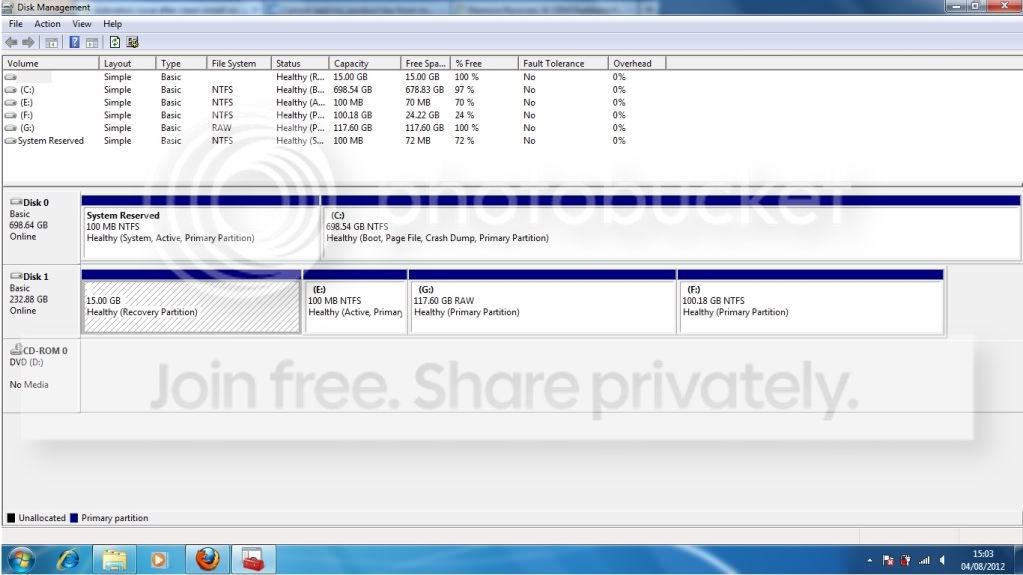
Didn't get any disks with the laptop so I assume it is in the Recovery Partition of my old hard drive? I was able to access this using Ubuntu Live CD and I assume will be able to hook it up to my laptop now and maybe run it or something?

Sorry for being pessimistic, I would have been lost without great help so far but for almost a week I have been tearing my hair out with one problem or another.

Below is what I see in Disk Management when I connect the old hard drive. Here you can see the Recovery I was talking about highlighted.

Really appreciate any help with this.
 

My Computer My Computer

At a glance

Windows 7 Home Premium 32bitPentium Dual-Core CPU T4300 2.10GHz3.00GB
Computer Manufacturer/Model Number
Samsung R530
OS
Windows 7 Home Premium 32bit
CPU
Pentium Dual-Core CPU T4300 2.10GHz
Memory
3.00GB
Hard Drives
Hitachi Travelstar SATA 2.5" 750GB
diskmanagement.jpg
 

My Computer My Computer

At a glance

Windows 7 Home Premium 32bitPentium Dual-Core CPU T4300 2.10GHz3.00GB
Computer Manufacturer/Model Number
Samsung R530
OS
Windows 7 Home Premium 32bit
CPU
Pentium Dual-Core CPU T4300 2.10GHz
Memory
3.00GB
Hard Drives
Hitachi Travelstar SATA 2.5" 750GB
Please red my posts.....

Your PC came with TWO keys.
1) The OEM_SLP Key - which is the one can ONLY you had previously been using, and which can only be activated using proper Recovery media.
2) The COA_SLP Key - the one on the sticker, which is unreadable.

The OEM_SLP Key cannot be activated by phone or by internet - it relies on special software found ONLY in the recovery media, together with the BIOS of the machine, too be able to self-activate on EVERY boot of the machine.
The COA_SLP Key MUST be activated by telephone or Internet.

You have already got the OEM_SLP Key - it's the one currently installed.
It CANNOT and will NEVER activate - because the media used for installation were not the proper Recovery media.
You need to order a set of media from Samsung - on DVD - and reinstall from that. It will contain the special code that allows self-activation.
If you can clone the Recovery partition from the old drive, it MAY work - depending on how the system was set up - but getting the proper media direct from Samsung is a better option, unless you can persuade MS to part with a replacement Key.
 

My Computer My Computer

At a glance

Win 7 x64 Home Premium (and x86 VirtualBox VM...i3 370M/i7 6500U8GB - finally :)/8GBit's an i3, dude!/dual Intel&nVidia
Computer type
Laptop
Computer Manufacturer/Model Number
Asus K52F or Lenovo B51-80
OS
Win 7 x64 Home Premium (and x86 VirtualBox VM)/Win10
CPU
i3 370M/i7 6500U
Motherboard
Asus/Lenovo
Memory
8GB - finally :)/8GB
Graphics Card(s)
it's an i3, dude!/dual Intel&nVidia
Sound Card
onboard
Monitor(s) Displays
15.6" built-in
Screen Resolution
1366x768/1920x1080
Hard Drives
750GB Seagate internal
Sundry external drives attached to other computers on the local network
1TB SSD on the Lenovo
PSU
n/a
Internet Speed
as much as I can get - usually on a dongle/phone, so <1MB/s
Antivirus
MSE/Defender
Browser
IE11/12/Edge/Chrome/FF(if I must)
Thanks. And I did read. Until you explained there it made no sense.

The way I understood it was that the guy had just blocked the 'automatic key' that is specific to my laptop and requires no activation and that now my machine would only accept a brand new version of Windows. Please tell me this is not the case.

The discs available from Samsung will install Windows using the OEM SLP key that does not require me to type any key in during installation. Samsung provide these but obviously are not authorised to hand out new Windows Keys, only Microsoft can do that (if they feel like it...)

Am I right so far?

I literally have no idea why I have this Key written down - and laminated - on a piece of paper.
 

My Computer My Computer

At a glance

Windows 7 Home Premium 32bitPentium Dual-Core CPU T4300 2.10GHz3.00GB
Computer Manufacturer/Model Number
Samsung R530
OS
Windows 7 Home Premium 32bit
CPU
Pentium Dual-Core CPU T4300 2.10GHz
Memory
3.00GB
Hard Drives
Hitachi Travelstar SATA 2.5" 750GB
He did nothing - except read the Key status from the computer screen (badly!)
They are *supposed* then to request that you read the COA sticker Key back to them so they can check it properly.
This is your opportunity to say it's illegible, and you need a new one (and pretty, pretty please would he be a nice little man and let you have one?.....)

Let's just check the Key you have written down -
If it ends 2BT4J then you can throw it in the bin, as it's the OEM_SLP Key.
If it ends PGGTG you can also thow it in the bin, as it's the Default (or Keyless Install) Key which won't activate under any cricumstances whatever.
If it's ANYTHING else, then post the last three blocks of the Key, and I'll do what tests I can (basically a google search and my archive search) and see what I can find.
 

My Computer My Computer

At a glance

Win 7 x64 Home Premium (and x86 VirtualBox VM...i3 370M/i7 6500U8GB - finally :)/8GBit's an i3, dude!/dual Intel&nVidia
Computer type
Laptop
Computer Manufacturer/Model Number
Asus K52F or Lenovo B51-80
OS
Win 7 x64 Home Premium (and x86 VirtualBox VM)/Win10
CPU
i3 370M/i7 6500U
Motherboard
Asus/Lenovo
Memory
8GB - finally :)/8GB
Graphics Card(s)
it's an i3, dude!/dual Intel&nVidia
Sound Card
onboard
Monitor(s) Displays
15.6" built-in
Screen Resolution
1366x768/1920x1080
Hard Drives
750GB Seagate internal
Sundry external drives attached to other computers on the local network
1TB SSD on the Lenovo
PSU
n/a
Internet Speed
as much as I can get - usually on a dongle/phone, so <1MB/s
Antivirus
MSE/Defender
Browser
IE11/12/Edge/Chrome/FF(if I must)
Lol guy sounded half asleep so maybe he was on autopilot. The key was already blocked, he made it sound so powerful, I was like :eek: "Noooooooooooo...." But yeah, it ends in 2BT4J.

I called up the number again and said 'Look I need advice here...'

The guy said that if I call Support when the lines open on Monday then someone there might be able to help me recover my COA key or issue a replacement key. I take it I will need date of purchase with Serial number etc?

It's worth a shot but I'm contacting Samsung also to find out about recovery discs. I have just cloned the recovery partition from the broken drive, is this basically the same info that Samsung would send me on a disc? ie burnable and bootable?
 

My Computer My Computer

At a glance

Windows 7 Home Premium 32bitPentium Dual-Core CPU T4300 2.10GHz3.00GB
Computer Manufacturer/Model Number
Samsung R530
OS
Windows 7 Home Premium 32bit
CPU
Pentium Dual-Core CPU T4300 2.10GHz
Memory
3.00GB
Hard Drives
Hitachi Travelstar SATA 2.5" 750GB
Back
Top