
Adapter settings through right click, like in XP

Spagnum

New member
Local time
5:30 AM
Messages
19
Location
Denmark
I was working on an Windows XP machine, and got to thinking how much I miss the option to right click the network icon in the system tray and going straight to Adapter settings. Instad of Windows 7 behavior where you have to go to System Sharing Center first.

Now I know I can make a shortcut straight to Adapter settings, I already did that along time ago. like it is explained here - but its not enough.
http://www.sevenforums.com/tutorials/24545-network-connections-create-shortcut.html

Is there really no way in in Windows 7 to hack the right click menu of the tray icon to add the feature Adapter settings?
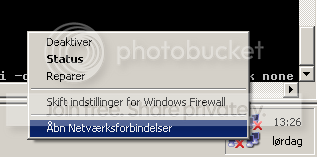
afrdghgsdf_zpsbc486d21.png

(Don't mind the danish languish I think you get my point)
 

My Computer My Computer

OS
Microsoft Windows 7 Professional 64-bit 7601 Multiprocessor Free Service Pack 1
CPU
Intel(R) Core(TM)2 Quad CPU Q6700 @ 2.66GHz
Motherboard
Gigabyte Technology Co., Ltd. P35C-DS3R
Memory
8,00 GB
Graphics Card(s)
NVIDIA GeForce GTX 550 Ti
Sound Card
(1) NVIDIA High Definition Audio (2) NVIDIA High Definitio
Screen Resolution
1920 x 1200 x 32 bits (4294967296 colors) @ 59 Hz
Hard Drives
(1) INTEL SSDSA2M160G2GC ATA Device (2) SAMSUNG HD103UJ ATA Device (3) SAMSUNG HD103UJ ATA Device
Hello Spagnum,

I'm not sure about for the tray icon, but I could whip up a .reg file that will add it your desktop context menu if you like. :)
 

My Computer My Computer

Computer type
PC/Desktop
Computer Manufacturer/Model Number
Self built custom
OS
64-bit Windows 11 Pro for Workstations
CPU
Intel i7-8700K OC'd to 5 GHz
Motherboard
ASUS ROG Maximus XI Formula Z390
Memory
64 GB (4x16GB) G.SKILL TridentZ RGB DDR4 3600 MHz
Graphics Card(s)
ASUS ROG-STRIX-GTX1080TI-O11G-GAMING
Sound Card
Integrated
Monitor(s) Displays
2 x Samsung Odyssey G7 27"
Screen Resolution
2560x1440
Hard Drives
1TB Samsung 990 PRO M.2,
4TB Samsung 990 PRO PRO M.2,
TerraMaster F8 SSD Plus NAS
PSU
Seasonic Prime Titanium 850W
Case
Thermaltake Core P3
Cooling
Corsair Hydro H115i
Keyboard
Logitech wireless K800
Mouse
Logitech MX Master 4
Internet Speed
2 Gb/s Download and 100 Mb/s Upload
Antivirus
Malwarebyte Anti-Malware Premium
Browser
Google Chrome
Other Info
Logitech Z625 speaker system,
Logitech BRIO 4K Pro webcam,
HP Color LaserJet Pro MFP M477fdn,
APC SMART-UPS RT 1000 XL - SURT1000XLI,
Galaxy S23 Plus phone
Hi Brink

Yeah I read that, but it not really what I'm looking for either. I already got a shortcut in my quick launch and an macro on my keyboard for it - and still I find myself right clicking the task bar icon and getting annoyed by the missing option of going strayed to the network adapter.
 

My Computer My Computer

OS
Microsoft Windows 7 Professional 64-bit 7601 Multiprocessor Free Service Pack 1
CPU
Intel(R) Core(TM)2 Quad CPU Q6700 @ 2.66GHz
Motherboard
Gigabyte Technology Co., Ltd. P35C-DS3R
Memory
8,00 GB
Graphics Card(s)
NVIDIA GeForce GTX 550 Ti
Sound Card
(1) NVIDIA High Definition Audio (2) NVIDIA High Definitio
Screen Resolution
1920 x 1200 x 32 bits (4294967296 colors) @ 59 Hz
Hard Drives
(1) INTEL SSDSA2M160G2GC ATA Device (2) SAMSUNG HD103UJ ATA Device (3) SAMSUNG HD103UJ ATA Device
Back
Top