Add folder on right side of Start menu

deeppit

New member
Local time
1:27 AM
Messages
4
It is easy. I looking for how to add folder right side?

Start_Menu_All_Programs_2.jpg
 

My Computer My Computer

At a glance

Windows 7 Ultimate 64BitIntel 2500KCorsair 1866Mhz 2x4GBSapphire R7 265
Computer type
PC/Desktop
Computer Manufacturer/Model Number
Custom
OS
Windows 7 Ultimate 64Bit
CPU
Intel 2500K
Motherboard
MSI Z68A-G43
Memory
Corsair 1866Mhz 2x4GB
Graphics Card(s)
Sapphire R7 265
Sound Card
Creative Sound Blaster Audigy Value
Monitor(s) Displays
AOC F22S+ 21.5"
Screen Resolution
1920x1080
Hard Drives
Kingston 120GB SSD
Samsung HD502HJ 500GB
PSU
Xigmatek X-Calibre 600W 80+
Case
Aerocool Cyborgx
Cooling
Thermaltake Frio
Keyboard
Microsoft Multimedia Keyboard
Mouse
Logitech G502
Internet Speed
16MBp/s
Antivirus
I do not use
Browser
Generally Google Chrome
I don't think it's possible without custom start menu.
But ,you can add custom folder using favourites trick.
As you can see on image you posted there's a folder called Favorites.

Method 1:
To get this :
Right click on taskbar > Properties > Start menu tab > Customize > Scroll down util you find Favorites menu and tick it > OK > OK
To add custom folder :
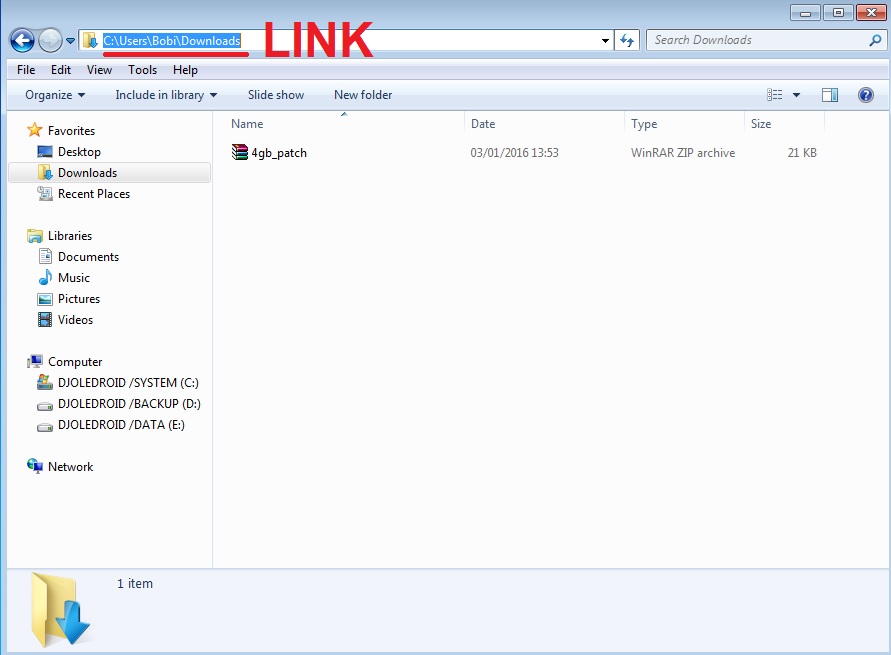
Right click on Favorites (in start menu)> Location > paste a link of folder location you wish to add

Method 2:
Right Click on your start button > Properties > Customize > Scroll down until you find Recorded TV > set it to Display as Link > Open Start Menu > right click on Recorded TV > click Properties> Remove all folders there > *To add a folder > Click on Include a folder and find folder you wish to display in start menu.
After you add your folder to rename you Recored TV:
Right Click on Recorded TV > Rename

bTdLksq.jpg


PS.
There are some scripts on the internet that will allow you to display your folder instead of some other folder (like Pictures) but it can also mess things up.
 
Last edited:

My Computer My Computer

At a glance

Windows 7 x64 Pro
OS
Windows 7 x64 Pro
Back
Top