
You are using an out of date browser. It may not display this or other websites correctly.
You should upgrade or use an alternative browser.
You should upgrade or use an alternative browser.
Solved add item to right click menu
- Thread starter muiacir
- Start date
i found that.
Right Click Context Menu Adder by =Vishal-Gupta on deviantART
but i have a question.if i want to remove some options of right click menu(for example remove "send to" option) what should i do?
Right Click Context Menu Adder by =Vishal-Gupta on deviantART
but i have a question.if i want to remove some options of right click menu(for example remove "send to" option) what should i do?
My Computer
- OS
- windows 7 ultimate x64
I recommend Default Programs Editor. It does everything you mentioned, and it's a standalone app.
My Computer
- Computer type
- PC/Desktop
- OS
- Windows 7 Ultimate x64
- CPU
- Intel Core i5-4670K
- Motherboard
- ASUS MAXIMUS VI GENE
- Memory
- G.SKILL Ripjaws Z Series 16GB (2 x 8GB)
- Graphics Card(s)
- 2x EVGA GeForce GTX 770 SC w/ ACX Cooler (SLI)
- Monitor(s) Displays
- ASUS VG248QE
- Screen Resolution
- 1920x1080
- Hard Drives
- Samsung 840 PRO 256GB SSD,
HSGT 7K1000
- PSU
- SeaSonic X Series X650 Gold
- Case
- Corsair Obsidian 350D
- Cooling
- Corsair SP120 PWM Quiet Edition, Cooler Master Hyper 212 EVO
- Keyboard
- CM Storm Quick Fire Rapid
- Mouse
- Razer DeathAdder 2013
- Internet Speed
- 30Mbit/s
- Antivirus
- MSSE
- Browser
- Chrome
i think it doe not work for me.my question is belowI recommend Default Programs Editor. It does everything you mentioned, and it's a standalone app.
i found that.
Right Click Context Menu Adder by =Vishal-Gupta on deviantART
if i want to remove some options of right click menu(for example remove "send to" option) what should i do?
My Computer
- OS
- windows 7 ultimate x64

Look at ShellExView - Shell Extension Manager For Windows it can be used to remove items from the context menu, but not all of them.
Look at our tutorial section under C there are several entries for Context menu editing http://www.sevenforums.com/tutorials/257-windows-7-tutorial-index.html#post1066
Jerry
Look at our tutorial section under C there are several entries for Context menu editing http://www.sevenforums.com/tutorials/257-windows-7-tutorial-index.html#post1066
Jerry
My Computer
- Computer type
- Laptop
- Computer Manufacturer/Model Number
- Sager NP9170
- OS
- Win 7 Pro x64 / Win 10 Pro
- CPU
- Intel(R) Core(TM) i7-3630QM CPU @ 2.40GHz
- Motherboard
- CLEVO P170EM
- Memory
- 12 GB
- Graphics Card(s)
- (1) Intel(R) HD Graphics 4000 (2) NVIDIA GeForce GTX 675M
- Sound Card
- (1) Realtek High Definition Audio (2) Intel(R) Display Aud
- Monitor(s) Displays
- 17.3
- Screen Resolution
- 1920x1080
- Hard Drives
- (1) Samsung 860 EVO 500GB(OS) (1) Samsung 860 EVO 500GB(Data)
- Keyboard
- Backlite
- Antivirus
- MSE, Malwarebytes Pro
- Browser
- Firefox
- Other Info
- DESKTOP: Custom-built.
OS: Win 10 Pro x64.
CASE: Rosewill R5.
CPU: Intel I5 4670K CPU @ 3.40GHz.
CPU COOLER: Cool Master Hyper 212 EVO.
MOTHERBOARD: Asus Z87-A.
MEMORY: Kingston HyperX 2x4 GB.
GPU: Nvidia Geforce 650 TI.
PSU: Corsair TX750.
DRIVES: (1) Samsung 840 120 GB SSD (2) Western Digital blue 500 GB 7200 RPM.
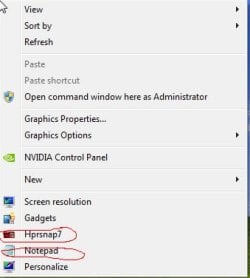
thank you my friend.exactlly my problem is the picture below:Look at ShellExView - Shell Extension Manager For Windows it can be used to remove items from the context menu, but not all of them.
Look at our tutorial section under C there are several entries for Context menu editing http://www.sevenforums.com/tutorials/257-windows-7-tutorial-index.html#post1066
Jerry
as you see the notepad and hypersnap(it is a program) are added to my right click menu.i could not find them in shellexview.i think i should do changes in registry but i do not know what to do?
Attachments
My Computer
- OS
- windows 7 ultimate x64
Have you looked in the options in hypersnap to see if you can disable it from there?
Did some program add Notepad to the context menu?
It is not there by default I know that.
Jerry
Did some program add Notepad to the context menu?
It is not there by default I know that.
Jerry
My Computer
- Computer type
- Laptop
- Computer Manufacturer/Model Number
- Sager NP9170
- OS
- Win 7 Pro x64 / Win 10 Pro
- CPU
- Intel(R) Core(TM) i7-3630QM CPU @ 2.40GHz
- Motherboard
- CLEVO P170EM
- Memory
- 12 GB
- Graphics Card(s)
- (1) Intel(R) HD Graphics 4000 (2) NVIDIA GeForce GTX 675M
- Sound Card
- (1) Realtek High Definition Audio (2) Intel(R) Display Aud
- Monitor(s) Displays
- 17.3
- Screen Resolution
- 1920x1080
- Hard Drives
- (1) Samsung 860 EVO 500GB(OS) (1) Samsung 860 EVO 500GB(Data)
- Keyboard
- Backlite
- Antivirus
- MSE, Malwarebytes Pro
- Browser
- Firefox
- Other Info
- DESKTOP: Custom-built.
OS: Win 10 Pro x64.
CASE: Rosewill R5.
CPU: Intel I5 4670K CPU @ 3.40GHz.
CPU COOLER: Cool Master Hyper 212 EVO.
MOTHERBOARD: Asus Z87-A.
MEMORY: Kingston HyperX 2x4 GB.
GPU: Nvidia Geforce 650 TI.
PSU: Corsair TX750.
DRIVES: (1) Samsung 840 120 GB SSD (2) Western Digital blue 500 GB 7200 RPM.
yes you right the notepad is not here as default and it is in my context menu after yesterday morning.i can not remember what did i do.Have you looked in the options in hypersnap to see if you can disable it from there?
Did some program add Notepad to the context menu?
It is not there by default I know that.
Jerry
i want a comprehensive solution learns me how to delete the unwanted files that was added to right click menu
My Computer
- OS
- windows 7 ultimate x64


My Computer
- OS
- windows 7 ultimate x64
I downloaded the trial of hypersnap installed it and it did not put a context menu entry in, so I do not know how you accomplished that.
Without knowing what program added Notepad it's going to be hard to tell what entry to remove.
That new entry you must have installed Skydrive Pro
Jerry
Without knowing what program added Notepad it's going to be hard to tell what entry to remove.
That new entry you must have installed Skydrive Pro
Jerry
My Computer
- Computer type
- Laptop
- Computer Manufacturer/Model Number
- Sager NP9170
- OS
- Win 7 Pro x64 / Win 10 Pro
- CPU
- Intel(R) Core(TM) i7-3630QM CPU @ 2.40GHz
- Motherboard
- CLEVO P170EM
- Memory
- 12 GB
- Graphics Card(s)
- (1) Intel(R) HD Graphics 4000 (2) NVIDIA GeForce GTX 675M
- Sound Card
- (1) Realtek High Definition Audio (2) Intel(R) Display Aud
- Monitor(s) Displays
- 17.3
- Screen Resolution
- 1920x1080
- Hard Drives
- (1) Samsung 860 EVO 500GB(OS) (1) Samsung 860 EVO 500GB(Data)
- Keyboard
- Backlite
- Antivirus
- MSE, Malwarebytes Pro
- Browser
- Firefox
- Other Info
- DESKTOP: Custom-built.
OS: Win 10 Pro x64.
CASE: Rosewill R5.
CPU: Intel I5 4670K CPU @ 3.40GHz.
CPU COOLER: Cool Master Hyper 212 EVO.
MOTHERBOARD: Asus Z87-A.
MEMORY: Kingston HyperX 2x4 GB.
GPU: Nvidia Geforce 650 TI.
PSU: Corsair TX750.
DRIVES: (1) Samsung 840 120 GB SSD (2) Western Digital blue 500 GB 7200 RPM.
thanks.I downloaded the trial of hypersnap installed it and it did not put a context menu entry in, so I do not know how you accomplished that.
Without knowing what program added Notepad it's going to be hard to tell what entry to remove.
That new entry you must have installed Skydrive Pro
Jerry
for skydrive what can i do?should i uninstall skydrive?
My Computer
- OS
- windows 7 ultimate x64
If you cannot find them with shellexview and do not want it there you would probably have to uninstall it. When using shellexview sometimes you have to look at the description, product name and manufacture to help narrow it down.
Jerry
Jerry
My Computer
- Computer type
- Laptop
- Computer Manufacturer/Model Number
- Sager NP9170
- OS
- Win 7 Pro x64 / Win 10 Pro
- CPU
- Intel(R) Core(TM) i7-3630QM CPU @ 2.40GHz
- Motherboard
- CLEVO P170EM
- Memory
- 12 GB
- Graphics Card(s)
- (1) Intel(R) HD Graphics 4000 (2) NVIDIA GeForce GTX 675M
- Sound Card
- (1) Realtek High Definition Audio (2) Intel(R) Display Aud
- Monitor(s) Displays
- 17.3
- Screen Resolution
- 1920x1080
- Hard Drives
- (1) Samsung 860 EVO 500GB(OS) (1) Samsung 860 EVO 500GB(Data)
- Keyboard
- Backlite
- Antivirus
- MSE, Malwarebytes Pro
- Browser
- Firefox
- Other Info
- DESKTOP: Custom-built.
OS: Win 10 Pro x64.
CASE: Rosewill R5.
CPU: Intel I5 4670K CPU @ 3.40GHz.
CPU COOLER: Cool Master Hyper 212 EVO.
MOTHERBOARD: Asus Z87-A.
MEMORY: Kingston HyperX 2x4 GB.
GPU: Nvidia Geforce 650 TI.
PSU: Corsair TX750.
DRIVES: (1) Samsung 840 120 GB SSD (2) Western Digital blue 500 GB 7200 RPM.
thanks bongo.i found my solution.
i used the method below to delete skydrive context menu:
1. Open registry editor from Run Command by typing regedit
2. Navigate to “HKEY_CLASSES_ROOT\AllFileSystemObjects\shell\SPFS.Context menu”
3. Right-click on it(left pane) and select “ Delete” option to remove this key and all its sub keys.
and use right click context menu editor to delete hypersnap and notepad.
i used the method below to delete skydrive context menu:
1. Open registry editor from Run Command by typing regedit
2. Navigate to “HKEY_CLASSES_ROOT\AllFileSystemObjects\shell\SPFS.Context menu”
3. Right-click on it(left pane) and select “ Delete” option to remove this key and all its sub keys.
and use right click context menu editor to delete hypersnap and notepad.
My Computer
- OS
- windows 7 ultimate x64
That's good news.
My Computer
- Computer type
- Laptop
- Computer Manufacturer/Model Number
- Sager NP9170
- OS
- Win 7 Pro x64 / Win 10 Pro
- CPU
- Intel(R) Core(TM) i7-3630QM CPU @ 2.40GHz
- Motherboard
- CLEVO P170EM
- Memory
- 12 GB
- Graphics Card(s)
- (1) Intel(R) HD Graphics 4000 (2) NVIDIA GeForce GTX 675M
- Sound Card
- (1) Realtek High Definition Audio (2) Intel(R) Display Aud
- Monitor(s) Displays
- 17.3
- Screen Resolution
- 1920x1080
- Hard Drives
- (1) Samsung 860 EVO 500GB(OS) (1) Samsung 860 EVO 500GB(Data)
- Keyboard
- Backlite
- Antivirus
- MSE, Malwarebytes Pro
- Browser
- Firefox
- Other Info
- DESKTOP: Custom-built.
OS: Win 10 Pro x64.
CASE: Rosewill R5.
CPU: Intel I5 4670K CPU @ 3.40GHz.
CPU COOLER: Cool Master Hyper 212 EVO.
MOTHERBOARD: Asus Z87-A.
MEMORY: Kingston HyperX 2x4 GB.
GPU: Nvidia Geforce 650 TI.
PSU: Corsair TX750.
DRIVES: (1) Samsung 840 120 GB SSD (2) Western Digital blue 500 GB 7200 RPM.
Similar threads

- Replies
- 0
- Views
- 2K
- Replies
- 1
- Views
- 864


- Replies
- 0
- Views
- 5K