Add new Gadgets!!!

Rajdhakate

Banned
Local time
4:50 AM
Messages
53
how can we add new gadgets from 3rd party...

i downloaded gadgets and after xtracting them i found some .css, .js, .png, .html and .xml files.....
how to use these files????:confused:
 

My Computer

Computer type
Laptop
Computer Manufacturer/Model Number
HP Pavilion dm4
OS
Windows 7 x64 (Home Premium)
CPU
Intel Corei5 2.4GHz (4 CPUs)
Memory
6144MB (6GB) RAM
Graphics Card(s)
1.6 GB Intel HD Graphic Family 3000
Sound Card
Realtek HD Audio
Monitor(s) Displays
VIA Chrome9 HC IGP Family S3 Graphics Co., Ltd.
Screen Resolution
1366x768
Can you post links to these gadgets so we can see what the problem might be.
 

My Computer

Computer type
PC/Desktop
Computer Manufacturer/Model Number
Self Built
OS
Win 10 Pro x64
CPU
Intel I5-2500K @3.3GHz
Motherboard
Asrock P67 Extreme4
Memory
16GB G.Skill Ripjaws X (4x4GB)
Graphics Card(s)
EVGA GeForce 750 Ti SC 2GB
Sound Card
ASUS Xonar DG 5.1 Channels 24-bit 96KHz PCI Interface Sound
Monitor(s) Displays
auria eq2367
Screen Resolution
1920 x 1080
Hard Drives
250GB Samsung 850 EVO SSD
1TB WD Blue
1TB Hitachi
PSU
SeaSonic X 650W 80 Plus Gold
Case
Corsair Obsidian 750D
Cooling
Corsair H60, Three 140mm case fans
Keyboard
Logitech Wireless Keyboard K520
Mouse
Logitech Wireless Mouse M310
Internet Speed
Wave Broadband ~ 100 dn 5 up
Antivirus
Windows Defender, Malwarebytes Premium
Browser
Edge, IE11, Chrome
Other Info
Laptop specs: HP g7-1365dx /
CPU: AMD A6-3420M APU with Radeon(tm) HD Graphics /
RAM: Crucial 8Gb (2x4Gb) /
SSD: Crucial M4-CT128M4SSD2 ATA Device/ FW 000F /
GFX: AMD Radeon HD 6520G /
OS: Windows 10 Pro x64
Do not extract the package, change the file extension to .gadget and the installer will put the different folders and files where they need to go... :cool:
 

My Computer

Computer type
Laptop
Computer Manufacturer/Model Number
HP 17-ak0xx, dv7 3173nr
OS
Win7 Home Premium x64 W10Pro&Home
CPU
A12 9720p 4+8 TurionII M520
Motherboard
HP 3839
Memory
6GB 8GB
Graphics Card(s)
R7
Monitor(s) Displays
24" sa550
Screen Resolution
1600x900 1920x1080
Mouse
Logitechx2
Internet Speed
120Mb/s down 12up
Do not extract the package, change the file extension to .gadget and the installer will put the different folders and files where they need to go... :cool:


Sorry dude cant get u....
when i extract the .zip file.....the comes a folder with the gadget name as - "gadgetname.gadget"...........there isnt any file of .gadget extension
 

My Computer

Computer type
Laptop
Computer Manufacturer/Model Number
HP Pavilion dm4
OS
Windows 7 x64 (Home Premium)
CPU
Intel Corei5 2.4GHz (4 CPUs)
Memory
6144MB (6GB) RAM
Graphics Card(s)
1.6 GB Intel HD Graphic Family 3000
Sound Card
Realtek HD Audio
Monitor(s) Displays
VIA Chrome9 HC IGP Family S3 Graphics Co., Ltd.
Screen Resolution
1366x768
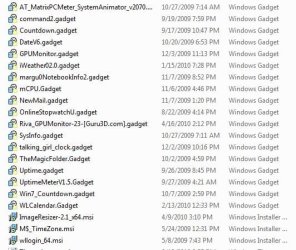
Here are some of mine unzipped. I just double click on them & they install ;)
 

Attachments

  • Gadget,gadget_snip.JPG
    Gadget,gadget_snip.JPG
    55.9 KB · Views: 120

My Computer

Computer type
PC/Desktop
Computer Manufacturer/Model Number
Built them myself, Science Experiments !
OS
Win7 Enterprise, Win7 x86 (Ult 7600), Win7 x64 Ult 7600, TechNet RTM on AMD x64 (2.8Ghz)
CPU
AMD fx8350 4ghz, AMD-32 2400mhz, AMD-64 3200mhz, AMDx64 2.8G
Motherboard
SIS 755, ECS-K8M890M-M (Ult 7600), GigaByte & others
Memory
2gb, 4gb on the Ult 7600, 4gb on Technet RTM, 32gb on FX8350
Graphics Card(s)
Draw my own Graphics, several nVidia cards
Sound Card
on motherboard
Monitor(s) Displays
19" flat scr, 28" I-Inc widescr,22" Emprex Widescr, 23" Acer
Screen Resolution
1280 x 1024, 1440 x 900, 1920 x 1080
Hard Drives
6 pata Ide HD's & 2 Sata HD's
added 80gb external on Ult 7600 computer,
numerous extra 1tb, 2TB, 3Tb SATA HD's
A collection of ext HD Docks w/ HDs
PSU
430w, 550w, 600w, 700, 800, etc
Case
All Generic Full Towers
Cooling
Open Air & a few fans, some w/ colored LEDs
Keyboard
Compaq & Dell recycled from GoodWill
Mouse
Made in China Optical Wired Mouse
Internet Speed
Fast Cable InterNet
Antivirus
AVG Free on 24 different Desktops, NO Problems!
Browser
IE 8 is preferred, but use FireFox sometimes
Other Info
Linksys Routers, switches, & Hubs
Too Many USB Flash Drives to count, Biggest is 64GB !
Eight computers in my home network.
Sixteen computers at my business network.
Linked via TeamViewer !
Lots of old used spare computer parts everywhere!
Do not extract the package, change the file extension to .gadget and the installer will put the different folders and files where they need to go... :cool:


Sorry dude cant get u....
when i extract the .zip file.....the comes a folder with the gadget name as - "gadgetname.gadget"...........there isnt any file of .gadget extension


If you downloaded a gadget that doesn't install on it's own, it's just the folder with the files in it, you'll need to either just put the folder in here-

User folder-Appdata-Local-Microsoft-Windows Sidebar-Gadgets

or just type shell:gadgets in your start menu search, and once you put the folder in there, you should be able to open the gadget window from the desktop, and the gadget should be there now. double click or drag it to the destktop to run it.


If you want a gadget to install, if it's just the folder with the files, then you'll have to open up the Folder Options in the control panel- Go to the View tab and uncheck Hide extensions for known file types.

Once you do that, you can right click on that gadget folder, send it to compressed (zip) folder, then name it want you want like... thisgadget.gadget. It will say something like ...changing the extension of a file might not make it work, just click, Allow it to change or whatever it is. It should now be ale to install just by clicking on that now.


Go back and put a check back in the hide known file extensions box.

It won't work to rename it a .gadget extension, unless you have that hide known file type extension box unchecked.

 

My Computer

Computer type
PC/Desktop
Computer Manufacturer/Model Number
Airbot 2.0
OS
Windows 7 Ultimate x64 SP1
CPU
Core i7 920 (D0) @ 4Ghz, *26c idle *65c full load on air
Motherboard
Asus P6X58D Premium - Sata 6Gb/s - USB 3.0
Memory
12GB DDR3 Corsair Dominator -CMD12GX3M6A1600C8 at 1600MHz
Graphics Card(s)
Zotac Geforce GTX 770
Sound Card
ASUS Xonar D2X
Monitor(s) Displays
1 LG 24" Flatron W2453V-PF 1 Samsung 24" P2450H both 2ms RT
Screen Resolution
1920x1080@60hz
Hard Drives
1 Samsung 250GB 840 Evo SSD
1 OCZ Vertex2 180GB SSD
1 TB Samsung Spinpoint F1 7200RPM 32MB cache
2 500GB WD Caviar Blacks 7200RPM 32MB cache (WD5001AALS)

Pioneer DVD Burner DVR-S18M
PSU
Corsair HX1000W
Case
Cooler Master HAF 932
Cooling
Case Fans *3 230mm, *1 140mm/CPU - *Tuniq Tower 120 Extreme
Keyboard
Logitech Wireless MK700
Mouse
Logitech Wireless MK700
Internet Speed
DL 15 Mbps UL 0.98 Mbps
Antivirus
None
Browser
Firefox Nightly
Other Info
Processor-7.7 *RAM- 7.9 *Graphics-7.9 *Gaming Graphics- 7.9 *SSD- 7.8 W.E.I final score= 7.7
*Phone- LG Nexus 5
Do not extract the package, change the file extension to .gadget and the installer will put the different folders and files where they need to go... :cool:


Sorry dude cant get u....
when i extract the .zip file.....the comes a folder with the gadget name as - "gadgetname.gadget"...........there isnt any file of .gadget extension


If you downloaded a gadget that doesn't install on it's own, it's just the folder with the files in it, you'll need to either just put the folder in here-

User folder-Appdata-Local-Microsoft-Windows Sidebar-Gadgets

or just type shell:gadgets in your start menu search, and once you put the folder in there, you should be able to open the gadget window from the desktop, and the gadget should be there now. double click or drag it to the destktop to run it.


If you want a gadget to install, if it's just the folder with the files, then you'll have to open up the Folder Options in the control panel- Go to the View tab and uncheck Hide extensions for known file types.

Once you do that, you can right click on that gadget folder, send it to compressed (zip) folder, then name it want you want like... thisgadget.gadget. It will say something like ...changing the extension of a file might not make it work, just click, Allow it to change or whatever it is. It should now be ale to install just by clicking on that now.


Go back and put a check back in the hide known file extensions box.

It won't work to rename it a .gadget extension, unless you have that hide known file type extension box unchecked.


i did as u say,,,,
but when m installing the gadget ,,,, its saying " Not a Valid Gadget Package"
 

My Computer

Computer type
Laptop
Computer Manufacturer/Model Number
HP Pavilion dm4
OS
Windows 7 x64 (Home Premium)
CPU
Intel Corei5 2.4GHz (4 CPUs)
Memory
6144MB (6GB) RAM
Graphics Card(s)
1.6 GB Intel HD Graphic Family 3000
Sound Card
Realtek HD Audio
Monitor(s) Displays
VIA Chrome9 HC IGP Family S3 Graphics Co., Ltd.
Screen Resolution
1366x768
Post a link to where you got it from, or put it into a zip folder, and upload it here.
 

My Computer

Computer type
PC/Desktop
Computer Manufacturer/Model Number
Airbot 2.0
OS
Windows 7 Ultimate x64 SP1
CPU
Core i7 920 (D0) @ 4Ghz, *26c idle *65c full load on air
Motherboard
Asus P6X58D Premium - Sata 6Gb/s - USB 3.0
Memory
12GB DDR3 Corsair Dominator -CMD12GX3M6A1600C8 at 1600MHz
Graphics Card(s)
Zotac Geforce GTX 770
Sound Card
ASUS Xonar D2X
Monitor(s) Displays
1 LG 24" Flatron W2453V-PF 1 Samsung 24" P2450H both 2ms RT
Screen Resolution
1920x1080@60hz
Hard Drives
1 Samsung 250GB 840 Evo SSD
1 OCZ Vertex2 180GB SSD
1 TB Samsung Spinpoint F1 7200RPM 32MB cache
2 500GB WD Caviar Blacks 7200RPM 32MB cache (WD5001AALS)

Pioneer DVD Burner DVR-S18M
PSU
Corsair HX1000W
Case
Cooler Master HAF 932
Cooling
Case Fans *3 230mm, *1 140mm/CPU - *Tuniq Tower 120 Extreme
Keyboard
Logitech Wireless MK700
Mouse
Logitech Wireless MK700
Internet Speed
DL 15 Mbps UL 0.98 Mbps
Antivirus
None
Browser
Firefox Nightly
Other Info
Processor-7.7 *RAM- 7.9 *Graphics-7.9 *Gaming Graphics- 7.9 *SSD- 7.8 W.E.I final score= 7.7
*Phone- LG Nexus 5
here's the file....
plz tell me when u are able to use it:(:(:(


and also try for the dark night..... it has another type of extension
 

Attachments

My Computer

Computer type
Laptop
Computer Manufacturer/Model Number
HP Pavilion dm4
OS
Windows 7 x64 (Home Premium)
CPU
Intel Corei5 2.4GHz (4 CPUs)
Memory
6144MB (6GB) RAM
Graphics Card(s)
1.6 GB Intel HD Graphic Family 3000
Sound Card
Realtek HD Audio
Monitor(s) Displays
VIA Chrome9 HC IGP Family S3 Graphics Co., Ltd.
Screen Resolution
1366x768
The aluminum bin I'm not sure about, someone else might know how to use that.

The dark knight gadget is made to run with this program, Windows Sidebar Styler,
Windows Sidebar Styler at Stanimir Stoyanov’s Blog
That looks like it's made for vista, I looked at it real quick but it seems like alot of tweaking and misc. settings for a gadget. Not really for me but that's what I could find for you.
I'd be interested in knowing how it works for you if you decide to try it.
 

My Computer

Computer type
PC/Desktop
Computer Manufacturer/Model Number
Self Built
OS
Win 10 Pro x64
CPU
Intel I5-2500K @3.3GHz
Motherboard
Asrock P67 Extreme4
Memory
16GB G.Skill Ripjaws X (4x4GB)
Graphics Card(s)
EVGA GeForce 750 Ti SC 2GB
Sound Card
ASUS Xonar DG 5.1 Channels 24-bit 96KHz PCI Interface Sound
Monitor(s) Displays
auria eq2367
Screen Resolution
1920 x 1080
Hard Drives
250GB Samsung 850 EVO SSD
1TB WD Blue
1TB Hitachi
PSU
SeaSonic X 650W 80 Plus Gold
Case
Corsair Obsidian 750D
Cooling
Corsair H60, Three 140mm case fans
Keyboard
Logitech Wireless Keyboard K520
Mouse
Logitech Wireless Mouse M310
Internet Speed
Wave Broadband ~ 100 dn 5 up
Antivirus
Windows Defender, Malwarebytes Premium
Browser
Edge, IE11, Chrome
Other Info
Laptop specs: HP g7-1365dx /
CPU: AMD A6-3420M APU with Radeon(tm) HD Graphics /
RAM: Crucial 8Gb (2x4Gb) /
SSD: Crucial M4-CT128M4SSD2 ATA Device/ FW 000F /
GFX: AMD Radeon HD 6520G /
OS: Windows 10 Pro x64
Last edited:

My Computer

Computer Manufacturer/Model Number
HP M9077c
OS
Windows 7 Home Premium 64bit
CPU
Intel(R)Core(TM)2 quad [email protected] 2.39GHz
Motherboard
ASUSeK
Memory
6GB DDR2 6400
Graphics Card(s)
GeForce 8500/512MB
Sound Card
Realtek High Def Audio
Monitor(s) Displays
HP w2408 LCD 24" widescreen
Screen Resolution
1920x1200
Cooling
6 pack of Bud
Keyboard
MS wireless Inteli
Mouse
MS wireless Inteli
Back
Top