Add New Printer not working

akadmon

New member
Local time
11:45 PM
Messages
24
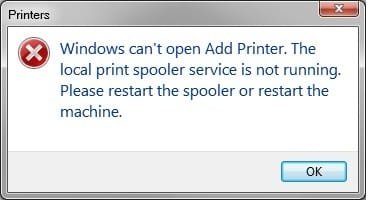
The Add New Printer function is broken on my machine. When I try to add a new printer, I get an error dialog (see below) telling me that the Local Print Spooler is not running, etc. . I have searched for a solution online, but nothing I have tried has helped. This includes firing up Services and restarting the Print Spooler, deleting all printer drivers (in case one was corrupted), and restoring the system to the oldest available restore point (when I know printing still worked).

Please help. I'm hoping I don't have to wipe everything and start from scratch, It would be such a bummer :(
 

Attachments

  • Error.jpg
    Error.jpg
    11.2 KB · Views: 13

My Computer

OS
Windows 7 Pro (64-bit)
CPU
Mac Pro
Memory
12GB
Graphics Card(s)
ATI 4870
Monitor(s) Displays
Dell 2407
Hard Drives
4x1TB WD Internal
So no one here has ever run across this problem?
 

My Computer

OS
Windows 7 Pro (64-bit)
CPU
Mac Pro
Memory
12GB
Graphics Card(s)
ATI 4870
Monitor(s) Displays
Dell 2407
Hard Drives
4x1TB WD Internal
You may want to try a repair install of Windows. You will not lose everything and it may work. Whatever you try, once System is up and working to your satisfaction. Make a copy of your HD and put it away. If you ever run into a problem, you can reinstall from the image. Any changes that you make after you take the image, write it down and put it in a safe place, so if you ever need to use the image you can make all the changes and get back to normal.
 

My Computer

Computer type
PC/Desktop
Computer Manufacturer/Model Number
Dell XPS 420
OS
Windows 10, Home Clean Install
CPU
Intel Core2 processsor Q8200(2.33Ghz 1333FSB) Quad Core Tech
Motherboard
Dell
Memory
6 gb
Graphics Card(s)
ATI Radeon 256MB HD3650
Sound Card
Intergrated 7.1 Channel Audio
Monitor(s) Displays
Dell SP2009W 20"
Hard Drives
640 GB Serial ATA Hard drive
Cooling
Fan
Keyboard
Dell USB Keyboard
Mouse
Dell Premium Optical USB
Internet Speed
DSL 2.85
Honestly, i have the same problem. im glad to know someone else has a similar problem as mine,

clean installing 7 won't help. trust me, i've done that 3 times so far.

as far as i know, just wait for a fix from windows.
 

My Computer

OS
7
Honestly, i have the same problem. im glad to know someone else has a similar problem as mine,

clean installing 7 won't help. trust me, i've done that 3 times so far.

as far as i know, just wait for a fix from windows.

I don't understand. If you format your HD (clean install), everything is gone. If now your install Win 7, everything should be perfect, and just like everyone else who has installed 7. Of course if your comp. is not equipped to handle 7, you may have problems.
 

My Computer

Computer type
PC/Desktop
Computer Manufacturer/Model Number
Dell XPS 420
OS
Windows 10, Home Clean Install
CPU
Intel Core2 processsor Q8200(2.33Ghz 1333FSB) Quad Core Tech
Motherboard
Dell
Memory
6 gb
Graphics Card(s)
ATI Radeon 256MB HD3650
Sound Card
Intergrated 7.1 Channel Audio
Monitor(s) Displays
Dell SP2009W 20"
Hard Drives
640 GB Serial ATA Hard drive
Cooling
Fan
Keyboard
Dell USB Keyboard
Mouse
Dell Premium Optical USB
Internet Speed
DSL 2.85
You may want to try a repair install of Windows. You will not lose everything and it may work.

If I will not lose everything when I perform a repair installation, what will I lose?
 

My Computer

OS
Windows 7 Pro (64-bit)
CPU
Mac Pro
Memory
12GB
Graphics Card(s)
ATI 4870
Monitor(s) Displays
Dell 2407
Hard Drives
4x1TB WD Internal
A repair install is suppose to be the same as an upgrade. You should not lose anything, but with puters, no one really knows. If the problem is important enough to you, give the repair a shot. If the prior poster is correct and a clean install does not help, I have serious doubts about the repair install.
 

My Computer

Computer type
PC/Desktop
Computer Manufacturer/Model Number
Dell XPS 420
OS
Windows 10, Home Clean Install
CPU
Intel Core2 processsor Q8200(2.33Ghz 1333FSB) Quad Core Tech
Motherboard
Dell
Memory
6 gb
Graphics Card(s)
ATI Radeon 256MB HD3650
Sound Card
Intergrated 7.1 Channel Audio
Monitor(s) Displays
Dell SP2009W 20"
Hard Drives
640 GB Serial ATA Hard drive
Cooling
Fan
Keyboard
Dell USB Keyboard
Mouse
Dell Premium Optical USB
Internet Speed
DSL 2.85
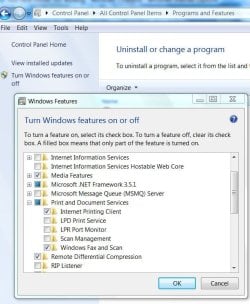
You have tried this? Turn off in features. Restart, turn back on restart? Maybe worth a try before the repair install. Good luck to you.
features.JPG
 

My Computer

Computer Manufacturer/Model Number
Gateway GT5692
OS
Windows 7 Ulti. x64
CPU
AMD Phenom 8450 triple-core 2.10 ghz
Memory
4GB
Graphics Card(s)
ATI Radion HD 3200
Monitor(s) Displays
Gateway FPD1775W
Screen Resolution
1280x720
Hard Drives
465.6613 Gibibytes
I've had this issue since Sunday and I've just given up. It's driving me crazy and being a student, I NEED to print so it's annoying.

Restore won't do anything, the print spooler will keep crashing I've done it multiple times with no success even restoring it before installing that print driver installation. Reinstall won't do anything either. There's some sort of windows glitch in the drivers that microsoft may have seem to missed. My netbook is set up to handle 7 even though it has a 1.6 ghz atom processor, 30 gb ssd, and a gig of ddr2 ram. Many others have set up 7 with success with my dell mini 10. If one has installed 7 successfully, I doubt there would be further issues, especially minor issues such as a print spooler.

To the post above me, what are you supposed to turn off in windows features?
 

My Computer

OS
7
Unselect print and doc service. apply that by clicking ok. Restart pc this turns off the feature. Go back after restart and turn back on by selecting the feature and then ok and restart. It reloads the feature. I do not have printing problem,don't know if this will help, just something to try.
 

My Computer

Computer Manufacturer/Model Number
Gateway GT5692
OS
Windows 7 Ulti. x64
CPU
AMD Phenom 8450 triple-core 2.10 ghz
Memory
4GB
Graphics Card(s)
ATI Radion HD 3200
Monitor(s) Displays
Gateway FPD1775W
Screen Resolution
1280x720
Hard Drives
465.6613 Gibibytes
You have tried this? Turn off in features. Restart, turn back on restart? Maybe worth a try before the repair install. Good luck to you.
View attachment 36982


Tried turning printing features on & off. No go :(

How do I do a repair install? There is no such option built into Win7 as far as I can see. The only option under Advanced Recovery Methods (besides restoring from an image, which I don't have) is to reinstall Windows! The information clearly states that this will remove all programs, so how is that different from a clean install? :confused:

I'm really not looking forward to wasting an evening (or two) reinstalling programs just to make printing work again. :mad:
 

My Computer

OS
Windows 7 Pro (64-bit)
CPU
Mac Pro
Memory
12GB
Graphics Card(s)
ATI 4870
Monitor(s) Displays
Dell 2407
Hard Drives
4x1TB WD Internal
Install your DVD Win 7 disc. Go through the process as though you are installing 7. At the beginning of the process it will ask you do you want clean install, upgrade or repair. Select repair, it should fix everything. Make sure you back everything up. Officially that is not necessary, but you know Murphy's Law.
 

My Computer

Computer type
PC/Desktop
Computer Manufacturer/Model Number
Dell XPS 420
OS
Windows 10, Home Clean Install
CPU
Intel Core2 processsor Q8200(2.33Ghz 1333FSB) Quad Core Tech
Motherboard
Dell
Memory
6 gb
Graphics Card(s)
ATI Radeon 256MB HD3650
Sound Card
Intergrated 7.1 Channel Audio
Monitor(s) Displays
Dell SP2009W 20"
Hard Drives
640 GB Serial ATA Hard drive
Cooling
Fan
Keyboard
Dell USB Keyboard
Mouse
Dell Premium Optical USB
Internet Speed
DSL 2.85
Install your DVD Win 7 disc. Go through the process as though you are installing 7. At the beginning of the process it will ask you do you want clean install, upgrade or repair. Select repair, it should fix everything. Make sure you back everything up. Officially that is not necessary, but you know Murphy's Law.

haven't tried this, but have reinstalled 7 twice. i will add that everytime i have added that same printer, i keep getting this problem.

or you can avoid this altogether and just manually delete the printer drivers through the registry editor.
 

My Computer

OS
7
go to start button>search>services>printer spooler. click on it then Turn on if it is off.
 

My Computer

Computer type
PC/Desktop
Computer Manufacturer/Model Number
Dell XPS 420
OS
Windows 10, Home Clean Install
CPU
Intel Core2 processsor Q8200(2.33Ghz 1333FSB) Quad Core Tech
Motherboard
Dell
Memory
6 gb
Graphics Card(s)
ATI Radeon 256MB HD3650
Sound Card
Intergrated 7.1 Channel Audio
Monitor(s) Displays
Dell SP2009W 20"
Hard Drives
640 GB Serial ATA Hard drive
Cooling
Fan
Keyboard
Dell USB Keyboard
Mouse
Dell Premium Optical USB
Internet Speed
DSL 2.85
go to start button>search>services>printer spooler. click on it then Turn on if it is off.

As I said in my original post, this does not work!


I tried to do an "upgrade install" as you suggested, but got this error midway through:

Windows cannot install required files. Make sure all required installation files are available, and restart the installation. Error code: 0x8000FFFF.

WTFFFF! :mad:
 

My Computer

OS
Windows 7 Pro (64-bit)
CPU
Mac Pro
Memory
12GB
Graphics Card(s)
ATI 4870
Monitor(s) Displays
Dell 2407
Hard Drives
4x1TB WD Internal
Try check disk for errors. Check both boxes for a complete (takes about an hour) check and repair. Then try to do a repair again from the DVD. If that does not work try upgrade (repair and upgrade are essentially the same, but lets see what happens). If you have an external HD, it may be best to back up what you have now with a system image.

If these steps don't work, and no one comes with a better idea, you may be forced to do a clean install. I hope not, though
 

My Computer

Computer type
PC/Desktop
Computer Manufacturer/Model Number
Dell XPS 420
OS
Windows 10, Home Clean Install
CPU
Intel Core2 processsor Q8200(2.33Ghz 1333FSB) Quad Core Tech
Motherboard
Dell
Memory
6 gb
Graphics Card(s)
ATI Radeon 256MB HD3650
Sound Card
Intergrated 7.1 Channel Audio
Monitor(s) Displays
Dell SP2009W 20"
Hard Drives
640 GB Serial ATA Hard drive
Cooling
Fan
Keyboard
Dell USB Keyboard
Mouse
Dell Premium Optical USB
Internet Speed
DSL 2.85
Thank you for sticking with this, rich46. It's extremely frustrating, especially for someone like me, who is used to a more stable OS (I'm writing this from my Mac Pro).

Sorry for asking a dumb question, but how do I run a check disk function in Win7? Is it run/chkdsk like in the DOS days?

I admit I don't have as much invested in this as some (like I said, I'm doing this on Mac, mostly out of curiosity). Still, I want Win7 to succeed, for the sake of the 95% of the people out there who aren't even aware of the existence of resources such as sevenforums. Right now I'm thinking a lot of them might be disappointed. That's too bad, because Win7 has much good stuff to offer (this coming from someone in the opposite camp). So long as it works.
 

My Computer

OS
Windows 7 Pro (64-bit)
CPU
Mac Pro
Memory
12GB
Graphics Card(s)
ATI 4870
Monitor(s) Displays
Dell 2407
Hard Drives
4x1TB WD Internal
left click computer>right click C:/drive>tools.ck disc. Do the full check, ie both boxes should be checked. It will take about an hour and half or so.

Hey, don't worry about the time and the questions, that is what this forum is all about. If I did not enjoy it, I would not be here.
 

My Computer

Computer type
PC/Desktop
Computer Manufacturer/Model Number
Dell XPS 420
OS
Windows 10, Home Clean Install
CPU
Intel Core2 processsor Q8200(2.33Ghz 1333FSB) Quad Core Tech
Motherboard
Dell
Memory
6 gb
Graphics Card(s)
ATI Radeon 256MB HD3650
Sound Card
Intergrated 7.1 Channel Audio
Monitor(s) Displays
Dell SP2009W 20"
Hard Drives
640 GB Serial ATA Hard drive
Cooling
Fan
Keyboard
Dell USB Keyboard
Mouse
Dell Premium Optical USB
Internet Speed
DSL 2.85
OK, I'll try this, though I think the error may have something to do with me being on a Mac (Boot Camp issue?). If this fails, I'll try calling MSFT tech support, although I'm not holding much hope for this option, seeing that I'm inevitably going to wind up talking to someone in India who had never seen a computer until a few months prior to getting hired by MSFT (I tell you, dealing with US based Apple techs makes a hemisphere of difference!). Failing that, I'll do a fresh install and create a disk image for future system recovery.
 

My Computer

OS
Windows 7 Pro (64-bit)
CPU
Mac Pro
Memory
12GB
Graphics Card(s)
ATI 4870
Monitor(s) Displays
Dell 2407
Hard Drives
4x1TB WD Internal
Back
Top