Add seconds to taskbar clock?

golem

New member
Member
VIP
Local time
2:34 PM
Messages
129
Has anyone yet found a way of adding the seconds tick to the standard Windows 7 taskbar clock?
 

My Computer

Computer type
PC/Desktop
Computer Manufacturer/Model Number
Self Assembly
OS
Windows 10 64
CPU
Intel i5 3570K (4.13GHz w/cool & quiet))
Motherboard
ASUS P8Z77-V LK
Memory
4x-4Gb Crucial Ballistix Sport PC3-12800 (1600)
Graphics Card(s)
GeForce GTX 1060 6GB
Sound Card
Realtek ALC892 (onboard)
Monitor(s) Displays
TCL 50" 4K
Screen Resolution
3840x2160
Hard Drives
Crucial MX500, Intel 330; Adata 480; Sea ST8000MD
PSU
Antec HCG-520M
Cooling
CPU - Coolermaster Hyper 212 P, Case - 2-120mm Scythe
Keyboard
Logitecl compact
Mouse
Logitec M705
Internet Speed
Gigabit
Other Info
1 RX-C525 Rosewill trayless hot-swap mobile rack
The standard Windows clock does not have the feature of showing seconds. The only practical solution is to use a third party clock. I have no experience with any.
 

My Computer

Computer type
PC/Desktop
Computer Manufacturer/Model Number
HP
OS
Windows 7 Pro 64 bit
CPU
Xeon W3520
Memory
8 GB
Graphics Card(s)
Nvidia Geforce 210

My Computer

Computer Manufacturer/Model Number
built my own
OS
win7 ultimate / virtual box
CPU
Intel Core i7 3770K,1155, Ivy Bridge
Motherboard
MSI Z77A-G43
Memory
GSkill Ripjaws Z Series 1600 CL 9.0 16GB
Graphics Card(s)
KFA2 GeForce GTX 670 EX OC 2048MB GDDR5 PCI-E gfx card
Sound Card
onboard Nvidia HDMI audio
Monitor(s) Displays
ASUS VK222H 22" widescreen LCD monitor
Screen Resolution
1680x1050
Hard Drives
Kingston 128gb SSD
OCZ Vertex 90gb SSD
500GB WDCaviar 16mb 5000KS
320GB WDCaviar 16mb 3200AAKS sata 2
1TB Samsung 16mb HD103SJ sata 2
PSU
Corsair HX 750W ATX2.2 Modular
Cooling
Antec 25 Kuhler H2O 620
Keyboard
logitech
Mouse
logitech MX518
Internet Speed
7mb adsl
Appreciate the replies!

Sadly it does seem 3rd-party apps are the only option. Incredible that MS chooses to display an active second hand on the left-click pop-up clock from the taskbar and also digitally displays the seconds in the Time & Date properties tab but disallows this option in the persistent clock.

Anyhow, even though I was searching for a very minimalist option T-Clock 2010 had me enthusiastic until I noticed it has no auto synchronization (a fairly important factor for my usage). The next best utility I found for adding seconds to the system clock is 7+ Taskbar Tweaker - 7+ Taskbar Tweaker - RaMMicHaeL's Blog . While it does have fewer bells and whistles (preferred) it doesn't designate yes or no for auto-synchronization. If I get an affirmative reply from the developer I'll inevitably give it a go as it looks to be the best option...so far. ;)
 

My Computer

Computer type
PC/Desktop
Computer Manufacturer/Model Number
Self Assembly
OS
Windows 10 64
CPU
Intel i5 3570K (4.13GHz w/cool & quiet))
Motherboard
ASUS P8Z77-V LK
Memory
4x-4Gb Crucial Ballistix Sport PC3-12800 (1600)
Graphics Card(s)
GeForce GTX 1060 6GB
Sound Card
Realtek ALC892 (onboard)
Monitor(s) Displays
TCL 50" 4K
Screen Resolution
3840x2160
Hard Drives
Crucial MX500, Intel 330; Adata 480; Sea ST8000MD
PSU
Antec HCG-520M
Cooling
CPU - Coolermaster Hyper 212 P, Case - 2-120mm Scythe
Keyboard
Logitecl compact
Mouse
Logitec M705
Internet Speed
Gigabit
Other Info
1 RX-C525 Rosewill trayless hot-swap mobile rack
I've been using TClockEx
TClockEx (free) - Download the latest version for Windows in english on Kioskea
since my Win95 days. Easily personalized and customizable, it works great with 7 :)
fah6lp4.jpg


What sort of auto sync are you looking for that isn't done automatically via Windows 7's Internet Time sync in Control Panel's Date and Time settings?
 

My Computer

Computer type
PC/Desktop
Computer Manufacturer/Model Number
Self-Built
OS
Win10 Pro 64-bit
CPU
AMD Ryzen 7 3800X
Motherboard
Gigabyte X570 UD
Memory
32 GB Kingston DDR4-2666
Graphics Card(s)
MSI nVidia GT 710 (2GB)
Sound Card
Creative Audigy FX 5.1
Monitor(s) Displays
ViewSonic VG2439Smh 24"
Screen Resolution
1920x1080
Hard Drives
3xWD1TB; 1xSeagate 1TB... all spinning rust
PSU
EVGA 100-W1-0500-KR (500w)
Case
SilverStone PS10 (modified)
Cooling
CPU:AMD Wraith Prism. Case:3x Noctua 120mm
Keyboard
Compaq Professional PS/2
Mouse
Microsoft Basic Optical Mouse 2.0
Internet Speed
Fiber 1Gbit/sec down/up
Antivirus
Avast Free
Browser
FF, Chrome
Other Info
2x LG GH24NSC0 DVD burners, Mackie CR3 monitor speakers
Much appreciate the reply OvenMaster.

Based on the following T-Clock FAQ I assumed T-Clock basically replaces Windows clock and likely nixes the sync function.

"Q. Does T-Clock include Time Synchronization?
A.
No. Time Synchronization is a system level privilege that requires Administrative Rights. T-Clock was written to comply with current industry standards that dictate that applications running in a Standard User session not require (or even try to) access protected system functions."

Since I see so many people rate it highly I still may give one of the t-Clock iterations a try on different Win7 system to test its utilization.


*EDIT* -- Just realized that as the FAQ is written it may mean that if your login is admin privileged it may not be an issue.
 
Last edited:

My Computer

Computer type
PC/Desktop
Computer Manufacturer/Model Number
Self Assembly
OS
Windows 10 64
CPU
Intel i5 3570K (4.13GHz w/cool & quiet))
Motherboard
ASUS P8Z77-V LK
Memory
4x-4Gb Crucial Ballistix Sport PC3-12800 (1600)
Graphics Card(s)
GeForce GTX 1060 6GB
Sound Card
Realtek ALC892 (onboard)
Monitor(s) Displays
TCL 50" 4K
Screen Resolution
3840x2160
Hard Drives
Crucial MX500, Intel 330; Adata 480; Sea ST8000MD
PSU
Antec HCG-520M
Cooling
CPU - Coolermaster Hyper 212 P, Case - 2-120mm Scythe
Keyboard
Logitecl compact
Mouse
Logitec M705
Internet Speed
Gigabit
Other Info
1 RX-C525 Rosewill trayless hot-swap mobile rack
I've been using TClockEx
TClockEx (free) - Download the latest version for Windows in english on Kioskea
since my Win95 days. Easily personalized and customizable, it works great with 7 :)
fah6lp4.jpg


What sort of auto sync are you looking for that isn't done automatically via Windows 7's Internet Time sync in Control Panel's Date and Time settings?
TClockEX will only work on a 32bit OS. The OP has a 64bit OS. But I do like TClockEX and I used it until I got a 64bit OS.


Much appreciate the reply OvenMaster.

Based on the following T-Clock FAQ I assumed T-Clock basically replaces Windows clock and likely nixes the sync function.

"Q. Does T-Clock include Time Synchronization?
A.
No. Time Synchronization is a system level privilege that requires Administrative Rights. T-Clock was written to comply with current industry standards that dictate that applications running in a Standard User session not require (or even try to) access protected system functions."

Since I see so many people rate it highly I still may give one of the t-Clock iterations a try on different Win7 system to test its utilization.


*EDIT* -- Just realized that as the FAQ is written it may mean that if your login is admin privileged it may not be an issue.
No, logging in as admin changes nothing because T-Clock does not try to sync the time. W7 already does that. If you want a time sync app, try D4. It has been around for quite some time and is actively being supported/updated:
http://www.thinkman.com/dimension4/screenshots.htm
http://www.thinkman.com/dimension4/updates.htm
 

My Computer

Computer type
Laptop
Computer Manufacturer/Model Number
Employer provided Dell Latitude
OS
W7 Pro SP1 64bit
CPU
i7
Memory
8GB
Graphics Card(s)
Intel HD Graphics
Hard Drives
crappy SSD
Antivirus
Employer mandated Symantec Endpoint Protection
Browser
Pale Moon 64bit, IE11 64bit & Chrome 64bit
Windows must know the current time for a variety of purposes, the clock display being a relatively minor one. To maintain the accuracy of this time Windows has long had the ability to sync with an Internet time standard. Third party clocks such as T-Clock do nothing more than provide an alternative means of displaying the time. They do not replace Windows time keeping system. There should be no need for such a clock to do it's own time sync.
 

My Computer

Computer type
PC/Desktop
Computer Manufacturer/Model Number
HP
OS
Windows 7 Pro 64 bit
CPU
Xeon W3520
Memory
8 GB
Graphics Card(s)
Nvidia Geforce 210
I've been using TClockEx
TClockEx (free) - Download the latest version for Windows in english on Kioskea
since my Win95 days. Easily personalized and customizable, it works great with 7 :)
fah6lp4.jpg


What sort of auto sync are you looking for that isn't done automatically via Windows 7's Internet Time sync in Control Panel's Date and Time settings?
TClockEX will only work on a 32bit OS. The OP has a 64bit OS. But I do like TClockEX and I used it until I got a 64bit OS.


Much appreciate the reply OvenMaster.

Based on the following T-Clock FAQ I assumed T-Clock basically replaces Windows clock and likely nixes the sync function.

"Q. Does T-Clock include Time Synchronization?
A.
No. Time Synchronization is a system level privilege that requires Administrative Rights. T-Clock was written to comply with current industry standards that dictate that applications running in a Standard User session not require (or even try to) access protected system functions."

Since I see so many people rate it highly I still may give one of the t-Clock iterations a try on different Win7 system to test its utilization.


*EDIT* -- Just realized that as the FAQ is written it may mean that if your login is admin privileged it may not be an issue.
No, logging in as admin changes nothing because T-Clock does not try to sync the time. W7 already does that. If you want a time sync app, try D4. It has been around for quite some time and is actively being supported/updated:
Thinking Man Software - Dimension 4 v5.3 Screen Shots
Thinking Man Software - Dimension 4 v5.3 Updates
Ah, crap. Didn't realize that TClockEx was 32-bit only. Sorry 'bout that.
I remember using Dimension 4 ages ago, and I tried it again last night. Still works fine :)
 

My Computer

Computer type
PC/Desktop
Computer Manufacturer/Model Number
Self-Built
OS
Win10 Pro 64-bit
CPU
AMD Ryzen 7 3800X
Motherboard
Gigabyte X570 UD
Memory
32 GB Kingston DDR4-2666
Graphics Card(s)
MSI nVidia GT 710 (2GB)
Sound Card
Creative Audigy FX 5.1
Monitor(s) Displays
ViewSonic VG2439Smh 24"
Screen Resolution
1920x1080
Hard Drives
3xWD1TB; 1xSeagate 1TB... all spinning rust
PSU
EVGA 100-W1-0500-KR (500w)
Case
SilverStone PS10 (modified)
Cooling
CPU:AMD Wraith Prism. Case:3x Noctua 120mm
Keyboard
Compaq Professional PS/2
Mouse
Microsoft Basic Optical Mouse 2.0
Internet Speed
Fiber 1Gbit/sec down/up
Antivirus
Avast Free
Browser
FF, Chrome
Other Info
2x LG GH24NSC0 DVD burners, Mackie CR3 monitor speakers
I cant try this because my OS is very customised but -

mc0j.png
 

My Computer

Computer type
PC/Desktop
Computer Manufacturer/Model Number
Home Built
OS
Win 7 Pro x64, Win 10 Pro x64, Linux Light x86
CPU
Core i7 3770K
Motherboard
Gigabyte GA-Z77P-D3
Memory
Crucial Ballistix Sport 8GB
Graphics Card(s)
ASUS GeForce GTX 650 Ti
Sound Card
On board
Monitor(s) Displays
ASUS 22 W/S
Screen Resolution
1920 x 1080
Hard Drives
Intel 320 Series SSD, WD Caviar Black 1TB
PSU
Corsair CX 750w
Case
Black Night
Cooling
120mm fans front/back, Coolermaster Hyper 212 Evo
Keyboard
Razer Blackwidow Expert 2013 Mechanical Keyboard
Mouse
Logitech G300 Gaming Mouse
Internet Speed
20mb Unlimited
Antivirus
ZA Antivirus + Firewall
Browser
Cyberfox
Other Info
Powered USB Hub, External Drives 3 x 1TB, Phone Dock.
Much appreciate all the replies!

My superficial understanding was based on the fact I assumed the OS based time on that which was derived from the clock itself. It does stand to reason though that there is actually an "internal" clock which self-synchronizes from which the tray clock is getting queues, not vise verse. I envisioned 3rd party clocks as complete replacements of the Windows clock thus removing that ability. Great to know my understanding was clouded and not the facts.

I intend to give all the suggested utilities a try on a like Win7-64 system before deciding on one for the more critical install.

Stephanie -- I was hopeful that tweak would be successful but alas it seems the option has been eliminated.
 

My Computer

Computer type
PC/Desktop
Computer Manufacturer/Model Number
Self Assembly
OS
Windows 10 64
CPU
Intel i5 3570K (4.13GHz w/cool & quiet))
Motherboard
ASUS P8Z77-V LK
Memory
4x-4Gb Crucial Ballistix Sport PC3-12800 (1600)
Graphics Card(s)
GeForce GTX 1060 6GB
Sound Card
Realtek ALC892 (onboard)
Monitor(s) Displays
TCL 50" 4K
Screen Resolution
3840x2160
Hard Drives
Crucial MX500, Intel 330; Adata 480; Sea ST8000MD
PSU
Antec HCG-520M
Cooling
CPU - Coolermaster Hyper 212 P, Case - 2-120mm Scythe
Keyboard
Logitecl compact
Mouse
Logitec M705
Internet Speed
Gigabit
Other Info
1 RX-C525 Rosewill trayless hot-swap mobile rack
Much appreciate all the replies!

My superficial understanding was based on the fact I assumed the OS based time on that which was derived from the clock itself. It does stand to reason though that there is actually an "internal" clock which self-synchronizes from which the tray clock is getting queues, not vise verse. I envisioned 3rd party clocks as complete replacements of the Windows clock thus removing that ability. Great to know my understanding was clouded and not the facts.

I intend to give all the suggested utilities a try on a like Win7-64 system before deciding on one for the more critical install.

Stephanie -- I was hopeful that tweak would be successful but alas it seems the option has been eliminated.

Awww thats a shame - but try clock-tray-skins-for-win-7-64-bit
 

My Computer

Computer type
PC/Desktop
Computer Manufacturer/Model Number
Home Built
OS
Win 7 Pro x64, Win 10 Pro x64, Linux Light x86
CPU
Core i7 3770K
Motherboard
Gigabyte GA-Z77P-D3
Memory
Crucial Ballistix Sport 8GB
Graphics Card(s)
ASUS GeForce GTX 650 Ti
Sound Card
On board
Monitor(s) Displays
ASUS 22 W/S
Screen Resolution
1920 x 1080
Hard Drives
Intel 320 Series SSD, WD Caviar Black 1TB
PSU
Corsair CX 750w
Case
Black Night
Cooling
120mm fans front/back, Coolermaster Hyper 212 Evo
Keyboard
Razer Blackwidow Expert 2013 Mechanical Keyboard
Mouse
Logitech G300 Gaming Mouse
Internet Speed
20mb Unlimited
Antivirus
ZA Antivirus + Firewall
Browser
Cyberfox
Other Info
Powered USB Hub, External Drives 3 x 1TB, Phone Dock.

My Computer

Computer type
PC/Desktop
Computer Manufacturer/Model Number
HP (HP-P6212F)
OS
Microsoft Windows 7 Home Premium 64-bit 7601 Multiprocessor Free Service Pack 1
CPU
Pentium(R) Dual-Core CPU E5300 @ 2.60GHz
Motherboard
PEGATRON CORPORATION Benicia
Memory
6.00 GB
Graphics Card(s)
Intel(R) G33/G31 Express Chipset Family
Sound Card
Realtek High Definition Audio
Monitor(s) Displays
24'' HP WS LCD
Screen Resolution
1920 x 1080 x 32 bits (4294967296 colors) @ 60 Hz
Hard Drives
(1) ATA Hitachi HDT72106 SCSI Disk Device (2) Generic- Compact Flash USB Device (3) Generic- MS/MS-Pro USB Device (4) Generic- SD/MMC USB Device (5) Generic- SM/xD-Picture USB Device (6) Verbatim STORE N GO USB Device
Keyboard
Logitech G510s
Mouse
Logitech Trackball M570
Antivirus
Microsoft Security Essentials / Malwarebytes
Browser
IE / Firefox / Chrome

My Computer

Computer type
PC/Desktop
OS
Windows 10 Home x64
CPU
INTEL Core i5-750 Quad-Core 3.37GHz
Motherboard
ASUS P7P55D
Memory
HyperX Fury Black Series 8GB (2 x 4GB) 1866Mhz
Graphics Card(s)
EVGA GeForce GTX 750 Superclocked 1GB 128-Bit GDDR5
Monitor(s) Displays
LG 32MA68HY 32" IPS
Screen Resolution
1920 x 1080
Hard Drives
Samsung 840 Evo 120GB, SEAGATE 500GB Barracuda® 7200.12, SATA 3 Gb/s, 7200 RPM, 16MB cache
PSU
ANTEC TruePower New TP-550, 80 PLUS, 550W
Case
ANTEC Three Hundred Illusion
Cooling
COOLER MASTER Hyper 212 Plus, 4 x 120mm 1 x 140mm Noctua's
Internet Speed
85 + Mbps
Antivirus
Avast
Browser
Vivaldi
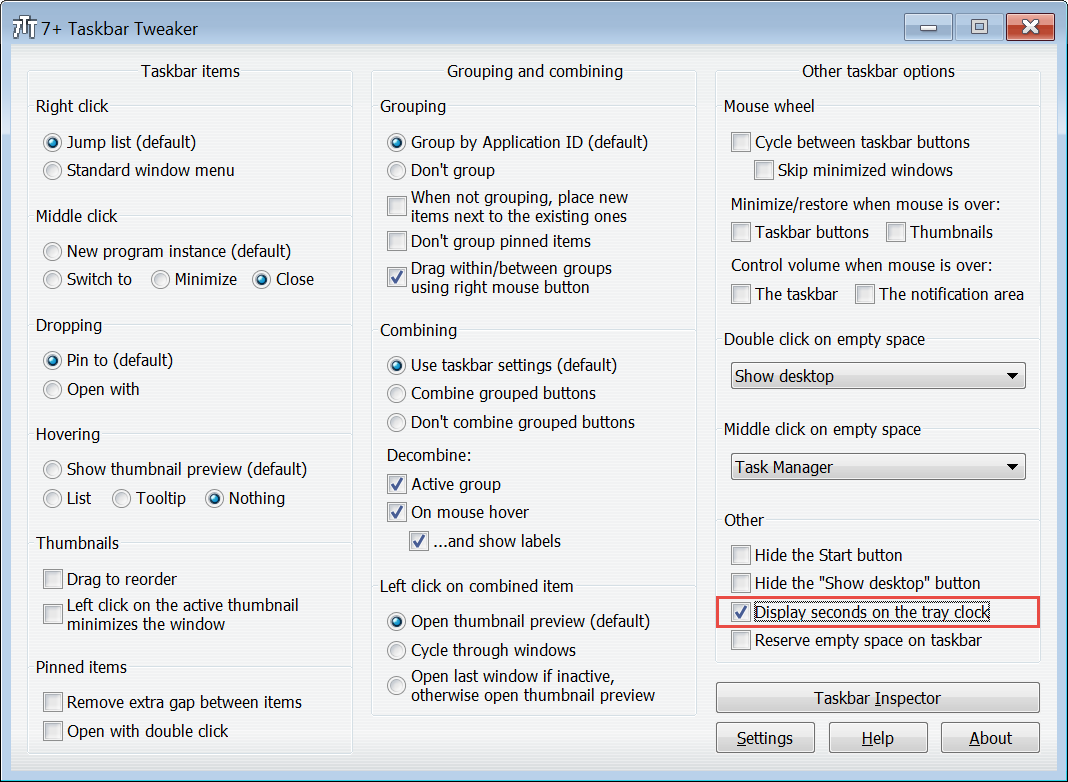
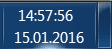
Currently it's not possible to make Windows 7 taskbar clock display the seconds without 3rd party app.

However, 7+ Taskbar Tweaker from 7+ Taskbar Tweaker - RaMMicHaeL's Blog adds this functionality with one single click:

lgyxE4K.png


ReacC34.png
 

My Computer

Computer type
PC/Desktop
OS
Windows 7 Ultimate x64
I did actually imagine it that way:
Seconds.Png
 

My Computer

Computer type
PC/Desktop
Computer Manufacturer/Model Number
Current Primary Computer: Samsung NP700G7A-S02
OS
Windows 7 Ultimate on my Primary Computer
Other Info
There is not enough Place to list everything here.
Here is it: http://pastebin.com/afD3kre7
Update: old VistaPC has TEN GigaBytes of RAM.
Back
Top