Added new/old HDs and now I get 'Reboot and Select Proper Media.'

I hate marketing. I didn't fall for this one though. I just went to newegg and found a board that got a lot of good reviews but wasn't too expensive. At the point I figured I would just go w/the legacy side of things and ignore the UEFI 'option', which doesn't even appear to be an option.
 

My Computer My Computer

At a glance

7 Ultimate 64 bit2x4Gb DDR3-SDRAMt750
Computer type
PC/Desktop
Computer Manufacturer/Model Number
need to update!
OS
7 Ultimate 64 bit
Memory
2x4Gb DDR3-SDRAM
Graphics Card(s)
t750
Monitor(s) Displays
AOC 24" yee haw and Dell 19"
Screen Resolution
1680 x 1050 @60hz
Hard Drives
Samsung 840EVO
Internet Speed
100/20
Antivirus
MSE
Browser
Firefox
Update! Now it's BSOD'ing at every restart. System_license_violation.

All I want to do is reinstall windows.
 

My Computer My Computer

At a glance

7 Ultimate 64 bit2x4Gb DDR3-SDRAMt750
Computer type
PC/Desktop
Computer Manufacturer/Model Number
need to update!
OS
7 Ultimate 64 bit
Memory
2x4Gb DDR3-SDRAM
Graphics Card(s)
t750
Monitor(s) Displays
AOC 24" yee haw and Dell 19"
Screen Resolution
1680 x 1050 @60hz
Hard Drives
Samsung 840EVO
Internet Speed
100/20
Antivirus
MSE
Browser
Firefox
After restarting and running System Repair and having it say 'sorry', Hit any key to shut down, I moved the SATA cable on the board to the next sata location and it booted up. :devil:

I really don't know what to do with this thing.
 

My Computer My Computer

At a glance

7 Ultimate 64 bit2x4Gb DDR3-SDRAMt750
Computer type
PC/Desktop
Computer Manufacturer/Model Number
need to update!
OS
7 Ultimate 64 bit
Memory
2x4Gb DDR3-SDRAM
Graphics Card(s)
t750
Monitor(s) Displays
AOC 24" yee haw and Dell 19"
Screen Resolution
1680 x 1050 @60hz
Hard Drives
Samsung 840EVO
Internet Speed
100/20
Antivirus
MSE
Browser
Firefox

My Computer My Computer

At a glance

Windows 7 64 Bit Home Premium SP1i7-3820GSkill F3-14900CL9Q - 16GBEVGA GeForce GTX660 - Driver 352.86
Computer type
PC/Desktop
Computer Manufacturer/Model Number
Home Built - Jan 2013
OS
Windows 7 64 Bit Home Premium SP1
CPU
i7-3820
Motherboard
Asus P9X79-PRO - Bios 4608
Memory
GSkill F3-14900CL9Q - 16GB
Graphics Card(s)
EVGA GeForce GTX660 - Driver 352.86
Sound Card
On board Realtek ALC898
Monitor(s) Displays
Acer S271HL
Screen Resolution
1920 x 1080
Hard Drives
#1- Samsung 840 Pro Series
#2- Western Digital WD1002FAEX Sata3 Black
#3- Western Digital WD1002FAEX Sata3 Black
PSU
Corsair CMPSU-850TX-V2 - 850 watt (by Seasonic)
Case
Corsair Obsidian 550D
Cooling
Standard 3 120mm case fans, Cooler Master Hyper 212 EVO
Keyboard
MS KC-0405
Mouse
Intellimouse 5-button
Internet Speed
56 Mbits/Sec (on a good day)
Antivirus
Avast & Malwarebytes
Browser
Firefox
Other Info
Asus DVD - DRW-24B1ST 24X
Windows 7 Home. Is it an OEM? With a new motherboard it will not activate.
 

My Computer My Computer

At a glance

Windows 10 Pro x64 ; Xubuntu x64Intel i7 860 @ 2.80 GHz O/C'ed to 4.0GHz16GB Corsair Vengance DDR3 @ 661 MHz Dual Cha...EVGA NVidia GTX 560 1024MB
Computer type
PC/Desktop
Computer Manufacturer/Model Number
Golden Mk. I.4
OS
Windows 10 Pro x64 ; Xubuntu x64
CPU
Intel i7 860 @ 2.80 GHz O/C'ed to 4.0GHz
Motherboard
Gigabyte P55A-UD3R Rev.1. Award BIOS F13
Memory
16GB Corsair Vengance DDR3 @ 661 MHz Dual Channel (9-9-9-24)
Graphics Card(s)
EVGA NVidia GTX 560 1024MB
Sound Card
Realtek Integrated
Monitor(s) Displays
Dual Samsung SyncMaster 2494HS
Screen Resolution
1920*1080 and 1920*1080
Hard Drives
1*Samsung 840 EVO 120GB SSD;
1*OCZ Vertex 2 60GB SSD;
2*Samsung F3 SpinPoint 1TB in RAID0;
1*Samsung F1 SpinPoint 1TB;
2*Western Digital 1TB External USB 3.0
1*Western Digital 500GB External USB 3.0
1*Seagate 500GB External USB 2.0
PSU
Thermaltake ToughPower QFan 750W
Case
Thermaltake Element S VK60001W2Z
Cooling
Corsair H60 Water Cooling, 2*230mm and 2*80mm case fans
Keyboard
Logitech G110
Mouse
Logitech MX518
After restarting and running System Repair and having it say 'sorry'

So does this mean the License problem is gone?
Or does "sorry" mean you could not run System Repair?

Hit any key to shut down, I moved the SATA cable on the board to the next sata location and it booted up.

Be sure the SATA cable for the SSD is connected as shown below.
*
Capture1.PNG
*
Do not connect any other hard drives until you have Windows installed and the system set up properly.


I really don't know what to do with this thing.

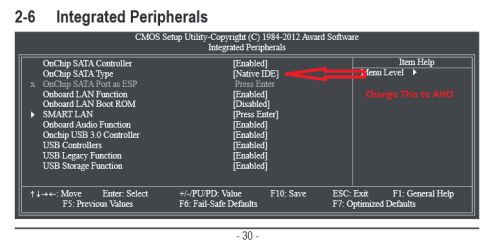
Be sure your BIOS settings are set up like this:
*
Capture2.PNG
Capture3.PNG
*
*
Try not to change any other BIOS settings other than Boot Priority until you get the system working correctly on the FAIL SAFE DEFAULTS.
 

My Computer My Computer

At a glance

Windows 7 64 Bit Home Premium SP1i7-3820GSkill F3-14900CL9Q - 16GBEVGA GeForce GTX660 - Driver 352.86
Computer type
PC/Desktop
Computer Manufacturer/Model Number
Home Built - Jan 2013
OS
Windows 7 64 Bit Home Premium SP1
CPU
i7-3820
Motherboard
Asus P9X79-PRO - Bios 4608
Memory
GSkill F3-14900CL9Q - 16GB
Graphics Card(s)
EVGA GeForce GTX660 - Driver 352.86
Sound Card
On board Realtek ALC898
Monitor(s) Displays
Acer S271HL
Screen Resolution
1920 x 1080
Hard Drives
#1- Samsung 840 Pro Series
#2- Western Digital WD1002FAEX Sata3 Black
#3- Western Digital WD1002FAEX Sata3 Black
PSU
Corsair CMPSU-850TX-V2 - 850 watt (by Seasonic)
Case
Corsair Obsidian 550D
Cooling
Standard 3 120mm case fans, Cooler Master Hyper 212 EVO
Keyboard
MS KC-0405
Mouse
Intellimouse 5-button
Internet Speed
56 Mbits/Sec (on a good day)
Antivirus
Avast & Malwarebytes
Browser
Firefox
Other Info
Asus DVD - DRW-24B1ST 24X
Update! Now it's BSOD'ing at every restart. System_license_violation.

All I want to do is reinstall windows.

What are you using for Windows 7 Installation?
Retail DVD?
OEM DVD?
Download?

Bug Check 0x9A: SYSTEM_LICENSE_VIOLATION (Windows Debuggers)
"This bug check indicates that the software license agreement has been violated"

I'm using a retail upgrade disc. I was able to install with it once.
I installed XP on the drive first and then installed 7 Pro over it.
The pc that originally had this disc on it hasn't been used for years. I assume that I would be able to register the product and all and if not I would call MS. I mean...I'm not using the OS on 2 PCs.

Update: I moved the sata cable to 1 (it was in o) and now it's running again.
It installed 69 updates and I shut it down.
If history proves itself; when I start it up it will go straight into System Repair and I will have to restore. Then it will shut down and upon restart Win will run again. If I plug the DVD back into the board everything will go to hell again. There will be a bunch of System restores and 'sorry your PC is broken' and then eventually it will boot again.

I'm about to start a new thread about this build. So many things have gone wrong with this build and I'm really beginning to wonder if it's not the board.
I'll post a link in this thread.
 

My Computer My Computer

At a glance

7 Ultimate 64 bit2x4Gb DDR3-SDRAMt750
Computer type
PC/Desktop
Computer Manufacturer/Model Number
need to update!
OS
7 Ultimate 64 bit
Memory
2x4Gb DDR3-SDRAM
Graphics Card(s)
t750
Monitor(s) Displays
AOC 24" yee haw and Dell 19"
Screen Resolution
1680 x 1050 @60hz
Hard Drives
Samsung 840EVO
Internet Speed
100/20
Antivirus
MSE
Browser
Firefox
Just to prove me wrong my PC updated and started up just fine. :-/
 

My Computer My Computer

At a glance

7 Ultimate 64 bit2x4Gb DDR3-SDRAMt750
Computer type
PC/Desktop
Computer Manufacturer/Model Number
need to update!
OS
7 Ultimate 64 bit
Memory
2x4Gb DDR3-SDRAM
Graphics Card(s)
t750
Monitor(s) Displays
AOC 24" yee haw and Dell 19"
Screen Resolution
1680 x 1050 @60hz
Hard Drives
Samsung 840EVO
Internet Speed
100/20
Antivirus
MSE
Browser
Firefox
Just bizarre behavior. I log in and go to Windows updates. There are 4 optional Win7 updates. I install, it finishes and says that 1 failed. I close it and open update again and there are 48 recommended updates. This is all within 60 seconds.

Anyways, I will post another thread today hopefully.
 

My Computer My Computer

At a glance

7 Ultimate 64 bit2x4Gb DDR3-SDRAMt750
Computer type
PC/Desktop
Computer Manufacturer/Model Number
need to update!
OS
7 Ultimate 64 bit
Memory
2x4Gb DDR3-SDRAM
Graphics Card(s)
t750
Monitor(s) Displays
AOC 24" yee haw and Dell 19"
Screen Resolution
1680 x 1050 @60hz
Hard Drives
Samsung 840EVO
Internet Speed
100/20
Antivirus
MSE
Browser
Firefox
Oops. I missed your post above. I will check it.
Windows BSOD while installing updates. Oh look, error recovery again. *sigh*
 

My Computer My Computer

At a glance

7 Ultimate 64 bit2x4Gb DDR3-SDRAMt750
Computer type
PC/Desktop
Computer Manufacturer/Model Number
need to update!
OS
7 Ultimate 64 bit
Memory
2x4Gb DDR3-SDRAM
Graphics Card(s)
t750
Monitor(s) Displays
AOC 24" yee haw and Dell 19"
Screen Resolution
1680 x 1050 @60hz
Hard Drives
Samsung 840EVO
Internet Speed
100/20
Antivirus
MSE
Browser
Firefox

My Computer My Computer

At a glance

7 Ultimate 64 bit2x4Gb DDR3-SDRAMt750
Computer type
PC/Desktop
Computer Manufacturer/Model Number
need to update!
OS
7 Ultimate 64 bit
Memory
2x4Gb DDR3-SDRAM
Graphics Card(s)
t750
Monitor(s) Displays
AOC 24" yee haw and Dell 19"
Screen Resolution
1680 x 1050 @60hz
Hard Drives
Samsung 840EVO
Internet Speed
100/20
Antivirus
MSE
Browser
Firefox
It could be a bad motherboard. You've got some weird stuff going on there.
 

My Computer My Computer

At a glance

Windows 7 64 Bit Home Premium SP1i7-3820GSkill F3-14900CL9Q - 16GBEVGA GeForce GTX660 - Driver 352.86
Computer type
PC/Desktop
Computer Manufacturer/Model Number
Home Built - Jan 2013
OS
Windows 7 64 Bit Home Premium SP1
CPU
i7-3820
Motherboard
Asus P9X79-PRO - Bios 4608
Memory
GSkill F3-14900CL9Q - 16GB
Graphics Card(s)
EVGA GeForce GTX660 - Driver 352.86
Sound Card
On board Realtek ALC898
Monitor(s) Displays
Acer S271HL
Screen Resolution
1920 x 1080
Hard Drives
#1- Samsung 840 Pro Series
#2- Western Digital WD1002FAEX Sata3 Black
#3- Western Digital WD1002FAEX Sata3 Black
PSU
Corsair CMPSU-850TX-V2 - 850 watt (by Seasonic)
Case
Corsair Obsidian 550D
Cooling
Standard 3 120mm case fans, Cooler Master Hyper 212 EVO
Keyboard
MS KC-0405
Mouse
Intellimouse 5-button
Internet Speed
56 Mbits/Sec (on a good day)
Antivirus
Avast & Malwarebytes
Browser
Firefox
Other Info
Asus DVD - DRW-24B1ST 24X
After restarting and running System Repair and having it say 'sorry'

So does this mean the License problem is gone?
Or does "sorry" mean you could not run System Repair?

Hit any key to shut down, I moved the SATA cable on the board to the next sata location and it booted up.

Be sure the SATA cable for the SSD is connected as shown below.
*
View attachment 298149
*
Do not connect any other hard drives until you have Windows installed and the system set up properly.


I really don't know what to do with this thing.

Be sure your BIOS settings are set up like this:
*
View attachment 298150
View attachment 298151
*
*
Try not to change any other BIOS settings other than Boot Priority until you get the system working correctly on the FAIL SAFE DEFAULTS.

I don't see how to get to that ESP area but the Portx hot plug are all disabled.
 

My Computer My Computer

At a glance

7 Ultimate 64 bit2x4Gb DDR3-SDRAMt750
Computer type
PC/Desktop
Computer Manufacturer/Model Number
need to update!
OS
7 Ultimate 64 bit
Memory
2x4Gb DDR3-SDRAM
Graphics Card(s)
t750
Monitor(s) Displays
AOC 24" yee haw and Dell 19"
Screen Resolution
1680 x 1050 @60hz
Hard Drives
Samsung 840EVO
Internet Speed
100/20
Antivirus
MSE
Browser
Firefox
Just bizarre behavior. I log in and go to Windows updates. There are 4 optional Win7 updates. I install, it finishes and says that 1 failed. I close it and open update again and there are 48 recommended updates. This is all within 60 seconds.

Anyways, I will post another thread today hopefully.

This is perfectly normal. Windows has no way telling if one update is not necessary because there is a newer one in the list. So a couple of updates fail because a newer one is installed and these are not needed and cannot be installed after it. When you install some updates, you fulfill some requirements for future updates (eg some must have dotNET 4 or newer installed). Since your system now meets these requirements, more updates are discovered at the new search. This is that case from Windows 95 up to 8.1 All you have to do in a new installation is update again and again, until nothing new is found. Then you are 100% up to date. Next time new stuff will be really new, not some old update that you hadn't install yet.
 

My Computer My Computer

At a glance

Windows 7 Ultimate 64-bit (now 11 24H2)Intel Core-i3 3770 3.5GHz16GB DDR3 1600MhznVidia Geforce RTX 3050
Computer type
PC/Desktop
Computer Manufacturer/Model Number
custom
OS
Windows 7 Ultimate 64-bit (now 11 24H2)
CPU
Intel Core-i3 3770 3.5GHz
Motherboard
Asus P8H61
Memory
16GB DDR3 1600Mhz
Graphics Card(s)
nVidia Geforce RTX 3050
Sound Card
Realtek HD audio
Monitor(s) Displays
Sony 19" LCD TV via VGA
Screen Resolution
1440x900
Hard Drives
WD 1TB SATA III SSD
PSU
unknown
Case
unknown
Cooling
Intel's provided with CPU
Antivirus
Windows Defender (Windows 11)
Browser
Microsoft Edge
Other Info
Previously Windows 7 Ultimate, now Windows 11 25H2
http://www.sevenforums.com/installation-setup/315704-1st-build-major-help-needed.html#post2630537

I have not tried your settings that you suggested above. This PC is freaking out. It is now restarting seemingly randomly. It's got to be the board.

This means that some update didn't install successfully, most likely some driver. Use Windows Restore to return to a stable state and try again. Press F8 several times (to make sure it works) before seeing the Microsoft logo. This should give you a menu. Select to boot into Safe Mode. Then load System Restore and restore Windows to an earlier checkpoint (usually last one or the previous one).
 

My Computer My Computer

At a glance

Windows 7 Ultimate 64-bit (now 11 24H2)Intel Core-i3 3770 3.5GHz16GB DDR3 1600MhznVidia Geforce RTX 3050
Computer type
PC/Desktop
Computer Manufacturer/Model Number
custom
OS
Windows 7 Ultimate 64-bit (now 11 24H2)
CPU
Intel Core-i3 3770 3.5GHz
Motherboard
Asus P8H61
Memory
16GB DDR3 1600Mhz
Graphics Card(s)
nVidia Geforce RTX 3050
Sound Card
Realtek HD audio
Monitor(s) Displays
Sony 19" LCD TV via VGA
Screen Resolution
1440x900
Hard Drives
WD 1TB SATA III SSD
PSU
unknown
Case
unknown
Cooling
Intel's provided with CPU
Antivirus
Windows Defender (Windows 11)
Browser
Microsoft Edge
Other Info
Previously Windows 7 Ultimate, now Windows 11 25H2
Pity you are far away. If you were here in Athens, Greece, you could bring your computer, or I could visit to have a look. Unfortunately such kind of trouble shooting cannot be done remotely (eg using TeamViewer), otherwise I could connect to your system with TeamViewer or VNC and try to help you. If you have access to another computer or a smartphone, we could use Skype to watch your computer and screen and guide you what to do, from connecting the cables right, setting the BIOS to updating Windows... however I don't have too much free time. Any other volunteer? Maybe a friend with some knowledge on computers could help you out?
 

My Computer My Computer

At a glance

Windows 7 Ultimate 64-bit (now 11 24H2)Intel Core-i3 3770 3.5GHz16GB DDR3 1600MhznVidia Geforce RTX 3050
Computer type
PC/Desktop
Computer Manufacturer/Model Number
custom
OS
Windows 7 Ultimate 64-bit (now 11 24H2)
CPU
Intel Core-i3 3770 3.5GHz
Motherboard
Asus P8H61
Memory
16GB DDR3 1600Mhz
Graphics Card(s)
nVidia Geforce RTX 3050
Sound Card
Realtek HD audio
Monitor(s) Displays
Sony 19" LCD TV via VGA
Screen Resolution
1440x900
Hard Drives
WD 1TB SATA III SSD
PSU
unknown
Case
unknown
Cooling
Intel's provided with CPU
Antivirus
Windows Defender (Windows 11)
Browser
Microsoft Edge
Other Info
Previously Windows 7 Ultimate, now Windows 11 25H2
Back
Top