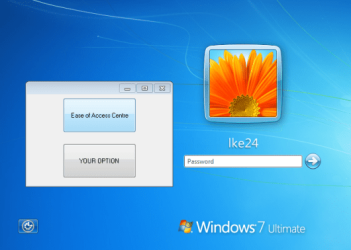
Adding Custom button to Logon Screen

lke24

New member
Local time
2:26 PM
Messages
3
We have a unique situation that requires us to try and add a custom button to the logon screen of windows 7. We have searched all over for a solution but have been unsuccessful in finding an answer, the only thing we have found is using the Accessibility icon on the logon screen and replacing this with our executable that we need to run. However we have some users that require the accessibility feature so doing this does not work for us. Has anyone successfully created a custom button on the logon screen that would call to an executable such as cmd.exe?
 

My Computer

OS
Windows 7 Enterprise 64bit
If start of a script or program is voluntary, why do you want user to make a decision to start it at Logon stage? What changes when user have option to start it while inside Windows?

As for solution, looks like you only option is to replace Accessibility icon with an intermediate executable. What executable should have a window with two options - link or button to start Standard Accessibility features and link or button to start your script/program. This way you will get what you want and save Accessibility features (they just gonna be one click away from user).
 

Attachments

  • logon.png
    logon.png
    184 KB · Views: 114

My Computer

Computer type
PC/Desktop
OS
Windows 8.1 ; Windows 7 x86 (Dec2008-Jan2013)
Other Info
"The scale icon at the top right of a post or tutorial is how you can give rep to the member."
Thanks Neutron16, the executable with the two different options as you mentioned would work for our situation. I am going to go ahead and try this option and see if that works for our users.

Thanks
 

My Computer

OS
Windows 7 Enterprise 64bit
I got the script built to bring up a window as mentioned, however when I replace the Utilman.exe with my custom executable and then rename the original Utilman.exe to Utilmanmod.exe when you click on the Utilmanmod.exe it actually opens the Utilman.exe (custom script I created) instead of the Ease of Access. Is there something else i have to change so that when I click on the Utilmanmod.exe it opens the ease of access?
 

My Computer

OS
Windows 7 Enterprise 64bit
Yes, that happens when explorer or cmd.exe starts utilmanMOD.exe directly or your custom utilman.exe passes command to explorer or cmd.

HOWEVER, that does not happen when parent process is not explorer or cmd. Basically, if your custom utilman.exe starts utilmanMOD.exe direcly, you will see utilmanMOD.exe running

I do not have any compilators to try, but I have tried with some trainer makers and autorun menu makers.
I can PM you proof - exe that will start utilmanmod.exe

Then only problem I have found - is that utilmanmod.exe comes with no text at all, but you can fix it.
In C:\windows\system32\en-US (or your language here) make copy of utilman.exe.mui and rename it to utilmanMOD.exe.mui
 

My Computer

Computer type
PC/Desktop
OS
Windows 8.1 ; Windows 7 x86 (Dec2008-Jan2013)
Other Info
"The scale icon at the top right of a post or tutorial is how you can give rep to the member."
how run this windows form

hi to all . please help me , how to run this window form before logon to windows?
help please
 
Last edited:

My Computer

OS
Windows 7 Home Premium 32bit
I realize this thread is old, but my business is just making the update to Windows 7 and I was wondering if Neutron16 could message me concerning the changing of ease-of-access button into two options. I would like to utilize this to create a change password and whether or not this is a vaible option. Example, is this going to cause security issues and can i access Internet Explorer from this login screen?
 

My Computer

Computer type
PC/Desktop
OS
Windows 7 Enterprise 64-bit
RGal08:
Yeah, this will cause security issues, because changing password function is standard windows function and user can go anything and start anything from that screen.

What is your initial problem? Why would you want to change password at that screen? Could you please elaborate on that?
May be we can come up with some other solutions.
 

My Computer

Computer type
PC/Desktop
OS
Windows 8.1 ; Windows 7 x86 (Dec2008-Jan2013)
Other Info
"The scale icon at the top right of a post or tutorial is how you can give rep to the member."
We would like to relieve some pressure from our helpdesk who has to manually go in and change the password everytime someone locks themself out. In order to do this we would like the user who is locked out to be able to select a link to reset thier password, they will then have to answer some preset security questions will be given a temporary password. The process that reset their password in the AD is built just needing to set up a link or button without giving up to much security.
 

My Computer

Computer type
PC/Desktop
OS
Windows 7 Enterprise 64-bit
Back
Top