Adding keywords to photos for searching

tonyvella

New member
Member
VIP
Local time
6:05 PM
Messages
161
Can anyone recommend a photo-collection management software that would allow me to add keywords (flowers, dogs, trees, river, etc.) to each photos which would then allow me to search through a number of folders by a particular keyword? Say, I search by the word river and get all the pictures, regardless of folder, that have the keyword river attached to them.

Thanks in advance for all help.
 

My Computer My Computer

OS
windows 7 Home Premium
Suggestion

Well you could use IrfanView

You could install it without making it your default image editor (don't associate file types when asked)

Then step by step instructions are going to be difficult to provide but hopefully you are bright enough to figure out how to use this software.

What you need to know:

Thumbnail view must be enabled in the toolbar. In order to batch edit EXIF & IPTC data you need to open the folder containing your photos using IrfanView and select all photos where you need to add keywords. (Ctrl + Shift to select multiples)

Edit: (Ctrl + Click or Shift + Click to select multiples)

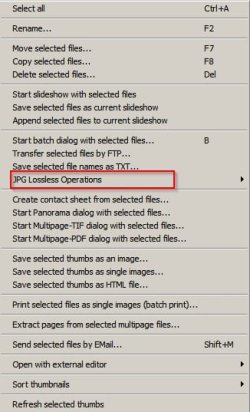
Once you've highlighted your thumbnails right click and choose "JPG Lossless Operations)

Irfanview 2.jpg

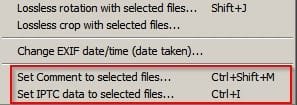
Then choose either of the following depending upon your needs:

Irfanview 3.jpg

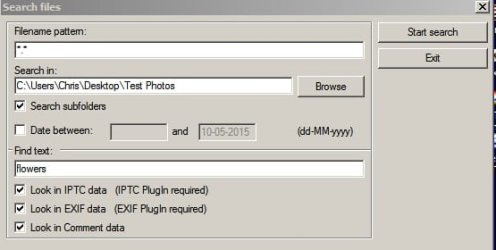
Once you've written the keywords / comments you can use the search function.

Irfanview 1.jpg
 
Last edited:

My Computer My Computer

Computer type
Laptop
Computer Manufacturer/Model Number
ASUS
OS
Microsoft Windows 7 Home Premium 64-bit 7601 Multiprocessor Free Service Pack 1
CPU
AMD C-60 APU with Radeon(tm) HD Graphics
Motherboard
ASUSTeK COMPUTER INC. X501U
Memory
4.00 GB
Graphics Card(s)
AMD Radeon HD 6290 Graphics
Sound Card
(1) AMD High Definition Audio Device (2) Realtek High Defi
Screen Resolution
1366 x 768 x 32 bits (4294967296 colors) @ 60 Hz
Hard Drives
Hitachi HTS545050A7E380 SATA Disk Device
Antivirus
Comodo CIS & FW, SecureAplus App Whitelisting, Threatfire
Browser
Cyberfox 64bit, Opera 64bit, Airfox
Other Info
Spy-The-Spy, HitmanPro.Alert, Norton Connect Safe, MJRegWatcher, BitDefender TrafficLight, Voodoo Shield, Zemana AntiMalware
Added images that I forgot to attach!
 

My Computer My Computer

Computer type
Laptop
Computer Manufacturer/Model Number
ASUS
OS
Microsoft Windows 7 Home Premium 64-bit 7601 Multiprocessor Free Service Pack 1
CPU
AMD C-60 APU with Radeon(tm) HD Graphics
Motherboard
ASUSTeK COMPUTER INC. X501U
Memory
4.00 GB
Graphics Card(s)
AMD Radeon HD 6290 Graphics
Sound Card
(1) AMD High Definition Audio Device (2) Realtek High Defi
Screen Resolution
1366 x 768 x 32 bits (4294967296 colors) @ 60 Hz
Hard Drives
Hitachi HTS545050A7E380 SATA Disk Device
Antivirus
Comodo CIS & FW, SecureAplus App Whitelisting, Threatfire
Browser
Cyberfox 64bit, Opera 64bit, Airfox
Other Info
Spy-The-Spy, HitmanPro.Alert, Norton Connect Safe, MJRegWatcher, BitDefender TrafficLight, Voodoo Shield, Zemana AntiMalware
Sorry but I also forgot to add that you actually need to install the IrfanView plugin pack too. Instructions are on the website.
 

My Computer My Computer

Computer type
Laptop
Computer Manufacturer/Model Number
ASUS
OS
Microsoft Windows 7 Home Premium 64-bit 7601 Multiprocessor Free Service Pack 1
CPU
AMD C-60 APU with Radeon(tm) HD Graphics
Motherboard
ASUSTeK COMPUTER INC. X501U
Memory
4.00 GB
Graphics Card(s)
AMD Radeon HD 6290 Graphics
Sound Card
(1) AMD High Definition Audio Device (2) Realtek High Defi
Screen Resolution
1366 x 768 x 32 bits (4294967296 colors) @ 60 Hz
Hard Drives
Hitachi HTS545050A7E380 SATA Disk Device
Antivirus
Comodo CIS & FW, SecureAplus App Whitelisting, Threatfire
Browser
Cyberfox 64bit, Opera 64bit, Airfox
Other Info
Spy-The-Spy, HitmanPro.Alert, Norton Connect Safe, MJRegWatcher, BitDefender TrafficLight, Voodoo Shield, Zemana AntiMalware
Hello Callender, thank you very much for your advice. I have Corel Paint Shop Pro, and Faststone Image Viewer which allow me to view an entire folder of thumbs with the file name underneath. Both programs also allow me to "tag" individual thumbs within the folder and then to select to view only the tagged images. This is good if I wanted to make a "movie". However, neither program allows me to attach a selection of words to each picture.

I shall try the IrfanView you recommended and see if it does what I want it to do, i.e. search for and view all pictures with the word, say, statue, attached even if they happen to be in 15 different folders.

Example of my idea of keywords: a picture of a statue between two trees with a river in the background and heavy cloud formations in the sky: Keywords = statue, water, river, turf, tree, cloud ---- and the ability to search against any one of those words. I have some 5000 pictures so keywording them will be a rather extensive task to begin with.

Thanks again.
 

My Computer My Computer

OS
windows 7 Home Premium
So no need to tag then - just try the search.
 

My Computer My Computer

Computer type
Laptop
Computer Manufacturer/Model Number
ASUS
OS
Microsoft Windows 7 Home Premium 64-bit 7601 Multiprocessor Free Service Pack 1
CPU
AMD C-60 APU with Radeon(tm) HD Graphics
Motherboard
ASUSTeK COMPUTER INC. X501U
Memory
4.00 GB
Graphics Card(s)
AMD Radeon HD 6290 Graphics
Sound Card
(1) AMD High Definition Audio Device (2) Realtek High Defi
Screen Resolution
1366 x 768 x 32 bits (4294967296 colors) @ 60 Hz
Hard Drives
Hitachi HTS545050A7E380 SATA Disk Device
Antivirus
Comodo CIS & FW, SecureAplus App Whitelisting, Threatfire
Browser
Cyberfox 64bit, Opera 64bit, Airfox
Other Info
Spy-The-Spy, HitmanPro.Alert, Norton Connect Safe, MJRegWatcher, BitDefender TrafficLight, Voodoo Shield, Zemana AntiMalware
Back
Top