
additional log on may be required warning

maxpeters

New member
Local time
7:48 PM
Messages
17
Whilst being connected on wifi to the internet in my building every so often (as well as when i first turn on my laptop) the warning message additional log on information may be required warning pops up on the task bar by the internet connection. Where it says click here for more info it just loads up IE and takes me to my home page.

When it says this messge it also says that i am disconnected from the network, yet it still works fine.

any one have any tips, its very annoying, thanks.
 
Last edited:

My Computer

Computer type
Laptop
Computer Manufacturer/Model Number
acer aspire 4735g
OS
windows 7
CPU
intel core 2 dou p7450 2.13 ghz 1066 fsb
Memory
2gb ddr3
Graphics Card(s)
nvida geforce g105m
Hard Drives
Seagate Momentus XT 500GB
no thoughts on this?
 

My Computer

Computer type
Laptop
Computer Manufacturer/Model Number
acer aspire 4735g
OS
windows 7
CPU
intel core 2 dou p7450 2.13 ghz 1066 fsb
Memory
2gb ddr3
Graphics Card(s)
nvida geforce g105m
Hard Drives
Seagate Momentus XT 500GB
i'm somehow getting this too.. even when i'm using a USB dongle, and never had this problem before.
 

My Computer

OS
Windows 7 Ultimate 64 bit
CPU
Intel Core i5 750
Motherboard
Gigabyte P55 US3L
Memory
Kingston 1333 DDR3 2gb x 2
Graphics Card(s)
ASUS ENGTX 275
Monitor(s) Displays
BenQ T705
Screen Resolution
1280 x 1024
Hard Drives
W.D. 500 GB SATA HDD
PSU
550W CoolerMaster Extreme
Case
CoolerMaster Elite 335
One of the fixes seems to be a router firmware update problem or the machine is trying to connect to the wrong network.

This thread at TechNet talks about the problem and a way to fix it.
'Additional log on information' when connecting to my network.

Another fix for this problem seems to be connecting to the router with a wired connection first then going back to wireless which somehow fixed the problem for someone, quoted below.

Ok, so I was troubleshooting with someone over the phone with this for too
long. I had him connect his computer direct to the router (Netgear) to
verify good Internet connectivity, which was good. Also had him log in to
the router and check settings, but he did NOT change any. Then when he
unplugged the cable, the wireless magically connected. He had never
connected the laptop before direct to the router. My guess, there is a
setting in the router that was hating the pc until he plugged it in and the
router and pc became buddies. I really have no clue why it would work after
that, but it is Vista.

Another person solved the problem by doing this...
This is for WEP but may also work for WPA. Also just changing from WEP to WPA can fix this problem.

1) Goto Network and sharing center
2) Goto Manage wireless networks
3) Remove the entry of the network you are trying to connect to
4) Then click on add.
5) Then select MANUALLY CONFIGURE NETWORK
6) Enter the information:- SSID->Network name, Select the security(WEP) and enter the key.
 

My Computer

Computer type
PC/Desktop
Computer Manufacturer/Model Number
Home built
OS
Windows 7 Ult, Windows 8.1 Pro,
CPU
Q9650-4.275GHz, E8600 4.5GHz, E6750-3.8GHz
Motherboard
Evga 780i FTW
Memory
G.Skill PC2 9600 1200Mhz 5 5 5 15 2T
Graphics Card(s)
GTX480
Sound Card
Asus Xonar D2
Monitor(s) Displays
HannsG
Screen Resolution
1680X1050
Hard Drives
GSkill Phoenix Pro 120GB SSD
PSU
ThermalTake Toughpower 1000Watt modular
Case
ThermalTake XaserV
Cooling
Xigmatek S1283
Keyboard
Logitech G15
Mouse
Logitech G9
Internet Speed
T1
Wired connections suffer the same!!!

Though I could see most of the posts adhering to the topic are purely about wireless connections prompting for "Additional log on information may be required", this happen quite frequently with wired connections as well.
Our Scenario
Windows 2008 AD Domain, ISA 2006 SP1 proxy, and 95% clients using Windows XP Pro 32bit with SP3. Ever since, we from IT has started lab testing Windows 7 Pro 64bit and 32bit clients, came across Additional log on information may be required or domain network showing "no internet access" false error messages.
We had gone through extensive ways to track and fix the problems.
1. Enabling the wpad.domain.com with DNS server solved most of the computers with these messages, while
2. Upgrading the NIC drivers, disabling the sleep mode (power options) etc has resolved few others problems with network connections.
3. However, what we had assessed that, somehow, Windows 7 doesn't pass the user authentication tickets to ISA 2006 properly which was mostly the culprit.

Hope the information is useful for others who are suffering out there because of this MOST annoying part of Windows 7.
 

My Computer

Computer Manufacturer/Model Number
HP 6530b
OS
Windows 7 Professional 64bit
I just began experiencing this problem after rebooting following a monthly MS update. I use an ethernet, not a wireless connection to my router. I solved the problem by changing the DNS IP addresses in the properties section of my network adapter. I had been using one of the IP addresses for OpenDNS and a non-OpenDNS IP address for the other choice for years without difficulty. The problem resolved immediately when I selected the OS's default radio button to let the OS automatically select the DNS. After that good outcome, I returned to the DNS IP selection area of the adapter's properties tab and entered both of the OpenDNS IP addresses. The problem has not recurred. I'll play with other choices over the next few days but as of right now, problem solved.
 

My Computer

OS
Win 7x64 Home Premium SP-1
Michael

2 important Updates!

It cost me $103, but MS fixed it.

Update #1: MS has since agreed to refund this.


This involves a change in a registry key. Don't do this if you are not familiar with such changes.

Always backup your registry first.

Open regedit and navigate as follows:
HKEY_LOCAL_MACHINE\SYSTEM\CurrentControlSet\services\NlaSvc\Parameters\Internet

Double-click on EnableActiveProbing

Change value to 0.


Update #2:
Reboot
Allow to simmer a couple of hours. (That's simply my superstitious behavior.)
Reboot
Now Revert same value back to 1.


Problem is fixed.


Best Wishes,
Michael
 
Last edited:

My Computer

OS
windows 7 x32
Michael, thanks much for the post. I just completed updating our 4 Win 7 machines and they all had this parameter set to 1. Once I changed it they all settled down and the prompt window disappeared.

On a side note, the 3 systems that were hard wired showed no internet access where the one on wireless showed internet access even though it still threw the prompt up.

Of course all of the system would actually get to the internet.

Thanks again, really appreciate the tip.

PS - I also use OpenDNS, but it is set in our router with the individual machines set to auto retrieve IP info from the router. Therefore, did not try the other poster's trick of clearing and re-entering the DNS info.
 
Last edited:

My Computer

OS
Win 7 Home Premium 64, Starter 32
Fixed

It cost me $103, but MS fixed it.

This involves a change in a registry key. Don't do this if you are not familiar with such changes. Always backup your registry first.

Open regedit and navigate as follows:
HKEY_LOCAL_MACHINE\SYSTEM\CurrentControlSet\services\NlaSvc\Parameters\Internet

Double-click on EnableActiveProbing

Change value to 0.

Best Wishes,
Michael

Thanks, that worked perfectly:)
 

My Computer

OS
Windows 7 Home Premium 64bit
I just began experiencing this problem after rebooting following a monthly MS update. I use an ethernet, not a wireless connection to my router. I solved the problem by changing the DNS IP addresses in the properties section of my network adapter. I had been using one of the IP addresses for OpenDNS and a non-OpenDNS IP address for the other choice for years without difficulty. The problem resolved immediately when I selected the OS's default radio button to let the OS automatically select the DNS. After that good outcome, I returned to the DNS IP selection area of the adapter's properties tab and entered both of the OpenDNS IP addresses. The problem has not recurred. I'll play with other choices over the next few days but as of right now, problem solved.

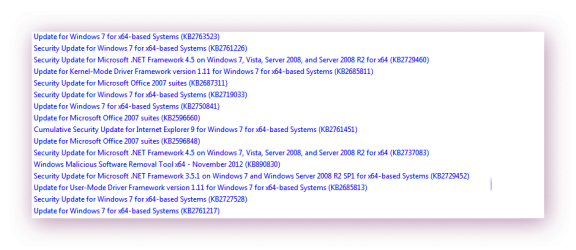
hi im getting this now after updating windows update i also have opendns and have followed what you have done so fingers crossed :p when i put opendns back into router settings and adapter settings pop up comes back :doh: must be something with the security updates?
 

Attachments

  • brys Snap 2012.11.14 001.png
    brys Snap 2012.11.14 001.png
    15.9 KB · Views: 124

My Computer

Computer Manufacturer/Model Number
packard bell IXTREME M5722
OS
Operating System : Windows 7 Home Premium Edition 6.01.7600 SP1 (x64)
CPU
Processor : Intel Core 2 Quad Q8300 @ 2500 MHz
Motherboard
Mainboard : Packard Bell (Acer EG43M )
Memory
Physical Memory :8GB Corsair4x 2GB 800MHz C5 DDR2
Graphics Card(s)
Video Card : XFX 6700 AMD
Monitor(s) Displays
Maestro 234DL - BenQ V2220 - BenQ VW2420H
Screen Resolution
Current Display :1920x1080p pixels at 60 Hz in HD LED
Hard Drives
Hard Disks : WDC (1000 GB)
Drive C: (Hard Disk) : 428 GB available on 491 GB
Drive D: (Hard Disk) : 426 GB available on 492 GB
SAMSUNG spinpoint HD103SJ 1000.2 GB
(X 2) KINGSTON SSD NOW V 30GB
PSU
XFX ProSeries 550W PSU
Case
PACKARD BELL IXTREME
Cooling
System Blower Current: 150mA Air Flow16CFM ;Akasa 90mm rear
Keyboard
Gigabyte Aivia K8100
Mouse
TRUST-Wireless Laser Mouse - Carbon edition MI-7770C
Internet Speed
TP-LINK > TL-WN951N / AV500 Gigabit Powerline Adapters
Browser
chrome dev
Other Info
EXTRA COOLING>(FAN CONTROLLER) PC Bay Cooler 3 x 40mm fans; Akasa AK-HD-BL Blue hard drive cooler 2 x 40 mm fan 4500 rpm 29.7 dBA
Bios> American Megatrends Inc.
Version : P01-A1
Date : 08/31/2009
It cost me $103, but MS fixed it.

This involves a change in a registry key. Don't do this if you are not familiar with such changes. Always backup your registry first.

Open regedit and navigate as follows:
HKEY_LOCAL_MACHINE\SYSTEM\CurrentControlSet\services\NlaSvc\Parameters\Internet

Double-click on EnableActiveProbing

Change value to 0.

Best Wishes,
Michael

just tried your reg key change and all seems ok no pop up at the moment thanks. :)
 

My Computer

Computer Manufacturer/Model Number
packard bell IXTREME M5722
OS
Operating System : Windows 7 Home Premium Edition 6.01.7600 SP1 (x64)
CPU
Processor : Intel Core 2 Quad Q8300 @ 2500 MHz
Motherboard
Mainboard : Packard Bell (Acer EG43M )
Memory
Physical Memory :8GB Corsair4x 2GB 800MHz C5 DDR2
Graphics Card(s)
Video Card : XFX 6700 AMD
Monitor(s) Displays
Maestro 234DL - BenQ V2220 - BenQ VW2420H
Screen Resolution
Current Display :1920x1080p pixels at 60 Hz in HD LED
Hard Drives
Hard Disks : WDC (1000 GB)
Drive C: (Hard Disk) : 428 GB available on 491 GB
Drive D: (Hard Disk) : 426 GB available on 492 GB
SAMSUNG spinpoint HD103SJ 1000.2 GB
(X 2) KINGSTON SSD NOW V 30GB
PSU
XFX ProSeries 550W PSU
Case
PACKARD BELL IXTREME
Cooling
System Blower Current: 150mA Air Flow16CFM ;Akasa 90mm rear
Keyboard
Gigabyte Aivia K8100
Mouse
TRUST-Wireless Laser Mouse - Carbon edition MI-7770C
Internet Speed
TP-LINK > TL-WN951N / AV500 Gigabit Powerline Adapters
Browser
chrome dev
Other Info
EXTRA COOLING>(FAN CONTROLLER) PC Bay Cooler 3 x 40mm fans; Akasa AK-HD-BL Blue hard drive cooler 2 x 40 mm fan 4500 rpm 29.7 dBA
Bios> American Megatrends Inc.
Version : P01-A1
Date : 08/31/2009
Thanks

Thank You!!!

It cost me $103, but MS fixed it.

This involves a change in a registry key. Don't do this if you are not familiar with such changes. Always backup your registry first.

Open regedit and navigate as follows:
HKEY_LOCAL_MACHINE\SYSTEM\CurrentControlSet\services\NlaSvc\Parameters\Internet

Double-click on EnableActiveProbing

Change value to 0.

Best Wishes,
Michael
 

My Computer

OS
Windows 7 Pro X64
Fixed

I first experienced this issue after running an update. Everything worked but the dialog box kept appearing and when I clicked on it my browser opened on my home page without any issues. I simply deleted my wireless connection and recreated it. No warning dialog box since then.
 

My Computer

Computer Manufacturer/Model Number
Dell
OS
Windows 7 Pro 64 bit
CPU
Intel i5
Memory
4GB
Monitor(s) Displays
Asus 24"
2 important Updates!

It cost me $103, but MS fixed it.

Update #1: MS has since agreed to refund this.


This involves a change in a registry key. Don't do this if you are not familiar with such changes.

Always backup your registry first.

Open regedit and navigate as follows:
HKEY_LOCAL_MACHINE\SYSTEM\CurrentControlSet\services\NlaSvc\Parameters\Internet

Double-click on EnableActiveProbing

Change value to 0.


Update #2:
Reboot
Allow to simmer a couple of hours. (That's simply my superstitious behavior.)
Reboot
Now Revert same value back to 1.


Problem is fixed.


Best Wishes,
Michael

I had been using Windows 7 for so many years yet it is only today that I encountered an issue similar to the one which started this thread. Also, this method fixed the problem for me.
 

My Computer

OS
Windows 7 Ultimate x64 (desktop) / x64 (laptop)
CPU
AMD Phenom 2 X3 720 2.8 GHz (desktop) / AMD Dual-Core E-350
Motherboard
ASRock N68-VS3 UCC / Acer Aspire 5253
Memory
4 Gb DDR3 / 4Gb DD3
Graphics Card(s)
Nvidia GeForce GTS 450 2048 Mb / AMD Radeon HD 6310
Sound Card
High Definition Audio Device
Monitor(s) Displays
ViewSonic
Screen Resolution
1024 x 768 / 1366 x 768
Hard Drives
313GB Seagate ST332041 8AS SCSI Disk Device (ATA) / 500 Gb HDD
PSU
Electron ATX-600W
Case
Some Case
Cooling
AMD built-in cooling fan
Keyboard
Logitech Keyboard
Mouse
A4tech Infrared Mouse / Philips Infrared Mouse
Internet Speed
1 Mbps
Other Info
Information of the PC's specs courtesy of Speccy freeware. Lol.
Good news/bad news

Glad to hear the fix still works. Disappointing that after all this time, the problem still persists.

M
 

My Computer

OS
windows 7 x32
Glad to hear the fix still works. Disappointing that after all this time, the problem still persists.

M

Rather, the aforementioned steps alone did not fixed it. But that and resetting the router, did. I'm guessing mine was a simple ISP issue.
 

My Computer

OS
Windows 7 Ultimate x64 (desktop) / x64 (laptop)
CPU
AMD Phenom 2 X3 720 2.8 GHz (desktop) / AMD Dual-Core E-350
Motherboard
ASRock N68-VS3 UCC / Acer Aspire 5253
Memory
4 Gb DDR3 / 4Gb DD3
Graphics Card(s)
Nvidia GeForce GTS 450 2048 Mb / AMD Radeon HD 6310
Sound Card
High Definition Audio Device
Monitor(s) Displays
ViewSonic
Screen Resolution
1024 x 768 / 1366 x 768
Hard Drives
313GB Seagate ST332041 8AS SCSI Disk Device (ATA) / 500 Gb HDD
PSU
Electron ATX-600W
Case
Some Case
Cooling
AMD built-in cooling fan
Keyboard
Logitech Keyboard
Mouse
A4tech Infrared Mouse / Philips Infrared Mouse
Internet Speed
1 Mbps
Other Info
Information of the PC's specs courtesy of Speccy freeware. Lol.
Back
Top