
Additional memory installed not showing in system

geramar31

New member
Local time
10:23 AM
Messages
5
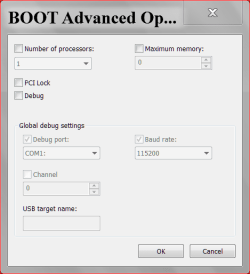
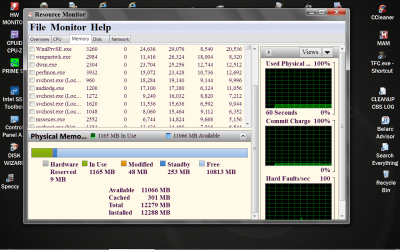
I have a Gateway GM5442 with 2 1024 MB DIMMs memory originally installed and just upgraded it with two additional DDR2 PC2-4200 1 GB Samsung memory cards. The computer works as before, but the additional memory does not show in system. I use Windows 7 with 64-bit OS. I already checked that the cards are quite in place and rebooted. I already checked as per your instructions msconfig Advance options. Maximum memory was already unchecked and then checked to "Make all boot settings permanent". Rebooted, and still shows 2.00 GB installed memory (RAM) in System info and 2037 Total Physical Memory in Task Manager.
 

My Computer

Computer Manufacturer/Model Number
Gateway GM5442
OS
64-bit Windows 7 OS
CPU
Intel Core 2 Duo E4400 Dual Core Processor 2 GHz ea.
Memory
2046 MB DDR2, 533 MHz (PC4200) dual channel expandable to 4
Graphics Card(s)
Intel Graphics Media Accelerator 950
Sound Card
Integrated 8-channel (7.1) High Definition Audio
Monitor(s) Displays
Acer LCD S201HLbd
Hard Drives
500 GB, 7200 RPM, STA II hard drive
FireLine USB Smartdisk external hard drive
Two thoughts:

Enter the BIOS settings and see if all the RAM is recognized there.

All 4 sticks should be the same voltage. Look on the original sticks and see if there is a sticker with the voltage marked on it, then compare that to the voltage of the new sticks.
 

My Computer

Computer type
PC/Desktop
Computer Manufacturer/Model Number
Home Built - Jan 2013
OS
Windows 7 64 Bit Home Premium SP1
CPU
i7-3820
Motherboard
Asus P9X79-PRO - Bios 4608
Memory
GSkill F3-14900CL9Q - 16GB
Graphics Card(s)
EVGA GeForce GTX660 - Driver 352.86
Sound Card
On board Realtek ALC898
Monitor(s) Displays
Acer S271HL
Screen Resolution
1920 x 1080
Hard Drives
#1- Samsung 840 Pro Series
#2- Western Digital WD1002FAEX Sata3 Black
#3- Western Digital WD1002FAEX Sata3 Black
PSU
Corsair CMPSU-850TX-V2 - 850 watt (by Seasonic)
Case
Corsair Obsidian 550D
Cooling
Standard 3 120mm case fans, Cooler Master Hyper 212 EVO
Keyboard
MS KC-0405
Mouse
Intellimouse 5-button
Internet Speed
56 Mbits/Sec (on a good day)
Antivirus
Avast & Malwarebytes
Browser
Firefox
Other Info
Asus DVD - DRW-24B1ST 24X
mem 2 12 14.PNG

mem 12 14.PNG

Resource Monitor RAM.PNG

After you check your ram as TVeblen has suggested.

This is what works for me.
 

My Computer

Computer type
PC/Desktop
Computer Manufacturer/Model Number
Home made Desktop
OS
Windows 10 Pro. 64/ version 1709 Windows 7 Pro/64
CPU
Intel i7-6800K @ 4.3
Motherboard
ASUS X-99 Deluxe II
Memory
Corsair Platinum 16 gig @2400
Graphics Card(s)
EVGA GTX 1070 OC
Monitor(s) Displays
Asus 27" LED LCD/VE278Q
Screen Resolution
1920-1080 or 1280-720 HDMI
Hard Drives
INTEL SSD 730-240 Gb Sata 3.0/
PSU
EVGA Platium 1200W
Case
Phanteks Luxe Tempered Glass 8 fans/ one radiator
Cooling
XSPC/ Water Cooled CPU
Keyboard
Das 4 Professional
Mouse
Logitech M705/MX Anywhere 2-S
Internet Speed
100 mbits
Antivirus
Microsoft Security Essentials/ Malwarebytes Premium 3.0/ SAS
Browser
I.E. 11 default/Firefox/ ISP Time Warner Cable/Spectrum
Other Info
LG BluRay Burner/
Sound system-KLipsch-THX/
Icy Dock ssd Hot Swap bays.
I believe they are the same voltage because the RAM cards received description: GENERIC DDR2-4200 1gb SAMSUNG 533 MHZ 128X72 DDR2 240 ECC REG.

The ones previously installed in my Gateway GM5442 are described by Gateway Support specifications as 2048 MB DDR2, 533 MHz (PC4200) dual channel memory (two 1024 MB DIMMs) Expandable to 4 GB (4DDR2 DIMM slots).

In addition, I enterred the BIOS settings and found that:
Memory Channel A slot 0 1024 MB
Memory Channel A slot 1 Not installed
Memory Channel B slot 0 1024 MB
Memory Channel B slot 1 Not installed

The new RAM I installed in slots 1 A & B that were empty. I placed them the same way the other two were installed. Is it possible that I should have placed them inverted?
 

My Computer

Computer Manufacturer/Model Number
Gateway GM5442
OS
64-bit Windows 7 OS
CPU
Intel Core 2 Duo E4400 Dual Core Processor 2 GHz ea.
Memory
2046 MB DDR2, 533 MHz (PC4200) dual channel expandable to 4
Graphics Card(s)
Intel Graphics Media Accelerator 950
Sound Card
Integrated 8-channel (7.1) High Definition Audio
Monitor(s) Displays
Acer LCD S201HLbd
Hard Drives
500 GB, 7200 RPM, STA II hard drive
FireLine USB Smartdisk external hard drive
No. there is a key (notch) in the card that prevents that. You can see the plastic ridge inside the slot that is to line up with that key. The key is off-center just for that reason.

Unfortunately the design voltage of memory sticks is not a part of that generic description. And many sellers do not list it in their specs. You have to look. Very annoying considering how important that spec is.

But you now know the problem: the sticks are not recognized by the system. So forget about the OS for now, it has nothing to do with it. You've got to figure out why the new RAM is not recognized at the BIOS level.

You could try this:
Take the original 2 sticks out (carefully note their orientation in terms of that key notch). The put the 2 new sticks in those same 2 slots and see if they are recognized by the system.
 

My Computer

Computer type
PC/Desktop
Computer Manufacturer/Model Number
Home Built - Jan 2013
OS
Windows 7 64 Bit Home Premium SP1
CPU
i7-3820
Motherboard
Asus P9X79-PRO - Bios 4608
Memory
GSkill F3-14900CL9Q - 16GB
Graphics Card(s)
EVGA GeForce GTX660 - Driver 352.86
Sound Card
On board Realtek ALC898
Monitor(s) Displays
Acer S271HL
Screen Resolution
1920 x 1080
Hard Drives
#1- Samsung 840 Pro Series
#2- Western Digital WD1002FAEX Sata3 Black
#3- Western Digital WD1002FAEX Sata3 Black
PSU
Corsair CMPSU-850TX-V2 - 850 watt (by Seasonic)
Case
Corsair Obsidian 550D
Cooling
Standard 3 120mm case fans, Cooler Master Hyper 212 EVO
Keyboard
MS KC-0405
Mouse
Intellimouse 5-button
Internet Speed
56 Mbits/Sec (on a good day)
Antivirus
Avast & Malwarebytes
Browser
Firefox
Other Info
Asus DVD - DRW-24B1ST 24X
Thank you! I'll follow your instructions. First, look at the voltage. If it is the same, replace the old with the new and see what happens! I'll let you know whatever the results may be.
 

My Computer

Computer Manufacturer/Model Number
Gateway GM5442
OS
64-bit Windows 7 OS
CPU
Intel Core 2 Duo E4400 Dual Core Processor 2 GHz ea.
Memory
2046 MB DDR2, 533 MHz (PC4200) dual channel expandable to 4
Graphics Card(s)
Intel Graphics Media Accelerator 950
Sound Card
Integrated 8-channel (7.1) High Definition Audio
Monitor(s) Displays
Acer LCD S201HLbd
Hard Drives
500 GB, 7200 RPM, STA II hard drive
FireLine USB Smartdisk external hard drive
I could not find indication of voltage (perhaps I did not know where to look), but when I removed the two original RAM sticks and replaced them with the two new ones in the same 0 slots in Channels A & B, and turned on the computer, it started wistling. Clearly they are either incompatible or defective. I'll try to get a refund.:sarc:

Thank you for all your help. I've learned a lot in the process!!
 

My Computer

Computer Manufacturer/Model Number
Gateway GM5442
OS
64-bit Windows 7 OS
CPU
Intel Core 2 Duo E4400 Dual Core Processor 2 GHz ea.
Memory
2046 MB DDR2, 533 MHz (PC4200) dual channel expandable to 4
Graphics Card(s)
Intel Graphics Media Accelerator 950
Sound Card
Integrated 8-channel (7.1) High Definition Audio
Monitor(s) Displays
Acer LCD S201HLbd
Hard Drives
500 GB, 7200 RPM, STA II hard drive
FireLine USB Smartdisk external hard drive
Whistling? Do you think it might have been beeping? Never heard Whistling before!

Yes, they "sound" like defective parts for sure.
 

My Computer

Computer type
PC/Desktop
Computer Manufacturer/Model Number
Home Built - Jan 2013
OS
Windows 7 64 Bit Home Premium SP1
CPU
i7-3820
Motherboard
Asus P9X79-PRO - Bios 4608
Memory
GSkill F3-14900CL9Q - 16GB
Graphics Card(s)
EVGA GeForce GTX660 - Driver 352.86
Sound Card
On board Realtek ALC898
Monitor(s) Displays
Acer S271HL
Screen Resolution
1920 x 1080
Hard Drives
#1- Samsung 840 Pro Series
#2- Western Digital WD1002FAEX Sata3 Black
#3- Western Digital WD1002FAEX Sata3 Black
PSU
Corsair CMPSU-850TX-V2 - 850 watt (by Seasonic)
Case
Corsair Obsidian 550D
Cooling
Standard 3 120mm case fans, Cooler Master Hyper 212 EVO
Keyboard
MS KC-0405
Mouse
Intellimouse 5-button
Internet Speed
56 Mbits/Sec (on a good day)
Antivirus
Avast & Malwarebytes
Browser
Firefox
Other Info
Asus DVD - DRW-24B1ST 24X
Yeah! Of course! I meant beeping!! :confused: I already asked to return the sticks and get a refund.
 

My Computer

Computer Manufacturer/Model Number
Gateway GM5442
OS
64-bit Windows 7 OS
CPU
Intel Core 2 Duo E4400 Dual Core Processor 2 GHz ea.
Memory
2046 MB DDR2, 533 MHz (PC4200) dual channel expandable to 4
Graphics Card(s)
Intel Graphics Media Accelerator 950
Sound Card
Integrated 8-channel (7.1) High Definition Audio
Monitor(s) Displays
Acer LCD S201HLbd
Hard Drives
500 GB, 7200 RPM, STA II hard drive
FireLine USB Smartdisk external hard drive
Good call. You didn't mention the brand of RAM those were. I find that if you stick to the better known brands the likelihood of bad sticks is reduced.
 

My Computer

Computer type
PC/Desktop
Computer Manufacturer/Model Number
Home Built - Jan 2013
OS
Windows 7 64 Bit Home Premium SP1
CPU
i7-3820
Motherboard
Asus P9X79-PRO - Bios 4608
Memory
GSkill F3-14900CL9Q - 16GB
Graphics Card(s)
EVGA GeForce GTX660 - Driver 352.86
Sound Card
On board Realtek ALC898
Monitor(s) Displays
Acer S271HL
Screen Resolution
1920 x 1080
Hard Drives
#1- Samsung 840 Pro Series
#2- Western Digital WD1002FAEX Sata3 Black
#3- Western Digital WD1002FAEX Sata3 Black
PSU
Corsair CMPSU-850TX-V2 - 850 watt (by Seasonic)
Case
Corsair Obsidian 550D
Cooling
Standard 3 120mm case fans, Cooler Master Hyper 212 EVO
Keyboard
MS KC-0405
Mouse
Intellimouse 5-button
Internet Speed
56 Mbits/Sec (on a good day)
Antivirus
Avast & Malwarebytes
Browser
Firefox
Other Info
Asus DVD - DRW-24B1ST 24X
I have never had any luck trying to matched O.E. ram. I would get all new matching ram of the proper specs. As TVeblen has recommend, a quality brand is a must.
TVeblen uses Corsair and I use Kingston. Both are quality.
 

My Computer

Computer type
PC/Desktop
Computer Manufacturer/Model Number
Home made Desktop
OS
Windows 10 Pro. 64/ version 1709 Windows 7 Pro/64
CPU
Intel i7-6800K @ 4.3
Motherboard
ASUS X-99 Deluxe II
Memory
Corsair Platinum 16 gig @2400
Graphics Card(s)
EVGA GTX 1070 OC
Monitor(s) Displays
Asus 27" LED LCD/VE278Q
Screen Resolution
1920-1080 or 1280-720 HDMI
Hard Drives
INTEL SSD 730-240 Gb Sata 3.0/
PSU
EVGA Platium 1200W
Case
Phanteks Luxe Tempered Glass 8 fans/ one radiator
Cooling
XSPC/ Water Cooled CPU
Keyboard
Das 4 Professional
Mouse
Logitech M705/MX Anywhere 2-S
Internet Speed
100 mbits
Antivirus
Microsoft Security Essentials/ Malwarebytes Premium 3.0/ SAS
Browser
I.E. 11 default/Firefox/ ISP Time Warner Cable/Spectrum
Other Info
LG BluRay Burner/
Sound system-KLipsch-THX/
Icy Dock ssd Hot Swap bays.
Back
Top