
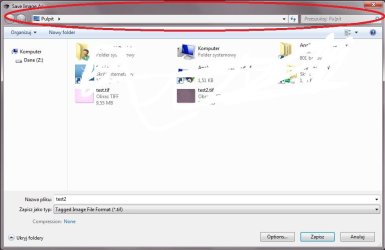
Addres bar and save as function

dracuch

New member
Local time
7:19 AM
Messages
3
I would like to off or hide search box in save as function. I would like to force everyone computer user save file to Z partition. Can you help me ?

Drive C is read only but still keeps save function in "Save as" Window.
Additionally i hide C partition on left menu.
 

Attachments
  • Mikro.jpg
    Mikro.jpg
    42.8 KB · Views: 0

My Computer

Computer type
PC/Desktop
OS
Windows 7 x64
You're taking the wrong approach here. The save file dialog is purely cosmetic and doesn't adds any kind of security by hiding its components.

If you want to restrict users to save to Z and nothing else, file system permissions can do this already. Doing it only from the "file save" dialog is simply too easy to bypass. Hiding C is neither a real solution.
As for the default location, it's determined by the program you use, and each one can set a different one.
 

My Computer

Computer type
Laptop
Computer Manufacturer/Model Number
Toshiba Sattelite A665-S6092
OS
Windows 7 Ultimate x64
CPU
Intel Core i7-740QM
Memory
8 GB DDR3
Graphics Card(s)
NVIDIA GeForce 330GT
Screen Resolution
1366x768
Hard Drives
Samsung 840 SSD 500GB
1TB USB3 external HD
Cooling
Coolermaster Notepal U3 notebook cooling pad
Internet Speed
3mbps ASDL
Antivirus
ClamWin 0.98.7
Browser
Opera 12.17 x86 (main), Firefox 38 (sec), IE11 (last resort)
I secured the systems by many different ways. This is the last one action witch i have to do. It does not have to be hiding address bar, but i thought it's can be the easiest. - Users have no access to desktop and disc C, - Users can not modified and change file/ folder names, - For the users desktop is empty, the users don't see anything but they see everything by window "save as " or "open" in many software using windows explorer - User can not save files on desktop, edit files in desktop etc. but can save files in "save as" Window, If users will not be able to choose desktop in "save as" window my OS will be safe. I tried everything and You are my last hope :)
 

My Computer

Computer type
PC/Desktop
OS
Windows 7 x64
Why do you think you'll be "safe" by forbiding saving to desktop? What danger are you protecting against?

If you've properly secured the OS, then anything the users will try will be greeted by a nice "access denied" message, be using Windows Explorer, a save/open as dialog, the command line or any other imaginable utility. Hiding anything is not needed at all, the Windows kernel will take care of denying everything.

People normally expect to use the desktop and in fact to have write access to their entire profile folder, in addition to some designated location. Why do you want to take that basic premise away?
 

My Computer

Computer type
Laptop
Computer Manufacturer/Model Number
Toshiba Sattelite A665-S6092
OS
Windows 7 Ultimate x64
CPU
Intel Core i7-740QM
Memory
8 GB DDR3
Graphics Card(s)
NVIDIA GeForce 330GT
Screen Resolution
1366x768
Hard Drives
Samsung 840 SSD 500GB
1TB USB3 external HD
Cooling
Coolermaster Notepal U3 notebook cooling pad
Internet Speed
3mbps ASDL
Antivirus
ClamWin 0.98.7
Browser
Opera 12.17 x86 (main), Firefox 38 (sec), IE11 (last resort)
i am working at company where data are critical.Action in OS and software are tracking.I adhere at the principle - better protect effectivelly than still review audit trail. I would like to restrict to minimum risk losing the data.
 

My Computer

Computer type
PC/Desktop
OS
Windows 7 x64
If your work is to ensure data security, then you should apply proper security measures instead. Hiding the address bar of the save dialog achieves exactly zero security in itself, but instead restricting user permissions is the way to go.

What's the particular scenario that you think you'll prevent? What's the risk you're protecting against?
 

My Computer

Computer type
Laptop
Computer Manufacturer/Model Number
Toshiba Sattelite A665-S6092
OS
Windows 7 Ultimate x64
CPU
Intel Core i7-740QM
Memory
8 GB DDR3
Graphics Card(s)
NVIDIA GeForce 330GT
Screen Resolution
1366x768
Hard Drives
Samsung 840 SSD 500GB
1TB USB3 external HD
Cooling
Coolermaster Notepal U3 notebook cooling pad
Internet Speed
3mbps ASDL
Antivirus
ClamWin 0.98.7
Browser
Opera 12.17 x86 (main), Firefox 38 (sec), IE11 (last resort)
Back
Top