Adhoc - How to connect automatically?

J32

New member
Hello,

I have two laptops. One is running seven ultimate 32bit the other premium 64bit.
The 32bit is connected to the internet per network cable to the router. The router is not wireless.

the 64bit laptop is connected per adhoc to the 32bit ultimate laptop and goes by ICS into the internet. That works fine.

My problem is that I have to manually connect to the adhoc on both laptops and on the 64bit laptop I have to enter the wpa key every time I connect.

Is it possible to connect automatically without having to enter the wpa key everytime?

If it isn't possible do so in Windows, maybe there is a 3rd party software for this somebody could recommend. Free software prefered ;)

Thanks
 

My Computer

Computer Manufacturer/Model Number
Dell Inspiron 6400
OS
Windows 7 Ultimate 32bit DE
CPU
Genuine Intel CPU T2300 1.66GHz
Memory
2GB
Graphics Card(s)
ATI Mobility Radeon x1300
Screen Resolution
1280x800
In your wireless connection icon bottom right, right-click on your connection, Properties, Connection tab, there should be an option for you to connect automatically. I assume you've done this and it's stiall asking for security key?
 

My Computer

Computer Manufacturer/Model Number
Lenovo ThinkPad T60
OS
Windows 7 Ultimate 64Bit
CPU
GenuineIntel Intel(R) Core(TM) DuoCore T2400 @ 1.83GHz
Motherboard
Intel(R) 82801G (ICH7 Family)
Memory
2.00 GB
Graphics Card(s)
Mobile Intel(R) 945 Express Chipset
Sound Card
SoundMAX Integrated Digital HD Audio
Monitor(s) Displays
ThinkPad Display
Screen Resolution
1400x1050
Hard Drives
100Gb SATA
Keyboard
Standard Keyboard
Mouse
HID-compliant Mouse
Internet Speed
Cable Broadband - 54Mbps
Other Info
Intel(R) PRO/1000 PL Network Connection
11a/b/g Wireless LAN Mini PCI Express Adapter
Well thats the weird thing. I do not have this option on both computers. There is no option "connect automatically". Maybe adhoc networks do not have this option?
 

My Computer

Computer Manufacturer/Model Number
Dell Inspiron 6400
OS
Windows 7 Ultimate 32bit DE
CPU
Genuine Intel CPU T2300 1.66GHz
Memory
2GB
Graphics Card(s)
ATI Mobility Radeon x1300
Screen Resolution
1280x800
So what is showing in your wireless network (icon bottom right)?
 

My Computer

Computer Manufacturer/Model Number
Lenovo ThinkPad T60
OS
Windows 7 Ultimate 64Bit
CPU
GenuineIntel Intel(R) Core(TM) DuoCore T2400 @ 1.83GHz
Motherboard
Intel(R) 82801G (ICH7 Family)
Memory
2.00 GB
Graphics Card(s)
Mobile Intel(R) 945 Express Chipset
Sound Card
SoundMAX Integrated Digital HD Audio
Monitor(s) Displays
ThinkPad Display
Screen Resolution
1400x1050
Hard Drives
100Gb SATA
Keyboard
Standard Keyboard
Mouse
HID-compliant Mouse
Internet Speed
Cable Broadband - 54Mbps
Other Info
Intel(R) PRO/1000 PL Network Connection
11a/b/g Wireless LAN Mini PCI Express Adapter
where I can see all my wireless networks and click a network I see the name of the network, connected and a button for disconnect. Nothing else.
 

My Computer

Computer Manufacturer/Model Number
Dell Inspiron 6400
OS
Windows 7 Ultimate 32bit DE
CPU
Genuine Intel CPU T2300 1.66GHz
Memory
2GB
Graphics Card(s)
ATI Mobility Radeon x1300
Screen Resolution
1280x800
Yes and you cannot right-click on the name of the network?
 

My Computer

Computer Manufacturer/Model Number
Lenovo ThinkPad T60
OS
Windows 7 Ultimate 64Bit
CPU
GenuineIntel Intel(R) Core(TM) DuoCore T2400 @ 1.83GHz
Motherboard
Intel(R) 82801G (ICH7 Family)
Memory
2.00 GB
Graphics Card(s)
Mobile Intel(R) 945 Express Chipset
Sound Card
SoundMAX Integrated Digital HD Audio
Monitor(s) Displays
ThinkPad Display
Screen Resolution
1400x1050
Hard Drives
100Gb SATA
Keyboard
Standard Keyboard
Mouse
HID-compliant Mouse
Internet Speed
Cable Broadband - 54Mbps
Other Info
Intel(R) PRO/1000 PL Network Connection
11a/b/g Wireless LAN Mini PCI Express Adapter
Ah ok I missunderstood. Sure I can right click on the network name. I have the options, disconnect, status and Properties. If I go to properties, I have two register cards. Connection, Security.

Connection shows me the name, the ssid, network type = adhoc, network availability=all users and a link that says "copy this network profile onto a flash drive". Nothing else. Except for the flash drive thing nothing is clickable.

Security shows the security type, the key type and the key itself. I can choose to show the key or hide it. Thats it.
 

My Computer

Computer Manufacturer/Model Number
Dell Inspiron 6400
OS
Windows 7 Ultimate 32bit DE
CPU
Genuine Intel CPU T2300 1.66GHz
Memory
2GB
Graphics Card(s)
ATI Mobility Radeon x1300
Screen Resolution
1280x800
I just figured that regular wireless network accesspoints in my area have the option to connect automatically. Only adhoc networks do not have the option.
 

My Computer

Computer Manufacturer/Model Number
Dell Inspiron 6400
OS
Windows 7 Ultimate 32bit DE
CPU
Genuine Intel CPU T2300 1.66GHz
Memory
2GB
Graphics Card(s)
ATI Mobility Radeon x1300
Screen Resolution
1280x800
I would think that is where you have the option to select connect automatically. Maybe the adhoc doesn't have this, or could be somewhere else (on the other laptop, or during creation)?
 

My Computer

Computer Manufacturer/Model Number
Lenovo ThinkPad T60
OS
Windows 7 Ultimate 64Bit
CPU
GenuineIntel Intel(R) Core(TM) DuoCore T2400 @ 1.83GHz
Motherboard
Intel(R) 82801G (ICH7 Family)
Memory
2.00 GB
Graphics Card(s)
Mobile Intel(R) 945 Express Chipset
Sound Card
SoundMAX Integrated Digital HD Audio
Monitor(s) Displays
ThinkPad Display
Screen Resolution
1400x1050
Hard Drives
100Gb SATA
Keyboard
Standard Keyboard
Mouse
HID-compliant Mouse
Internet Speed
Cable Broadband - 54Mbps
Other Info
Intel(R) PRO/1000 PL Network Connection
11a/b/g Wireless LAN Mini PCI Express Adapter
Nope never had the option, whether in creation or on any of both laptops. Thats really bugging me.
 

My Computer

Computer Manufacturer/Model Number
Dell Inspiron 6400
OS
Windows 7 Ultimate 32bit DE
CPU
Genuine Intel CPU T2300 1.66GHz
Memory
2GB
Graphics Card(s)
ATI Mobility Radeon x1300
Screen Resolution
1280x800
Time to invest in a wireless router i'd say, and make it a Linksys one too :p
 

My Computer

Computer Manufacturer/Model Number
Lenovo ThinkPad T60
OS
Windows 7 Ultimate 64Bit
CPU
GenuineIntel Intel(R) Core(TM) DuoCore T2400 @ 1.83GHz
Motherboard
Intel(R) 82801G (ICH7 Family)
Memory
2.00 GB
Graphics Card(s)
Mobile Intel(R) 945 Express Chipset
Sound Card
SoundMAX Integrated Digital HD Audio
Monitor(s) Displays
ThinkPad Display
Screen Resolution
1400x1050
Hard Drives
100Gb SATA
Keyboard
Standard Keyboard
Mouse
HID-compliant Mouse
Internet Speed
Cable Broadband - 54Mbps
Other Info
Intel(R) PRO/1000 PL Network Connection
11a/b/g Wireless LAN Mini PCI Express Adapter
maybe one day, when I am rich and feel like I need to throw out some money I will spend so much money on a wlan router ;)

Until then a $20 dlink has to do it.
 

My Computer

Computer Manufacturer/Model Number
Dell Inspiron 6400
OS
Windows 7 Ultimate 32bit DE
CPU
Genuine Intel CPU T2300 1.66GHz
Memory
2GB
Graphics Card(s)
ATI Mobility Radeon x1300
Screen Resolution
1280x800

My Computer

Computer Manufacturer/Model Number
Lenovo ThinkPad T60
OS
Windows 7 Ultimate 64Bit
CPU
GenuineIntel Intel(R) Core(TM) DuoCore T2400 @ 1.83GHz
Motherboard
Intel(R) 82801G (ICH7 Family)
Memory
2.00 GB
Graphics Card(s)
Mobile Intel(R) 945 Express Chipset
Sound Card
SoundMAX Integrated Digital HD Audio
Monitor(s) Displays
ThinkPad Display
Screen Resolution
1400x1050
Hard Drives
100Gb SATA
Keyboard
Standard Keyboard
Mouse
HID-compliant Mouse
Internet Speed
Cable Broadband - 54Mbps
Other Info
Intel(R) PRO/1000 PL Network Connection
11a/b/g Wireless LAN Mini PCI Express Adapter
What we have to remember here is that the Ad-Hoc network facility is designed to create a temporary network link between two systems for the purpose of data sharing.

This is useful, for example, at a business meeting where files may be shared.

If you intend to use the connection on a permanent basis you need to set things up differently.

you need to run the ICS wizard on the machine connected to the internet to st this up as a server and bridge the two networks, (internet & local).

Once this is completed you need to run the ICS wizard in the other machine to set this up as part of the same local network as the server with the server as the internet gateway, DHCP server, and DNS server Etc.
 

My Computers

System One System Two

  • Computer type
    PC/Desktop
    Computer Manufacturer/Model Number
    ChillBlast - Custom to my design
    OS
    Windows 11 Pro x64 [Latest Release and Release Preview]
    CPU
    Ryzen 9 5950X, 3.8 - 5.2 MHz
    Motherboard
    Asus Prime X570-Pro
    Memory
    64GB [2 x 32GB] DDR4 3200MHz
    Graphics Card(s)
    4GB NVIDIA GEFORCE GTX 1650 Ti
    Sound Card
    On-board SPDIF to 5.1 System + HDMI [5.1 system]
    Monitor(s) Displays
    32" UHD 32 Bit HDR Monitor + 43" UHD 4K 32Bit HDR TV
    Screen Resolution
    2 x 3840 x 2160 @60Hz
    Hard Drives
    1TB M2 SSD OS, 500GB Fast Access SSD, 2 x 8TB Data + Various Externals from 1TB to 4TB, 10TB NAS
    PSU
    NZXT C750 80 PLUS Gold 750W Modular PSU
    Case
    Workstation Case [Matt Black]
    Cooling
    NZXT Kraken X63 280mm CPU Cooler +2x Quiet Case fans
    Keyboard
    Logitech Wireless MX Keys & K400 + others
    Mouse
    Logitech Wireless MX Master 3S
    Internet Speed
    920 MB Down 50 MB Up
    Antivirus
    BitDefender Total Security Pro
    Browser
    Chrome (always run latest Non-Beta)
    Other Info
    Also run ...
    Laptop - Quad 8GB - Windows 10 Pro x64
    Nexus 7 Android tablet x2
    Samsung 10.2" tablet
    Blackview TAB 8 4G Android Tablet c/w Keyboard
    Wacom Intuos Pro Medium Pen Pad
    Wacom Intuos Pro Small Pen Pad
    Wacom Expresskeys Remote
    Loopdeck+ Graphics Controller
    Shuttle Pro v2 Control
  • Computer type
    Laptop
    System Manufacturer/Model Number
    Dell XPS 17 10750H
    OS
    Windows 11 Pro x64 Latest RP
    CPU
    Intel I7 10750H 5.0GHz
    Motherboard
    Dell XPS
    Memory
    32GB [2x16GB] DDR4 2933 MHz
    Graphics Card(s)
    nVidia GTX1650Ti 4 GB GDDR6
    Sound Card
    Stock [Realtek] 4 Speaker
    Monitor(s) Displays
    17" IPS UHD+ Infinity Edge Touchscreen
    Screen Resolution
    3840 x 2400
    Hard Drives
    2TB M2 NVMe, 4TB External + various 500GB & 1TB External NVMe (also have access to spinner HDD from
    PSU
    Stock
    Case
    Stock XPS Aluminium & Carbon Fibre
    Cooling
    Stock - Active Fan Control
    Keyboard
    Backlit + Various Logitech
    Mouse
    Stock Track Pad + Logitech MX Trackball
    Internet Speed
    72 MB Down 18MB Up
    Browser
    Chrome
    Other Info
    Also run ...
    Laptop - Quad 8GB - Windows 10 Pro x64
    Nexus 7 Android tablet x2
    10.2" tablet
    Sony Z3 Android Smartphone
    Wacom Intuos Pro Medium Pen Pad
    Wacom Intuos Pro Small Pen Pad
    Wacom Expresskeys Remote
    Loopdeck+ Graphics Controller
    Shuttle Pro v2 Control Pad
    10TB NAS
uhm ok. I give it a try. Where do I find the ICS wizard?
 

My Computer

Computer Manufacturer/Model Number
Dell Inspiron 6400
OS
Windows 7 Ultimate 32bit DE
CPU
Genuine Intel CPU T2300 1.66GHz
Memory
2GB
Graphics Card(s)
ATI Mobility Radeon x1300
Screen Resolution
1280x800
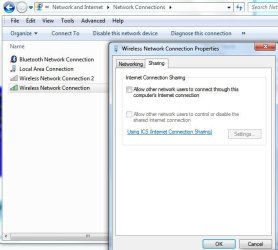
Right-click on the connection you want to share internet with. Properties and then in Sharing tab, as follows.

Noname.jpg
 

My Computer

Computer Manufacturer/Model Number
Lenovo ThinkPad T60
OS
Windows 7 Ultimate 64Bit
CPU
GenuineIntel Intel(R) Core(TM) DuoCore T2400 @ 1.83GHz
Motherboard
Intel(R) 82801G (ICH7 Family)
Memory
2.00 GB
Graphics Card(s)
Mobile Intel(R) 945 Express Chipset
Sound Card
SoundMAX Integrated Digital HD Audio
Monitor(s) Displays
ThinkPad Display
Screen Resolution
1400x1050
Hard Drives
100Gb SATA
Keyboard
Standard Keyboard
Mouse
HID-compliant Mouse
Internet Speed
Cable Broadband - 54Mbps
Other Info
Intel(R) PRO/1000 PL Network Connection
11a/b/g Wireless LAN Mini PCI Express Adapter
I use connectify and I'm in ADHOC mode. I have the same problem, Windows 7 won't remember the security key where Windows XP was.
 

My Computer

OS
Win7 64 bits FR
CPU
2500K @ 4.5 GHz
Motherboard
Asrock Z68 Gen3 Extreme3
Memory
4x4GB 1600MHz GSkill CL9.
Graphics Card(s)
HD6850 Powercolor stock
Sound Card
Integrated
Monitor(s) Displays
Samsung 2343 + Dell 20in 4/3
Screen Resolution
2048x1152, 1600x1200
Hard Drives
OCZ Vertex LE SSD, 50GB
OCZ Solid 3 120GB
OCZ Vertex 2 240GB
Western Digital Scorpio 320GB 5400 rpm
PSU
KingWin Lazer Platinum (90+) 550Watts
Case
HAF912
Cooling
CPU: OCZ Vendetta 2
Keyboard
MX5500 revolution bluetooth
Mouse
MX5500 revolution bluetooth
Internet Speed
Cable 7 Mbps
Back
Top