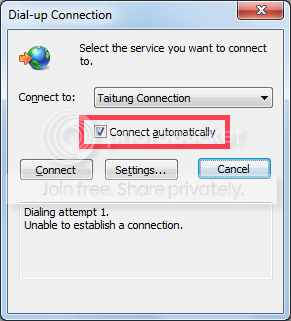
The Dialing attempt log message is me manually disconnecting from the Internet and immediately cancelling the redialing process, just so I can bring up that dialog up and show the option name, "Connect Automatically". It was never intended to be a part of the problem in the first place.
I have set my dialing attempts to infinity (specifically, 997234 times), and with only 1 second of interval in-between each dialing attempts (where it would tell you dial connection failed and a button, "Retry", counting down from X amounts of seconds, before actually retrying).
And specifically, this isn't dial-up. It's ADSL. I never put any routers in-between my PC and my ADSL modem. I never managed to set up something that saves the account and password. I'm used to opening up IE9, and letting the OS handle the online connection automatically. Just never liked the way it pops up without IE9 in the background, as it should be.
---------------------------------------------------
Continuing on, you mentioned that if it tries to auto-connect, but it doesn't detect any connections, it will automatically unchecked the option by itself. Do you happen to know anything that may have caused the connection itself to be undetectable, even though the wirings and wire connections are correctly in place?
I tried leaving the ADSL black box modem turned on and restarted my computer. The "Connect Automatically" option is unchecked.
I just couldn't figure out if it was due to motherboard internet network LAN port issues or it has to do with OS multithreading and priority issues (Connection process starts first before Modem Connection Flag was set) or something similar to that...