Administrator not allowed to turn off hibernation?

gridsystems

New member
Member
Local time
6:22 PM
Messages
31
Hi,

1) When I installed Windows 7 RC one administrator account was created. That account is what I am using. But when I try to turn off hibernation by issuing powercfg -h off at the command prompt, I am told that I don't have authority to do that. If I can't do it when I am logged in as administrator, then who can?

2) Related to this, sometimes I don't have access to view all folders on my hard drive. Sometimes UAC tells me I need to enter the administrator password to gain access to the folder. When I do that I can access the folder but why should I have to when I am already logged in as Administrator?

Anyone knows why this is so?
 

My Computer My Computer

At a glance

Windows 7 Pro 64-bitIntel i7 95018GBGigabyte Radeon HD7700
Computer Manufacturer/Model Number
built it myself
OS
Windows 7 Pro 64-bit
CPU
Intel i7 950
Motherboard
Asus Sabertooth X58
Memory
18GB
Graphics Card(s)
Gigabyte Radeon HD7700
Sound Card
onboard Realtek HD audio chip
Monitor(s) Displays
2 x Dell U2412M
Screen Resolution
1920x1200
Hard Drives
3 SSD
4 Western Digital Caviar Green
PSU
SeaSonic x650
Case
Fractal Design R3 case
Cooling
Magehalems rev. B CPU cooler
1). The account that is created, is a member of the admins group, however by default the UAC system still comes into play and limits what you can and cannot do. To disable the hibernation feature, start a command prompt with elevated privs first (Start, run, cmd and hit CTRL-Shift-Enter). This will give you an elevated command line, run your powercfg -h off.

2). If UAC is prompting for a password, that usually means you don't already have admin privs. Check your group settings for your user account and ensure it's actual a member of the local admins groups. Sounds like you have a standard user account and that is why it prompts you for a username/password. Normally, if you are an admin, it will simply throw a prompt telling you it's elevating and you simply click on ok.
 

My Computer My Computer

At a glance

Windows 7 Ultimate x64Intel Q9550 2.83Ghz OC'd to 3.40Ghz8GB G.Skill PI DDR2-800, 4-4-4-12 timingsEVGA 1280MB Nvidia GeForce GTX570
Computer Manufacturer/Model Number
Self-Built in July 2009
OS
Windows 7 Ultimate x64
CPU
Intel Q9550 2.83Ghz OC'd to 3.40Ghz
Motherboard
Gigabyte GA-EP45-UD3R rev. 1.1, F12 BIOS
Memory
8GB G.Skill PI DDR2-800, 4-4-4-12 timings
Graphics Card(s)
EVGA 1280MB Nvidia GeForce GTX570
Sound Card
Realtek ALC899A 8 channel onboard audio
Monitor(s) Displays
23" Acer x233H
Screen Resolution
1920x1080
Hard Drives
Intel X25-M 80GB Gen 2 SSD
Western Digital 1TB Caviar Black, 32MB cache. WD1001FALS
PSU
Corsair 620HX modular
Case
Antec P182
Cooling
stock
Keyboard
ABS M1 Mechanical
Mouse
Logitech G9 Laser Mouse
Internet Speed
15/2 cable modem
Other Info
Windows and Linux enthusiast. Logitech G35 Headset.
Hi thanks for your reply!

1) I tried what you wrote but it still says I don't have permission to enable of disable hibernation.

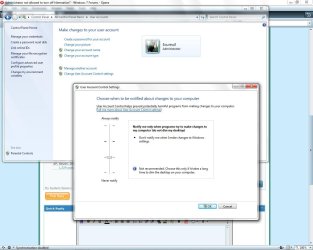
2) In user accounts I am listed as Administrator.

?????
 

My Computer My Computer

At a glance

Windows 7 Pro 64-bitIntel i7 95018GBGigabyte Radeon HD7700
Computer Manufacturer/Model Number
built it myself
OS
Windows 7 Pro 64-bit
CPU
Intel i7 950
Motherboard
Asus Sabertooth X58
Memory
18GB
Graphics Card(s)
Gigabyte Radeon HD7700
Sound Card
onboard Realtek HD audio chip
Monitor(s) Displays
2 x Dell U2412M
Screen Resolution
1920x1200
Hard Drives
3 SSD
4 Western Digital Caviar Green
PSU
SeaSonic x650
Case
Fractal Design R3 case
Cooling
Magehalems rev. B CPU cooler
you need to "run [the command prompt] as Administrator" before typing in the command.
 

My Computer My Computer

At a glance

XP, Seven, 2008R2AMD, Intel, VIACorsair, Kingston, etc.ATI, NVIDIA
Computer Manufacturer/Model Number
Too many to list.
OS
XP, Seven, 2008R2
CPU
AMD, Intel, VIA
Motherboard
Various
Memory
Corsair, Kingston, etc.
Graphics Card(s)
ATI, NVIDIA
Monitor(s) Displays
Samsung
Hard Drives
Maxtor, Western Digital
Keyboard
qwerty
Internet Speed
22 Mb/s @ home, 1 Gb/s @ server
Other Info
All of my systems still run fastest on XP 32-bit for the most part. Win7 is fun to play with, but I still prefer XP for raw speed, security, and functionality.
Thanks!

1) Now it worked.

2) Perhaps I am remembering wrongly, perhaps the problem was simply that even after clicking OK to the UAC popup I still did not get access to the folder in question.

I got the impression that there are adminstrators and administrators. A bit like in 1) when I as administrator still had to run the command prompt as administrator in order to issue the command successfully.

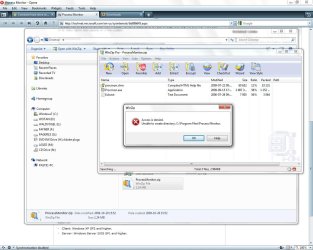
Surely I am an administrator? See attached screenshot.
 

Attachments

  • admin_or_not.jpg
    admin_or_not.jpg
    102.7 KB · Views: 329
  • admin_or_not2jpg.jpg
    admin_or_not2jpg.jpg
    126.7 KB · Views: 172

My Computer My Computer

At a glance

Windows 7 Pro 64-bitIntel i7 95018GBGigabyte Radeon HD7700
Computer Manufacturer/Model Number
built it myself
OS
Windows 7 Pro 64-bit
CPU
Intel i7 950
Motherboard
Asus Sabertooth X58
Memory
18GB
Graphics Card(s)
Gigabyte Radeon HD7700
Sound Card
onboard Realtek HD audio chip
Monitor(s) Displays
2 x Dell U2412M
Screen Resolution
1920x1200
Hard Drives
3 SSD
4 Western Digital Caviar Green
PSU
SeaSonic x650
Case
Fractal Design R3 case
Cooling
Magehalems rev. B CPU cooler
This is the whole purpose of User Account Control. It's so you can safely use the computer as an administrator account. If you disable UAC you will have less of these problems but your security will be impacted.
 

My Computer My Computer

At a glance

XP, Seven, 2008R2AMD, Intel, VIACorsair, Kingston, etc.ATI, NVIDIA
Computer Manufacturer/Model Number
Too many to list.
OS
XP, Seven, 2008R2
CPU
AMD, Intel, VIA
Motherboard
Various
Memory
Corsair, Kingston, etc.
Graphics Card(s)
ATI, NVIDIA
Monitor(s) Displays
Samsung
Hard Drives
Maxtor, Western Digital
Keyboard
qwerty
Internet Speed
22 Mb/s @ home, 1 Gb/s @ server
Other Info
All of my systems still run fastest on XP 32-bit for the most part. Win7 is fun to play with, but I still prefer XP for raw speed, security, and functionality.
So in order to perform the operation that is being blocked in screenshot 2 above, then I would as an administrator still have to disable UAC?

In not an administrator trusted by UAC to create a folder in program files?
 

My Computer My Computer

At a glance

Windows 7 Pro 64-bitIntel i7 95018GBGigabyte Radeon HD7700
Computer Manufacturer/Model Number
built it myself
OS
Windows 7 Pro 64-bit
CPU
Intel i7 950
Motherboard
Asus Sabertooth X58
Memory
18GB
Graphics Card(s)
Gigabyte Radeon HD7700
Sound Card
onboard Realtek HD audio chip
Monitor(s) Displays
2 x Dell U2412M
Screen Resolution
1920x1200
Hard Drives
3 SSD
4 Western Digital Caviar Green
PSU
SeaSonic x650
Case
Fractal Design R3 case
Cooling
Magehalems rev. B CPU cooler
In not an administrator trusted by UAC to create a folder in program files?

Admin yes, Winzip no.

If you run Winzip as an administrator you should be able to extract files.
 

My Computer My Computer

At a glance

XP, Seven, 2008R2AMD, Intel, VIACorsair, Kingston, etc.ATI, NVIDIA
Computer Manufacturer/Model Number
Too many to list.
OS
XP, Seven, 2008R2
CPU
AMD, Intel, VIA
Motherboard
Various
Memory
Corsair, Kingston, etc.
Graphics Card(s)
ATI, NVIDIA
Monitor(s) Displays
Samsung
Hard Drives
Maxtor, Western Digital
Keyboard
qwerty
Internet Speed
22 Mb/s @ home, 1 Gb/s @ server
Other Info
All of my systems still run fastest on XP 32-bit for the most part. Win7 is fun to play with, but I still prefer XP for raw speed, security, and functionality.
ok, I see.
thanks.
 

My Computer My Computer

At a glance

Windows 7 Pro 64-bitIntel i7 95018GBGigabyte Radeon HD7700
Computer Manufacturer/Model Number
built it myself
OS
Windows 7 Pro 64-bit
CPU
Intel i7 950
Motherboard
Asus Sabertooth X58
Memory
18GB
Graphics Card(s)
Gigabyte Radeon HD7700
Sound Card
onboard Realtek HD audio chip
Monitor(s) Displays
2 x Dell U2412M
Screen Resolution
1920x1200
Hard Drives
3 SSD
4 Western Digital Caviar Green
PSU
SeaSonic x650
Case
Fractal Design R3 case
Cooling
Magehalems rev. B CPU cooler
It's a bit difficult to wrap your head around this stuff at first and far too many people just disable UAC and consider it a nuisance. Generally speaking though, once you get the machine setup and most things installed and configured, it's somewhat rare to see a UAC prompt.

And with regards to being able to simply create things in C\Program Files...it's actually quite beneficial that something cannot simply just write itself into that location when you are logged into the computer. That does help to prevent various spyware/malware from infecting your system. So, you have to take the good with the bad.
 

My Computer My Computer

At a glance

Windows 7 Ultimate x64Intel Q9550 2.83Ghz OC'd to 3.40Ghz8GB G.Skill PI DDR2-800, 4-4-4-12 timingsEVGA 1280MB Nvidia GeForce GTX570
Computer Manufacturer/Model Number
Self-Built in July 2009
OS
Windows 7 Ultimate x64
CPU
Intel Q9550 2.83Ghz OC'd to 3.40Ghz
Motherboard
Gigabyte GA-EP45-UD3R rev. 1.1, F12 BIOS
Memory
8GB G.Skill PI DDR2-800, 4-4-4-12 timings
Graphics Card(s)
EVGA 1280MB Nvidia GeForce GTX570
Sound Card
Realtek ALC899A 8 channel onboard audio
Monitor(s) Displays
23" Acer x233H
Screen Resolution
1920x1080
Hard Drives
Intel X25-M 80GB Gen 2 SSD
Western Digital 1TB Caviar Black, 32MB cache. WD1001FALS
PSU
Corsair 620HX modular
Case
Antec P182
Cooling
stock
Keyboard
ABS M1 Mechanical
Mouse
Logitech G9 Laser Mouse
Internet Speed
15/2 cable modem
Other Info
Windows and Linux enthusiast. Logitech G35 Headset.
Back
Top