Administrator Privlages ??? HELP!!!

xesvuli420

New member
Local time
10:56 PM
Messages
25
God I hate this OS. forget the bells and whistles I MISS XP!!!!!!

Ok anyone know how to fix?

I have 1 USER ACCOUNT. it is set as an administrator. but I KEEP getting these stupid pop ups saying I cant do stuff, I have to log in as an administrator!

I AM AN ADMINISTRATOR!!!

For example, while trying to move a file from another networked computers hard drive, to the Windows 7 computer. (YES the network is set up correctly) It just tells me that I have to get an administrator to do it.

I know how to enable the stupid administrator account, but do I really have to keep switching users every time I want to do something? W T F ?!?!?

1 Can I change the Administrator account name from "Administrator" to my own or
2 Can I somehow get FULL PRIVILEGES to my user account?

PLease someone help me
 

My Computer

OS
Duh
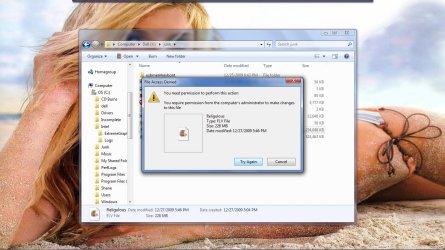
Ok, it let me move a MP4 file, but will not let me move a FLV file.

Heres a pic
 

Attachments

  • WTF.jpg
    WTF.jpg
    142.7 KB · Views: 42

My Computer

OS
Duh
BTW,It did let me make the transfer once I went to the XP computer and did it.
 

My Computer

OS
Duh
have a look HERE, you might need to ''take ownership'' of the folders which contain those files.

to make you feel a little better, ive never had or seen this issue on my rig so its not an ''out of the box''' fault. :)
 

My Computer

Computer Manufacturer/Model Number
myself
OS
SEVEN x64
CPU
Q9450 @ 3.6GHZ 1.34v
Motherboard
ASUS P5K PREMIUM P35
Memory
8GB 1066 buffalo firestix @ 1152mhz CL5
Graphics Card(s)
Sapphire HD 5970 + GTX260 (physX)
Sound Card
Creative X-FI Xtreme Gamer
Monitor(s) Displays
SAMSUNG 20'' & SAMSUNG 23'' (dual screens)
Screen Resolution
2048x1152 & 1680x1050
Hard Drives
1x seagate 160gb IDE & 1x seagate 160gb SATA
PSU
XCILIO 850w (78A)
Case
CM590 1x 120x38mm & 2x92x38mm / 4x 120x25mm
Cooling
AC7 PRO @ 92x38mm blower, Lamptron military bus bay controll
Keyboard
LOGITECH E110
Mouse
logitech NX5
Internet Speed
2MB
Other Info
its a continual ''work in progress''....
Thank you for your advice

However I need to take ownership of the entire drive. Both computers are mine, and I want to have access to both from both without being told I need an administrator...especially since I am one (on both)

BTW This IS an out of the box problem, I encourage you to try to duplicate the results. I am confident that you find yourself in this boat with me!

If you have a windows 7, and XP computer on a home network. Download a FLV video to the XP machine, then go to the 7 machine, open up windows explore, navigate to the XP file structure, and try to copy it to the 7 machine.

Since it let me do it with a MP4 file, Im wondering if the win7 security only does that when you try to transfer a file that has no program associations. Who knows, BUT either way I dont want my computer telling me I cant do something because it dont think I should!

There has GOT to be a way to tell the computer to STFU!

I mean it takes a registry hack, but you can disable Security Center from telling you that you don't have Virus software everyday.
 

My Computer

OS
Duh
Thank you for your advice

However I need to take ownership of the entire drive. Both computers are mine, and I want to have access to both from both without being told I need an administrator...especially since I am one (on both)

BTW This IS an out of the box problem, I encourage you to try to duplicate the results. I am confident that you find yourself in this boat with me!

If you have a windows 7, and XP computer on a home network. Download a FLV video to the XP machine, then go to the 7 machine, open up windows explore, navigate to the XP file structure, and try to copy it to the 7 machine.

Since it let me do it with a MP4 file, Im wondering if the win7 security only does that when you try to transfer a file that has no program associations. Who knows, BUT either way I dont want my computer telling me I cant do something because it dont think I should!

There has GOT to be a way to tell the computer to STFU!

I mean it takes a registry hack, but you can disable Security Center from telling you that you don't have Virus software everyday.

Are you an admin on the other computer as well?
 

My Computer

Computer Manufacturer/Model Number
Acer Veriton m261 (modded)
OS
Win 7 pro 64-bit, Ubuntu 9.10 64-bit
CPU
Intel Core 2 Duo 2.60 Ghz
Motherboard
Whatever came with the system
Memory
4 gb ddr2 667 Mhz
Graphics Card(s)
NVidia Geforce 9400 GS 1 gb ddr2 550 mhz GPU
Sound Card
Intergrated
Monitor(s) Displays
samsung SyncMaster 2494 24"
Screen Resolution
1080p
Hard Drives
80gb - IDE
750gb - SATA II
PSU
whatever came with the system
Case
whatever came with the system
Cooling
whatever came with the system
Keyboard
Apple Aluminium (Awesome)
Mouse
Some awesome Dell mouse, really good.
Internet Speed
100mbps

My Computer

Computer Manufacturer/Model Number
Acer Veriton m261 (modded)
OS
Win 7 pro 64-bit, Ubuntu 9.10 64-bit
CPU
Intel Core 2 Duo 2.60 Ghz
Motherboard
Whatever came with the system
Memory
4 gb ddr2 667 Mhz
Graphics Card(s)
NVidia Geforce 9400 GS 1 gb ddr2 550 mhz GPU
Sound Card
Intergrated
Monitor(s) Displays
samsung SyncMaster 2494 24"
Screen Resolution
1080p
Hard Drives
80gb - IDE
750gb - SATA II
PSU
whatever came with the system
Case
whatever came with the system
Cooling
whatever came with the system
Keyboard
Apple Aluminium (Awesome)
Mouse
Some awesome Dell mouse, really good.
Internet Speed
100mbps
Back
Top