Administrator problems

funambolo

New member
Local time
12:55 PM
Messages
11
Hi guys, here's a tricky one.
I am using a laptop with 3 users. The built-in admin, myself and the support account which was created by the IT for the company I used to work for.
I am supposed to be an administrator and as far as I can tell my user profile is the exact same as the support's one.
Recently I had a hardware problem and the guy who fixed it created a Guest built-in admin account in order to check it.
Ever since I am facing the surreal problem of not being able to run my VPN, which used to work perfectly before, with my user account. It works fine with the built-in administrator's and the support's user account.
I've read multiple articles about how to fix it, but I am still lost.
Any ideas and any help would be much appreciated...
Thanx!
(PS. English is not my native language and I am not a computer expert, so excuse any foolish mistakes I make)
 

My Computer

Computer type
Laptop
Computer Manufacturer/Model Number
lenovo
OS
windows 7 professional X64

My Computer

Computer type
PC/Desktop
Computer Manufacturer/Model Number
medionl/Aspire 6930G/acer x55a
OS
W7 home premium 32bit/W7HP 64bit/w10 tp insider ring
CPU
E5300 dual core
Motherboard
medion MS7366
Memory
3gb
Graphics Card(s)
Nvidia Geforce 7100 Nforce 630i
Monitor(s) Displays
avixc
Internet Speed
n (isp resticted to 72)
Antivirus
mse/pands
Browser
palemoon
Other Info
Belkin Fd7050 n USB using Railink RT2870 drivers, more upto date
Hi Roy

Thanks for the reply.

So here is what happened : I followed all the steps for your first tutorial using the account "support", where my VPN runs without problem. It is an administrator account, (like supposedly mine as well). Mine is the Press601 account.

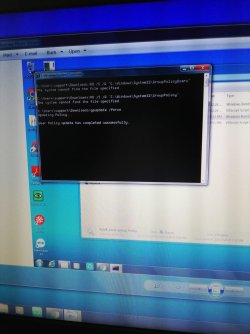
Ran the batch file, got the following message with no luck running the VPN from my account .

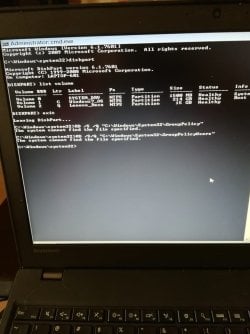
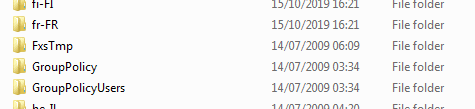
Ran the boot command prompt, no luck. Also I received some messages saying that windows can not find the Group Policy and the Group Policy Users file.

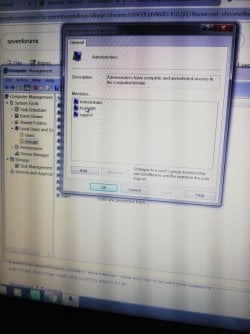
Checked again the administrators and seems to me that Press601 and support have the same privileges.
Still, I can't run the VPN from the Press601 account.

Then I followed your second tutorial, everything came out as Not Configured.

So I am still lost...

Athina

(PS I tried to insert the photos in specific places in the post, but couldn't find out how, it asks for a url when I press the Insert Image button and I can't find a url for the desktop photos. So I am attaching them in no particular order.)
 

Attachments

  • IMG_20191028_145901.jpg
    IMG_20191028_145901.jpg
    73.1 KB · Views: 4
  • IMG_20191028_145145.jpg
    IMG_20191028_145145.jpg
    58.9 KB · Views: 0
  • IMG_20191028_144935_BURST002.jpg
    IMG_20191028_144935_BURST002.jpg
    89 KB · Views: 0
  • IMG_20191028_121840.jpg
    IMG_20191028_121840.jpg
    75 KB · Views: 2

My Computer

Computer type
Laptop
Computer Manufacturer/Model Number
lenovo
OS
windows 7 professional X64
To insert an image from your computer.
- From the page you want the image, run the Snipping tool (Start - Accessories - Snipping tool (%windir%\system32\SnippingTool.exe)
- Take a snap shot of what you want to post and save it to your computer.
- On the Quick replay window, at the top there is a paper Clip. A window will open. Browse to the saved image - upload.

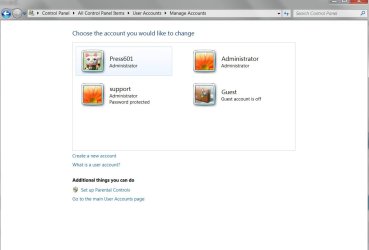
Can you please take a snapshot of Control Panel\All Control Panel Items\User Accounts\Manage Accounts? I would like to see the actives accounts.
 

My Computers

System One System Two

  • Computer type
    PC/Desktop
    Computer Manufacturer/Model Number
    custom build
    OS
    Windows 7 HP 64
    CPU
    i5 6600K - 800MHz to 4200MHz
    Motherboard
    GA-Z170-HD3P
    Memory
    4+4G GSkill DDR4 3000
    Graphics Card(s)
    IG - Intel 530
    Monitor(s) Displays
    Samsung 226BW
    Screen Resolution
    1680x1050
    Hard Drives
    (1) -1 SM951 – 128GB M.2 AHCI PCIe SSD drive for Windows 7 and Lubuntu
    (2) -1 WD SATA 3 - 1T for Data
    (3) -1 WD SATA 3 - 1T for backup
    PSU
    Thermaltake 450W TR2 gold
    Keyboard
    Old and good Chicony mechanical keyboard
    Mouse
    Logitech mX performance - 9 buttons (had to disable some)
    Internet Speed
    500Mb/s
    Browser
    Firefox 64
    Other Info
    TinyWall firewall
  • Computer type
    Laptop
    System Manufacturer/Model Number
    Asus Q550LF
    OS
    Windows 7 Pro
    CPU
    i7-4500U 800MHz to 3.0GHz
    Motherboard
    Asus Q550LF
    Memory
    (4+4)G DDR3 1600
    Graphics Card(s)
    IG intel 4400 + NVIDIA GeForce GT 745M
    Sound Card
    Realtek
    Monitor(s) Displays
    LG Display LP156WF4-SPH1
    Screen Resolution
    1920 x 1080
    Hard Drives
    BX500 120G SSD for Windows and programs +
    1T HDD for data
    Internet Speed
    500 Mb/s
    Browser
    Firefox
    Other Info
    TinyWall firewall
Hi and thanks for the reply.
I meant I couldn't find to use the Insert Image button and insert the photos in the context, so I attached the other photos of the Boot Command Prompt etc. at the end of my previous answer (or at least I think I did, since I can see them attached :rolleyes:)
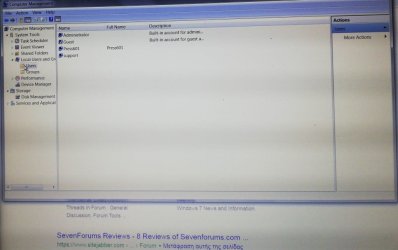
Here's the screenshot you asked for. I am the press601, Administrator is the built in super admin, Guest is the built in super account that created a few weeks ago the IT guy who fixed the hardware and probably messed up my VPN and support is the account of the IT who originally set the laptop. I have access to the support account and I turned off the Guest account.
Hope the attachment is visible :)
users.jpg
 

My Computer

Computer type
Laptop
Computer Manufacturer/Model Number
lenovo
OS
windows 7 professional X64
Oh and I forgot to mention that the IT who was trying to check the laptop's problem installed a program called AIDA 64 Extreme, as I found out later. I uninstalled it. Don't know if it's relevant. Thanks again :-)
 

My Computer

Computer type
Laptop
Computer Manufacturer/Model Number
lenovo
OS
windows 7 professional X64
Try this.
- Log on as the Administrator
- Create a new account with your name.

See if you can use the VPN (you have all necessary information to set the VPN, don't you?)
 

My Computers

System One System Two

  • Computer type
    PC/Desktop
    Computer Manufacturer/Model Number
    custom build
    OS
    Windows 7 HP 64
    CPU
    i5 6600K - 800MHz to 4200MHz
    Motherboard
    GA-Z170-HD3P
    Memory
    4+4G GSkill DDR4 3000
    Graphics Card(s)
    IG - Intel 530
    Monitor(s) Displays
    Samsung 226BW
    Screen Resolution
    1680x1050
    Hard Drives
    (1) -1 SM951 – 128GB M.2 AHCI PCIe SSD drive for Windows 7 and Lubuntu
    (2) -1 WD SATA 3 - 1T for Data
    (3) -1 WD SATA 3 - 1T for backup
    PSU
    Thermaltake 450W TR2 gold
    Keyboard
    Old and good Chicony mechanical keyboard
    Mouse
    Logitech mX performance - 9 buttons (had to disable some)
    Internet Speed
    500Mb/s
    Browser
    Firefox 64
    Other Info
    TinyWall firewall
  • Computer type
    Laptop
    System Manufacturer/Model Number
    Asus Q550LF
    OS
    Windows 7 Pro
    CPU
    i7-4500U 800MHz to 3.0GHz
    Motherboard
    Asus Q550LF
    Memory
    (4+4)G DDR3 1600
    Graphics Card(s)
    IG intel 4400 + NVIDIA GeForce GT 745M
    Sound Card
    Realtek
    Monitor(s) Displays
    LG Display LP156WF4-SPH1
    Screen Resolution
    1920 x 1080
    Hard Drives
    BX500 120G SSD for Windows and programs +
    1T HDD for data
    Internet Speed
    500 Mb/s
    Browser
    Firefox
    Other Info
    TinyWall firewall
"...AIDA 64 Extreme,..." If memory serves me, that program sniffs what hardware and drivers[?] are used, and offers ideas for performance improvement -- google is my friend, here is a snippit from google:
"AIDA64 Extreme has a hardware detection engine unrivaled in its class. It provides detailed information about installed software and offers diagnostic functions ..."
 

My Computer

Computer type
PC/Desktop
Computer Manufacturer/Model Number
Antec desktop; Acer Aspire laptops
OS
Windows 7 Professional 64-bit
CPU
Desktop i5; Acers i5 & i7
Memory
desktop 16GB; 1 Acer 8GB & 1 Acer 16GB
Hard Drives
1TB split into 2 equal partitions [OS and data] usable by RJS
Internet Speed
AT&T DSL
Browser
FF, GChrome, msIE
Other Info
Windows 7 Firewall, Emsisoft AM/AV, MSE [scan-only], SpywareBlaster, Ruiware/BillP combine
Hi

I cant understand why Group policy is missing
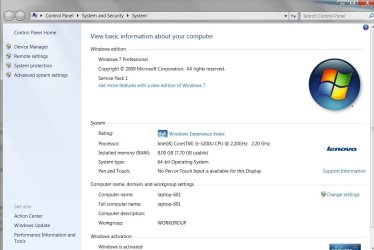
Please confirm your running W7 Pro

i set-up an Ultimate OS to check, see screenshot
ON my HOME Premium OS only Group policy Users is present


Roy
 

Attachments

  • ultgr.PNG
    ultgr.PNG
    2.4 KB · Views: 12

My Computer

Computer type
PC/Desktop
Computer Manufacturer/Model Number
medionl/Aspire 6930G/acer x55a
OS
W7 home premium 32bit/W7HP 64bit/w10 tp insider ring
CPU
E5300 dual core
Motherboard
medion MS7366
Memory
3gb
Graphics Card(s)
Nvidia Geforce 7100 Nforce 630i
Monitor(s) Displays
avixc
Internet Speed
n (isp resticted to 72)
Antivirus
mse/pands
Browser
palemoon
Other Info
Belkin Fd7050 n USB using Railink RT2870 drivers, more upto date
Try this.
- Log on as the Administrator
- Create a new account with your name.

See if you can use the VPN (you have all necessary information to set the VPN, don't you?)

So far all the other accounts can use the VPN, except mine. I will try to create another account, which I have never done, but I would actually prefer to be able to use mine with the VPN, since I have a lot of files etc.

In any case, should I create a simple user's account or an administrator one?

(Thanx again)
 

My Computer

Computer type
Laptop
Computer Manufacturer/Model Number
lenovo
OS
windows 7 professional X64
"...AIDA 64 Extreme,..." If memory serves me, that program sniffs what hardware and drivers[?] are used, and offers ideas for performance improvement -- google is my friend, here is a snippit from google:
"AIDA64 Extreme has a hardware detection engine unrivaled in its class. It provides detailed information about installed software and offers diagnostic functions ..."

Hi Roland and thanks for the reply. I googled it as well before uninstalling it, I don't know if it has anything to do with the problem. I am assuming he was trying to find out what was wrong with the laptop. And voila he created one!
 

My Computer

Computer type
Laptop
Computer Manufacturer/Model Number
lenovo
OS
windows 7 professional X64
Hi

I cant understand why Group policy is missing
Please confirm your running W7 Pro

i set-up an Ultimate OS to check, see screenshot
ON my HOME Premium OS only Group policy Users is present


Roy

Yeap, I am using Windows 7 Pro, screenshot attached. But I have no idea what the Ultimate OS is and if and how I should set up one?
 

My Computer

Computer type
Laptop
Computer Manufacturer/Model Number
lenovo
OS
windows 7 professional X64
Am not sure if I posted the screenshot, so here it is
 

Attachments

  • windows-pro.jpg
    windows-pro.jpg
    74.2 KB · Views: 0

My Computer

Computer type
Laptop
Computer Manufacturer/Model Number
lenovo
OS
windows 7 professional X64
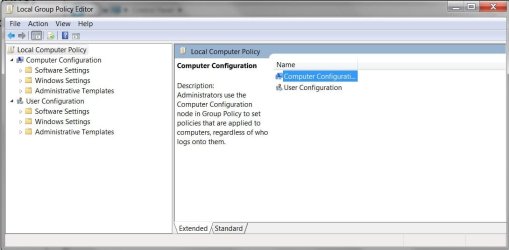
So, this is the closest thing I found to Group Policy
 

Attachments

  • Local-group-policy-editor.jpg
    Local-group-policy-editor.jpg
    48.3 KB · Views: 0

My Computer

Computer type
Laptop
Computer Manufacturer/Model Number
lenovo
OS
windows 7 professional X64
Try this.
- Log on as the Administrator
- Create a new account with your name.

See if you can use the VPN (you have all necessary information to set the VPN, don't you?)

So I did create another administrator account. VPN works like a charm. Is my account cursed or something?:cry::cry:
 

My Computer

Computer type
Laptop
Computer Manufacturer/Model Number
lenovo
OS
windows 7 professional X64
My suggestion:
Don't waste your time on fixing the Press61 Account.
Log in as your new account and move all your data under Press61 to the new account.
Delete the Press61 (account and data).
 

My Computers

System One System Two

  • Computer type
    PC/Desktop
    Computer Manufacturer/Model Number
    custom build
    OS
    Windows 7 HP 64
    CPU
    i5 6600K - 800MHz to 4200MHz
    Motherboard
    GA-Z170-HD3P
    Memory
    4+4G GSkill DDR4 3000
    Graphics Card(s)
    IG - Intel 530
    Monitor(s) Displays
    Samsung 226BW
    Screen Resolution
    1680x1050
    Hard Drives
    (1) -1 SM951 – 128GB M.2 AHCI PCIe SSD drive for Windows 7 and Lubuntu
    (2) -1 WD SATA 3 - 1T for Data
    (3) -1 WD SATA 3 - 1T for backup
    PSU
    Thermaltake 450W TR2 gold
    Keyboard
    Old and good Chicony mechanical keyboard
    Mouse
    Logitech mX performance - 9 buttons (had to disable some)
    Internet Speed
    500Mb/s
    Browser
    Firefox 64
    Other Info
    TinyWall firewall
  • Computer type
    Laptop
    System Manufacturer/Model Number
    Asus Q550LF
    OS
    Windows 7 Pro
    CPU
    i7-4500U 800MHz to 3.0GHz
    Motherboard
    Asus Q550LF
    Memory
    (4+4)G DDR3 1600
    Graphics Card(s)
    IG intel 4400 + NVIDIA GeForce GT 745M
    Sound Card
    Realtek
    Monitor(s) Displays
    LG Display LP156WF4-SPH1
    Screen Resolution
    1920 x 1080
    Hard Drives
    BX500 120G SSD for Windows and programs +
    1T HDD for data
    Internet Speed
    500 Mb/s
    Browser
    Firefox
    Other Info
    TinyWall firewall
I guess you are right. Thanks for the effort ��
 

My Computer

Computer type
Laptop
Computer Manufacturer/Model Number
lenovo
OS
windows 7 professional X64
Back
Top