Adobe Flash Cookies: The Silent Privacy Killer

echrada

New member
Guru
VIP
Local time
8:40 PM
Messages
1,385
Location
Scotland
There are hundreds of applications out there from spyware cleaners to built-in browser features that eliminate cookies on the spot, and even let you set cookie policies on your computer regarding what can be stored in your machine, and for how long. I’m assuming that if you’re here reading this post, you already know all of the dangers of cookies on your computer. In all honesty, I don’t seriously believe that they’re the most dangerous form of movement or web tracking, but they can definitely be used to monitor more movements than a person should feel comfortable with.
What if there was a type of cookie that could:

* Stay on your computer for an unlimited amount of time
* Store 100 kb of data by default, with an unlimited max
* Couldn’t be deleted by your browser
* Send previous visit information and history, by default, without your permission

Okay… That’s a pretty scary cookie. As it is right now, the cookies we’re so deadly afraid of can store a maximum of 4 kb of information, are manage by your browser, and by default have reasonable defaults and restrictions.
This type of cookie exists on 98% of global computers, across all operating systems. it’s the Adobe Flash Player.

The Adobe Flash Player maintains proprietary cookies called Local Shared Objects or LSO’s. LSO’s are capable of storing 100 kb’s of information for an indefinite amount of time by default. When you clear your browser history in Internet Explorer, Firefox or Opera on Windows, Linux, or OS X LSO’s are not cleared from Adobe’s local repository.
In fact, all the information in those cookies will remain indefinitely until they’re removed by the issuing website, or by you via a cumbersome and ridiculous process.
Unfortunately, I haven’t even explained the worst of it.
There’s no easy way to tell what sites are using flash cookies to track your movements. There’s no list, and there doesn’t have to be a flash GUI or visible application for flash cookies to be present. In fact, most websites using flash for user tracking don’t create GUI’s, toolbars, or applications that you can actually see in your browser while browsing the site.
Many times a tiny flash module, 2 kb in size or less is loaded into your browser on every page visit in the same way a gif, jpg or other image is. The whole purpose of this tiny, invisible flash module might be to simply record the page request, and your username or other session variables.
Alright, so now you’re sufficiently convinced that this is creepy stuff. Let’s talk about how to get rid of it?
Lame as it might be, the Flash Player has no ability to delete cookies. And as I’ve already said, your browser can’t help you out. It doesn’t even know these cookies exist! Most of the privacy settings for Adobe Flash have be accessed via a flash application on Adobe’s website called the Adobe Flash Player Settings Manager.
If you want to access the Settings Manager, you can do so here. In fact, open it up now and let’s take a look.
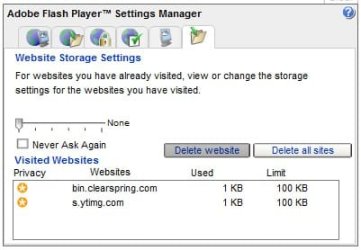
If you’ve clicked the link above, then you’re looking at the Flash Player Settings Manager, and a list of all the sites currently storing information on the cookies stored on your computer.
Looking at my list, I see over 100 websites that have been accessing the same cookie for the last year (the last time I formatted my computer). Some of them are storing only 1kb of information, some are storing the full 100 kb’s. On my own computer, I see that my bank is storing flash information despite the fact that there isn’t a single flash application visible when I log in to check my balance. I see Youtube, CNN, Microsoft, Rotten Tomatoes and a ton more!
To delete all the Flash Cookies currently being stored on your machine:

1. Go to the Settings Manager (Website Storage Settings)
2. Go to the far-right tab
3. Click “Delete all sites”

To prevent websites from storing any more information on your computer:

1. Go to Settings Manager
2. Click the Second Tab from the left (Global Storage Settings)
3. Set the Storage Settings slider to None
4. Uncheck “Allow Third Party Flash Content to store data on your computer

There are several other “privacy” settings on the other tabs, but don’t be persuaded. Most of those privacy settings have to do with whether or not websites can access your microphone and webcam. There isn’t a single cookie option on any of the privacy tabs on the Settings Manager.
Adobe, as a global leader in browser technology (a 98% computer market share), has a responsibility to make Privacy Options easily accessible from within the Player application itself. They also have a responsibility to set reasonble default limitations. It’s ridiculous that they would enable websites to store cookies indefinitely, and in such large sizes.

http://www.macromedia.com/support/documentation/en/flashplayer/help/settings_manager07.html

http://www.imasuper.com/66/technology/flash-cookies-the-silent-privacy-killer/
 

My Computer My Computer

At a glance

Windows 7 Ultimate x64AMD Phenom II x48GBNVIDIA GeForce HD
Computer Manufacturer/Model Number
Self build
OS
Windows 7 Ultimate x64
CPU
AMD Phenom II x4
Motherboard
Gigabyte 880
Memory
8GB
Graphics Card(s)
NVIDIA GeForce HD
Sound Card
Realtek HD Audio
Screen Resolution
1920 x 1080
Hard Drives
2 x 1TB
PSU
Thermalake 550w
Case
XCase
Internet Speed
8MB
This is why I have got NoScript, stops scrips and flash things running unless I want them to, so I only allow trustworthy sites.

I'll take a look at the settings of my Flash Player in a minute anyway and see whats what though.
 

My Computer My Computer

At a glance

OS X Leopard, Vista Basic and Windows 7 Ultimate2.1GHz Penryn Intel Core 2 Duo4GB 667MHz DDR2 SDRAMCrappy integrated one
Computer Manufacturer/Model Number
Apple MacBook
OS
OS X Leopard, Vista Basic and Windows 7 Ultimate
CPU
2.1GHz Penryn Intel Core 2 Duo
Motherboard
Not sure
Memory
4GB 667MHz DDR2 SDRAM
Graphics Card(s)
Crappy integrated one
Sound Card
Not sure
Monitor(s) Displays
Built in one, it's a laptop
Screen Resolution
1280x800
Hard Drives
120GB HD, 100GB OS X Leopard partition and 20GB Vista Home Basic partition
PSU
Not sure
Cooling
Fans
Keyboard
Apple laptop one with the annoying caps lock button
Mouse
No, it's a trackpad
Internet Speed
8 meg (or so the ISP tells me)
Other Info
I accidentally whacked the side of it against a door this morning.
I had a look and this is all I found :confused:

2009-01-01_204743.jpg
 

My Computer My Computer

At a glance

Windows 7 Ultimate Vista Ultimate x64Core 2 Duo E8500 3.16Ghz @ 3.8Ghz2x2Gigs Patriot PC2-6400 LLInno3D GeForce GTX260 216 SP
Computer Manufacturer/Model Number
Home Brew
OS
Windows 7 Ultimate Vista Ultimate x64
CPU
Core 2 Duo E8500 3.16Ghz @ 3.8Ghz
Motherboard
eVGA 750i FTW
Memory
2x2Gigs Patriot PC2-6400 LL
Graphics Card(s)
Inno3D GeForce GTX260 216 SP
Monitor(s) Displays
ASUS VW222U 22" 2ms Response time
Screen Resolution
1680x1050
Hard Drives
SATA 150GB
SATA II 250GB
USB IDE 750GB Ext.
PSU
HYTEC 600W & Thermaltake 650W Toughpower Power Exp
Case
Thermaltake Armor LCS (Liquid Cooling System)
Cooling
Liquid Cooling System
Keyboard
Logitech G15 Gaming Keyboard
Mouse
Logitech G9 Gaming Mouse
Did you click on all the settings at the top? Also it is better to clear everything.
 

My Computer My Computer

At a glance

Windows 7 Ultimate x64AMD Phenom II x48GBNVIDIA GeForce HD
Computer Manufacturer/Model Number
Self build
OS
Windows 7 Ultimate x64
CPU
AMD Phenom II x4
Motherboard
Gigabyte 880
Memory
8GB
Graphics Card(s)
NVIDIA GeForce HD
Sound Card
Realtek HD Audio
Screen Resolution
1920 x 1080
Hard Drives
2 x 1TB
PSU
Thermalake 550w
Case
XCase
Internet Speed
8MB
I stopped sites from saving stuff and cleared everything.
 

My Computer My Computer

At a glance

OS X Leopard, Vista Basic and Windows 7 Ultimate2.1GHz Penryn Intel Core 2 Duo4GB 667MHz DDR2 SDRAMCrappy integrated one
Computer Manufacturer/Model Number
Apple MacBook
OS
OS X Leopard, Vista Basic and Windows 7 Ultimate
CPU
2.1GHz Penryn Intel Core 2 Duo
Motherboard
Not sure
Memory
4GB 667MHz DDR2 SDRAM
Graphics Card(s)
Crappy integrated one
Sound Card
Not sure
Monitor(s) Displays
Built in one, it's a laptop
Screen Resolution
1280x800
Hard Drives
120GB HD, 100GB OS X Leopard partition and 20GB Vista Home Basic partition
PSU
Not sure
Cooling
Fans
Keyboard
Apple laptop one with the annoying caps lock button
Mouse
No, it's a trackpad
Internet Speed
8 meg (or so the ISP tells me)
Other Info
I accidentally whacked the side of it against a door this morning.
Well out of interest I didn't clear it and I run CCleaner and when I checked it again it was empty and I use that on a regular basis which explains why there were only two sites previously.
 

My Computer My Computer

At a glance

Windows 7 Ultimate Vista Ultimate x64Core 2 Duo E8500 3.16Ghz @ 3.8Ghz2x2Gigs Patriot PC2-6400 LLInno3D GeForce GTX260 216 SP
Computer Manufacturer/Model Number
Home Brew
OS
Windows 7 Ultimate Vista Ultimate x64
CPU
Core 2 Duo E8500 3.16Ghz @ 3.8Ghz
Motherboard
eVGA 750i FTW
Memory
2x2Gigs Patriot PC2-6400 LL
Graphics Card(s)
Inno3D GeForce GTX260 216 SP
Monitor(s) Displays
ASUS VW222U 22" 2ms Response time
Screen Resolution
1680x1050
Hard Drives
SATA 150GB
SATA II 250GB
USB IDE 750GB Ext.
PSU
HYTEC 600W & Thermaltake 650W Toughpower Power Exp
Case
Thermaltake Armor LCS (Liquid Cooling System)
Cooling
Liquid Cooling System
Keyboard
Logitech G15 Gaming Keyboard
Mouse
Logitech G9 Gaming Mouse
Well out of interest I didn't clear it and I run CCleaner and when I checked it again it was empty and I use that on a regular basis which explains why there were only two sites previously.

Good to know. Thanks.

Gary
 

My Computer My Computer

At a glance

Vista Ult 64 bit Seven Ult RTM x64Intel Core2 Quad Q6600 2.40 gigahertzCrucial Ballistix 4x2GB PC2 6400NVIDIA GeForce 8600 GTS 256 MB
Computer Manufacturer/Model Number
Dell XPS420
OS
Vista Ult 64 bit Seven Ult RTM x64
CPU
Intel Core2 Quad Q6600 2.40 gigahertz
Memory
Crucial Ballistix 4x2GB PC2 6400
Graphics Card(s)
NVIDIA GeForce 8600 GTS 256 MB
Sound Card
Creative SB X-Fi audio
Monitor(s) Displays
HP w2207 + HPvs15
Screen Resolution
1680x1050 + 1024x768
Hard Drives
2-WD5000AAKS-500 GB
WD5000AAV-500 GB external
Keyboard
Microsoft Comfort Curve
Mouse
MX Revolution
Other Info
Wacom Intuos 2 Graphics Tablet
Experience Index=5.5
There are hundreds of applications out there from spyware cleaners to built-in browser features that eliminate cookies on the spot, and even let you set cookie policies on your computer regarding what can be stored in your machine, and for how long. I’m assuming that if you’re here reading this post, you already know all of the dangers of cookies on your computer. In all honesty, I don’t seriously believe that they’re the most dangerous form of movement or web tracking, but they can definitely be used to monitor more movements than a person should feel comfortable with.
What if there was a type of cookie that could:

* Stay on your computer for an unlimited amount of time
* Store 100 kb of data by default, with an unlimited max
* Couldn’t be deleted by your browser
* Send previous visit information and history, by default, without your permission

Okay… That’s a pretty scary cookie. As it is right now, the cookies we’re so deadly afraid of can store a maximum of 4 kb of information, are manage by your browser, and by default have reasonable defaults and restrictions.
This type of cookie exists on 98% of global computers, across all operating systems. it’s the Adobe Flash Player.

The Adobe Flash Player maintains proprietary cookies called Local Shared Objects or LSO’s. LSO’s are capable of storing 100 kb’s of information for an indefinite amount of time by default. When you clear your browser history in Internet Explorer, Firefox or Opera on Windows, Linux, or OS X LSO’s are not cleared from Adobe’s local repository.
In fact, all the information in those cookies will remain indefinitely until they’re removed by the issuing website, or by you via a cumbersome and ridiculous process.
Unfortunately, I haven’t even explained the worst of it.
There’s no easy way to tell what sites are using flash cookies to track your movements. There’s no list, and there doesn’t have to be a flash GUI or visible application for flash cookies to be present. In fact, most websites using flash for user tracking don’t create GUI’s, toolbars, or applications that you can actually see in your browser while browsing the site.
Many times a tiny flash module, 2 kb in size or less is loaded into your browser on every page visit in the same way a gif, jpg or other image is. The whole purpose of this tiny, invisible flash module might be to simply record the page request, and your username or other session variables.
Alright, so now you’re sufficiently convinced that this is creepy stuff. Let’s talk about how to get rid of it?
Lame as it might be, the Flash Player has no ability to delete cookies. And as I’ve already said, your browser can’t help you out. It doesn’t even know these cookies exist! Most of the privacy settings for Adobe Flash have be accessed via a flash application on Adobe’s website called the Adobe Flash Player Settings Manager.
If you want to access the Settings Manager, you can do so here. In fact, open it up now and let’s take a look.
If you’ve clicked the link above, then you’re looking at the Flash Player Settings Manager, and a list of all the sites currently storing information on the cookies stored on your computer.
Looking at my list, I see over 100 websites that have been accessing the same cookie for the last year (the last time I formatted my computer). Some of them are storing only 1kb of information, some are storing the full 100 kb’s. On my own computer, I see that my bank is storing flash information despite the fact that there isn’t a single flash application visible when I log in to check my balance. I see Youtube, CNN, Microsoft, Rotten Tomatoes and a ton more!
To delete all the Flash Cookies currently being stored on your machine:

1. Go to the Settings Manager (Website Storage Settings)
2. Go to the far-right tab
3. Click “Delete all sites”

To prevent websites from storing any more information on your computer:

1. Go to Settings Manager
2. Click the Second Tab from the left (Global Storage Settings)
3. Set the Storage Settings slider to None
4. Uncheck “Allow Third Party Flash Content to store data on your computer

There are several other “privacy” settings on the other tabs, but don’t be persuaded. Most of those privacy settings have to do with whether or not websites can access your microphone and webcam. There isn’t a single cookie option on any of the privacy tabs on the Settings Manager.
Adobe, as a global leader in browser technology (a 98% computer market share), has a responsibility to make Privacy Options easily accessible from within the Player application itself. They also have a responsibility to set reasonble default limitations. It’s ridiculous that they would enable websites to store cookies indefinitely, and in such large sizes.

Adobe - Flash Player : Settings Manager - Website Storage Settings panel

I’m A Super.com » Flash Cookies: The Silent Privacy Killer

Excellent post! It has now been stickied. I want everyone to know about this one. I was shocked to learn about it and welcomed the solution.
 

My Computer My Computer

At a glance

Windows 7 RCIntel Q6600 Quad Core4 GB DDR 800Nvidia 8800GT
Computer Manufacturer/Model Number
Dell XPS 420
OS
Windows 7 RC
CPU
Intel Q6600 Quad Core
Motherboard
Dell Proprietary
Memory
4 GB DDR 800
Graphics Card(s)
Nvidia 8800GT
Sound Card
Integrated - Sigmatel HD Audio
Monitor(s) Displays
Dual Dell 22" Wide Screen
Screen Resolution
3360x1050
Hard Drives
320 GB internal
2.5 TB external
PSU
Big Enough
Case
Dell XPS 420
Cooling
Air
Keyboard
Dell USB
Mouse
Wireless MS mouse
Internet Speed
DSL 3MB Down
Other Info
WEI 5.9 (Windows 7 RC), Not too bad for an off the shelf PC :)
Yes, excellent post echrada,

I too only had the bin.clearspring one but I dropped the storage down to zero. Thanks, didn't know about this. I think like Mr. Grim said, ccleaner clears these.
 

My Computer My Computer

At a glance

Windows 7 Ultimate x64 SP1Core i7 920 (D0) @ 4Ghz, *26c idle *65c full ...12GB DDR3 Corsair Dominator -CMD12GX3M6A1600C...Zotac Geforce GTX 770
Computer type
PC/Desktop
Computer Manufacturer/Model Number
Airbot 2.0
OS
Windows 7 Ultimate x64 SP1
CPU
Core i7 920 (D0) @ 4Ghz, *26c idle *65c full load on air
Motherboard
Asus P6X58D Premium - Sata 6Gb/s - USB 3.0
Memory
12GB DDR3 Corsair Dominator -CMD12GX3M6A1600C8 at 1600MHz
Graphics Card(s)
Zotac Geforce GTX 770
Sound Card
ASUS Xonar D2X
Monitor(s) Displays
1 LG 24" Flatron W2453V-PF 1 Samsung 24" P2450H both 2ms RT
Screen Resolution
1920x1080@60hz
Hard Drives
1 Samsung 250GB 840 Evo SSD
1 OCZ Vertex2 180GB SSD
1 TB Samsung Spinpoint F1 7200RPM 32MB cache
2 500GB WD Caviar Blacks 7200RPM 32MB cache (WD5001AALS)

Pioneer DVD Burner DVR-S18M
PSU
Corsair HX1000W
Case
Cooler Master HAF 932
Cooling
Case Fans *3 230mm, *1 140mm/CPU - *Tuniq Tower 120 Extreme
Keyboard
Logitech Wireless MK700
Mouse
Logitech Wireless MK700
Internet Speed
DL 15 Mbps UL 0.98 Mbps
Antivirus
None
Browser
Firefox Nightly
Other Info
Processor-7.7 *RAM- 7.9 *Graphics-7.9 *Gaming Graphics- 7.9 *SSD- 7.8 W.E.I final score= 7.7
*Phone- LG Nexus 5
That is some good info there. Thanks man, scarey stuff!

-baMBi-
 

My Computer My Computer

At a glance

Windows 7 7000; Windows XP Pro SP3
OS
Windows 7 7000; Windows XP Pro SP3
Amazing!! I always took flash as a "nice guy". My guess it's the Adobe part that is not so nice!! Anyone know if flash was like this under Macromedia?
 

My Computer My Computer

At a glance

ESXi 3, VistaSP1, VistaSP2 Beta, XPSP3, Win7 ...(2) Quad core Xeon E5310 - 1.6GHz8 Gig DDR2 ECC PC5300Integrated
Computer Manufacturer/Model Number
Dell PowerEdge 1900
OS
ESXi 3, VistaSP1, VistaSP2 Beta, XPSP3, Win7 build 7000, SBS2003, SBS2008
CPU
(2) Quad core Xeon E5310 - 1.6GHz
Motherboard
OEM
Memory
8 Gig DDR2 ECC PC5300
Graphics Card(s)
Integrated
Sound Card
None
Hard Drives
(2) 250 Gig 15,000 RPM SAS - RAID1
Case
Full Size Server Tower
Cooling
(6) 92MM Fans
Internet Speed
TW Premium - 1Meg up, 15MEG Down
Yes Adobe basically just changed the name and 'made to fit' the rest.
 

My Computer My Computer

At a glance

Windows 7 Ultimate x64AMD Phenom II x48GBNVIDIA GeForce HD
Computer Manufacturer/Model Number
Self build
OS
Windows 7 Ultimate x64
CPU
AMD Phenom II x4
Motherboard
Gigabyte 880
Memory
8GB
Graphics Card(s)
NVIDIA GeForce HD
Sound Card
Realtek HD Audio
Screen Resolution
1920 x 1080
Hard Drives
2 x 1TB
PSU
Thermalake 550w
Case
XCase
Internet Speed
8MB
Do I visit the wrong sites?? My list was not very big at all !!

Still cleared and turned it off though

Thanks for this echrada :)

Pooch
 

My Computer My Computer

At a glance

Windows 7 Ultimate x64Intel Core i7-2600K16 GB G Skill F3-10666 CL9D-4GBRLATI Radeon HD 6870
Computer Manufacturer/Model Number
Something I threw together
OS
Windows 7 Ultimate x64
CPU
Intel Core i7-2600K
Motherboard
Asus P8P67
Memory
16 GB G Skill F3-10666 CL9D-4GBRL
Graphics Card(s)
ATI Radeon HD 6870
Sound Card
ATI Radeon HDMI / Realtek ALC892
Monitor(s) Displays
2 x 22" standard monitors / LG32LC56v TV to watch films
Screen Resolution
1920 x1080
Hard Drives
2 x OCZ Vertex2 111.79GB
3 x Samsung103SJ
1 x Samsung103UJ
1 x WD3200BEVT
1 x Hitachi5K320-160
PSU
Thermaltake Toughpower Cable Management 750W
Case
Antec 300
Cooling
Noctua NH-U12P SE2 and 5 120mm Case fans
Keyboard
Microsoft Comfort Curve Keyboard 2000
Mouse
Hama M3110 / Logitech M305
Internet Speed
16000
Other Info
I have also used Fedora, Suse, Ubuntu Linux
And all other Windows from 95 to date except ME
You're welcome Pooch.
 

My Computer My Computer

At a glance

Windows 7 Ultimate x64AMD Phenom II x48GBNVIDIA GeForce HD
Computer Manufacturer/Model Number
Self build
OS
Windows 7 Ultimate x64
CPU
AMD Phenom II x4
Motherboard
Gigabyte 880
Memory
8GB
Graphics Card(s)
NVIDIA GeForce HD
Sound Card
Realtek HD Audio
Screen Resolution
1920 x 1080
Hard Drives
2 x 1TB
PSU
Thermalake 550w
Case
XCase
Internet Speed
8MB
Thanks echrada!


Later ;) Ted
 

My Computer My Computer

At a glance

W 7 64-bit UltimateIntel Q9550 Yorkfield8GB Dominator 8500C5DATI : XFX 5870
Computer Manufacturer/Model Number
* BFK Customs *
OS
W 7 64-bit Ultimate
CPU
Intel Q9550 Yorkfield
Motherboard
ASUS P5Q Pro
Memory
8GB Dominator 8500C5D
Graphics Card(s)
ATI : XFX 5870
Sound Card
Realtek HD Audio 7-1
Monitor(s) Displays
1x 47" LCD HDMI & 3x 26" LCD HDMI
Screen Resolution
1920x1080P & 1920x1200
Hard Drives
1x 80GB Intel X25-M G2 SSD : 1x 500GB & 1x 640GB WD Caviar Black(s)
PSU
Corsair 620HX
Case
Cooler Master RC-690
Cooling
Tuniq Tower 120, 2x 140mm and 3x 120mm case fans
Keyboard
Microsoft 500
Mouse
Razer Diamondback 3G
Internet Speed
14 Mb/s
Other Info
1x Koutech 3Gb/s SATA HDD Hot Swap Rack
Good one!!! thanks a lot! *bookmarks*
 

My Computer My Computer

At a glance

Windows 10 Professional 64-bitRyzen 9 5900XG.Skill 3600Mhz CL16 16GB × 4EVGA GeForce RTX 3070 Ti FTW3 Ultra Gaming
Computer type
PC/Desktop
Computer Manufacturer/Model Number
Custom build
OS
Windows 10 Professional 64-bit
CPU
Ryzen 9 5900X
Motherboard
Gigabyte X570 Aorus Master
Memory
G.Skill 3600Mhz CL16 16GB × 4
Graphics Card(s)
EVGA GeForce RTX 3070 Ti FTW3 Ultra Gaming
Sound Card
On-board
Monitor(s) Displays
Dell Alienware AW3418DW
Screen Resolution
3440x1440
Hard Drives
1×Sabrent Rocket 4 Plus 2TB nvme SSD (System, internal)
2x4TB Western Digital Blue (Internal)
1x4TB HDST 7200RPM (Internal)
PSU
Seasonic Focus Plus 850W Platinum
Case
Corsair 680X
Cooling
Stock fans + 3× Corsair QL120, Corsair H100i Platinum
Keyboard
Logitech K350
Mouse
Logitech M510
Internet Speed
120Mbits dl - 20Mbits up
Antivirus
ESET NOD32 Antivirus
Browser
Firefox (latest version)
Other Info
Headphones : Audio-Technica ATH-M50x
Scanner : Canon Canoscan LiDE 220 + Plustek OptiBook 4800
I too thank you for a fantastic thread. Also I also had 1 item to remove due to ccleaner.
Thanks echrada
 

My Computer My Computer

At a glance

windows 7 RC 7127E8400
OS
windows 7 RC 7127
CPU
E8400
Superb post man! Thanks for it! It will really save me in the future. :D
 

My Computer My Computer

At a glance

Windows 7 Ultimate Beta 32bit, Windows Vista ...Intel Core 2 Duo 6300 1.86GHz4gb DDR2 4200 533mHzNVIDIA 7300 LE
Computer Manufacturer/Model Number
Dell Dimension e520
OS
Windows 7 Ultimate Beta 32bit, Windows Vista Home Premium 32bit, Ubuntu 8.04 32bit
CPU
Intel Core 2 Duo 6300 1.86GHz
Memory
4gb DDR2 4200 533mHz
Graphics Card(s)
NVIDIA 7300 LE
Sound Card
SigmaTel High Def Audio
Screen Resolution
1360x768
PSU
305W
Cooling
Fan
Keyboard
Dell Multi-media Keyboard
Thanks for the great tips. If CCleaner indeed does clean them out, I should be good though....

*checks anyway*
 

My Computer My Computer

At a glance

Windows 7 build 7000 x86Intel E68504GB DDR2XFX 8800GT 512
OS
Windows 7 build 7000 x86
CPU
Intel E6850
Motherboard
ASUS Maximus II Formula
Memory
4GB DDR2
Graphics Card(s)
XFX 8800GT 512
Sound Card
PCI-E X-Fi (Bundled with MB)
Monitor(s) Displays
SyncMaster 223BW
Screen Resolution
1680x1050
Hard Drives
Raptor 10k 150GB
Maxtor 300GB
WD 300GB
PSU
Chill Innovation 700W
Case
Cosmos 1000
Keyboard
G15 Gaming
Mouse
G9
Internet Speed
6/2Mbit
Glad to know. Well done documenting this for us.
 

My Computer My Computer

At a glance

Vista 64 bit SP 1; Windows 7; Server 2008
OS
Vista 64 bit SP 1; Windows 7; Server 2008
Back
Top