Solved Adobe Flash won't install on IE8

Anak

New member
Guru
Gold Member
VIP
Local time
12:27 AM
Messages
5,599
Hi Everyone!

I can/and have installed Flash on my FireFox browser, but not my DW's IE8.

I have tried Adobe's suggestions about security settings, but how low do I have to go?

Does anyone have any experience with this?
 

My Computer My Computer

Computer type
PC/Desktop
Computer Manufacturer/Model Number
Gateway DX4831-01e (Mid-Tower Desktop)
OS
Originally Win 7 Hm Prem x64 Ver 6.1.7600 Build 7601-SP1 | Upgraded to Windows 10 December 14, 2019
CPU
Intel i3 530 2.93GHz, 2933MHz 2 Cores 4 Logical Processors
Motherboard
Gateway H57M01 133 megahertz
Memory
6GB of 1,333MHz DDR3 SDRAM
Graphics Card(s)
32MB Intel Graphics Media Accelerator HD IGChip
Sound Card
Realtek High Definition Audio
Monitor(s) Displays
Gateway HX2000 20inch TFT active matrix TN
Screen Resolution
1600 x 900 x 59 hertz
Hard Drives
WDC WD10EADS-00M2B0 [HDD] (1000.20 GB) -- drive 0,
HL-DT-ST DVDRAM GH41N [CD-ROM dr]
Four card readers, and Four USB 2.0
PSU
300watts.
Case
Mid-Tower Desktop
Cooling
Stock from Gateway
Keyboard
Natural Ergonomic Keyboard 4000, see Other Info
Mouse
Orig. Gateway wore out now using Insignia USB wired optical
Internet Speed
Vz FIOS 10ms png 57.64Mbps down 65.53Mbps up Speedtest.org
Antivirus
Zamana Anti-logger with Anti-malware, MSE, Windows Firewall,
Browser
IE11.0.9600.19399-Upd ver11.0.135, Firefox 68.0.1 x64
Other Info
System Specs by Belarc.

BIOS: American Megatrends Inc. P01-A0 11/17/2009

Replaced the MS 'Natural' Standard PS/2 Enhanced 101-102 Keyboard with a new Natural Ergonomic Keyboard 4000 on August 1st 2014.

Canon Pixma MG3222 Printer.

Updated to IE11 on 12102015 | Fios Quantum Router g1100

Additional AV: SpywareBlaster, manual Mbam, SAS
Same problem on my system. Being trying for a month but no luck.
I use FF 99% of the time so no big deal for me. I do get the beta flash to load on IE-8 64 bit but nothing on the IE-8 32bit.

Jim :geek:
 

My Computer My Computer

Computer type
PC/Desktop
Computer Manufacturer/Model Number
Home Built
OS
Windows 8.1 Pro w/Media Center 64bit, Windows 7 HP 64bit
CPU
Phenom II X6 1100T
Motherboard
ASUS M5A99X EVO
Memory
Crucial Balistic 8gb DDR3-1866 CL9
Graphics Card(s)
MSI R6850 Cyclone IGD5 PE
Sound Card
On Board
Monitor(s) Displays
ASUS VE258Q 25" LED with DVI-HDMI-DisplayPort
Screen Resolution
1920 x 1080
Hard Drives
Two WD Cavier Black 2TB Sata III, WD My Book Essential 2TB USB 3.0
PSU
Seasonic X650 80 Plus GOLD Modular
Case
Corsair 400R
Cooling
Antec Kuhler H2O 620, Two 120mm and four 140mm
Keyboard
Logitech K120
Mouse
Logitech Marble Mouse USB, Logitech Precision Game Pad
Internet Speed
15MB
Antivirus
Norton IS 2013, Malwarebytes Pro Beta 2
Browser
IE-11, FF-27
Other Info
APC UPS ES 750, Netgear WNR3500L Gigabit & Wireless N Router with SamKnows Test Program, Motorola SB6120 Gigabit Cable Modem. Brother HL-2170W Laser Printer, Epson V300 Scanner
I recommend using the Adobe Flash Player Uninstaller first to eliminate corruption or any other oddities. You can find it at Adobe - Web Players under Windows 2000/XP/Vista. It does work in Windows 7 as well. You will need to reinstall Flash in Firefox after this as well.

After it's uninstalled, close any open browsers then go to Troubleshoot Flash Player installation | Windows and scroll down to the section labeled "Download Flash Player with the manual installer". You will see two download links shortly after that, "Flash Player 10 ActiveX" and "Flash Player 10 Plugin". You can download both as they are executables then close any open browsers and run each download one at a time. See if this gets Flash Player 10 working in Internet Explorer. If not, you may want to go to Tools --> Manage Add-ons and then ensure that on the left hand side below "Show:", you select "All add-ons". Then on the right-hand side, look for one called "Shockwave Flash Object" and check to see if it is enabled or not. If it is disabled, click on it then below, click to enable it. If it is already enabled, let us know.

See if this helps or not.
 

My Computer My Computer

OS
Windows 7 Ultimate x64 SP1
CPU
Intel Core i3 530 2.93 Ghz Clarkdale
Motherboard
ASRock P55 PRO/USB3 LGA 1156
Memory
4 GB OCZ DDR3 1600 (PC12800) Low Voltage Desktop Memory
Graphics Card(s)
Nvidia GeForce GTX 550 Ti with 1 GB of RAM
Sound Card
Realtek HD ALC892
Monitor(s) Displays
20'' eMachines E202HDbmd Glare Panel Widescreen
Screen Resolution
1600 x 900
Hard Drives
Western Digital 1 TB Caviar Black Edition (7200 RPM) SATA
Hitachi Deskstar 500 GB (7200 RPM) SATA
Samsung SpinPoint 400 GB (7200 RPM) SATA
PSU
Rosewill Xtreme Series RX750-D-B ATX12V v2.2 & EPS12V (750W)
Case
Cooler Master Centurion 534 RC-534-KKN2-GP Mid-Tower
Cooling
Standard Case Fans and Stock CPU Heatsink
Keyboard
Microsoft Wireless Optical Desktop Elite
Mouse
Microsoft Wireless Optical Desktop Elite
Internet Speed
7.1 Mbps Verizon DSL
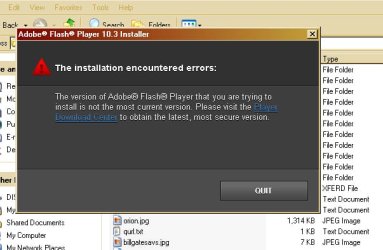
Tried your instructions Darician, and this is what I get, the activeX installs but no flash:
 

Attachments

  • adobeFlash2.JPG
    adobeFlash2.JPG
    20.8 KB · Views: 93

My Computer My Computer

Computer type
PC/Desktop
Computer Manufacturer/Model Number
Gateway DX4831-01e (Mid-Tower Desktop)
OS
Originally Win 7 Hm Prem x64 Ver 6.1.7600 Build 7601-SP1 | Upgraded to Windows 10 December 14, 2019
CPU
Intel i3 530 2.93GHz, 2933MHz 2 Cores 4 Logical Processors
Motherboard
Gateway H57M01 133 megahertz
Memory
6GB of 1,333MHz DDR3 SDRAM
Graphics Card(s)
32MB Intel Graphics Media Accelerator HD IGChip
Sound Card
Realtek High Definition Audio
Monitor(s) Displays
Gateway HX2000 20inch TFT active matrix TN
Screen Resolution
1600 x 900 x 59 hertz
Hard Drives
WDC WD10EADS-00M2B0 [HDD] (1000.20 GB) -- drive 0,
HL-DT-ST DVDRAM GH41N [CD-ROM dr]
Four card readers, and Four USB 2.0
PSU
300watts.
Case
Mid-Tower Desktop
Cooling
Stock from Gateway
Keyboard
Natural Ergonomic Keyboard 4000, see Other Info
Mouse
Orig. Gateway wore out now using Insignia USB wired optical
Internet Speed
Vz FIOS 10ms png 57.64Mbps down 65.53Mbps up Speedtest.org
Antivirus
Zamana Anti-logger with Anti-malware, MSE, Windows Firewall,
Browser
IE11.0.9600.19399-Upd ver11.0.135, Firefox 68.0.1 x64
Other Info
System Specs by Belarc.

BIOS: American Megatrends Inc. P01-A0 11/17/2009

Replaced the MS 'Natural' Standard PS/2 Enhanced 101-102 Keyboard with a new Natural Ergonomic Keyboard 4000 on August 1st 2014.

Canon Pixma MG3222 Printer.

Updated to IE11 on 12102015 | Fios Quantum Router g1100

Additional AV: SpywareBlaster, manual Mbam, SAS
"Shockwave ActiveX Control" corresponds to Shockwave itself, not Flash Player. Just to confirm, you downloaded the executables in the article I linked to and ran and installed them, correct? Did any errors come up when installing them? If anything, you may want to try doing a full reset of Internet Explorer by going to the Advanced Tab in Internet Options then hitting "Reset" under Reset Internet Explorer Settings to see if that helps because it seems the browser is acting up.
 

My Computer My Computer

OS
Windows 7 Ultimate x64 SP1
CPU
Intel Core i3 530 2.93 Ghz Clarkdale
Motherboard
ASRock P55 PRO/USB3 LGA 1156
Memory
4 GB OCZ DDR3 1600 (PC12800) Low Voltage Desktop Memory
Graphics Card(s)
Nvidia GeForce GTX 550 Ti with 1 GB of RAM
Sound Card
Realtek HD ALC892
Monitor(s) Displays
20'' eMachines E202HDbmd Glare Panel Widescreen
Screen Resolution
1600 x 900
Hard Drives
Western Digital 1 TB Caviar Black Edition (7200 RPM) SATA
Hitachi Deskstar 500 GB (7200 RPM) SATA
Samsung SpinPoint 400 GB (7200 RPM) SATA
PSU
Rosewill Xtreme Series RX750-D-B ATX12V v2.2 & EPS12V (750W)
Case
Cooler Master Centurion 534 RC-534-KKN2-GP Mid-Tower
Cooling
Standard Case Fans and Stock CPU Heatsink
Keyboard
Microsoft Wireless Optical Desktop Elite
Mouse
Microsoft Wireless Optical Desktop Elite
Internet Speed
7.1 Mbps Verizon DSL
"Shockwave ActiveX Control" corresponds to Shockwave itself, not Flash Player. Just to confirm, you downloaded the executables in the article I linked to and ran and installed them, correct?
Yes.
Did any errors come up when installing them?
No.
If anything, you may want to try doing a full reset of Internet Explorer by going to the Advanced Tab in Internet Options then hitting "Reset" under Reset Internet Explorer Settings to see if that helps because it seems the browser is acting up.
Tried that, even included the check box to delete personal settings. Still would not install.
 

My Computer My Computer

Computer type
PC/Desktop
Computer Manufacturer/Model Number
Gateway DX4831-01e (Mid-Tower Desktop)
OS
Originally Win 7 Hm Prem x64 Ver 6.1.7600 Build 7601-SP1 | Upgraded to Windows 10 December 14, 2019
CPU
Intel i3 530 2.93GHz, 2933MHz 2 Cores 4 Logical Processors
Motherboard
Gateway H57M01 133 megahertz
Memory
6GB of 1,333MHz DDR3 SDRAM
Graphics Card(s)
32MB Intel Graphics Media Accelerator HD IGChip
Sound Card
Realtek High Definition Audio
Monitor(s) Displays
Gateway HX2000 20inch TFT active matrix TN
Screen Resolution
1600 x 900 x 59 hertz
Hard Drives
WDC WD10EADS-00M2B0 [HDD] (1000.20 GB) -- drive 0,
HL-DT-ST DVDRAM GH41N [CD-ROM dr]
Four card readers, and Four USB 2.0
PSU
300watts.
Case
Mid-Tower Desktop
Cooling
Stock from Gateway
Keyboard
Natural Ergonomic Keyboard 4000, see Other Info
Mouse
Orig. Gateway wore out now using Insignia USB wired optical
Internet Speed
Vz FIOS 10ms png 57.64Mbps down 65.53Mbps up Speedtest.org
Antivirus
Zamana Anti-logger with Anti-malware, MSE, Windows Firewall,
Browser
IE11.0.9600.19399-Upd ver11.0.135, Firefox 68.0.1 x64
Other Info
System Specs by Belarc.

BIOS: American Megatrends Inc. P01-A0 11/17/2009

Replaced the MS 'Natural' Standard PS/2 Enhanced 101-102 Keyboard with a new Natural Ergonomic Keyboard 4000 on August 1st 2014.

Canon Pixma MG3222 Printer.

Updated to IE11 on 12102015 | Fios Quantum Router g1100

Additional AV: SpywareBlaster, manual Mbam, SAS
I'm at a loss. Usually these steps work for most people and get Flash up and running in IE. Sorry it didn't work out for you. Let's hope someone else has other ideas for this issue.
 

My Computer My Computer

OS
Windows 7 Ultimate x64 SP1
CPU
Intel Core i3 530 2.93 Ghz Clarkdale
Motherboard
ASRock P55 PRO/USB3 LGA 1156
Memory
4 GB OCZ DDR3 1600 (PC12800) Low Voltage Desktop Memory
Graphics Card(s)
Nvidia GeForce GTX 550 Ti with 1 GB of RAM
Sound Card
Realtek HD ALC892
Monitor(s) Displays
20'' eMachines E202HDbmd Glare Panel Widescreen
Screen Resolution
1600 x 900
Hard Drives
Western Digital 1 TB Caviar Black Edition (7200 RPM) SATA
Hitachi Deskstar 500 GB (7200 RPM) SATA
Samsung SpinPoint 400 GB (7200 RPM) SATA
PSU
Rosewill Xtreme Series RX750-D-B ATX12V v2.2 & EPS12V (750W)
Case
Cooler Master Centurion 534 RC-534-KKN2-GP Mid-Tower
Cooling
Standard Case Fans and Stock CPU Heatsink
Keyboard
Microsoft Wireless Optical Desktop Elite
Mouse
Microsoft Wireless Optical Desktop Elite
Internet Speed
7.1 Mbps Verizon DSL

My Computer My Computer

Computer type
PC/Desktop
Computer Manufacturer/Model Number
OQO 2+
OS
Windows 8 Pro w/MC 32-bit
CPU
Intel Atom 1.86 GHz
Motherboard
OQO 2+
Memory
2 GB
Graphics Card(s)
Intel GMA 500
Sound Card
IDT
Monitor(s) Displays
LCD
Screen Resolution
800 x 480 (portable) 1280 x 1024 (docked)
Hard Drives
64 GB SSD
PSU
9 Ah Battery (portable) or OQO Brick (docked)
Case
Shirt Pocket Sized
Cooling
Tiny Fan
Keyboard
Slide out (portable) DiNovo Edge (docked)
Mouse
Eraser head (portable) Logitech Bluetooth (docked)
Internet Speed
WWAN or 802.11G (portable) T1 (docked)
Browser
IE 10
Other Info
DVD-RW OQO Docking Station
Lets see where do I start?

I have tried to install Adobe Flash 10.1.102.64 at least a half dozen times to use with IE8.
Both Darician, and roncerrs links point to the same programs.

I was sure to use my Administrator rights every time I went to install.

Yes, every new try included using the un-installer with a restart before I went on to install the ActiveX control, and then the actual Flash Program.

At first I only restarted after the un-installer, then I tried restarting after installing the other two, no difference.

I tried following the above procedures in safe mode, no difference.

I tried shutting down any anti-virus, malware, spyware, firewalls, clouds, no difference.

I tried resetting IE8 back to defaults, no difference.

I tried to install from different sites that required it, no difference.

I have tried installing an older version of Flash to see if I could get it to up date, no success.

I tried searching for kill-bits as suggested in this thread, but I did not have what the OP had listed or could not interpret the clsid numbers. :
Adobe Forums: Shockwave Flash Object not present as...

Different links I've been to:
Adobe Forums: Adobe flash player will not install on...
Tried this, but it really doesn't apply to me:
Adobe Forums: Flash Player 10.1 problem
I never got my versions of IE8 (x32) mixed with x64:
Adobe Forums: flash player installs but doesn't work
I don't have this problem because I can't get it installed in the first place:
Adobe Forums: Why do I have to install Flash Player...
General issues on the Flash Forum:
Adobe Forums: Forum: Flash Player

I tried Troubleshooting the installation, and that means step by step by step by step to the end, didn't work:
Troubleshoot Flash Player installation | Windows

I have tried to check though Adobe's bug report forum, but every response is either "It works for us" or "we can't reproduce your error" ......HUH?
https://bugs.adobe.com/jira/secure/IssueNavigator.jspa
Unfortunately when you use the link you will have to re-set the parameters for Flash again.

Some responses from Tech net:
Unable to install Adobe Flash Player: Error message "Unable to authenticate install"

This one looks promising from Kashile:
Unable to install Adobe Flash Player: Error message "Unable to authenticate install"

I am planning on running the debugger, and the SubInACL tool:
Can’t install Flash Player | Windows registry permissions

There are steps in this link that may work:
Adobe Flash Player trouble - Internet EXP 8 [Solved]


This all boils down IMHO that adobe is using outdated certificates for their flash installations. But, why does it work for some IE8's, and not for others?

But I sure when someone would ask them, their response would be either "It works for us" or "we can't reproduce your error" ......HUH?

Well, it is getting late for me here on the right coast, (12:34am est) its snowin' agin' with freezing rain later on, so I'm going to cruse the forum for awhile then get to bed.

I'll try those last couple of fixes later today, and report back.....
 

My Computer My Computer

Computer type
PC/Desktop
Computer Manufacturer/Model Number
Gateway DX4831-01e (Mid-Tower Desktop)
OS
Originally Win 7 Hm Prem x64 Ver 6.1.7600 Build 7601-SP1 | Upgraded to Windows 10 December 14, 2019
CPU
Intel i3 530 2.93GHz, 2933MHz 2 Cores 4 Logical Processors
Motherboard
Gateway H57M01 133 megahertz
Memory
6GB of 1,333MHz DDR3 SDRAM
Graphics Card(s)
32MB Intel Graphics Media Accelerator HD IGChip
Sound Card
Realtek High Definition Audio
Monitor(s) Displays
Gateway HX2000 20inch TFT active matrix TN
Screen Resolution
1600 x 900 x 59 hertz
Hard Drives
WDC WD10EADS-00M2B0 [HDD] (1000.20 GB) -- drive 0,
HL-DT-ST DVDRAM GH41N [CD-ROM dr]
Four card readers, and Four USB 2.0
PSU
300watts.
Case
Mid-Tower Desktop
Cooling
Stock from Gateway
Keyboard
Natural Ergonomic Keyboard 4000, see Other Info
Mouse
Orig. Gateway wore out now using Insignia USB wired optical
Internet Speed
Vz FIOS 10ms png 57.64Mbps down 65.53Mbps up Speedtest.org
Antivirus
Zamana Anti-logger with Anti-malware, MSE, Windows Firewall,
Browser
IE11.0.9600.19399-Upd ver11.0.135, Firefox 68.0.1 x64
Other Info
System Specs by Belarc.

BIOS: American Megatrends Inc. P01-A0 11/17/2009

Replaced the MS 'Natural' Standard PS/2 Enhanced 101-102 Keyboard with a new Natural Ergonomic Keyboard 4000 on August 1st 2014.

Canon Pixma MG3222 Printer.

Updated to IE11 on 12102015 | Fios Quantum Router g1100

Additional AV: SpywareBlaster, manual Mbam, SAS

My Computer My Computer

Computer type
PC/Desktop
Computer Manufacturer/Model Number
OQO 2+
OS
Windows 8 Pro w/MC 32-bit
CPU
Intel Atom 1.86 GHz
Motherboard
OQO 2+
Memory
2 GB
Graphics Card(s)
Intel GMA 500
Sound Card
IDT
Monitor(s) Displays
LCD
Screen Resolution
800 x 480 (portable) 1280 x 1024 (docked)
Hard Drives
64 GB SSD
PSU
9 Ah Battery (portable) or OQO Brick (docked)
Case
Shirt Pocket Sized
Cooling
Tiny Fan
Keyboard
Slide out (portable) DiNovo Edge (docked)
Mouse
Eraser head (portable) Logitech Bluetooth (docked)
Internet Speed
WWAN or 802.11G (portable) T1 (docked)
Browser
IE 10
Other Info
DVD-RW OQO Docking Station

My Computer My Computer

Computer type
PC/Desktop
Computer Manufacturer/Model Number
Custom Build
OS
Windows 7 Home Premium 64 bit
CPU
Intel Core i7-4790
Motherboard
GA-Z87X-D3H
Memory
G.SKILL 8GB (2 x 4GB) DDR3 F3-10666CL9D-8GBNT
Graphics Card(s)
AMD Radeon R7 250
Sound Card
Realtek ALC892
Monitor(s) Displays
Samsung UN32EH5000, Dell 1703FPT
Screen Resolution
1920 x 1080, 1280 x 1024
Hard Drives
WD5003AZEX
WD10EZEX
Samsung HD103SJ
Samsung 128 GB 840 PRO
PSU
SeaSonic M12II SS-500GM
Case
Fractal Design Define R4
Cooling
Zalman CNPS9900ALED
Keyboard
Logitech K800
Mouse
Logitech M705
Internet Speed
16 Mbps
Antivirus
Avast
Browser
Firefox
Other Info
Bose Companion 2 Multimedia Speakers

Finally Success!!!


I tried p5dbkw's suggestion here:
And Flash downloaded, installed, and Worked!

The only thing you have to watch is the "Agree to license and download now" box popped under the FileHippo page.

~~~ ~~~~~ ~~~

As a test. I then went to the site I found from Kashile on the social.technet site, and it too worked.: ZEPoRAMA.com : Découvrez le véritable ZEP en chair et en pixels. L'actualité de Titeuf et des autres héros de Zep sur son site officiel
It installed on IE8 just like it would with less hassle with FireFox.
Don't worry 'bout the language it was painless and automatic.

As a matter of fact (Don't ask me why) the installs from zeporama initialize, and run faster than the ones from FileHippo.

I'll give anyone three guesses which download I kept, and the first two don't count!
 

My Computer My Computer

Computer type
PC/Desktop
Computer Manufacturer/Model Number
Gateway DX4831-01e (Mid-Tower Desktop)
OS
Originally Win 7 Hm Prem x64 Ver 6.1.7600 Build 7601-SP1 | Upgraded to Windows 10 December 14, 2019
CPU
Intel i3 530 2.93GHz, 2933MHz 2 Cores 4 Logical Processors
Motherboard
Gateway H57M01 133 megahertz
Memory
6GB of 1,333MHz DDR3 SDRAM
Graphics Card(s)
32MB Intel Graphics Media Accelerator HD IGChip
Sound Card
Realtek High Definition Audio
Monitor(s) Displays
Gateway HX2000 20inch TFT active matrix TN
Screen Resolution
1600 x 900 x 59 hertz
Hard Drives
WDC WD10EADS-00M2B0 [HDD] (1000.20 GB) -- drive 0,
HL-DT-ST DVDRAM GH41N [CD-ROM dr]
Four card readers, and Four USB 2.0
PSU
300watts.
Case
Mid-Tower Desktop
Cooling
Stock from Gateway
Keyboard
Natural Ergonomic Keyboard 4000, see Other Info
Mouse
Orig. Gateway wore out now using Insignia USB wired optical
Internet Speed
Vz FIOS 10ms png 57.64Mbps down 65.53Mbps up Speedtest.org
Antivirus
Zamana Anti-logger with Anti-malware, MSE, Windows Firewall,
Browser
IE11.0.9600.19399-Upd ver11.0.135, Firefox 68.0.1 x64
Other Info
System Specs by Belarc.

BIOS: American Megatrends Inc. P01-A0 11/17/2009

Replaced the MS 'Natural' Standard PS/2 Enhanced 101-102 Keyboard with a new Natural Ergonomic Keyboard 4000 on August 1st 2014.

Canon Pixma MG3222 Printer.

Updated to IE11 on 12102015 | Fios Quantum Router g1100

Additional AV: SpywareBlaster, manual Mbam, SAS
Seems like the same download from the Adobe website. Have no idea why downloading from the other sites worked as opposed to the official download from the Adobe website. Not going to try and guess this one though; I'll just chalk it up to Flash being Flash and Windows being Windows.
 

My Computer My Computer

OS
Windows 7 Ultimate x64 SP1
CPU
Intel Core i3 530 2.93 Ghz Clarkdale
Motherboard
ASRock P55 PRO/USB3 LGA 1156
Memory
4 GB OCZ DDR3 1600 (PC12800) Low Voltage Desktop Memory
Graphics Card(s)
Nvidia GeForce GTX 550 Ti with 1 GB of RAM
Sound Card
Realtek HD ALC892
Monitor(s) Displays
20'' eMachines E202HDbmd Glare Panel Widescreen
Screen Resolution
1600 x 900
Hard Drives
Western Digital 1 TB Caviar Black Edition (7200 RPM) SATA
Hitachi Deskstar 500 GB (7200 RPM) SATA
Samsung SpinPoint 400 GB (7200 RPM) SATA
PSU
Rosewill Xtreme Series RX750-D-B ATX12V v2.2 & EPS12V (750W)
Case
Cooler Master Centurion 534 RC-534-KKN2-GP Mid-Tower
Cooling
Standard Case Fans and Stock CPU Heatsink
Keyboard
Microsoft Wireless Optical Desktop Elite
Mouse
Microsoft Wireless Optical Desktop Elite
Internet Speed
7.1 Mbps Verizon DSL
Darician,

I have torn my hair out over this. I must have uninstalled & reinstalled a dozen times, first getting something like "not authorized", then getting "download complete". Then it disappeared and was not recognized on the Adobe test site.

Then I read your post #3, did the manual install, still no go. Then I followed these instructions that you wrote "If not, you may want to go to Tools --> Manage Add-ons and then ensure that on the left hand side below "Show:", you select "All add-ons". Then on the right-hand side, look for one called "Shockwave Flash Object" and check to see if it is enabled or not. If it is disabled, click on it then below, click to enable it."


Eurkea! If you were sitting here, I would kiss you! Thinking back on what may have happened, everything was working fine, then my brand new Dell OptiPlex started slowing down. So I disabled a bunch of add-ons, messaging crap and the like, just about everything I thought I didn't need. Couple days later, I went to You Tube (I know, not on company time...) and it said I needed to update my flash player to view the video. Then all this started and I was stumped. Thanks so much for your help.
 

My Computer My Computer

Computer Manufacturer/Model Number
Dell optliplex
OS
Windows 7 home prem 32 bit
Hi! Linda431, welcome to 7F :)

I am glad to hear that one of our solved threads has been helpful to you!
 

My Computer My Computer

Computer type
PC/Desktop
Computer Manufacturer/Model Number
Gateway DX4831-01e (Mid-Tower Desktop)
OS
Originally Win 7 Hm Prem x64 Ver 6.1.7600 Build 7601-SP1 | Upgraded to Windows 10 December 14, 2019
CPU
Intel i3 530 2.93GHz, 2933MHz 2 Cores 4 Logical Processors
Motherboard
Gateway H57M01 133 megahertz
Memory
6GB of 1,333MHz DDR3 SDRAM
Graphics Card(s)
32MB Intel Graphics Media Accelerator HD IGChip
Sound Card
Realtek High Definition Audio
Monitor(s) Displays
Gateway HX2000 20inch TFT active matrix TN
Screen Resolution
1600 x 900 x 59 hertz
Hard Drives
WDC WD10EADS-00M2B0 [HDD] (1000.20 GB) -- drive 0,
HL-DT-ST DVDRAM GH41N [CD-ROM dr]
Four card readers, and Four USB 2.0
PSU
300watts.
Case
Mid-Tower Desktop
Cooling
Stock from Gateway
Keyboard
Natural Ergonomic Keyboard 4000, see Other Info
Mouse
Orig. Gateway wore out now using Insignia USB wired optical
Internet Speed
Vz FIOS 10ms png 57.64Mbps down 65.53Mbps up Speedtest.org
Antivirus
Zamana Anti-logger with Anti-malware, MSE, Windows Firewall,
Browser
IE11.0.9600.19399-Upd ver11.0.135, Firefox 68.0.1 x64
Other Info
System Specs by Belarc.

BIOS: American Megatrends Inc. P01-A0 11/17/2009

Replaced the MS 'Natural' Standard PS/2 Enhanced 101-102 Keyboard with a new Natural Ergonomic Keyboard 4000 on August 1st 2014.

Canon Pixma MG3222 Printer.

Updated to IE11 on 12102015 | Fios Quantum Router g1100

Additional AV: SpywareBlaster, manual Mbam, SAS
It's not a bug, it's a feesure!

I'm at a loss. Usually these steps work for most people and get Flash up and running in IE. Sorry it didn't work out for you. Let's hope someone else has other ideas for this issue.


What are you talking about? There is explicit code in the Flash 10 player installer to check for a more recent version and not install if there is. Version 11 makes 10 obsolete by design. This is more marketing crap to get you to upgrade your browser. Oh, there's no higher version for your OS? Upgrade your OS. It's a big Win 7 promotion.


Bottom line, if you're using IE 8 and are prompted to upgrade to Flash 11, don't do it! The other part of the arm twisting is sites like youtube that won't work anymore in version 10. That's because there's a tag in the html page that basically says, "require version 11". The code is still version 10- sometimes as old as 6!- and those swfs will play JUST FINE. They only don't, and prompt you to upgrade because a programmer stuck a tag in the html that said so. They want the latest version on their resume, screw you. Ditto the marketers.

Some sites maintained an offline installer for version 10.3 so that you could get around this. Of course the legal beagles had to threaten them unless they cooperated in screwing you up the arse. No doubt it still around somewhere if you can find it.

Bottom line, this is the kind of crap you accept when you run Windoze. You really need to sit down and think about why you're trusting your computer to people that put marketers wet dreams ahead of your being able to get stuff done, every time.
 

Attachments

  • wontinstall.jpg
    wontinstall.jpg
    42.5 KB · Views: 5

My Computer My Computer

Computer Manufacturer/Model Number
Dell
OS
XP
Other Info
I only use this sytstem for backward compatibility testing. For real work and productivity I have Ubuntu boxes, of course. I've installed it, then Windoze, then back on the same hardware and benchmarked it. Windoze is using 1/2 of your hardware resources in poor algorithms and fighting attacks due to poor design. When you buy a Win system, just divide the hardware specs by 1/2.
You might try resetting IE first to remove all add-ons and set default status: Tools/Internet Options/Advanced/Reset. Then go here to install Flash:
Adobe - Install a different version of Adobe Flash Player

That will work IF you get rid of the registry keys that explicitly disallow the older version from installing. Here's how to do it. You might have to edit the cmd file to put the full path to the executable in. I've gotten this to work on about 75% of the machines with the problem. It at least proves that this isn't a technical problem, or an incompatibility. Marketers got tired of your not upgrading and decided to make you upgrade.

Flash Player | Windows registry permissions
 

My Computer My Computer

Computer Manufacturer/Model Number
Dell
OS
XP
Other Info
I only use this sytstem for backward compatibility testing. For real work and productivity I have Ubuntu boxes, of course. I've installed it, then Windoze, then back on the same hardware and benchmarked it. Windoze is using 1/2 of your hardware resources in poor algorithms and fighting attacks due to poor design. When you buy a Win system, just divide the hardware specs by 1/2.
Hi WroteWindoze1, welcome to 7F! :)

Thank you for the added tutorial, but as the Thread Starter, and pseudo Moderator I must ask you why you feel the need to shout even though you do not use Caps.

To paraphrase your paragraphs.
What are you talking about?
After I read this paragraph, I could feel my hair blowin' in the breeze....

Then:
Bottom line,
Bottom line,
With this paragraph; Did you really feel it was necessary to condemn Microsoft?


In your second post:
That will work IF

Let it be known that I use my Authoritative Voice on occasion, but I still do not come across as you have.

I would like to make a request, If you still desire to continue to post in your "fashion" Please, keep that form of decorum reserved to your personal sphere, and not in any of my threads!

I could make a request to the Adminstrators, and Moderators here at 7F to remove your first post, the reason?
Your reference to a "nocturnal emission", but I think I will wait, wait to see if you do the right thing, you do have the power to edit your post.


You do have an intuitive mind, let us think of Tron; in order to see, not only the problem, but beyond the problem. Do not waste it on trying to be cocky.
 

My Computer My Computer

Computer type
PC/Desktop
Computer Manufacturer/Model Number
Gateway DX4831-01e (Mid-Tower Desktop)
OS
Originally Win 7 Hm Prem x64 Ver 6.1.7600 Build 7601-SP1 | Upgraded to Windows 10 December 14, 2019
CPU
Intel i3 530 2.93GHz, 2933MHz 2 Cores 4 Logical Processors
Motherboard
Gateway H57M01 133 megahertz
Memory
6GB of 1,333MHz DDR3 SDRAM
Graphics Card(s)
32MB Intel Graphics Media Accelerator HD IGChip
Sound Card
Realtek High Definition Audio
Monitor(s) Displays
Gateway HX2000 20inch TFT active matrix TN
Screen Resolution
1600 x 900 x 59 hertz
Hard Drives
WDC WD10EADS-00M2B0 [HDD] (1000.20 GB) -- drive 0,
HL-DT-ST DVDRAM GH41N [CD-ROM dr]
Four card readers, and Four USB 2.0
PSU
300watts.
Case
Mid-Tower Desktop
Cooling
Stock from Gateway
Keyboard
Natural Ergonomic Keyboard 4000, see Other Info
Mouse
Orig. Gateway wore out now using Insignia USB wired optical
Internet Speed
Vz FIOS 10ms png 57.64Mbps down 65.53Mbps up Speedtest.org
Antivirus
Zamana Anti-logger with Anti-malware, MSE, Windows Firewall,
Browser
IE11.0.9600.19399-Upd ver11.0.135, Firefox 68.0.1 x64
Other Info
System Specs by Belarc.

BIOS: American Megatrends Inc. P01-A0 11/17/2009

Replaced the MS 'Natural' Standard PS/2 Enhanced 101-102 Keyboard with a new Natural Ergonomic Keyboard 4000 on August 1st 2014.

Canon Pixma MG3222 Printer.

Updated to IE11 on 12102015 | Fios Quantum Router g1100

Additional AV: SpywareBlaster, manual Mbam, SAS
...There is explicit code in the Flash 10 player installer to check for a more recent version and not install if there is. Version 11 makes 10 obsolete by design...
The reason Flash is updated so often has to do with security fixes, not that old versions don't work.
 

My Computer My Computer

Computer type
PC/Desktop
Computer Manufacturer/Model Number
OQO 2+
OS
Windows 8 Pro w/MC 32-bit
CPU
Intel Atom 1.86 GHz
Motherboard
OQO 2+
Memory
2 GB
Graphics Card(s)
Intel GMA 500
Sound Card
IDT
Monitor(s) Displays
LCD
Screen Resolution
800 x 480 (portable) 1280 x 1024 (docked)
Hard Drives
64 GB SSD
PSU
9 Ah Battery (portable) or OQO Brick (docked)
Case
Shirt Pocket Sized
Cooling
Tiny Fan
Keyboard
Slide out (portable) DiNovo Edge (docked)
Mouse
Eraser head (portable) Logitech Bluetooth (docked)
Internet Speed
WWAN or 802.11G (portable) T1 (docked)
Browser
IE 10
Other Info
DVD-RW OQO Docking Station
Back
Top