Advanced Audio Settings/Controls

Fuzz Ball

New member
Local time
4:38 PM
Messages
31
Location
Melbourne, Australia
This isn't so much a problem as more of something I'd like to know about. I'm curious as to whether there are advanced audio controls in Windows 7 somewhere, something like XP's controls where you could control the wav and all sorts of different audio levels. Wanting to know because with earphones in, I have to lower my volume level to 1, and even thats a bit loud.
The alternate is whether theres any settings in Realtek (the one you get with 7), that do the same/similar thing. Thanks
 

My Computer

Computer Manufacturer/Model Number
msi GX740-235US
OS
Windows 7 Home Premium 64-bit
CPU
Intel i5 450 @ 2.4GHz
Motherboard
Unknown
Memory
4GB DDR3 1066MHz
Graphics Card(s)
ATi Mobile Radeon HD5870 1GB vDDR5
Sound Card
On-board Realtek HD Audio
Monitor(s) Displays
17" WSXGA+
Screen Resolution
1680x1050
Hard Drives
Western Digital 320GB 7200 RPM
PSU
Unknown
Case
msi GX740 Laptop Case
Cooling
Unknown
Keyboard
Full laptop keyboard (including Numpad)
Mouse
Logitech G500
Internet Speed
18.75Mbps DL, 0.49Mbps UP (Cable). ISP upload limits.
Other Info
My graphics card says its a 5870, my processor says its an i5 and my ram says its 4GB. What's to say that they're not actually this? MY PARTS MIGHT BE FOOLING ME.

My Computer

Computer type
PC/Desktop
Computer Manufacturer/Model Number
Custom Build
OS
Windows 7 Home Premium 64 bit
CPU
Intel Core i7-4790
Motherboard
GA-Z87X-D3H
Memory
G.SKILL 8GB (2 x 4GB) DDR3 F3-10666CL9D-8GBNT
Graphics Card(s)
AMD Radeon R7 250
Sound Card
Realtek ALC892
Monitor(s) Displays
Samsung UN32EH5000, Dell 1703FPT
Screen Resolution
1920 x 1080, 1280 x 1024
Hard Drives
WD5003AZEX
WD10EZEX
Samsung HD103SJ
Samsung 128 GB 840 PRO
PSU
SeaSonic M12II SS-500GM
Case
Fractal Design Define R4
Cooling
Zalman CNPS9900ALED
Keyboard
Logitech K800
Mouse
Logitech M705
Internet Speed
16 Mbps
Antivirus
Avast
Browser
Firefox
Other Info
Bose Companion 2 Multimedia Speakers
This is how you do the sound settings for IDT Audio and RealTek in Vista, and I believe Windows 7 is the same or very similar:

Initial Settings:
Go to Control Panel, Sound, “Speaker + Dual Headphones”
Should have green check mark and say: Working
Select: Playback, Recording or Sounds
Double-click for settings, and choose all settings (including “Room Enhancements”)

To Boost or Lower the Volume:
1. Right click on "speaker/volume icon" on the right lower corner of Desktop.
2. Click "Playback devices"
3. Under Playback Tab, click "Speakers + Dual Headphones, and then click "Properties"
4.Under Enhancements Tab, scroll down + check on "Loudness Equalization", then click Apply + OK

Go to Control Panel + open IDT Audio, Playback
Click on: Settings, and choose your setting options
Then click on: Setup and choose your setting options

To Balance Speakers:
Go to IDT Audio, select Setup

Laptop speakers: Sound, “Speaker + Dual Headphones”
Should have green check mark and say: Working
Select: Playback, Recording or Sounds
Double-click for settings

Go to Control Panel + open IDT Audio, Playback
Click on: Settings, and choose all settings
Then click on: Setup and choose all settings

Headphone settings:
Go to Control Panel + open IDT Audio
“Independent Dual Headphones”
For Playback
Settings
Check: set as default
Bass Management – have set at the maximum
Optimize Bass Routing – have it selected (button turns green)
Independent Dual Headphones is the middle one

Sound Mixing for Headphones
Go to Control Panel + open Sound
Select Independent Dual Headphones + double-click on it
To adjust base: Go to Enhancements + check Bass Boost + Low Frequency Protection, + then go down to Settings and try different settings.
Same for Headphone Virtualization and Loudness Equalization
Go to Control Panel + open IDT Audio, Playback
In left-hand column, select: Equalization, and choose settings
 

My Computer

Computer Manufacturer/Model Number
HP Pavillion dv5t (generation 1)
OS
Vista 64 bit and 32 bit (SP2)
CPU
Intel(R) Core(TM)2 Duo Processor T9400 (2.53 GHz
Memory
4GB DDR2 System Memory (2 Dimm)
Graphics Card(s)
512 MB NVIDIA GeForce 9600M GT
Monitor(s) Displays
15.4" diagonal WSXGA+ High-Definition HP BrightView Widescre
Screen Resolution
1680 x 1050
Hard Drives
320GB 5400RPM SATA Hard Drive with HP ProtectSmart Hard Drive Protection
Keyboard
Built-in HP
Mouse
Built in - Synaptics TouchPad V6.5 on PS/2 Port
Internet Speed
Max
Other Info
~ Intel Next-Gen Wireless-N Mini-card w/Bluetooth ~ Blu-Ray ROM DVD+/-R/RW ~ Integ. HDTV Hybrid Tuner ~ 12 Cell Battery ~ MS Office (Home Premium) 2007 ~
Thanks p5bdkw, it helped greatly. Found what I need to change.

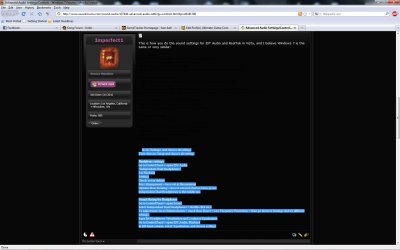
Also Imperfect1, thanks for the post, but I can't see the text well... its all black :P meaning I have to highlight it to read. But nonetheless, problem solved :D.

Thanks guys
 

My Computer

Computer Manufacturer/Model Number
msi GX740-235US
OS
Windows 7 Home Premium 64-bit
CPU
Intel i5 450 @ 2.4GHz
Motherboard
Unknown
Memory
4GB DDR3 1066MHz
Graphics Card(s)
ATi Mobile Radeon HD5870 1GB vDDR5
Sound Card
On-board Realtek HD Audio
Monitor(s) Displays
17" WSXGA+
Screen Resolution
1680x1050
Hard Drives
Western Digital 320GB 7200 RPM
PSU
Unknown
Case
msi GX740 Laptop Case
Cooling
Unknown
Keyboard
Full laptop keyboard (including Numpad)
Mouse
Logitech G500
Internet Speed
18.75Mbps DL, 0.49Mbps UP (Cable). ISP upload limits.
Other Info
My graphics card says its a 5870, my processor says its an i5 and my ram says its 4GB. What's to say that they're not actually this? MY PARTS MIGHT BE FOOLING ME.
Thanks p5bdkw, it helped greatly. Found what I need to change.

Also Imperfect1, thanks for the post, but I can't see the text well... its all black :P meaning I have to highlight it to read. But nonetheless, problem solved :D.

Thanks guys
Glad you solved your problem Fuzz Ball, but I'm really puzzled by your comment. Why would the text be all black? You can't see the text, and you have to highlight it? I'm really confused, because it looks perfectly clear and normal to me. Would you mind very much taking a screen shot so that we can see what you mean? Thanks very much.
 

My Computer

Computer Manufacturer/Model Number
HP Pavillion dv5t (generation 1)
OS
Vista 64 bit and 32 bit (SP2)
CPU
Intel(R) Core(TM)2 Duo Processor T9400 (2.53 GHz
Memory
4GB DDR2 System Memory (2 Dimm)
Graphics Card(s)
512 MB NVIDIA GeForce 9600M GT
Monitor(s) Displays
15.4" diagonal WSXGA+ High-Definition HP BrightView Widescre
Screen Resolution
1680 x 1050
Hard Drives
320GB 5400RPM SATA Hard Drive with HP ProtectSmart Hard Drive Protection
Keyboard
Built-in HP
Mouse
Built in - Synaptics TouchPad V6.5 on PS/2 Port
Internet Speed
Max
Other Info
~ Intel Next-Gen Wireless-N Mini-card w/Bluetooth ~ Blu-Ray ROM DVD+/-R/RW ~ Integ. HDTV Hybrid Tuner ~ 12 Cell Battery ~ MS Office (Home Premium) 2007 ~
It's black text on black background for me. :P
 

Attachments

  • Black text.jpg
    Black text.jpg
    109.2 KB · Views: 321

My Computer

Computer Manufacturer/Model Number
msi GX740-235US
OS
Windows 7 Home Premium 64-bit
CPU
Intel i5 450 @ 2.4GHz
Motherboard
Unknown
Memory
4GB DDR3 1066MHz
Graphics Card(s)
ATi Mobile Radeon HD5870 1GB vDDR5
Sound Card
On-board Realtek HD Audio
Monitor(s) Displays
17" WSXGA+
Screen Resolution
1680x1050
Hard Drives
Western Digital 320GB 7200 RPM
PSU
Unknown
Case
msi GX740 Laptop Case
Cooling
Unknown
Keyboard
Full laptop keyboard (including Numpad)
Mouse
Logitech G500
Internet Speed
18.75Mbps DL, 0.49Mbps UP (Cable). ISP upload limits.
Other Info
My graphics card says its a 5870, my processor says its an i5 and my ram says its 4GB. What's to say that they're not actually this? MY PARTS MIGHT BE FOOLING ME.
Jeez, I've never heard of anything like that. I wonder why one post on a forum would appear any different than any other post on your system? It's not like the forum poster can control your system! I can understand the font being different, of course, but the background color on your screen? That's a real mystery!
 

My Computer

Computer Manufacturer/Model Number
HP Pavillion dv5t (generation 1)
OS
Vista 64 bit and 32 bit (SP2)
CPU
Intel(R) Core(TM)2 Duo Processor T9400 (2.53 GHz
Memory
4GB DDR2 System Memory (2 Dimm)
Graphics Card(s)
512 MB NVIDIA GeForce 9600M GT
Monitor(s) Displays
15.4" diagonal WSXGA+ High-Definition HP BrightView Widescre
Screen Resolution
1680 x 1050
Hard Drives
320GB 5400RPM SATA Hard Drive with HP ProtectSmart Hard Drive Protection
Keyboard
Built-in HP
Mouse
Built in - Synaptics TouchPad V6.5 on PS/2 Port
Internet Speed
Max
Other Info
~ Intel Next-Gen Wireless-N Mini-card w/Bluetooth ~ Blu-Ray ROM DVD+/-R/RW ~ Integ. HDTV Hybrid Tuner ~ 12 Cell Battery ~ MS Office (Home Premium) 2007 ~
I'm using the pitch black setting... what colour does the background and text appear to you?
 

My Computer

Computer Manufacturer/Model Number
msi GX740-235US
OS
Windows 7 Home Premium 64-bit
CPU
Intel i5 450 @ 2.4GHz
Motherboard
Unknown
Memory
4GB DDR3 1066MHz
Graphics Card(s)
ATi Mobile Radeon HD5870 1GB vDDR5
Sound Card
On-board Realtek HD Audio
Monitor(s) Displays
17" WSXGA+
Screen Resolution
1680x1050
Hard Drives
Western Digital 320GB 7200 RPM
PSU
Unknown
Case
msi GX740 Laptop Case
Cooling
Unknown
Keyboard
Full laptop keyboard (including Numpad)
Mouse
Logitech G500
Internet Speed
18.75Mbps DL, 0.49Mbps UP (Cable). ISP upload limits.
Other Info
My graphics card says its a 5870, my processor says its an i5 and my ram says its 4GB. What's to say that they're not actually this? MY PARTS MIGHT BE FOOLING ME.
I'm using the Seven Forums default theme: (SF Default CDN)
My background is a pale, pale blue, almost white. Text is black.
 

My Computer

Computer Manufacturer/Model Number
HP Pavillion dv5t (generation 1)
OS
Vista 64 bit and 32 bit (SP2)
CPU
Intel(R) Core(TM)2 Duo Processor T9400 (2.53 GHz
Memory
4GB DDR2 System Memory (2 Dimm)
Graphics Card(s)
512 MB NVIDIA GeForce 9600M GT
Monitor(s) Displays
15.4" diagonal WSXGA+ High-Definition HP BrightView Widescre
Screen Resolution
1680 x 1050
Hard Drives
320GB 5400RPM SATA Hard Drive with HP ProtectSmart Hard Drive Protection
Keyboard
Built-in HP
Mouse
Built in - Synaptics TouchPad V6.5 on PS/2 Port
Internet Speed
Max
Other Info
~ Intel Next-Gen Wireless-N Mini-card w/Bluetooth ~ Blu-Ray ROM DVD+/-R/RW ~ Integ. HDTV Hybrid Tuner ~ 12 Cell Battery ~ MS Office (Home Premium) 2007 ~
I couldn't read it on my screen either---black on black.
 

My Computer

Computer type
PC/Desktop
Computer Manufacturer/Model Number
Ignatz Special; 4 speed manual gearbox; factory air conditioning; one of one
OS
Windows 7 Home Premium SP1, 64-bit
CPU
Intel Skylake i5-6600K, not overclocked
Motherboard
AsRock Z170M Extreme 4, micro ATX
Memory
8 GB HyperX DDR4-2666 (2 x 4 GB)
Graphics Card(s)
none; graphics are integrated on CPU
Sound Card
onboard: Realtek ALC1150; external: USB Behringer UF0-202
Monitor(s) Displays
Dell S2340M 23 inch IPS
Screen Resolution
1600 x 900
Hard Drives
System: Crucial MX100 series SSD, 128 GB;
Data: Samsung Spinpoint 103SJ, 1 TB;
Backup: WD Caviar Green WD30EZRX-00D8PB0, 3 TB
PSU
Rosewill SilentNight 500 watt fanless, semi-modular
Case
Antec Solo II
Cooling
Noctua NH-U12S; Noctua F12 intake, Noctua S12A exhaust
Keyboard
Microsoft 200 6JH-00001 USB
Mouse
Dell or Microsoft optical wired; USB
Antivirus
Microsoft Security Essentials and Malwarebytes Premium
Browser
Pale Moon
Other Info
All fans PWM; speeds at idle: CPU circa 500 rpm; intake circa 600 rpm; exhaust circa 600 rpm; CPU temps 27 idle and 47 C load in a warm room (27 C/81 F) when running Intel Extreme Tuning Utility stress test.
I'm assuming you both can read this post and could also read my above post (#9), so it must be the fact that I originally wrote the IDT and RealTek Sound Settings information in a Word doc and cut and pasted into the Message Reply box. Can't imagine why that would happen, but it apparently did, so there you have it. . .
 

My Computer

Computer Manufacturer/Model Number
HP Pavillion dv5t (generation 1)
OS
Vista 64 bit and 32 bit (SP2)
CPU
Intel(R) Core(TM)2 Duo Processor T9400 (2.53 GHz
Memory
4GB DDR2 System Memory (2 Dimm)
Graphics Card(s)
512 MB NVIDIA GeForce 9600M GT
Monitor(s) Displays
15.4" diagonal WSXGA+ High-Definition HP BrightView Widescre
Screen Resolution
1680 x 1050
Hard Drives
320GB 5400RPM SATA Hard Drive with HP ProtectSmart Hard Drive Protection
Keyboard
Built-in HP
Mouse
Built in - Synaptics TouchPad V6.5 on PS/2 Port
Internet Speed
Max
Other Info
~ Intel Next-Gen Wireless-N Mini-card w/Bluetooth ~ Blu-Ray ROM DVD+/-R/RW ~ Integ. HDTV Hybrid Tuner ~ 12 Cell Battery ~ MS Office (Home Premium) 2007 ~
Hi guys, any more info on how to get more advanced settings? I have the same question as Fuzz Ball, but my motivation is to take advantage of multiple audio devices.

I have an L502x windows7 home edition, dell's realtek options do not allow disabling of jack detection, and I'd like to specifically (first!) keep playing audio on one application (mediamonkey) through speakers (built-in, awesome) while using speakers plugged in to (either) headphone socket to simultaneously play audio from another app (chrome)

I've done the mapping apps to devices before, guess the system had a better soundcard that supported this...

How do I find out which soundcard I have and whether it support the feature I'm describing?

someone found a solution, but I don't know where this was achieved, or if my spec will allow... 2 headphone jacks? surely I must be able to have multi-speakers!?!

optimistic 'J

solved the problem with different output to the front panel on my ASUS P5P43TD.

All you need to do is to go to Onboard Devices Configuration in BIOS settings and change Front Panel Type from HD Audio to AC97

After restarting you have now Tab called HD Audio 2nd output in Realtek Audio Manager (but keep Speakers tab as default output).

If you can't see that Tab, go to Device Advanced Settings and change it to Make Front and Rear output devices playback two different audio streams simultaneously. If you choose the other option in Advanced, you will have only one stream but from both outputs - front and rear.

And now you have multiple choice for output in popular applications such as audoi- and video-players, where you can change output to Speakers or to HD Audio 2nd output.

As a result my Foobar2000 (audio) and MPC (video) are playing onto different outputs as I'm typing this post.

For some games you can choose the output too (Black Ops) in game Sound options but in some of them you cannot (MW II) BTW if you don't set anything as Default in Realtek Audio Manager you won't have any sound in MW II and some other games.
 

My Computer

Computer type
Laptop
Computer Manufacturer/Model Number
Dell
OS
Windows 7 Ultimate 64bit
CPU
2.2
Memory
8Gb
Graphics Card(s)
NVIDIA
Screen Resolution
1280/762
Mouse
built in pad || iphone || MS wireless
Internet Speed
100MB
Antivirus
Avast
Browser
Chrome, Chrome portable
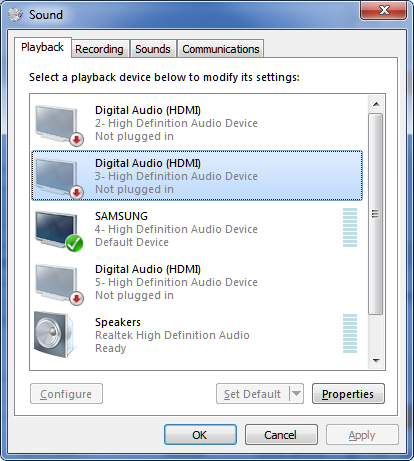
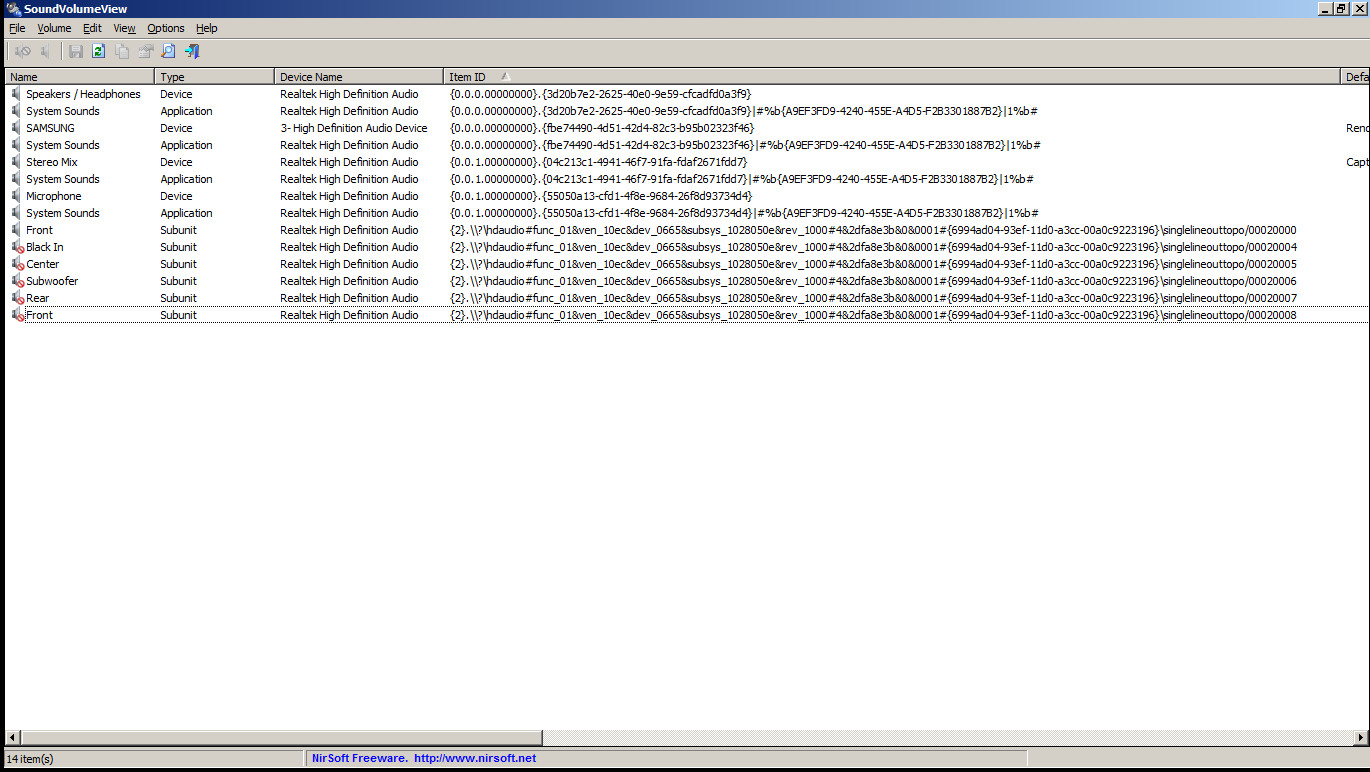
any l502x owners anywhere that can confirm whether this is "normal" (abundance of "unplugged devices" when connecting a single samsung lcd tv via hdmi....)

HQ80STn.png


data from nirsoft's soundvolumeview

GoaqMhM.png


thanks in advance.
 

My Computer

Computer type
Laptop
Computer Manufacturer/Model Number
Dell
OS
Windows 7 Ultimate 64bit
CPU
2.2
Memory
8Gb
Graphics Card(s)
NVIDIA
Screen Resolution
1280/762
Mouse
built in pad || iphone || MS wireless
Internet Speed
100MB
Antivirus
Avast
Browser
Chrome, Chrome portable
Back
Top