Solved Advanced boot option F8 not appearing

dhaneshka

New member
Local time
4:16 PM
Messages
21
Hi,
I have just upgraded to windows 7 last week.The problem is when I am trying to hit F8 button and get into advanced boot options.I tried holding it down instead of repeatedly pressing it too :cry: ..tried everything possible, All the time only a screen appears that give me the option to select the boot device with 3 options(My HD, USB Drive and DVD). I can't get into safe mode.. Please help Me

I am having 32 bit with Intel i3
:)
 

My Computer My Computer

At a glance

Windows 7 Ultimate 32Intel i3Transcend 2GB DDR3
Computer Manufacturer/Model Number
Assembled
OS
Windows 7 Ultimate 32
CPU
Intel i3
Motherboard
Asus
Memory
Transcend 2GB DDR3
Monitor(s) Displays
Asus
Hard Drives
WD 500Gb
Case
Zebronics
Check in BIOS for USB legacy is enable, & not disabled.
or
Try a PS2 keyboard.
 

My Computer My Computer

At a glance

ME/XP/Vista/Win7
OS
ME/XP/Vista/Win7
You're tapping F8 too soon, you need to wait for the bios screen to clear first. The trick is timing it right from when the bios screen clears off to when Windows starts to load.
 

My Computer My Computer

At a glance

Win 7 Ultimate x64FX-8350 @ 4.6 GHz so farADATA XPG V1 Series Black 8GB DDR3 1600Sapphire R9 270x Dual-X
Computer type
PC/Desktop
Computer Manufacturer/Model Number
Me
OS
Win 7 Ultimate x64
CPU
FX-8350 @ 4.6 GHz so far
Motherboard
Asus M5A97 EVO
Memory
ADATA XPG V1 Series Black 8GB DDR3 1600
Graphics Card(s)
Sapphire R9 270x Dual-X
Sound Card
Xonar DGX w/ Corsair Vengence 1300
Monitor(s) Displays
Acer S232HL Abid
Screen Resolution
1920x1080
Hard Drives
120 GB OCZ Vertex 3
500 GB Seagate 7200.12
PSU
Antec Earthwatts 650W Green
Case
Antec Three Hundred
Cooling
Cooler Master 212 EVO
Keyboard
Logitech G510
Mouse
Logitech G500s
Internet Speed
35000/3000

My Computer My Computer

At a glance

Windows 7 x64 pro/ Windows 7 x86 Pro/ XP SP3 x86
Computer Manufacturer/Model Number
Too many to describe...
OS
Windows 7 x64 pro/ Windows 7 x86 Pro/ XP SP3 x86
@theog
I am using a PS2 keyboard..
@stormy
I think the tapping is correct, that's why the screen for boot device selection is coming up on pressing F8 :)
 

My Computer My Computer

At a glance

Windows 7 Ultimate 32Intel i3Transcend 2GB DDR3
Computer Manufacturer/Model Number
Assembled
OS
Windows 7 Ultimate 32
CPU
Intel i3
Motherboard
Asus
Memory
Transcend 2GB DDR3
Monitor(s) Displays
Asus
Hard Drives
WD 500Gb
Case
Zebronics
Mine is the exact same way, F8 for the bios boot selector screen as well. Like I said the fun part is timing it right to catch it between the bios loading screen clearing and before Windows starts to load.

The msconfig method above works as well, just need to remember to set it back to normal boot when done or you'll be right back in safe mode upon restart.
 

My Computer My Computer

At a glance

Win 7 Ultimate x64FX-8350 @ 4.6 GHz so farADATA XPG V1 Series Black 8GB DDR3 1600Sapphire R9 270x Dual-X
Computer type
PC/Desktop
Computer Manufacturer/Model Number
Me
OS
Win 7 Ultimate x64
CPU
FX-8350 @ 4.6 GHz so far
Motherboard
Asus M5A97 EVO
Memory
ADATA XPG V1 Series Black 8GB DDR3 1600
Graphics Card(s)
Sapphire R9 270x Dual-X
Sound Card
Xonar DGX w/ Corsair Vengence 1300
Monitor(s) Displays
Acer S232HL Abid
Screen Resolution
1920x1080
Hard Drives
120 GB OCZ Vertex 3
500 GB Seagate 7200.12
PSU
Antec Earthwatts 650W Green
Case
Antec Three Hundred
Cooling
Cooler Master 212 EVO
Keyboard
Logitech G510
Mouse
Logitech G500s
Internet Speed
35000/3000
@bill2,stormy
Ok thanks..I heard about msconfig method early but I was just wondering whether there was any problem with the board .. I had replaced the board last week and replaced the smps 2 times within a week..anyhow those problem were because of my faulty UPS.. :)

So there is no other way to get the other options in advanced boot options screen other than safe mode?
 
Last edited:

My Computer My Computer

At a glance

Windows 7 Ultimate 32Intel i3Transcend 2GB DDR3
Computer Manufacturer/Model Number
Assembled
OS
Windows 7 Ultimate 32
CPU
Intel i3
Motherboard
Asus
Memory
Transcend 2GB DDR3
Monitor(s) Displays
Asus
Hard Drives
WD 500Gb
Case
Zebronics
Hello dhaneshka, welcome to Seven Forums!


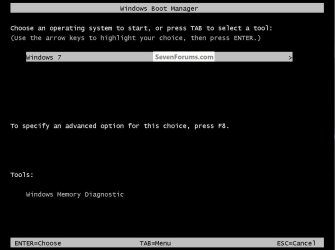
As soon as you hit the PC power button, start continually tapping the space bar and don't stop until you get the Windows boot manager screen like in this snip below.

click to enlarge
SpaceBar.jpg
 

My Computer My Computer

At a glance

W 7 64-bit UltimateIntel Q9550 Yorkfield8GB Dominator 8500C5DATI : XFX 5870
Computer Manufacturer/Model Number
* BFK Customs *
OS
W 7 64-bit Ultimate
CPU
Intel Q9550 Yorkfield
Motherboard
ASUS P5Q Pro
Memory
8GB Dominator 8500C5D
Graphics Card(s)
ATI : XFX 5870
Sound Card
Realtek HD Audio 7-1
Monitor(s) Displays
1x 47" LCD HDMI & 3x 26" LCD HDMI
Screen Resolution
1920x1080P & 1920x1200
Hard Drives
1x 80GB Intel X25-M G2 SSD : 1x 500GB & 1x 640GB WD Caviar Black(s)
PSU
Corsair 620HX
Case
Cooler Master RC-690
Cooling
Tuniq Tower 120, 2x 140mm and 3x 120mm case fans
Keyboard
Microsoft 500
Mouse
Razer Diamondback 3G
Internet Speed
14 Mb/s
Other Info
1x Koutech 3Gb/s SATA HDD Hot Swap Rack
Thanks a Lot Barefoot..It really worked...:)
:geek::cool::geek:

.SOLVED.
 

My Computer My Computer

At a glance

Windows 7 Ultimate 32Intel i3Transcend 2GB DDR3
Computer Manufacturer/Model Number
Assembled
OS
Windows 7 Ultimate 32
CPU
Intel i3
Motherboard
Asus
Memory
Transcend 2GB DDR3
Monitor(s) Displays
Asus
Hard Drives
WD 500Gb
Case
Zebronics
Glad I could help and thanks for the update! :party:
 

My Computer My Computer

At a glance

W 7 64-bit UltimateIntel Q9550 Yorkfield8GB Dominator 8500C5DATI : XFX 5870
Computer Manufacturer/Model Number
* BFK Customs *
OS
W 7 64-bit Ultimate
CPU
Intel Q9550 Yorkfield
Motherboard
ASUS P5Q Pro
Memory
8GB Dominator 8500C5D
Graphics Card(s)
ATI : XFX 5870
Sound Card
Realtek HD Audio 7-1
Monitor(s) Displays
1x 47" LCD HDMI & 3x 26" LCD HDMI
Screen Resolution
1920x1080P & 1920x1200
Hard Drives
1x 80GB Intel X25-M G2 SSD : 1x 500GB & 1x 640GB WD Caviar Black(s)
PSU
Corsair 620HX
Case
Cooler Master RC-690
Cooling
Tuniq Tower 120, 2x 140mm and 3x 120mm case fans
Keyboard
Microsoft 500
Mouse
Razer Diamondback 3G
Internet Speed
14 Mb/s
Other Info
1x Koutech 3Gb/s SATA HDD Hot Swap Rack
Back
Top