
Advanced Context Menu

Here's How:

You'll need to download these two applications toward the bottom of the link:

Adds extra functionality to the Context Menu.

Features:
Open Elevated Command Prompt
Copy Path
Register/UnRegister Dll
Open / Close CD Drive
Open any Program / Application

A Command-Line tool which allows you to run Actions as if you were clicking your mouse or pushing a button using Command-Line Arguments. By combining these Actions with Open++ you get the most versatile and powerful tools to completely revamp your Context Menu and it’s functions.
   Note
The Context menu has a limit of 128 Commands


Using Custom Functions with Open++
Open++ Installs itself into your Context Menu by default. To change the settings; Right-Click your desktop, choose Open++ then Customize Open++. You can now see which settings have been added to your Context Menu. If some of the settings are of no use to you, highlight it and click Delete.
You can, for example, create an “Open With <insert program name>” function for any file without having to save settings for each file type.

  1. Choose Where in the menu you want the new item (Or use the UP and Down buttons later)
  2. Click Add
  3. Choose Run With Parameters
  4. Give it a Title: Open With <insert program name>
  5. Click on the Browse Button (…) to choose the Program Path
  6. under Parameters Choose (or type): %TargetPath1&
  7. Give it an Icon, by using the same Path as the Program path
  8. Choose Associate with: Files only
  9. If you want, you can set file type limitations, eg: image files (separated by semicolon). This will disable it if you click on the wrong file type.
  10. Click Apply or OK (OK to Finish, Apply to do more changes)
  11. Test by right-clicking a file
OpenPlus.png


Using Custom Functions with NirCMD
The procedure is much the same as above. Instead of using the cryptic %…% parameters you can use NirCmd Parameters Instead.

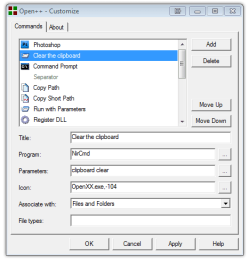
eg: To create a Clear The Clipboard.​

  1. Choose where in the menu you want the new item (Or use the UP and Down buttons later)
  2. Click Add
  3. Choose: Run With Parameters
  4. Give it a Title: Clear The Clipboard
  5. Write: NirCMD in the Program field
  6. under Parameters write: clipboard clear
  7. Choose an icon (Read: Choose Icons, below)
  8. Choose Associate with: Files and Folders
  9. No File Type Limitations
  10. Click Apply or OK (OK to Finish, Apply to do more changes)
  11. Test your New Context Menu Item
NirCmd.png
 
Last edited by a moderator:
Well done. Thanks for doing the tutorial on this. It will come in handy, for sure.
 

My Computer

Computer Manufacturer/Model Number
Gateway, Toshiba Laptop, and Home Brew
OS
Windows 7 x64 HP, Windows 7 HP, Windows 7 Ult
CPU
Intel I3, Cerelon, Pentium 4 @ 3Ghz
Motherboard
Intel, Intel, Asus
Memory
8G, 3G, 3G
Graphics Card(s)
On-board Intel, On-board nVidia, nVIDIA card
Sound Card
on-board, on-board, SoundBlaster
Monitor(s) Displays
Hannspree HF237, Toshiba, SyncMaster 931B
Screen Resolution
default (all)
Hard Drives
1T internal, 320G internal, 160G internal, 1T networked
PSU
300w, unk, 650w
Case
black, black, grey
Cooling
air (all)
Keyboard
standard wired (all)
Mouse
standard wired (all)
Internet Speed
6M down, 768K up
Other Info
Home LAN through Linksys hub to 4 port and wireless switch/router. Networked HP 2600n. Wife's computer running Windows 7, and spare laptop running Ubuntu "Karmic Kola" (9.10).
MANY THANKS FOR YOU,,IT'S A VERY GREAT THING
 

My Computer

OS
windows xp, windows 7
Thanks for the tutorial, just downloaded the program and gonna have a mess around with it :)
 

My Computer

Computer Manufacturer/Model Number
Zoostorm
OS
Windows 7 Ultimate
CPU
Intel Core2 Quad Q6700
Motherboard
Foxconn
Memory
4GB
Graphics Card(s)
nVidia 9800GT 512mb
Monitor(s) Displays
20" Samsung Widescreen
Hard Drives
750GB Internal
500GB Western Digital External
320GB Western Digital Passport
Keyboard
Logitech diNovo
Mouse
Logitech MX Revolution
Internet Speed
512kbps :(
Really a useful post. Thanks a lot.:)
 

My Computer

Computer Manufacturer/Model Number
HP Pavilion w5610la (Improved because of mobo and PCIE slot failures)
OS
Windows 7 Ultimate
CPU
AMD Athlon(tm)64 X2 DUAL CORE PROCESSOR 5200+ 2.71GHz
Motherboard
Asus M2N68-AM-SE2
Memory
1GB KINGSTON - 512MB SAMSUNG
Graphics Card(s)
nVidia GeForce 9400 GT 512MB
Sound Card
Onboard
Monitor(s) Displays
CRT HPmx 705 17" Plane
Hard Drives
SAMSUNG SP2004C SATA-II Búfer 8 MB(Dual Ported, Read Ahead)
Unformatted 206432MB Formatted 200GB
PSU
Yes 500W
Case
HP original
Cooling
Original CPU and case original
Thanks Friend!
 

My Computer

Computer Manufacturer/Model Number
Intel DG31PR (Intel Dual core 2.5 E5200 @ 2.5GHz)
OS
windows7 Ultimate SP1 x32bit
CPU
Intel
Motherboard
Intel DG31PR
Memory
Kinsgton 1GB an Transcend 2GB
Graphics Card(s)
Intel- onboard
Sound Card
Intel- onboard
Monitor(s) Displays
ViewSonic LCD Widescreen 19
Screen Resolution
1400x900
Hard Drives
Samsung 256GB
PSU
Legend
Case
Legend
Cooling
Intel
Keyboard
Seemo
Mouse
Prolink
Internet Speed
Download Speed-512Kbps, Upload Speed-128Kbps (ADSL wired)
Other Info
UPS- Prolink Pro650s
Router Prolink H5201
Sub Woofer - Creative 2.1
Open ++ 32bit CD/DVD open tray

Hi, please could you tell me how can I configure commands to open/close CD/DVD drivers? Thanks, regards.:)
 

My Computer

Computer Manufacturer/Model Number
HP Pavilion w5610la (Improved because of mobo and PCIE slot failures)
OS
Windows 7 Ultimate
CPU
AMD Athlon(tm)64 X2 DUAL CORE PROCESSOR 5200+ 2.71GHz
Motherboard
Asus M2N68-AM-SE2
Memory
1GB KINGSTON - 512MB SAMSUNG
Graphics Card(s)
nVidia GeForce 9400 GT 512MB
Sound Card
Onboard
Monitor(s) Displays
CRT HPmx 705 17" Plane
Hard Drives
SAMSUNG SP2004C SATA-II Búfer 8 MB(Dual Ported, Read Ahead)
Unformatted 206432MB Formatted 200GB
PSU
Yes 500W
Case
HP original
Cooling
Original CPU and case original
thx for the tips.

I will try this, if I don't like it I'll try to install vista 32 and 64 in Vbox and move WindowsMediaPlayer11 to 7's not so great wmp12.
The problem is that in vista I could open the root folder of any media to play in wmp11. In win7, I have to go down to each individual folder. I don't want to "build a library". I only want to play a folder and done with it. The only remaining "souvenir" of this is maybe a playlist saved from this if I want to, not a cluthered library folder that I'll never us again.
All the registry keys/context menu items that worked on vista and XP are useless for win7 now. Even worst, the two machine runs 7 now, a 32 and a 64 (one is too old). They don't have the same registry keys for wmp12. I don't have to go as low in the folder to play one in the 32bit version machine. I've switched the 64bit machine to use wmp12 64bit, still not better. The only player that add context menu element is VLC or winamp, but I use them only for wmv and wma files (look into taskmanager and you'll see why ;)lolol


and dl the links are moved...

Open++

Peace
 

My Computer

Computer Manufacturer/Model Number
2002 and 2007 discontinued Seanix Technology Inc
OS
VistaHomePremiumSP2, recently switch to 7Ultimate64. And 1 old 2002 PC Win98,to XP SP3,now 7ultim32
CPU
Intel Core 2 Duo [email protected]. Intel Pentium4 2.4GHz
Motherboard
Intel MB IA Skt 775 965GI uATX, Gigabits 8IG1000MK i865P....
Memory
4GB for the 2007 PC. 512MB still on the 2002 PC
Graphics Card(s)
IntelGMA 3000 256MB, ATI 9200 128MB ...whatever good Win7 ..
Sound Card
SigmaTel, SBLive 5.1 (or whatever good Win7 left from them)
Monitor(s) Displays
Generic PnP Monitor 1024 x 768 @ 60Hz
Screen Resolution
as above, so below ;)
Hard Drives
C: F: G:, and C: D: G:
PSU
Per Single User?
Case
the older they are, if I can find even more ;)
Cooling
Good old fresh air and greasy dust.
Keyboard
Microsoft and Logitech. All cordless
Mouse
as above, so .....
Internet Speed
whatever the lies my ISP tells me ;)
Other Info
Never been married, always single. Don't care what others say. I stand my ground. My freedom is somewhat a work of art now. It allow me to see the real value of things (which have none), and to value people who stands up for their own and youngs, not for some illusory rules, gods, flags. Which valued a lot more the time spent with them as much as real friends or family ;)

Peace
This is just great app...just loving it. The Best accessing all my applications without Widows Explorer/Start Menu Run/Start Menu and all possible ways. Also helps me to have my desktop clean and beautiful :) ;)
 

My Computer

Computer type
Laptop
OS
Windows 7 Ultimate
Back
Top