Advanced Search?

higgins

New member
Member
VIP
Local time
10:16 AM
Messages
144
Hi!

Is there any form of advanced search available for Windows 7?

I'd need to specify:
a) folder I search in
b) part of file name
c) keyword IN the file contents

This was all a piece of cake in XP. How can I do the same under 7?
 

My Computer

Computer type
PC/Desktop
OS
Windows 7 x64
CPU
AMD Athlon(tm) II X2 250 Processor
Motherboard
N68C-GS FX
Memory
4GB DDR3 (PC3-10700H) Apacer Technology
Graphics Card(s)
NVIDIA GeForce GTX 560
Screen Resolution
1920x1080
Hard Drives
SSD + 2x HDD
PSU
450W
Case
Codegen SuperPower M608-CA 450W
Cooling
Fan
Antivirus
Microsoft Security Essentials
The search in seven, is by the start menu. click on the Windows start button and type in search. I think that it works very well.

You merely supply the information that you are looking for and all the results are shown.
 
Last edited:

My Computer

Computer type
PC/Desktop
Computer Manufacturer/Model Number
Dell XPS 420
OS
Windows 10, Home Clean Install
CPU
Intel Core2 processsor Q8200(2.33Ghz 1333FSB) Quad Core Tech
Motherboard
Dell
Memory
6 gb
Graphics Card(s)
ATI Radeon 256MB HD3650
Sound Card
Intergrated 7.1 Channel Audio
Monitor(s) Displays
Dell SP2009W 20"
Hard Drives
640 GB Serial ATA Hard drive
Cooling
Fan
Keyboard
Dell USB Keyboard
Mouse
Dell Premium Optical USB
Internet Speed
DSL 2.85
Not even 3rd party ones?
 

My Computer

Computer type
PC/Desktop
OS
Windows 7 x64
CPU
AMD Athlon(tm) II X2 250 Processor
Motherboard
N68C-GS FX
Memory
4GB DDR3 (PC3-10700H) Apacer Technology
Graphics Card(s)
NVIDIA GeForce GTX 560
Screen Resolution
1920x1080
Hard Drives
SSD + 2x HDD
PSU
450W
Case
Codegen SuperPower M608-CA 450W
Cooling
Fan
Antivirus
Microsoft Security Essentials
Never tried this, but you may want to give it a chance.

Hint, set a system restore before installing. If you do not like it you can get ride of ALL without anything remaining

Google Desktop Download
 

My Computer

Computer type
PC/Desktop
Computer Manufacturer/Model Number
Dell XPS 420
OS
Windows 10, Home Clean Install
CPU
Intel Core2 processsor Q8200(2.33Ghz 1333FSB) Quad Core Tech
Motherboard
Dell
Memory
6 gb
Graphics Card(s)
ATI Radeon 256MB HD3650
Sound Card
Intergrated 7.1 Channel Audio
Monitor(s) Displays
Dell SP2009W 20"
Hard Drives
640 GB Serial ATA Hard drive
Cooling
Fan
Keyboard
Dell USB Keyboard
Mouse
Dell Premium Optical USB
Internet Speed
DSL 2.85
Hm, why wouldn't a simple uninstall do?
 

My Computer

Computer type
PC/Desktop
OS
Windows 7 x64
CPU
AMD Athlon(tm) II X2 250 Processor
Motherboard
N68C-GS FX
Memory
4GB DDR3 (PC3-10700H) Apacer Technology
Graphics Card(s)
NVIDIA GeForce GTX 560
Screen Resolution
1920x1080
Hard Drives
SSD + 2x HDD
PSU
450W
Case
Codegen SuperPower M608-CA 450W
Cooling
Fan
Antivirus
Microsoft Security Essentials
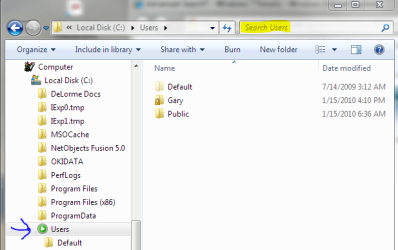
You can do a search in a specific folder by doing the search from that folder in Win Explorer. In order to have it search contents in un-indexed files you may need to set search to do so on the search tab of the folder options dialog.

Here's a snip. search.PNG
 

My Computer

Computer Manufacturer/Model Number
Dell XPS420
OS
Vista Ult 64 bit Seven Ult RTM x64
CPU
Intel Core2 Quad Q6600 2.40 gigahertz
Memory
Crucial Ballistix 4x2GB PC2 6400
Graphics Card(s)
NVIDIA GeForce 8600 GTS 256 MB
Sound Card
Creative SB X-Fi audio
Monitor(s) Displays
HP w2207 + HPvs15
Screen Resolution
1680x1050 + 1024x768
Hard Drives
2-WD5000AAKS-500 GB
WD5000AAV-500 GB external
Keyboard
Microsoft Comfort Curve
Mouse
MX Revolution
Other Info
Wacom Intuos 2 Graphics Tablet
Experience Index=5.5
Very very good question. There are some excellent uninstallers out there, Revno for one comes to mind. Its just personal preferance, if I install something, I like to use system restore (most will disagee) I know that EVERYTHING is gone. I also know that nothing has been changed, by the uninstall that I would not like. Of course I am assuming it has been installed for only a short time.

That being said most at this forum would just use Revno to uninstall.
 

My Computer

Computer type
PC/Desktop
Computer Manufacturer/Model Number
Dell XPS 420
OS
Windows 10, Home Clean Install
CPU
Intel Core2 processsor Q8200(2.33Ghz 1333FSB) Quad Core Tech
Motherboard
Dell
Memory
6 gb
Graphics Card(s)
ATI Radeon 256MB HD3650
Sound Card
Intergrated 7.1 Channel Audio
Monitor(s) Displays
Dell SP2009W 20"
Hard Drives
640 GB Serial ATA Hard drive
Cooling
Fan
Keyboard
Dell USB Keyboard
Mouse
Dell Premium Optical USB
Internet Speed
DSL 2.85
You can do a search in a specific folder by doing the search from that folder in Win Explorer. In order to have it search contents in un-indexed files you may need to set search to do so on the search tab of the folder options dialog.
Thanks for the tip, I'll try it out. :)
 

My Computer

Computer type
PC/Desktop
OS
Windows 7 x64
CPU
AMD Athlon(tm) II X2 250 Processor
Motherboard
N68C-GS FX
Memory
4GB DDR3 (PC3-10700H) Apacer Technology
Graphics Card(s)
NVIDIA GeForce GTX 560
Screen Resolution
1920x1080
Hard Drives
SSD + 2x HDD
PSU
450W
Case
Codegen SuperPower M608-CA 450W
Cooling
Fan
Antivirus
Microsoft Security Essentials
Hm, why wouldn't a simple uninstall do?

Could it be because so many uninstallers leave a ton of junk behind and never clean up after themselves?

Regards,
GEWB
 

My Computer

Computer type
PC/Desktop
Computer Manufacturer/Model Number
(7 different computers booting up to 10 systems)
OS
Linux Mint / XP / Win7 Home, Pro, Ultimate / Win8.1 / Win10
Other Info
Four desktops, two laptops, one notebook and one tablet
GEWB, that is exactly the reason that I suggested System Restore. Get ready for all those that disagree, now.
 

My Computer

Computer type
PC/Desktop
Computer Manufacturer/Model Number
Dell XPS 420
OS
Windows 10, Home Clean Install
CPU
Intel Core2 processsor Q8200(2.33Ghz 1333FSB) Quad Core Tech
Motherboard
Dell
Memory
6 gb
Graphics Card(s)
ATI Radeon 256MB HD3650
Sound Card
Intergrated 7.1 Channel Audio
Monitor(s) Displays
Dell SP2009W 20"
Hard Drives
640 GB Serial ATA Hard drive
Cooling
Fan
Keyboard
Dell USB Keyboard
Mouse
Dell Premium Optical USB
Internet Speed
DSL 2.85
Back
Top