Advanced uninstaller Pro's monitoring feature

netadict

New member
Member
VIP
Local time
3:48 PM
Messages
155
Location
Egypt
Does Advanced uninstaller Pro do a better job of uninstallng when the installation is monitored? I ask because I used Ashampoo uninstaller some time back and it monitors installations but freezes when uninstalling large software like Photoshop or ms office.
 

My Computer My Computer

At a glance

Windows 7 Professional 32 bitPentium D 3.4 GHYz4GBNvidia GE Force 9600 GT
Computer Manufacturer/Model Number
HP Compaq dc7600 Convertible Minitower PC
OS
Windows 7 Professional 32 bit
CPU
Pentium D 3.4 GHYz
Motherboard
original that came with the PC
Memory
4GB
Graphics Card(s)
Nvidia GE Force 9600 GT
Sound Card
intergrated on the motherboard
Monitor(s) Displays
Samsung SyncMaster 713N
Screen Resolution
1280X1024
Hard Drives
Maxtor 6V160E0 ATA
Case
mini tower
Keyboard
standard PS/2
Mouse
PS/2 compatible
Internet Speed
2 M/s ADSL
What do you mean by "Monitored Installation"? And btw why use a 3rd Party Uninstaller? I've always used Programs and Settings. If some Registry values are left use CCleaner.
 

My Computer My Computer

At a glance

Microsoft Windows 7 Ultimate 64-bitIntel Core i3-3110M @ 2.40 Ghz Ivy Bridge 22n...4.00 GB Dual-Channel DDR3 @ 665MHz (9-9-9-24)Intel HD Graphics 4000
Computer Manufacturer/Model Number
HP ProBook 4540s
OS
Microsoft Windows 7 Ultimate 64-bit
CPU
Intel Core i3-3110M @ 2.40 Ghz Ivy Bridge 22nm Technology
Motherboard
Hewlett-Packard 17F6 (U3E1)
Memory
4.00 GB Dual-Channel DDR3 @ 665MHz (9-9-9-24)
Graphics Card(s)
Intel HD Graphics 4000
Sound Card
IDT High Definition Audio CODEC
Monitor(s) Displays
Generic PnP Monitor
Screen Resolution
1366x768@60Hz
Hard Drives
466GB Hitachi HTS727550A9E364 (SATA)
Keyboard
Standard PS/2 Keyboard Fixed
Mouse
Dell HID-compliant mouse
Internet Speed
3 Mbs/s Down, 1Mbs/s Up.
Other Info
Bought by Laptop on 24 December 2012, after making sure the world wasn't going to end.
I would go with what Forz said. Windows uninstaller works just fine and to clear the reg just use CCleaner.
 

My Computer My Computer

At a glance

Windows 7AMD X6 1090T 4.02Ghz16.00GBNvidia Geforce 470
Computer type
PC/Desktop
Computer Manufacturer/Model Number
Me :D
OS
Windows 7
CPU
AMD X6 1090T 4.02Ghz
Motherboard
ASUS Crosshair IV Formula
Memory
16.00GB
Graphics Card(s)
Nvidia Geforce 470
Sound Card
ASUS Xonar DX
Monitor(s) Displays
Dell 24" Monitor
Hard Drives
2TB WD
1TB WD
2TB WD
60 SSD
60 SSD
PSU
700W Crosshair
Case
Antec Three hundred
Cooling
Water Cooling
I have Advanced Uninstaller 11.14

press general tools> monitored installation.

Usually a software's uninstaller or uninstalling it from Programs and settings not only leaves behind registry entries but a lot of files as well, including dlls
 

My Computer My Computer

At a glance

Windows 7 Professional 32 bitPentium D 3.4 GHYz4GBNvidia GE Force 9600 GT
Computer Manufacturer/Model Number
HP Compaq dc7600 Convertible Minitower PC
OS
Windows 7 Professional 32 bit
CPU
Pentium D 3.4 GHYz
Motherboard
original that came with the PC
Memory
4GB
Graphics Card(s)
Nvidia GE Force 9600 GT
Sound Card
intergrated on the motherboard
Monitor(s) Displays
Samsung SyncMaster 713N
Screen Resolution
1280X1024
Hard Drives
Maxtor 6V160E0 ATA
Case
mini tower
Keyboard
standard PS/2
Mouse
PS/2 compatible
Internet Speed
2 M/s ADSL
Sometimes monitoring may find and delete a few leftovers that uninstallers leaves (maybe deliberately) on disk and registry, but they cannot do anything about files created thereafter by the program operation.

I prefer using the program's own uninstaller to delete it, ran though the leftover scanner from Advanced Uninstaller Pro. CCleaner and the like are from other types of junk that messes up the registry.
Installation monitor is nice to find out what programs REALLY do, as you can in fact monitor anything, not just installations.
 

My Computer My Computer

At a glance

Windows 7 Ultimate x64Intel Core i7-740QM8 GB DDR3NVIDIA GeForce 330GT
Computer type
Laptop
Computer Manufacturer/Model Number
Toshiba Sattelite A665-S6092
OS
Windows 7 Ultimate x64
CPU
Intel Core i7-740QM
Memory
8 GB DDR3
Graphics Card(s)
NVIDIA GeForce 330GT
Screen Resolution
1366x768
Hard Drives
Samsung 840 SSD 500GB
1TB USB3 external HD
Cooling
Coolermaster Notepal U3 notebook cooling pad
Internet Speed
3mbps ASDL
Antivirus
ClamWin 0.98.7
Browser
Opera 12.17 x86 (main), Firefox 38 (sec), IE11 (last resort)
Sometimes monitoring may find and delete a few leftovers that uninstallers leaves (maybe deliberately) on disk and registry, but they cannot do anything about files created thereafter by the program operation.

I prefer using the program's own uninstaller to delete it, ran though the leftover scanner from Advanced Uninstaller Pro. CCleaner and the like are from other types of junk that messes up the registry.
Installation monitor is nice to find out what programs REALLY do, as you can in fact monitor anything, not just installations.
Totally agree with you, some dll's are in common with other programs which if you delete them in your uninstalling, other programs may get trouble in their work,
about the registry, i think you may leave that alone, the remain doesn't have any defect on your system but if you change something accidentally wrong that could make trouble...
 

My Computer My Computer

At a glance

Windows 7 Ultimate x64core i7.
OS
Windows 7 Ultimate x64
CPU
core i7.
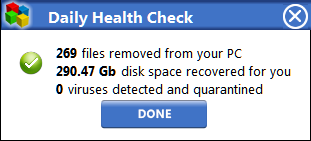
There's a dailyhealthcheck feature which is great for pro-active protection/notification of new startup/BHO entries. It'll do all sorts, just (like CCleaner and any other powertool) make sure you know what you're doing - this led me to unremoved wmp features (had to get registry ownership to get permission to remove, but no more missing dlls) and the service profile editor is a godsend..

One thing is wish I knew is where it gets it's figures from.. I panic every time I see something like this

On my 30Gb install!
teNZogk.png
 

My Computer My Computer

At a glance

Windows 7 Ultimate 64bit2.28GbNVIDIA
Computer type
Laptop
Computer Manufacturer/Model Number
Dell
OS
Windows 7 Ultimate 64bit
CPU
2.2
Memory
8Gb
Graphics Card(s)
NVIDIA
Screen Resolution
1280/762
Mouse
built in pad || iphone || MS wireless
Internet Speed
100MB
Antivirus
Avast
Browser
Chrome, Chrome portable
Johnny - have you ever considered that your many and continuing problems could be the result of using this 'tool'??
 

My Computer My Computer

At a glance

Win 7 x64 Home Premium (and x86 VirtualBox VM...i3 370M/i7 6500U8GB - finally :)/8GBit's an i3, dude!/dual Intel&nVidia
Computer type
Laptop
Computer Manufacturer/Model Number
Asus K52F or Lenovo B51-80
OS
Win 7 x64 Home Premium (and x86 VirtualBox VM)/Win10
CPU
i3 370M/i7 6500U
Motherboard
Asus/Lenovo
Memory
8GB - finally :)/8GB
Graphics Card(s)
it's an i3, dude!/dual Intel&nVidia
Sound Card
onboard
Monitor(s) Displays
15.6" built-in
Screen Resolution
1366x768/1920x1080
Hard Drives
750GB Seagate internal
Sundry external drives attached to other computers on the local network
1TB SSD on the Lenovo
PSU
n/a
Internet Speed
as much as I can get - usually on a dongle/phone, so <1MB/s
Antivirus
MSE/Defender
Browser
IE11/12/Edge/Chrome/FF(if I must)
Revo offers a good free version for monitoring the uninstall.
 

My Computer My Computer

At a glance

Windows 7 Professional 32bitP6200 @ 2.13GHz2043 MBIntel HD graphics
Computer type
Laptop
Computer Manufacturer/Model Number
Acer 5733Z
OS
Windows 7 Professional 32bit
CPU
P6200 @ 2.13GHz
Memory
2043 MB
Graphics Card(s)
Intel HD graphics
Hard Drives
C: Total - 49899 MB; D: Total - 149999; E: Total - 149999 MB; F: Total - 123107 MB;
Antivirus
Microsoft Security Essentials, ESET NOD 32
Browser
Mozilla
I've used Uninstaller Pro for years and never had a problem with it. I don't use the Monitor feature because I like to minimize the number of started tasks on my system. Uninstaller Pro often finds leftover files and registry entries the default uninstaller leaves behind. CCleaner is very good, but it sometimes misses files that Uninstaller Pro finds.
 

My Computer My Computer

At a glance

Win7-64Intel i7-3770S16GBnVidia GT630
Computer type
PC/Desktop
Computer Manufacturer/Model Number
Custom built
OS
Win7-64
CPU
Intel i7-3770S
Motherboard
ASUS P8Z77-M
Memory
16GB
Graphics Card(s)
nVidia GT630
Sound Card
onboard
Monitor(s) Displays
dual
Screen Resolution
1920x1200 (primary) 1050x1680 (secondary)
Hard Drives
128GB SSD (boot)
64GB SSD (Temp/My Documents)
500GB (photos/videos)
1TB (rendered video, backups)
PSU
650W
Case
Thermaltake A30
Cooling
Thermaltake
Keyboard
Logitech Lighted
Mouse
Kensington Expert Mouse (trackball)
Internet Speed
FIOS 35/35
Antivirus
MS Security Essentials
Browser
Chrome (beta)
NoelIDP, that's a possibility (like anything!) If I was using the reg cleaning in blind mode, and cleaning away...

I don't know how detrimental (if at all) it is to clean temp files "too regularly".

I'm almost 100% All the woes I've had are (thankfully!) explainable, and not related to advanced uninstaller pro...

Having said all that, it's academic now as my freeHealthCheck trial's nearly done, and I'm using the far superior Wise Registry Cleaner (exclusively, it rocks), and my machine's never ran better.

Good question though!
 

My Computer My Computer

At a glance

Windows 7 Ultimate 64bit2.28GbNVIDIA
Computer type
Laptop
Computer Manufacturer/Model Number
Dell
OS
Windows 7 Ultimate 64bit
CPU
2.2
Memory
8Gb
Graphics Card(s)
NVIDIA
Screen Resolution
1280/762
Mouse
built in pad || iphone || MS wireless
Internet Speed
100MB
Antivirus
Avast
Browser
Chrome, Chrome portable
OUCH!!
ALL Wise products are dangerous to your system's health in my opinion!
 

My Computer My Computer

At a glance

Win 7 x64 Home Premium (and x86 VirtualBox VM...i3 370M/i7 6500U8GB - finally :)/8GBit's an i3, dude!/dual Intel&nVidia
Computer type
Laptop
Computer Manufacturer/Model Number
Asus K52F or Lenovo B51-80
OS
Win 7 x64 Home Premium (and x86 VirtualBox VM)/Win10
CPU
i3 370M/i7 6500U
Motherboard
Asus/Lenovo
Memory
8GB - finally :)/8GB
Graphics Card(s)
it's an i3, dude!/dual Intel&nVidia
Sound Card
onboard
Monitor(s) Displays
15.6" built-in
Screen Resolution
1366x768/1920x1080
Hard Drives
750GB Seagate internal
Sundry external drives attached to other computers on the local network
1TB SSD on the Lenovo
PSU
n/a
Internet Speed
as much as I can get - usually on a dongle/phone, so <1MB/s
Antivirus
MSE/Defender
Browser
IE11/12/Edge/Chrome/FF(if I must)
Back
Top