Advantages of dual-booting?

Stylah

Banned
Local time
5:25 AM
Messages
30
I'm thinking of installing Ubuntu to go along with my Win7 currently installed.
What are the advantages of dual-booting Win7 & Ubuntu?

Thanks,
Stylah.
 

My Computer My Computer

At a glance

Windows 7 Ultimate 32 BitIntel Celeron1GBBuilt in.
Computer Manufacturer/Model Number
Acer Extensa
OS
Windows 7 Ultimate 32 Bit
CPU
Intel Celeron
Motherboard
Not sure.
Memory
1GB
Graphics Card(s)
Built in.
Sound Card
Built in.
Monitor(s) Displays
'ink spill' laptop screen. Using LG TV/Monitor 22" 1080p.
Hard Drives
136GB.
PSU
/
Case
/
Cooling
/
None...it is just a means to run another OS without removing the first OS.
No real advantages other then that. I mean its not like it will make your computer faster.

Or do you have something to compare to? An alternative to dual-booting?
 

My Computer My Computer

At a glance

Windows 10 Pro (x64)Intel Core i7-3930K (3.2GHz - 4.5GHz)4x Samsung 4GB PC3-12800 DDR3 (16GB 1600MHz)Nvidia Geforce GTX 690
Computer type
PC/Desktop
Computer Manufacturer/Model Number
Alienware Aurora ALX R4
OS
Windows 10 Pro (x64)
CPU
Intel Core i7-3930K (3.2GHz - 4.5GHz)
Motherboard
Alienware Aurora-R4 x79
Memory
4x Samsung 4GB PC3-12800 DDR3 (16GB 1600MHz)
Graphics Card(s)
Nvidia Geforce GTX 690
Sound Card
SteelSeries Siberia Elite
Monitor(s) Displays
Dell UltraSharp U3011
Screen Resolution
2560x1600
Hard Drives
Samsung 850 Pro 256 GB, Seagate 1TB Desktop Hybrid HDD, 2x Western Digital 4TB Green HDD
PSU
875W Some Dell PSU <.<
Case
Alienware Aurora ALX
Cooling
Custom Liquid Cooling (EK CPU & GPU blocks) dual EK 480RAD
Keyboard
Logitech G710+ Mechanical
Mouse
Logitech G700s
Internet Speed
Verizon Fios (50 mbps average)
Other Info
Server: Intel NUC D54250WYK: i5-4250U, 16GB, 256 GB mSATA, Windows Server 2012 R2
No really advantage, indeed, but if you're a customizer (as i am), it could save you sometimes... (i confirm... lol)
 

My Computer My Computer

At a glance

7Home64AMD Phenom II x4 965 - 3,4GHzDDR3 1333Mhz, 8Gb (Corsair xms3 : 9, 9, 9, 24)GeForce GTX550Ti 1024mb GDDR5 (Gainward)
Computer Manufacturer/Model Number
Home Made 00x
OS
7Home64
CPU
AMD Phenom II x4 965 - 3,4GHz
Motherboard
Gigabyte GA-880GMA-UD2H
Memory
DDR3 1333Mhz, 8Gb (Corsair xms3 : 9, 9, 9, 24)
Graphics Card(s)
GeForce GTX550Ti 1024mb GDDR5 (Gainward)
Sound Card
Creative X-Fi ExtremeGamer
Monitor(s) Displays
Acer 27", led, full hd
Screen Resolution
1920x1080
Hard Drives
G-Skill SSD 80Gb + Kingston SSD 64Gb + WD sata 500Mb + Hitachi sata 1Tb
PSU
CombatPower 750W, 12cm fan
Case
Antec "Three Hundred", 12 + 14 cm fans
Cooling
Noctua NH-U12P (CPU) + 2xNF-B9 (HDD's) + NF-P12 (case side)
Keyboard
Logitech + Saitek "Cyborg Command Unit"
Mouse
Logitech LS1 laser
Internet Speed
4Mb/s
Other Info
6-fan-&-temp controller Scythe Kase Master Pro 5.25
Na, I meant like, experience wise?
Should I install it to get Linux experience or not?
And scoopeeedoo, you'll have to help me customize my Windows 7 some time, I want a good desktop.
 

My Computer My Computer

At a glance

Windows 7 Ultimate 32 BitIntel Celeron1GBBuilt in.
Computer Manufacturer/Model Number
Acer Extensa
OS
Windows 7 Ultimate 32 Bit
CPU
Intel Celeron
Motherboard
Not sure.
Memory
1GB
Graphics Card(s)
Built in.
Sound Card
Built in.
Monitor(s) Displays
'ink spill' laptop screen. Using LG TV/Monitor 22" 1080p.
Hard Drives
136GB.
PSU
/
Case
/
Cooling
/

My Computer My Computer

At a glance

7Home64AMD Phenom II x4 965 - 3,4GHzDDR3 1333Mhz, 8Gb (Corsair xms3 : 9, 9, 9, 24)GeForce GTX550Ti 1024mb GDDR5 (Gainward)
Computer Manufacturer/Model Number
Home Made 00x
OS
7Home64
CPU
AMD Phenom II x4 965 - 3,4GHz
Motherboard
Gigabyte GA-880GMA-UD2H
Memory
DDR3 1333Mhz, 8Gb (Corsair xms3 : 9, 9, 9, 24)
Graphics Card(s)
GeForce GTX550Ti 1024mb GDDR5 (Gainward)
Sound Card
Creative X-Fi ExtremeGamer
Monitor(s) Displays
Acer 27", led, full hd
Screen Resolution
1920x1080
Hard Drives
G-Skill SSD 80Gb + Kingston SSD 64Gb + WD sata 500Mb + Hitachi sata 1Tb
PSU
CombatPower 750W, 12cm fan
Case
Antec "Three Hundred", 12 + 14 cm fans
Cooling
Noctua NH-U12P (CPU) + 2xNF-B9 (HDD's) + NF-P12 (case side)
Keyboard
Logitech + Saitek "Cyborg Command Unit"
Mouse
Logitech LS1 laser
Internet Speed
4Mb/s
Other Info
6-fan-&-temp controller Scythe Kase Master Pro 5.25
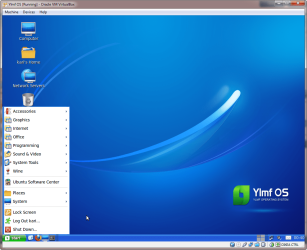
Simply for learning, I would rather install a Linux distro into a virtual machine running on Windows 7 host. Ubuntu is a nice beginners choice (1), or Ubuntu based Ylmf OS which has the most Windows-like GUI to help get started.

YlmfOS.png

This tutorial shows you how to start by installing Ubuntu Linux on a VirtualBox virtual machine on your Windows Seven. Download link for Ubuntu can be found in the tutorial. If you'd rather start with Ylfm OS, you can download an ISO image here: Ylmf OS-YlmF Operating System

Kari

(1) = Seems we have different opinion about Ubuntu, Scoopeeedoo :) IMO it's so popular especially because it's so easy, really a beginners Linux. It also seems to be the distro found in 99.99% of computers of those users trolling various Windows forums telling how advanced tech geeks only use Linux ;)
 
Last edited:

My Computer My Computer

At a glance

Windows 10 Pro x64 EN-GB1.6 GHz Intel Core i7-720QM Processor6 GBATI Mobility Radeon HD 5850 Graphics
Computer type
Laptop
Computer Manufacturer/Model Number
HP ENVY 17-1150eg
OS
Windows 10 Pro x64 EN-GB
CPU
1.6 GHz Intel Core i7-720QM Processor
Memory
6 GB
Graphics Card(s)
ATI Mobility Radeon HD 5850 Graphics
Sound Card
Beats sound system with integrated subwoofer
Monitor(s) Displays
17" laptop display, 22" LED and 32" Full HD TV through HDMI
Screen Resolution
1600*900 (1), 1920*1080 (2&3)
Hard Drives
Internal: 2 x 500 GB SATA Hard Disk Drive 7200 rpm
External: 2TB for backups, 3TB USB3 network drive for media
Cooling
As Envy runs a bit warm, I have it on a Cooler Master pad
Keyboard
Logitech diNovo Media Desktop Laser (bluetooth)
Mouse
Logitech Performance Mouse MX
Internet Speed
50/10 Mbps VDSL
Antivirus
Windows Defender 4.3.9431.0
Browser
Maxthon 3.5.2., IE11
If your Windows falls over and dies, in a dual boot with Linux, you can always recover your windows-based data unless the hard drive itself has failed. It could save your a**.

It won't make your Windows faster, but it will never waste your time downloading the same automatic updates that failed last time, that you never wanted anyway, or leave you waiting while running malware and antivirus scans, or defragging.

It will never accuse you of piracy or nag you that you need to validate the OS before you can download some new application update.

It will not get slower and slower as time goes by, and you don't have to buy a new PC just to run the latest edition, or pay money to upgrade - it just downloads and installs the new kernel and system files when you want it to, or not if you don't. Most updates do not require a reboot, you just carry on doing what you were doing as it stops the old services and starts the new ones in the background.

It automatically cleans up the traces of the old version, leaving all your applications working like they did before, without having to reinstall, and leaving you with most of the disk space you had before. It also updates your applications in the same way.

It's a bit like the old broom that you have used for many years, three new heads, five replacement handles... :)

Yes, It's good experience to have, and it can download fixes while your Windows is sick and waiting for the knowledge of how to make it well again.

Alternatively, you can just boot it from a live CD or a USB.

 

My Computer My Computer

At a glance

Win 7 Ult + Starter, XP Pro +Home, 2kAS, Linu...AMD 64 Athlon X2 , Intel Atom N450, Intel Cel...2.5GB ; 1GB; 2GBNvidia GeForce7000m; Intel; Intel
Computer Manufacturer/Model Number
Acer 7520, Packard Bell dot se, Acer travelmate 2423
OS
Win 7 Ult + Starter, XP Pro +Home, 2kAS, Linux Mint 8, SuperOS
CPU
AMD 64 Athlon X2 , Intel Atom N450, Intel Celeron M 1.50 Ghz
Motherboard
Acer Fuquene
Memory
2.5GB ; 1GB; 2GB
Graphics Card(s)
Nvidia GeForce7000m; Intel; Intel
Sound Card
Realtek AC57
Monitor(s) Displays
17" ;10.1"; 19"
Screen Resolution
1440x900;1024x600;1440x900;
Hard Drives
WD 80, WD 320;
PSU
19v
Case
Laptop
Cooling
Air
Internet Speed
9.7Mb/s down 0.99Mb/s up
Other Info
ISP VIRGINMEDIA 10M cable broadband - D-Link DIR615 wireless router, 3Com OfficeConnect ASDL router used as wireless extender switch
I always maintain a dual boot system with an OS on each drive if the computer has 2 or more drives, so if and when one OS or drive fails (its only a matter of time) I can continue on with the other. I don't store files such as music, video, pictures, documents, etc., on the OS drives.
 

My Computer My Computer

At a glance

SSDs: Windows 7 HP 64, HDDs: Vista HP 64PC: Intel Q9650, Laptop: Intel T9900PC: 8 GB, Laptop: 8 GBPC: Gigabyte GeForce GTX-280, Laptop: ATI HD4670
Computer Manufacturer/Model Number
PC: Self Configured, Laptop: Acer 8935G
OS
SSDs: Windows 7 HP 64, HDDs: Vista HP 64
CPU
PC: Intel Q9650, Laptop: Intel T9900
Motherboard
PC: Asus P5Q-SE, Laptop: Acer
Memory
PC: 8 GB, Laptop: 8 GB
Graphics Card(s)
PC: Gigabyte GeForce GTX-280, Laptop: ATI HD4670
Hard Drives
PC: SSD, OCZ Vertzex 60 GB
PC: HDD, WD VelociRaptor 300 GB
PC: HDD, Seagate Baracuda 250 GB?
Laptop: SSD, Mushkin Callisto Deluxe 240 GB
Laptop: HDD, WD Caviar Black 500 GB
Back
Top