Advice for Updating All Passwords?

aozgolo

New member
Local time
6:41 AM
Messages
18
Hi, I've been using computers and the internet for about 16 years now, and in that time I've signed up for hundreds of websites on the internet committing probably the worst password crime you can do...

I only use about 5 passwords, and simply vary them from site to site, even if it's a site I haven't been to in forever I can pretty easily guess my password from the small selection I use.

I want to correct this and go through all these websites and update all my passwords and create more sophisticated and personalized passwords for each. The problem is I have absolute terrible memory and won't just remember all these hundreds of passwords I use.

I am VERY leery of using any sort of password utility on my PC since it seems that any sort of security compromise on my system could spell the end for the entirety of my online accounts, I'm unsure what added level of security these types of software provide to keep your password library secure.

Also I'm curious to hear any advice people use for creating secure passwords and keeping track of them. I don't really mind using the same password or variation of it for accounts that aren't really what I view as major security issues (things like forums or image sharing sites which I mostly only use for screenshots and hold no personally identifiable info beyond my e-mail) but for secure sites like my e-mail, social networking, bank accounts, work accounts, etc. I'd like to create that added layer of security that personalized passwords provide without having the painful situation of being locked out later down the road because I've lost said password.
 

My Computer My Computer

Computer type
PC/Desktop
Computer Manufacturer/Model Number
Custom Build
OS
Windows 7 Professional 64Bit
CPU
Intel i7 4790k
Motherboard
ASUS Hero VII Maximus
Memory
16GB
Graphics Card(s)
GeForce GTX 970
PSU
750 Watt
Internet Speed
Cable @ 1.0 MPBS
Antivirus
Norton 360
Browser
Firefox
Passwords

The important passwords are kept in my brain and nowhere else. If I forget then there's usually a password reset button that sends a reset link to my email address.

Some people will use password managers and the like. I used to keep Dashlane installed but these days use PowerCryptor Free although it's a bit complicated to use at first.

Basics:

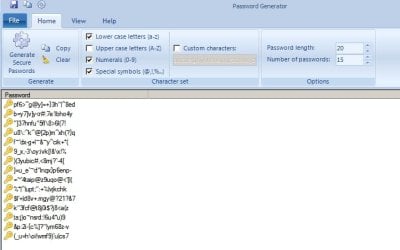
Generate a secure password list:

Password Generator.jpg

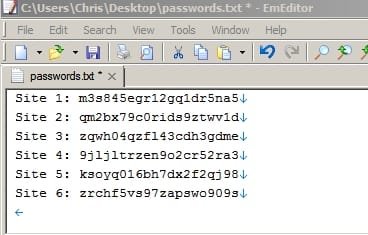
Assign passwords to sites and save text file:

passwords text file.jpg

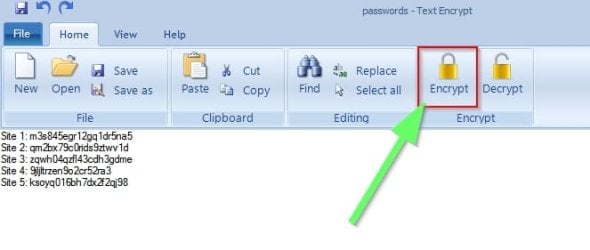
Encrypt the password file:

Text Encrypt.jpg

If opened it looks like this:

passwords text file encrypted.jpg

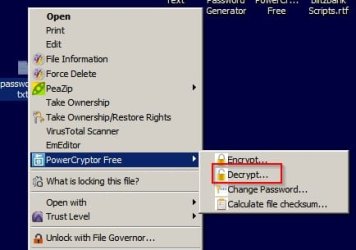
Right click to decrypt and open using password:

Decrypt.jpg

It's an alternative to password managers anyway.
 

My Computer My Computer

Computer type
Laptop
Computer Manufacturer/Model Number
ASUS
OS
Microsoft Windows 7 Home Premium 64-bit 7601 Multiprocessor Free Service Pack 1
CPU
AMD C-60 APU with Radeon(tm) HD Graphics
Motherboard
ASUSTeK COMPUTER INC. X501U
Memory
4.00 GB
Graphics Card(s)
AMD Radeon HD 6290 Graphics
Sound Card
(1) AMD High Definition Audio Device (2) Realtek High Defi
Screen Resolution
1366 x 768 x 32 bits (4294967296 colors) @ 60 Hz
Hard Drives
Hitachi HTS545050A7E380 SATA Disk Device
Antivirus
Comodo CIS & FW, SecureAplus App Whitelisting, Threatfire
Browser
Cyberfox 64bit, Opera 64bit, Airfox
Other Info
Spy-The-Spy, HitmanPro.Alert, Norton Connect Safe, MJRegWatcher, BitDefender TrafficLight, Voodoo Shield, Zemana AntiMalware
I keep mine on a file in MS Word. The file name is an unusual one so it can not be easily detected. This isn't fancy, but it stops me from forgetting them and is easily accessible. For websites like this one, security is not that important. I only have a few that are really important, like my bank.
 

My Computer My Computer

Computer type
PC/Desktop
Computer Manufacturer/Model Number
Custom Build
OS
Windows 7 Home Premium 32-Bit - Build 7600 SP1
CPU
Intel Core i3-2120 3.30Ghz
Motherboard
Asus P8Z68-V LX Intel Z68 Socket H2 ATX
Memory
Kingston 4 GB DDR3 1333 mhz
Graphics Card(s)
AMD Radeon HD6670
Sound Card
Sound Blaster Audigy SE 24-Bit
Monitor(s) Displays
Asus VE228
Screen Resolution
1440 X 900
Hard Drives
OCZ Vertex 3 120 GB Sata 3 SSD ==
Kingston SH103/S3 120 G Hyper X 120 GB SSD ==
Western Digital 500 GB Caviar Green 7200 RPM ==
PSU
Corsair CX600M == 600 Watt
Case
NZXT Apollo - Silver with Clear Side Panel
Cooling
Three 120 mm Fans
Keyboard
Microsoft Natural 4000
Mouse
Microsoft Custom Optical 3000
Internet Speed
AT&T Fiber Optic Wireless Network
Antivirus
Microsoft Security Essentials
Browser
Chrome
Other Info
120 mm Blue LED Fan -- Three Blue LED Lazer Light Sticks
Got a favorite song?

No doubt about it? Always will be? Not public knowledge?

What's the first 15 words to it?

Write those words down and use the first letter from each word. Sprinkle in an upper case letter, a number, or maybe an odd character, like a semi-colon or something. Maybe 16 or 17 characters total.

You should be able to train your fingers to spit out those first letters to the words in the song easily.

Change it from time to time by keeping the same song, but using different upper case letters, numbers, or odd characters.

No need to use it for ordinary harmless sites like this; use it where a password breach would be a big problem for you---banks, bill paying, etc.

The CPU power required to crack passwords is getting cheaper every month. The last I read, it took thousands of dollars worth of CPU time to crack a well-constructed 15 character password. Adding another character in length significantly adds to the security.
 

My Computer My Computer

Computer type
PC/Desktop
Computer Manufacturer/Model Number
Ignatz Special; 4 speed manual gearbox; factory air conditioning; one of one
OS
Windows 7 Home Premium SP1, 64-bit
CPU
Intel Skylake i5-6600K, not overclocked
Motherboard
AsRock Z170M Extreme 4, micro ATX
Memory
8 GB HyperX DDR4-2666 (2 x 4 GB)
Graphics Card(s)
none; graphics are integrated on CPU
Sound Card
onboard: Realtek ALC1150; external: USB Behringer UF0-202
Monitor(s) Displays
Dell S2340M 23 inch IPS
Screen Resolution
1600 x 900
Hard Drives
System: Crucial MX100 series SSD, 128 GB;
Data: Samsung Spinpoint 103SJ, 1 TB;
Backup: WD Caviar Green WD30EZRX-00D8PB0, 3 TB
PSU
Rosewill SilentNight 500 watt fanless, semi-modular
Case
Antec Solo II
Cooling
Noctua NH-U12S; Noctua F12 intake, Noctua S12A exhaust
Keyboard
Microsoft 200 6JH-00001 USB
Mouse
Dell or Microsoft optical wired; USB
Antivirus
Microsoft Security Essentials and Malwarebytes Premium
Browser
Pale Moon
Other Info
All fans PWM; speeds at idle: CPU circa 500 rpm; intake circa 600 rpm; exhaust circa 600 rpm; CPU temps 27 idle and 47 C load in a warm room (27 C/81 F) when running Intel Extreme Tuning Utility stress test.
That idea of a favorite song is a good one.
 

My Computer My Computer

Computer type
PC/Desktop
Computer Manufacturer/Model Number
Custom Build
OS
Windows 7 Home Premium 32-Bit - Build 7600 SP1
CPU
Intel Core i3-2120 3.30Ghz
Motherboard
Asus P8Z68-V LX Intel Z68 Socket H2 ATX
Memory
Kingston 4 GB DDR3 1333 mhz
Graphics Card(s)
AMD Radeon HD6670
Sound Card
Sound Blaster Audigy SE 24-Bit
Monitor(s) Displays
Asus VE228
Screen Resolution
1440 X 900
Hard Drives
OCZ Vertex 3 120 GB Sata 3 SSD ==
Kingston SH103/S3 120 G Hyper X 120 GB SSD ==
Western Digital 500 GB Caviar Green 7200 RPM ==
PSU
Corsair CX600M == 600 Watt
Case
NZXT Apollo - Silver with Clear Side Panel
Cooling
Three 120 mm Fans
Keyboard
Microsoft Natural 4000
Mouse
Microsoft Custom Optical 3000
Internet Speed
AT&T Fiber Optic Wireless Network
Antivirus
Microsoft Security Essentials
Browser
Chrome
Other Info
120 mm Blue LED Fan -- Three Blue LED Lazer Light Sticks
How about writing down the passwords and keeping them in your desk.
I keep mine on a Rolodex. It sits on my desk for easy access.

I usually use little sayings I can remember in most cases.

Example:
My dog took a dump.
Grandma nickers
Cold beer please
 

My Computer My Computer

Computer type
PC/Desktop
Computer Manufacturer/Model Number
Home made Desktop
OS
Windows 10 Pro. 64/ version 1709 Windows 7 Pro/64
CPU
Intel i7-6800K @ 4.3
Motherboard
ASUS X-99 Deluxe II
Memory
Corsair Platinum 16 gig @2400
Graphics Card(s)
EVGA GTX 1070 OC
Monitor(s) Displays
Asus 27" LED LCD/VE278Q
Screen Resolution
1920-1080 or 1280-720 HDMI
Hard Drives
INTEL SSD 730-240 Gb Sata 3.0/
PSU
EVGA Platium 1200W
Case
Phanteks Luxe Tempered Glass 8 fans/ one radiator
Cooling
XSPC/ Water Cooled CPU
Keyboard
Das 4 Professional
Mouse
Logitech M705/MX Anywhere 2-S
Internet Speed
100 mbits
Antivirus
Microsoft Security Essentials/ Malwarebytes Premium 3.0/ SAS
Browser
I.E. 11 default/Firefox/ ISP Time Warner Cable/Spectrum
Other Info
LG BluRay Burner/
Sound system-KLipsch-THX/
Icy Dock ssd Hot Swap bays.
Back
Top