

- Local time
- 8:20 AM
- Messages
- 108
Hi all,
I have a PC (the one im writing this from). In it are 2 x 1Tb HDD's set up like this:
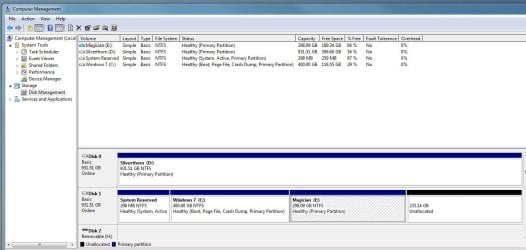
This is a full retail version of W7 HP 64bit.
Ive also just bought all the parts for a new build. This will eventually be OS on a 128Gb SSD and 2 x 1TB HDDs in a software raid for fast games. Over the next day ill build it. In terms of OS I will be using a new retail copy of W7 HP 64bit i just bought with all the parts. Heres the trickier bit: The 2 x 1tb HDD's (almost identical) i want to raid together are the two in my old machine (pictured above). My wife will inherit my old machine but ive bought her a new single 1TB (different manufacturer).
Anyhow here are my problems and my own solutions but perhaps there are better / more elegant ways of doing this??
1) Whilst I build my new computer i want my old one to alive and well so i can use it to come to forums like this! I can achieve this to begin with by building the new rig and installing the new retail OS to the new SSD. No too hard so far.
2) Once the new PC is booting happily into windows from the SSD I then want to take the 2 x 1TB HDD's out of my old machine. My plan is to format the new HDD on the old machine and create two partitions. I will then discimage my old OS onto one of the partitions of the new HDD on my old machine. i can then boot the old machine from this new HDD and still see my old, familiar windoes OS setup.
3) At some point my wife wants a rebuilt OS thats all shiny and new. I was going to use my old retail W7 to create a brand new isntall onto the other partition and get that all set up for her. At any time i want to be able to dual boot back to my old w7 install (from the same copy of windows). Is this even possible? And once the new os is set up, my wife is happy, my new PC is all hunky dory, I will delete my old (and much loved) OS, and expand the partition with the clean install to fill the HDD and then its over to the wife.
I have a NAS which is networked (Synology 4 bay with 2 TB in it atm) which I can also use if it helps anything??
I look forward to any suggestions and advice if anyone has any (or can understand a word ive written)
thanks
Matt
I have a PC (the one im writing this from). In it are 2 x 1Tb HDD's set up like this:
This is a full retail version of W7 HP 64bit.
Ive also just bought all the parts for a new build. This will eventually be OS on a 128Gb SSD and 2 x 1TB HDDs in a software raid for fast games. Over the next day ill build it. In terms of OS I will be using a new retail copy of W7 HP 64bit i just bought with all the parts. Heres the trickier bit: The 2 x 1tb HDD's (almost identical) i want to raid together are the two in my old machine (pictured above). My wife will inherit my old machine but ive bought her a new single 1TB (different manufacturer).
Anyhow here are my problems and my own solutions but perhaps there are better / more elegant ways of doing this??
1) Whilst I build my new computer i want my old one to alive and well so i can use it to come to forums like this! I can achieve this to begin with by building the new rig and installing the new retail OS to the new SSD. No too hard so far.
2) Once the new PC is booting happily into windows from the SSD I then want to take the 2 x 1TB HDD's out of my old machine. My plan is to format the new HDD on the old machine and create two partitions. I will then discimage my old OS onto one of the partitions of the new HDD on my old machine. i can then boot the old machine from this new HDD and still see my old, familiar windoes OS setup.
3) At some point my wife wants a rebuilt OS thats all shiny and new. I was going to use my old retail W7 to create a brand new isntall onto the other partition and get that all set up for her. At any time i want to be able to dual boot back to my old w7 install (from the same copy of windows). Is this even possible? And once the new os is set up, my wife is happy, my new PC is all hunky dory, I will delete my old (and much loved) OS, and expand the partition with the clean install to fill the HDD and then its over to the wife.
I have a NAS which is networked (Synology 4 bay with 2 TB in it atm) which I can also use if it helps anything??
I look forward to any suggestions and advice if anyone has any (or can understand a word ive written)
thanks
Matt
Last edited:
My Computer
At a glance
W7 Home Prem, Vista home PremIntel E8600 3.3GHz dual core4 GbNvidia - GForce GTX 280 - 1Gb
- Computer Manufacturer/Model Number
- Manufacturer: Me
- OS
- W7 Home Prem, Vista home Prem
- CPU
- Intel E8600 3.3GHz dual core
- Motherboard
- Asus (need to find model)
- Memory
- 4 Gb
- Graphics Card(s)
- Nvidia - GForce GTX 280 - 1Gb
- Sound Card
- Xonar Dx 5.1
- Monitor(s) Displays
- Hazro flatscreen
- Screen Resolution
- 1920 x 1200
- Hard Drives
- 1 x Samsung Spinpoint F1 300 gb
1 x Samsung Spinpoint F1 1 Tb
1 x Samsung Spinpoint F3 1 Tb
- PSU
- Later
- Case
- Infiniti Midi tower
- Cooling
- later
- Keyboard
- Logitech G11
- Mouse
- Logitech G9 Laser
- Internet Speed
- 3mb/s - awful
- Other Info
- I built this three years ago. It was very fast at the time. Now it's about average but still runs any game I throw at it at max detail.
Currently


