
Adware.Hicosmea

Snugglebugs

New member
Member
Local time
1:59 AM
Messages
79
Location
Vormark in Denmark
Almost everytime I run Malwarebytes I get a report that Adware.Hicosmea needs quarantining. I have checked on advice for permanently removing this nuisance, but the steps needed are so involved that I don't fancy trying to do it manually. The adverts that popup recommending various removal software downloads to buy don't inspire me with any confidence!

Does anyone know of a macro that is available to run all the cmd commands to remove it?

Tony
 

My Computer

Computer type
PC/Desktop
Computer Manufacturer/Model Number
Acer twice plus Lenovo
OS
XP Pro and Win7 Pro both 32 bit plus Win 8.1 64bit
Memory
4 G
Hard Drives
300G and 500 G with 4TB backup drive
Antivirus
AVG, MS Essentials and Windows Defender
Browser
IE8, IE9, IE11 and Opera.
Other Info
The various items listed are NOT all on one PC! But all PCs are connected via a combined LAN/WLAN which also provides connection to a network printer

My Computer

Computer type
PC/Desktop
Computer Manufacturer/Model Number
HP Desktop & Compaq Laptop
OS
Win 10 x64, Linux Lite, Win 7 x64, BlackArch, & Kali
Hard Drives
Samsung 850 Pro 256Gb,
Hitachi HDD 1Tb,
Crucial MX SSD 250Gb
Segate 3Tb USB 3.0 Ext. Backup HDD
Internet Speed
150Mbps dn, 20Mbps up
Antivirus
Avast Free, Malwarebytes Anti-Exploit & Anti-Ransomware
Browser
Firefox, Chrome, Opera, & VPN
Snick

The first suggestion was one of the ones I gave up on - the auto method involves installing a programme that itself has disadvantages. The manual method suggests different things that are not correct! For example, Hicosmea does not appear as an installed programme via CP. Neither does it appear in programme files or programme data or in roaming, and regedit doesn't show it.

The second suggestion is merely a different sell from the first! Methods in there are a carbon copy and give the same results in CP and regedit etc.

As I said, Malwarebytes detects and cleans it, but obviously not completely as it comes back af ter a while and is then detected again, and again, and...........

Tony
 

My Computer

Computer type
PC/Desktop
Computer Manufacturer/Model Number
Acer twice plus Lenovo
OS
XP Pro and Win7 Pro both 32 bit plus Win 8.1 64bit
Memory
4 G
Hard Drives
300G and 500 G with 4TB backup drive
Antivirus
AVG, MS Essentials and Windows Defender
Browser
IE8, IE9, IE11 and Opera.
Other Info
The various items listed are NOT all on one PC! But all PCs are connected via a combined LAN/WLAN which also provides connection to a network printer
OK Snugglebugs, please do the following:
On default settings, run Malwarebytes and delete everything it finds.
To upload Malwarebytes log
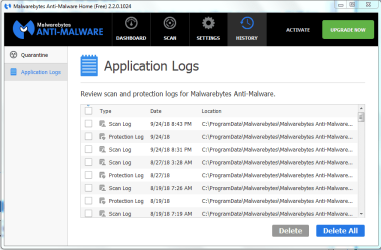
start Malwarebytes select History>Applications Log>double click latest scan log>export>text file>at popup choose desktop.
Upload log

Nic
 
Last edited:

My Computer

Computer type
PC/Desktop
Computer Manufacturer/Model Number
HP Desktop & Compaq Laptop
OS
Win 10 x64, Linux Lite, Win 7 x64, BlackArch, & Kali
Hard Drives
Samsung 850 Pro 256Gb,
Hitachi HDD 1Tb,
Crucial MX SSD 250Gb
Segate 3Tb USB 3.0 Ext. Backup HDD
Internet Speed
150Mbps dn, 20Mbps up
Antivirus
Avast Free, Malwarebytes Anti-Exploit & Anti-Ransomware
Browser
Firefox, Chrome, Opera, & VPN
Snick

Generally I just delete the reports but I found a recent one that I didn't!
Here it is attached. (Not in the menu as you describe, but I found it.)

Sorry I took so long - been rather busy!

Tony
 

Attachments

My Computer

Computer type
PC/Desktop
Computer Manufacturer/Model Number
Acer twice plus Lenovo
OS
XP Pro and Win7 Pro both 32 bit plus Win 8.1 64bit
Memory
4 G
Hard Drives
300G and 500 G with 4TB backup drive
Antivirus
AVG, MS Essentials and Windows Defender
Browser
IE8, IE9, IE11 and Opera.
Other Info
The various items listed are NOT all on one PC! But all PCs are connected via a combined LAN/WLAN which also provides connection to a network printer
No problem with the time factor.

OOPS, I didn't ask you to click setting > Detection and Protection > check Scan for rootkits
Would you please do that now, & rescan.
I'm running an older version of Malwarebytes, interface may be different on new versions. Old MB Free doesn't delete my MB Anti-Exploit and MB Anti-Ransomware stand alone versions. New MB has those included, but deletes the stand alone versions, even if you don't choose MB Premium Trial
Capture.PNG
In perusing your posts, Hicosmea has a few variations, I believe, that is what those articles address. You've determined that some of the instruction don't apply to your particular situation.
Appears that Malwarebytes flagged a registry key and quarantined it.

Please download the appropriate FRST for your ailing machine.
FRST32
FRST64

Place it on your Desktop and run it.
In search type Hicosmea > click Search Registry
When it completes > click Files

When it completes upload SearchReg.txt & Search.txt from your Desktop & the new Malwarebytes Scan Log, I requested you to run above.
Logs will indicate any location that Hicosmea is still present in. If need be, I'll prepare a fix for you.

Nic
 
Last edited:

My Computer

Computer type
PC/Desktop
Computer Manufacturer/Model Number
HP Desktop & Compaq Laptop
OS
Win 10 x64, Linux Lite, Win 7 x64, BlackArch, & Kali
Hard Drives
Samsung 850 Pro 256Gb,
Hitachi HDD 1Tb,
Crucial MX SSD 250Gb
Segate 3Tb USB 3.0 Ext. Backup HDD
Internet Speed
150Mbps dn, 20Mbps up
Antivirus
Avast Free, Malwarebytes Anti-Exploit & Anti-Ransomware
Browser
Firefox, Chrome, Opera, & VPN
Scan for Rootkits option is On and always has been.

I tried FRST download and got a message that
"FRST.exe is not commonly downloaded and could harm your computer"
I selected the option Delete.

Any ideas?

Tony
 

My Computer

Computer type
PC/Desktop
Computer Manufacturer/Model Number
Acer twice plus Lenovo
OS
XP Pro and Win7 Pro both 32 bit plus Win 8.1 64bit
Memory
4 G
Hard Drives
300G and 500 G with 4TB backup drive
Antivirus
AVG, MS Essentials and Windows Defender
Browser
IE8, IE9, IE11 and Opera.
Other Info
The various items listed are NOT all on one PC! But all PCs are connected via a combined LAN/WLAN which also provides connection to a network printer
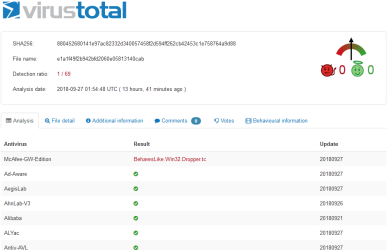
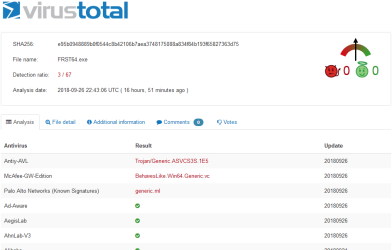
Yea, false positive, I provided you a link to Bleeping Computers download (clean website too), I tested the link, downloaded FRSTx64 and FRSTx32, submitted to Virus Total, they are clean. Here's snippets

FRSTx32

Capture1.PNG

FRSTx64

Capture.PNG

Those in red are from AVs that are not very good, actually, pretty bad. All the scanner that are top of the line according to AV Comparatives are green. You can upload the files to VirusTotal
and see for yourself. I have the VT uploader on my computers, added to the right-click context menu.

I'm a college student studying for CyberSecurity certification as well as CompTIA certs.

Nic

FYI: running multiple AV is not a recommended practice, AVG, MS Essentials and Windows Defender, with the exception of Malwarebytes Premium running alongside an AV (one AV).
 
Last edited:

My Computer

Computer type
PC/Desktop
Computer Manufacturer/Model Number
HP Desktop & Compaq Laptop
OS
Win 10 x64, Linux Lite, Win 7 x64, BlackArch, & Kali
Hard Drives
Samsung 850 Pro 256Gb,
Hitachi HDD 1Tb,
Crucial MX SSD 250Gb
Segate 3Tb USB 3.0 Ext. Backup HDD
Internet Speed
150Mbps dn, 20Mbps up
Antivirus
Avast Free, Malwarebytes Anti-Exploit & Anti-Ransomware
Browser
Firefox, Chrome, Opera, & VPN
I am not sure what you are telling me? I did try to download FRST from that bleeping computers website and that was what gave me the warning.

I have now run AdwCleaner and that found 103 threats of which two could not be removed - logs attached.
No message given as to how to deal with the two not removed.

Regarding multiple protections - no, I don't have all those installed and running! I only have MSE and Malwarebytes on THIS computer. Defender is installed (as an old experiment) but switched off so is never active.

Tony
 

Attachments

Last edited:

My Computer

Computer type
PC/Desktop
Computer Manufacturer/Model Number
Acer twice plus Lenovo
OS
XP Pro and Win7 Pro both 32 bit plus Win 8.1 64bit
Memory
4 G
Hard Drives
300G and 500 G with 4TB backup drive
Antivirus
AVG, MS Essentials and Windows Defender
Browser
IE8, IE9, IE11 and Opera.
Other Info
The various items listed are NOT all on one PC! But all PCs are connected via a combined LAN/WLAN which also provides connection to a network printer
Hi Tony,

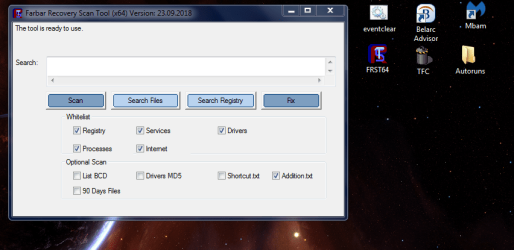
if you have it on your desktop, see screenshot, run it (hit the scan button), and provide BOTH logs.


Roy
 

Attachments

  • tony.PNG
    tony.PNG
    67.2 KB · Views: 0

My Computer

Computer type
PC/Desktop
Computer Manufacturer/Model Number
medionl/Aspire 6930G/acer x55a
OS
W7 home premium 32bit/W7HP 64bit/w10 tp insider ring
CPU
E5300 dual core
Motherboard
medion MS7366
Memory
3gb
Graphics Card(s)
Nvidia Geforce 7100 Nforce 630i
Monitor(s) Displays
avixc
Internet Speed
n (isp resticted to 72)
Antivirus
mse/pands
Browser
palemoon
Other Info
Belkin Fd7050 n USB using Railink RT2870 drivers, more upto date
Always glad to see your posts/assistance Torchwood!
 

My Computer

Computer type
PC/Desktop
Computer Manufacturer/Model Number
HP Desktop & Compaq Laptop
OS
Win 10 x64, Linux Lite, Win 7 x64, BlackArch, & Kali
Hard Drives
Samsung 850 Pro 256Gb,
Hitachi HDD 1Tb,
Crucial MX SSD 250Gb
Segate 3Tb USB 3.0 Ext. Backup HDD
Internet Speed
150Mbps dn, 20Mbps up
Antivirus
Avast Free, Malwarebytes Anti-Exploit & Anti-Ransomware
Browser
Firefox, Chrome, Opera, & VPN
I'm telling you the download link is clean! Your Anti-virus is providing you with a false positive, i.e. it is incorrectly flagging this executable.

Many AVs do this to protect the less IT savvy individuals from downloading something that may harm their computer. For example, NirSoft, author Nir Sofer, has numerous free IT tools on his website. If I download say NirLauncher, from the website, my Avast Free AV goes nuts flagging perfectly fine apps. None of NirSoft apps are malicious, however, some, if used incorrectly can cause damage to an Operation System, thus your AV flaggs them as may harm your computer.

What we are attempting to do with Farbar Recovery Scan Tool (FRST) is to locate all entries of Hicosmea, files, folders, registry entries. With those logs in hand, I can author a fix to remove the malware/adware from your computer.

If you continue to have issues with downloading FRST, you may temporarily disable your AV. FRST is an executable and doesn't require installation on your computer.
 

My Computer

Computer type
PC/Desktop
Computer Manufacturer/Model Number
HP Desktop & Compaq Laptop
OS
Win 10 x64, Linux Lite, Win 7 x64, BlackArch, & Kali
Hard Drives
Samsung 850 Pro 256Gb,
Hitachi HDD 1Tb,
Crucial MX SSD 250Gb
Segate 3Tb USB 3.0 Ext. Backup HDD
Internet Speed
150Mbps dn, 20Mbps up
Antivirus
Avast Free, Malwarebytes Anti-Exploit & Anti-Ransomware
Browser
Firefox, Chrome, Opera, & VPN
Regarding multiple protections - no, I don't have all those installed and running! I only have MSE and Malwarebytes on THIS computer. Defender is installed (as an old experiment) but switched off so is never active.

I was perusing your System specs, in which you indicate, Antivirus: AVG, MS Essentials and Windows Defender
That is why I made referencing statement.

Just perused your ADWCleaner logs, lots of crap was on your computer!
 

My Computer

Computer type
PC/Desktop
Computer Manufacturer/Model Number
HP Desktop & Compaq Laptop
OS
Win 10 x64, Linux Lite, Win 7 x64, BlackArch, & Kali
Hard Drives
Samsung 850 Pro 256Gb,
Hitachi HDD 1Tb,
Crucial MX SSD 250Gb
Segate 3Tb USB 3.0 Ext. Backup HDD
Internet Speed
150Mbps dn, 20Mbps up
Antivirus
Avast Free, Malwarebytes Anti-Exploit & Anti-Ransomware
Browser
Firefox, Chrome, Opera, & VPN
I will try and get it to download and then run it. Not today though :sleep:
 

My Computer

Computer type
PC/Desktop
Computer Manufacturer/Model Number
Acer twice plus Lenovo
OS
XP Pro and Win7 Pro both 32 bit plus Win 8.1 64bit
Memory
4 G
Hard Drives
300G and 500 G with 4TB backup drive
Antivirus
AVG, MS Essentials and Windows Defender
Browser
IE8, IE9, IE11 and Opera.
Other Info
The various items listed are NOT all on one PC! But all PCs are connected via a combined LAN/WLAN which also provides connection to a network printer
Not a problem, I don't sit waiting for a response from OPs. I do however, have my email notifications set. Torchwood/Roy has been at this a bit long that I have, he is monitoring this thread as he posted here.

F22 Simpilot's suggestions are applicable and relevant. I also use & recommend them as well as a few others, which I have posted in a couple other threads including hyperlinks thereto.
 

My Computer

Computer type
PC/Desktop
Computer Manufacturer/Model Number
HP Desktop & Compaq Laptop
OS
Win 10 x64, Linux Lite, Win 7 x64, BlackArch, & Kali
Hard Drives
Samsung 850 Pro 256Gb,
Hitachi HDD 1Tb,
Crucial MX SSD 250Gb
Segate 3Tb USB 3.0 Ext. Backup HDD
Internet Speed
150Mbps dn, 20Mbps up
Antivirus
Avast Free, Malwarebytes Anti-Exploit & Anti-Ransomware
Browser
Firefox, Chrome, Opera, & VPN
I have now run FRST from my desktop and after two messages about incorrect entries, it generated the two log files attached. I ran it using the defaults that appeared and have not changed anything, or clicked on any buttons except "Scan"

Tony

PS - What are OPs?
 

Attachments

Last edited:

My Computer

Computer type
PC/Desktop
Computer Manufacturer/Model Number
Acer twice plus Lenovo
OS
XP Pro and Win7 Pro both 32 bit plus Win 8.1 64bit
Memory
4 G
Hard Drives
300G and 500 G with 4TB backup drive
Antivirus
AVG, MS Essentials and Windows Defender
Browser
IE8, IE9, IE11 and Opera.
Other Info
The various items listed are NOT all on one PC! But all PCs are connected via a combined LAN/WLAN which also provides connection to a network printer
Hi Tony,

Actually theres a fair bit of unusuall activity reported.
Im not a malware hunter/cleaner, so i've put a call out to DonnaB.


Your the OP - original poster.


Roy
 

My Computer

Computer type
PC/Desktop
Computer Manufacturer/Model Number
medionl/Aspire 6930G/acer x55a
OS
W7 home premium 32bit/W7HP 64bit/w10 tp insider ring
CPU
E5300 dual core
Motherboard
medion MS7366
Memory
3gb
Graphics Card(s)
Nvidia Geforce 7100 Nforce 630i
Monitor(s) Displays
avixc
Internet Speed
n (isp resticted to 72)
Antivirus
mse/pands
Browser
palemoon
Other Info
Belkin Fd7050 n USB using Railink RT2870 drivers, more upto date
Thanks again Torchwood!
 

My Computer

Computer type
PC/Desktop
Computer Manufacturer/Model Number
HP Desktop & Compaq Laptop
OS
Win 10 x64, Linux Lite, Win 7 x64, BlackArch, & Kali
Hard Drives
Samsung 850 Pro 256Gb,
Hitachi HDD 1Tb,
Crucial MX SSD 250Gb
Segate 3Tb USB 3.0 Ext. Backup HDD
Internet Speed
150Mbps dn, 20Mbps up
Antivirus
Avast Free, Malwarebytes Anti-Exploit & Anti-Ransomware
Browser
Firefox, Chrome, Opera, & VPN

My Computer

Computer type
PC/Desktop
Computer Manufacturer/Model Number
medionl/Aspire 6930G/acer x55a
OS
W7 home premium 32bit/W7HP 64bit/w10 tp insider ring
CPU
E5300 dual core
Motherboard
medion MS7366
Memory
3gb
Graphics Card(s)
Nvidia Geforce 7100 Nforce 630i
Monitor(s) Displays
avixc
Internet Speed
n (isp resticted to 72)
Antivirus
mse/pands
Browser
palemoon
Other Info
Belkin Fd7050 n USB using Railink RT2870 drivers, more upto date
Back
Top