
H4LO341
New member
So last week I turned my computer on in the morning as usual and after logging on I notice that Windows Aero is now the basic Windows 98-esk style... so I go to my themes and I change it to an "Aero" theme again and absolutely nothing changes except the wallpaper. I tried the Microsoft Fix-It aero troubleshooter utility and it said that Desktop window manager was disabled. I went to Services.msc and checked if it was running and it was in fact running. Even so I still restarted the service and it still says it's running every time I boot up, yet no Aero?? I'm stumped on this one
My Computer
- Computer type
- PC/Desktop
- Computer Manufacturer/Model Number
- Custom build
- OS
- Microsoft Windows 7 Home Premium 64-bit 7601 Multiprocessor Free Service Pack 1
- CPU
- AMD FX(tm)-6300 Six-Core Processor
- Motherboard
- ASUSTeK COMPUTER INC. M5A99FX PRO R2.0
- Memory
- 8gb(4x4) G-skill Ripjaws-x 1866mhz DDR3
- Graphics Card(s)
- Sapphire HD4850 512mb
- Sound Card
- (1) SoundBlaster Audigy (2) AMD High Definition
- Monitor(s) Displays
- 1x Asus VE-228 LED LCD monitor 1x acer G206HL
- Screen Resolution
- 1920x1080
- Hard Drives
- (1) ST3500630AS ATA Device (2) TOSHIBA External USB 3.0 SCSI Disk Device
- PSU
- Seasonic G550 550w /w 80+ Gold
- Case
- Raidmax Orion
- Cooling
- Air cooled, 4x 120mm case fans(2 top, 1 front, 1 side)
- Keyboard
- Standard Dell keyboard
- Mouse
- Logitech G5 laser gaming mouse
- Internet Speed
- Down: 14mbps Up: 1mbps PING: 14 - all averages
- Antivirus
- Microsoft Security Essentials, Malwarebytes
- Browser
- Google Chrome, Firefox, Opera

 rb:-adjust the appearance and performance of windows-(type that in search box) that you have desktop composition turned on.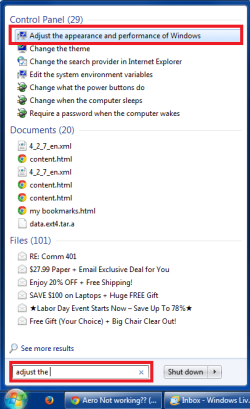

 and All the options in the visual effects tab are checked


