Aero Theme Not Displaying On Administrator Prompt

TechFreak2516

New member
Local time
10:23 PM
Messages
6
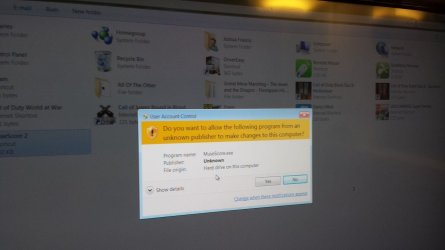
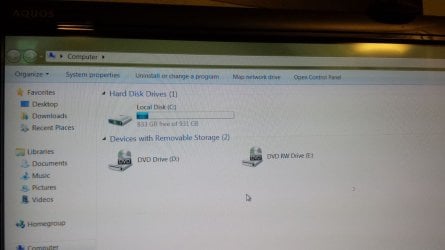
Ok so hello there,so i have windows 7 ultimate x64 bit and i have gotten the latest driver updates for my graphics card...And aero theme works great with everything,but when an admin prompt comes along...I know this is quite stupid for me to fuss over,but i have insane ocd :cry: and i really want to get this issue solved,i will try to get an image here in a bit....
 

Attachments

  • 20151031_230636.jpg
    20151031_230636.jpg
    52.4 KB · Views: 3
  • 20151031_230623.jpg
    20151031_230623.jpg
    69.2 KB · Views: 1
Last edited:

My Computer My Computer

At a glance

Windows 7 Ultimate x64Intel Core i5-46704GB Crucial,4GB Team Elite=8GB TotalEVGA Geforce GTX 750 Ti 2GB
Computer type
PC/Desktop
Computer Manufacturer/Model Number
Custom Build
OS
Windows 7 Ultimate x64
CPU
Intel Core i5-4670
Motherboard
MSI B85 Gaming Motherboard
Memory
4GB Crucial,4GB Team Elite=8GB Total
Graphics Card(s)
EVGA Geforce GTX 750 Ti 2GB
Hard Drives
1TB Western Digital
Browser
Chrome
Anybody?
 

My Computer My Computer

At a glance

Windows 7 Ultimate x64Intel Core i5-46704GB Crucial,4GB Team Elite=8GB TotalEVGA Geforce GTX 750 Ti 2GB
Computer type
PC/Desktop
Computer Manufacturer/Model Number
Custom Build
OS
Windows 7 Ultimate x64
CPU
Intel Core i5-4670
Motherboard
MSI B85 Gaming Motherboard
Memory
4GB Crucial,4GB Team Elite=8GB Total
Graphics Card(s)
EVGA Geforce GTX 750 Ti 2GB
Hard Drives
1TB Western Digital
Browser
Chrome
There are several forum members that will not visit external image hosting websites for security (infection risks) reasons.

I cannot recall if new members can edit their posts. If you see an edit button on you original post, please attach those images via these steps: http://www.sevenforums.com/tutorials/9733-screenshots-files-upload-post-seven-forums.html

If you cannot edit your first post, then please attach those images to your next post using the steps in the link above.

Also, don't bump your thread so soon. You should wait at least a day or two.
 

My Computer My Computer

At a glance

W7 Pro SP1 64biti78GBIntel HD Graphics
Computer type
Laptop
Computer Manufacturer/Model Number
Employer provided Dell Latitude
OS
W7 Pro SP1 64bit
CPU
i7
Memory
8GB
Graphics Card(s)
Intel HD Graphics
Hard Drives
crappy SSD
Antivirus
Employer mandated Symantec Endpoint Protection
Browser
Pale Moon 64bit, IE11 64bit & Chrome 64bit
There we go thanks for letting me know to do that :)
 

My Computer My Computer

At a glance

Windows 7 Ultimate x64Intel Core i5-46704GB Crucial,4GB Team Elite=8GB TotalEVGA Geforce GTX 750 Ti 2GB
Computer type
PC/Desktop
Computer Manufacturer/Model Number
Custom Build
OS
Windows 7 Ultimate x64
CPU
Intel Core i5-4670
Motherboard
MSI B85 Gaming Motherboard
Memory
4GB Crucial,4GB Team Elite=8GB Total
Graphics Card(s)
EVGA Geforce GTX 750 Ti 2GB
Hard Drives
1TB Western Digital
Browser
Chrome
Thanks for fixing that. I don't use themes, so I cannot confirm the info on this website. Maybe other forum members know if this can be changed.
 

My Computer My Computer

At a glance

W7 Pro SP1 64biti78GBIntel HD Graphics
Computer type
Laptop
Computer Manufacturer/Model Number
Employer provided Dell Latitude
OS
W7 Pro SP1 64bit
CPU
i7
Memory
8GB
Graphics Card(s)
Intel HD Graphics
Hard Drives
crappy SSD
Antivirus
Employer mandated Symantec Endpoint Protection
Browser
Pale Moon 64bit, IE11 64bit & Chrome 64bit
Welcome hope someone does :l
 

My Computer My Computer

At a glance

Windows 7 Ultimate x64Intel Core i5-46704GB Crucial,4GB Team Elite=8GB TotalEVGA Geforce GTX 750 Ti 2GB
Computer type
PC/Desktop
Computer Manufacturer/Model Number
Custom Build
OS
Windows 7 Ultimate x64
CPU
Intel Core i5-4670
Motherboard
MSI B85 Gaming Motherboard
Memory
4GB Crucial,4GB Team Elite=8GB Total
Graphics Card(s)
EVGA Geforce GTX 750 Ti 2GB
Hard Drives
1TB Western Digital
Browser
Chrome
Your pop up seems to coming from MuseScore.

https://en.wikipedia.org/wiki/MuseScore

Did you install this program?
If you did you could probably go into the program and stop it from booting at Start Up.

You could also try Start Orb/Starup and remove it from the Startup.

You could also do msconfig/Startup and Uncheck it.
Also check in msconfig/Non Microsoft Services and make sure it's not checked.

What ever you try make sure you reboot.
 

My Computer My Computer

At a glance

Windows 10 Pro. 64/ version 1709 Windows 7 Pr...Intel i7-6800K @ 4.3Corsair Platinum 16 gig @2400EVGA GTX 1070 OC
Computer type
PC/Desktop
Computer Manufacturer/Model Number
Home made Desktop
OS
Windows 10 Pro. 64/ version 1709 Windows 7 Pro/64
CPU
Intel i7-6800K @ 4.3
Motherboard
ASUS X-99 Deluxe II
Memory
Corsair Platinum 16 gig @2400
Graphics Card(s)
EVGA GTX 1070 OC
Monitor(s) Displays
Asus 27" LED LCD/VE278Q
Screen Resolution
1920-1080 or 1280-720 HDMI
Hard Drives
INTEL SSD 730-240 Gb Sata 3.0/
PSU
EVGA Platium 1200W
Case
Phanteks Luxe Tempered Glass 8 fans/ one radiator
Cooling
XSPC/ Water Cooled CPU
Keyboard
Das 4 Professional
Mouse
Logitech M705/MX Anywhere 2-S
Internet Speed
100 mbits
Antivirus
Microsoft Security Essentials/ Malwarebytes Premium 3.0/ SAS
Browser
I.E. 11 default/Firefox/ ISP Time Warner Cable/Spectrum
Other Info
LG BluRay Burner/
Sound system-KLipsch-THX/
Icy Dock ssd Hot Swap bays.
Your pop up seems to coming from MuseScore.

https://en.wikipedia.org/wiki/MuseScore

Did you install this program?
If you did you could probably go into the program and stop it from booting at Start Up.

You could also try Start Orb/Starup and remove it from the Startup.

You could also do msconfig/Startup and Uncheck it.
Also check in msconfig/Non Microsoft Services and make sure it's not checked.

What ever you try make sure you reboot.

Thanks man,but this is on every admin prompt,i just ran this program to show you what it looked like just in case :)
 

My Computer My Computer

At a glance

Windows 7 Ultimate x64Intel Core i5-46704GB Crucial,4GB Team Elite=8GB TotalEVGA Geforce GTX 750 Ti 2GB
Computer type
PC/Desktop
Computer Manufacturer/Model Number
Custom Build
OS
Windows 7 Ultimate x64
CPU
Intel Core i5-4670
Motherboard
MSI B85 Gaming Motherboard
Memory
4GB Crucial,4GB Team Elite=8GB Total
Graphics Card(s)
EVGA Geforce GTX 750 Ti 2GB
Hard Drives
1TB Western Digital
Browser
Chrome
I believe that is by design, when a UAC prompt pops up it is in secure desktop mode, (the darkening of the screen behind it.)

In UNI's link you can see the transparency only when using the flip 3D,

uacaero.jpg


I believe the secure desktop is what keeps Aero from being seen on those prompts.
 

My Computer My Computer

At a glance

Win 10 Pro x64Intel I5-2500K @3.3GHz16GB G.Skill Ripjaws X (4x4GB)EVGA GeForce 750 Ti SC 2GB
Computer type
PC/Desktop
Computer Manufacturer/Model Number
Self Built
OS
Win 10 Pro x64
CPU
Intel I5-2500K @3.3GHz
Motherboard
Asrock P67 Extreme4
Memory
16GB G.Skill Ripjaws X (4x4GB)
Graphics Card(s)
EVGA GeForce 750 Ti SC 2GB
Sound Card
ASUS Xonar DG 5.1 Channels 24-bit 96KHz PCI Interface Sound
Monitor(s) Displays
auria eq2367
Screen Resolution
1920 x 1080
Hard Drives
250GB Samsung 850 EVO SSD
1TB WD Blue
1TB Hitachi
PSU
SeaSonic X 650W 80 Plus Gold
Case
Corsair Obsidian 750D
Cooling
Corsair H60, Three 140mm case fans
Keyboard
Logitech Wireless Keyboard K520
Mouse
Logitech Wireless Mouse M310
Internet Speed
Wave Broadband ~ 100 dn 5 up
Antivirus
Windows Defender, Malwarebytes Premium
Browser
Edge, IE11, Chrome
Other Info
Laptop specs: HP g7-1365dx /
CPU: AMD A6-3420M APU with Radeon(tm) HD Graphics /
RAM: Crucial 8Gb (2x4Gb) /
SSD: Crucial M4-CT128M4SSD2 ATA Device/ FW 000F /
GFX: AMD Radeon HD 6520G /
OS: Windows 10 Pro x64
I believe that is by design, when a UAC prompt pops up it is in secure desktop mode, (the darkening of the screen behind it.)

In UNI's link you can see the transparency only when using the flip 3D,

uacaero.jpg


I believe the secure desktop is what keeps Aero from being seen on those prompts.

Why thanks man that is awesome,but see,on other versions of windows,this issue doesn't arise,so is there a way to maybe get just aero on there and not the black out or dim background,cause i want and like that,thanks!
 

My Computer My Computer

At a glance

Windows 7 Ultimate x64Intel Core i5-46704GB Crucial,4GB Team Elite=8GB TotalEVGA Geforce GTX 750 Ti 2GB
Computer type
PC/Desktop
Computer Manufacturer/Model Number
Custom Build
OS
Windows 7 Ultimate x64
CPU
Intel Core i5-4670
Motherboard
MSI B85 Gaming Motherboard
Memory
4GB Crucial,4GB Team Elite=8GB Total
Graphics Card(s)
EVGA Geforce GTX 750 Ti 2GB
Hard Drives
1TB Western Digital
Browser
Chrome
What other versions are you talking about? I'd like to see this, any pictures?
 

My Computer My Computer

At a glance

Win 10 Pro x64Intel I5-2500K @3.3GHz16GB G.Skill Ripjaws X (4x4GB)EVGA GeForce 750 Ti SC 2GB
Computer type
PC/Desktop
Computer Manufacturer/Model Number
Self Built
OS
Win 10 Pro x64
CPU
Intel I5-2500K @3.3GHz
Motherboard
Asrock P67 Extreme4
Memory
16GB G.Skill Ripjaws X (4x4GB)
Graphics Card(s)
EVGA GeForce 750 Ti SC 2GB
Sound Card
ASUS Xonar DG 5.1 Channels 24-bit 96KHz PCI Interface Sound
Monitor(s) Displays
auria eq2367
Screen Resolution
1920 x 1080
Hard Drives
250GB Samsung 850 EVO SSD
1TB WD Blue
1TB Hitachi
PSU
SeaSonic X 650W 80 Plus Gold
Case
Corsair Obsidian 750D
Cooling
Corsair H60, Three 140mm case fans
Keyboard
Logitech Wireless Keyboard K520
Mouse
Logitech Wireless Mouse M310
Internet Speed
Wave Broadband ~ 100 dn 5 up
Antivirus
Windows Defender, Malwarebytes Premium
Browser
Edge, IE11, Chrome
Other Info
Laptop specs: HP g7-1365dx /
CPU: AMD A6-3420M APU with Radeon(tm) HD Graphics /
RAM: Crucial 8Gb (2x4Gb) /
SSD: Crucial M4-CT128M4SSD2 ATA Device/ FW 000F /
GFX: AMD Radeon HD 6520G /
OS: Windows 10 Pro x64
Yes. Type "user account control" into the start menu, and click on "change user account control settings. Move the bar down to "Notify me only when programs try to make changes to my computer (do not dim my desktop)." That should fix it.
 

My Computer My Computer

At a glance

Windows 7 Ultimate x64i7-4702M
Computer type
Laptop
Computer Manufacturer/Model Number
Lenovo Thinkpad E540
OS
Windows 7 Ultimate x64
CPU
i7-4702M
Antivirus
Norton 360
Browser
Pale Moon
Back
Top