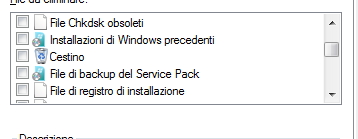
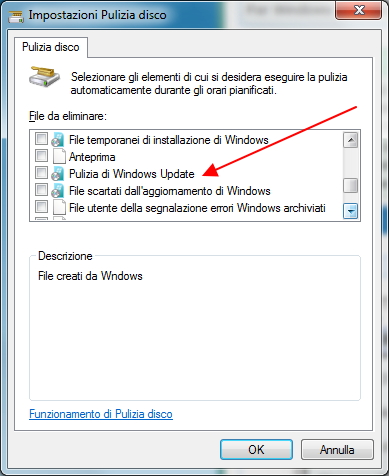
after august update,Windows Update Cleanup is gone

drugo

New member
Member
VIP
Local time
5:24 AM
Messages
476
Hi
after every update , i used to run as administrator Disk Cleanup and clean windows update

and Disk cleanup kept always 2mb under windows update cleanup

well , i update august update , i reboot , and after i run as administrator disk cleanup and i select windows update cleanup

the odd thing is that it deleted without a reboot! in the past when i wanted to clean the windows update via Disk cleanup w7 performs this action after the reboot

well the point is that now when i run as administrator disk cleanup , in the list windows update cleanup is gone

weird there is still the option "back file service pack" -> 0 kb

but there is no more windows update cleanup option , it's gone

thanks
sorry for my poor english
 

My Computer My Computer

Computer type
PC/Desktop
OS
windows 7 ultimate 64bit
Since I never use the option I've not noticed anything amiss here - but when I ran the Cleanup, it properly scanned the WU cleanup area and gave me the option to remove 7.3GB of data (I need the older updates, so didn't take the option!)

I'll have a play in a VM later and see if I can reproduce your observation - I'll also refer a couple of other specialists to the thread and see if they have seen anything similar.
 

My Computer My Computer

Computer type
Laptop
Computer Manufacturer/Model Number
Asus K52F or Lenovo B51-80
OS
Win 7 x64 Home Premium (and x86 VirtualBox VM)/Win10
CPU
i3 370M/i7 6500U
Motherboard
Asus/Lenovo
Memory
8GB - finally :)/8GB
Graphics Card(s)
it's an i3, dude!/dual Intel&nVidia
Sound Card
onboard
Monitor(s) Displays
15.6" built-in
Screen Resolution
1366x768/1920x1080
Hard Drives
750GB Seagate internal
Sundry external drives attached to other computers on the local network
1TB SSD on the Lenovo
PSU
n/a
Internet Speed
as much as I can get - usually on a dongle/phone, so <1MB/s
Antivirus
MSE/Defender
Browser
IE11/12/Edge/Chrome/FF(if I must)
Since I never use the option I've not noticed anything amiss here - but when I ran the Cleanup, it properly scanned the WU cleanup area and gave me the option to remove 7.3GB of data (I need the older updates, so didn't take the option!)

I'll have a play in a VM later and see if I can reproduce your observation - I'll also refer a couple of other specialists to the thread and see if they have seen anything similar.
thanks Noel
 

My Computer My Computer

Computer type
PC/Desktop
OS
windows 7 ultimate 64bit
Question

What happens if you try this?

Start> Run then type

cleanmgr.exe sageset:10

Press Enter

In the window that appears - click Clean up system files - do you see the windows Update Cleanup option available?

View attachment 330069

If it's available make your choices then click OK.

Then run cleanmgr.exe sagerun:10 to run disk cleanup with advanced options.

Also see this if you haven't got update kb2852386 installed:

Disk Cleanup Wizard addon lets users delete outdated Windows updates on Windows 7 SP1 or Windows Server 2008 R2 SP1
 
Last edited:

My Computer My Computer

Computer type
Laptop
Computer Manufacturer/Model Number
ASUS
OS
Microsoft Windows 7 Home Premium 64-bit 7601 Multiprocessor Free Service Pack 1
CPU
AMD C-60 APU with Radeon(tm) HD Graphics
Motherboard
ASUSTeK COMPUTER INC. X501U
Memory
4.00 GB
Graphics Card(s)
AMD Radeon HD 6290 Graphics
Sound Card
(1) AMD High Definition Audio Device (2) Realtek High Defi
Screen Resolution
1366 x 768 x 32 bits (4294967296 colors) @ 60 Hz
Hard Drives
Hitachi HTS545050A7E380 SATA Disk Device
Antivirus
Comodo CIS & FW, SecureAplus App Whitelisting, Threatfire
Browser
Cyberfox 64bit, Opera 64bit, Airfox
Other Info
Spy-The-Spy, HitmanPro.Alert, Norton Connect Safe, MJRegWatcher, BitDefender TrafficLight, Voodoo Shield, Zemana AntiMalware
What happens if you try this?

Start> Run then type

cleanmgr.exe sageset:10

Press Enter

In the window that appears - click Clean up system files - do you see the windows Update Cleanup option available?

View attachment 330069

If it's available make your choices then click OK.

Then run cleanmgr.exe sagerun:10 to run disk cleanup with advanced options.

Also see this if you haven't got update kb2852386 installed:

Disk Cleanup Wizard addon lets users delete outdated Windows updates on Windows 7 SP1 or Windows Server 2008 R2 SP1


i run it and i have lots of options
SG2Y4FC.jpg


LYmayzi.jpg


i don't have clean up system files ,your screenshot with the green arrow

Also see this if you haven't got update kb2852386 installed:
yes i have installed

but if you run clean disk normally do you have clean windows update option?


thanks
 

My Computer My Computer

Computer type
PC/Desktop
OS
windows 7 ultimate 64bit
The 'Deep Clean' option is only available when Disk Cleanup is run as an Administrator
 

My Computer My Computer

Computer type
Laptop
Computer Manufacturer/Model Number
Asus K52F or Lenovo B51-80
OS
Win 7 x64 Home Premium (and x86 VirtualBox VM)/Win10
CPU
i3 370M/i7 6500U
Motherboard
Asus/Lenovo
Memory
8GB - finally :)/8GB
Graphics Card(s)
it's an i3, dude!/dual Intel&nVidia
Sound Card
onboard
Monitor(s) Displays
15.6" built-in
Screen Resolution
1366x768/1920x1080
Hard Drives
750GB Seagate internal
Sundry external drives attached to other computers on the local network
1TB SSD on the Lenovo
PSU
n/a
Internet Speed
as much as I can get - usually on a dongle/phone, so <1MB/s
Antivirus
MSE/Defender
Browser
IE11/12/Edge/Chrome/FF(if I must)
Disk Cleanup

i run it and i have lots of options
SG2Y4FC.jpg


LYmayzi.jpg


i don't have clean up system files ,your screenshot with the green arrow

Also see this if you haven't got update kb2852386 installed:
yes i have installed

but if you run clean disk normally do you have clean windows update option?


thanks

I I run Disk Cleanup in the usual way here's what I see:

View attachment 330199

View attachment 330200

So there are no advanced options shown. As NoelDP says - you need to run as administrator to see them.

Start> All Programs> Accessories> System Tools

Right Click Disk Cleanup and choose run as admin. Then you see more options.

Hopefully this helps!
 

My Computer My Computer

Computer type
Laptop
Computer Manufacturer/Model Number
ASUS
OS
Microsoft Windows 7 Home Premium 64-bit 7601 Multiprocessor Free Service Pack 1
CPU
AMD C-60 APU with Radeon(tm) HD Graphics
Motherboard
ASUSTeK COMPUTER INC. X501U
Memory
4.00 GB
Graphics Card(s)
AMD Radeon HD 6290 Graphics
Sound Card
(1) AMD High Definition Audio Device (2) Realtek High Defi
Screen Resolution
1366 x 768 x 32 bits (4294967296 colors) @ 60 Hz
Hard Drives
Hitachi HTS545050A7E380 SATA Disk Device
Antivirus
Comodo CIS & FW, SecureAplus App Whitelisting, Threatfire
Browser
Cyberfox 64bit, Opera 64bit, Airfox
Other Info
Spy-The-Spy, HitmanPro.Alert, Norton Connect Safe, MJRegWatcher, BitDefender TrafficLight, Voodoo Shield, Zemana AntiMalware
When you run Disk Cleanup ... run as administrator

You should see Disk cleanup status bar -> scanning for Windows Updates(WU) that meet the criteria

You will only see the checkbox if there is something to process.
In other words, if there are no superseded WUs, there is nothing to process and the checkbox is not presented (I think ... I'm fairly sure ... I could be mistaken ... but I think that is how the deep clean works)
 

My Computer My Computer

Computer type
Laptop
Computer Manufacturer/Model Number
HP Pavilion dv6-6c10us
OS
x64 (6.3.9600) Win8.1 Pro & soon dual boot x64 (6.1.7601) Win7_SP1 HomePrem
CPU
AMD A6-3420M APU with Radeon(tm) HD Graphics
Motherboard
Hewlett-Packard 1805
Memory
6.00 GB
Graphics Card(s)
AMD Radeon(TM) HD 6520G
Sound Card
(1) AMD High Definition Audio Device (2) IDT High Definiti
Monitor(s) Displays
HP W2072a 20" LCD (1600 x 900) @ 60 Hz
Screen Resolution
1366 x 768 x 32 bits (4294967296 colors) @ 60 Hz
Hard Drives
ST640LM0 00 HM641JI SATA Disk Device
Keyboard
Logitech k520 wireless KB
Mouse
Logitech m320 wireless mouse (bundled with KB)
Internet Speed
15/5 | 54 MB Wireless 'n'
Antivirus
Realtime: Defender or Avast | On-demand: Malwarebytes, ESET
Browser
IE 11 on Win8, IE 10 on win 7
Other Info
Media: [Gimp, Audacity, VLC] || Comm: [WEmail 2012, Skype] || Productivity: [OpenOffice,| Textpad] || Utils: [Sysinternals, cCleaner, Speccy, Defraggler]
When you run Disk Cleanup ... run as administrator

You should see Disk cleanup status bar -> scanning for Windows Updates(WU) that meet the criteria

You will only see the checkbox if there is something to process.
In other words, if there are no superseded WUs, there is nothing to process and the checkbox is not presented (I think ... I'm fairly sure ... I could be mistaken ... but I think that is how the deep clean works)
thanks!
i run disk cleanup always as administrator
so i have to wait for the future updates
 

My Computer My Computer

Computer type
PC/Desktop
OS
windows 7 ultimate 64bit
Back
Top