after moving partitions, windows not genuine

Windows 7 has a number of issues with it's drive letter assignments and that kind of thing can sometimes happen when moving it around.

There is a great little function from Paragon which you can use to easily fix those. It is also available on the free Paragon Rescue kit 10 express.

The image restore worked great , so you're fine now.:)
 

My Computers My Computers

  • At a glance

    7 X64i5 84002x8gb 3200mhz
    Computer type
    PC/Desktop
    OS
    7 X64
    CPU
    i5 8400
    Motherboard
    gigabyte b365m ds3h
    Memory
    2x8gb 3200mhz
    Hard Drives
    various
    PSU
    pure power 11 400w cm
    Case
    Coolermaster
    Cooling
    cryorig m9i
  • At a glance

    7x64g54008gb ddr4 2400
    Computer type
    PC/Desktop
    OS
    7x64
    CPU
    g5400
    Motherboard
    ga b365m ds3h
    Memory
    8gb ddr4 2400
    PSU
    xfx pro 450w
Thanks SIW2,

Yes, I am fine now. I figured that GpartEd was not really the culprit, since, as I mentioned, I have used it many times for Vista partition manipulations and never had a problem that could not be repaired. It has always worked great for Linux. It seems, as I said, that at least Win 7 is very sensitive to partition manipulations. You indicate as much too. Groan! The crippled Win 7 OS indicated my drive letter was V: and not C:, but if the Paragon utilities you mentioned run under windows, I'm afraid that the crippled OS will not allow me to run them to fix anything. The "temporary profile" used by the munged OS will not allow you to access ANY files nor run just about anything. Do you have any experience with such a situation? I'll go get the Paragon stuff now. Sounds interesting.

Thanks again for your insight.
 

My Computer My Computer

At a glance

Windows 7 Ultimate Build 7600GenuineIntel Intel(R) Pentium(R) D CPU 3.00GH...8 GBMSI N430GT 2GB GPU
Computer Manufacturer/Model Number
Dell XPS 600
OS
Windows 7 Ultimate Build 7600
CPU
GenuineIntel Intel(R) Pentium(R) D CPU 3.00GHz [Intel64 Fami
Memory
8 GB
Graphics Card(s)
MSI N430GT 2GB GPU
Sound Card
HT Omega Striker 7.1
Hard Drives
1TB x 4 internal HD's
I see now that the Paragon package is a boot disk, so I would have been able to use it to perhaps fix the crippled OS. As it so happens, I made an image backup of the crippled OS, so I might just restore it and see if the Paragon stuff will fix it. Sounds like fun.

Thanks
 

My Computer My Computer

At a glance

Windows 7 Ultimate Build 7600GenuineIntel Intel(R) Pentium(R) D CPU 3.00GH...8 GBMSI N430GT 2GB GPU
Computer Manufacturer/Model Number
Dell XPS 600
OS
Windows 7 Ultimate Build 7600
CPU
GenuineIntel Intel(R) Pentium(R) D CPU 3.00GHz [Intel64 Fami
Memory
8 GB
Graphics Card(s)
MSI N430GT 2GB GPU
Sound Card
HT Omega Striker 7.1
Hard Drives
1TB x 4 internal HD's
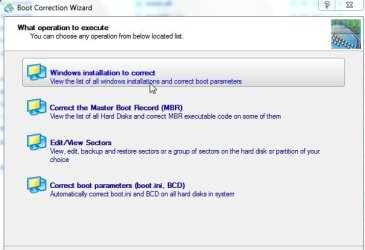
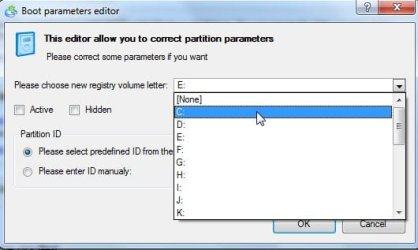
The idea is to boot the cd, select Normal Mode >Boot corrector>correct drive letters in system registry.

Change it to C from whatever it is.

The free Linux based Rscue kit express is a touch fiddly if you have to release the drive letter you want to use, when you have used it once, you get the hang of it.

With the Paid versions, you get winpe boot media, it is child's play:

BOOTCORRECTOR1.jpg

BOOTCORRECTOR2.jpg
 

My Computers My Computers

  • At a glance

    7 X64i5 84002x8gb 3200mhz
    Computer type
    PC/Desktop
    OS
    7 X64
    CPU
    i5 8400
    Motherboard
    gigabyte b365m ds3h
    Memory
    2x8gb 3200mhz
    Hard Drives
    various
    PSU
    pure power 11 400w cm
    Case
    Coolermaster
    Cooling
    cryorig m9i
  • At a glance

    7x64g54008gb ddr4 2400
    Computer type
    PC/Desktop
    OS
    7x64
    CPU
    g5400
    Motherboard
    ga b365m ds3h
    Memory
    8gb ddr4 2400
    PSU
    xfx pro 450w
Thanks again SIW2. I'm not sure yet if I want to come of the $100 that the Pro version costs. I'm giving it a hard think.

In the mean time, here is some more of this saga.

As I said, I had made an image copy of the munged Win 7 OS partition. I did this using GPartEd to copy the OS partition from the laptop disk to an external USB hard drive. Just for grins and giggles, I thought it would be "fun" and instructive to put this munged partition back on the laptop and see if I could use the newly acquired Paragon package to fix it up. Again I used GPartEd to copy from the USB hard drive back on to the laptop. I left the USB drive attached and did a reboot. I expected to see a bootup as I had seen before into the crippled OS, but lo and behold! I see lots of disk activity on the USB drive and what to my astonishment, the system boots back up perfectly! I used the Manage utility to look at the disk structure and I see that both C: and V: are labeled OS partitions. C: was the laptop and V: was the external USB drive, both of which were identical copies of each other. A path command showed all references to V: drive. A set command showed some references to C: drive. Is this weird or what?! Next I rebooted with the USB drive unplugged just to see what would happen. As I expected, it booted up into the non-genuine OS. At this point I put in the Paragon disk and rebooted to see if I could fix it. I used Normal Mode>Boot Corrector>Correct drive letters. I released the V: letter from the OS partition and re-assigned it to the C: letter. I thought it was surly going to work OK on the next reboot, but alas! it came back up in the non-genuine mode, but it was not a light blue background as before, but sort of a lighter shade of black. Groan! I also noticed that it did not say it was "Preparing the desktop" like it had always done when coming into the non-genuine mode. My hopes were dashed! Feeling defeated once again, I hit CTRL-ALT-DEL to bring up the screen where you can choose to shutdown, but the Activate Windows screen popped up instead. I don't think CTRL-ALT-DEL brought it up, I think I had just not waited long enough. In any event, I clicked on the activate on-line link, and a few moments later, it reported that Win & had been successfully activated! Then the delayed CTRL-ALT-DEL screen came up. I heard the familiar chimes in the background that you get after Win 7 boots into your account, so I chose cancel on that screen and my background with all the desktop popped up! Amazing! The only problem was that a few of the app icons were broken because they pointed to the V: drive. That was easily fixed by modifying the icon properties.

So, the bottom line is that the Paragon package was able to successfully fix the registry to point to all the correct drive letters. Everything is again all OK now. This is the answer to caho's original question.

Thanks so much for your help. This has been a great learning experience for me.

 

My Computer My Computer

At a glance

Windows 7 Ultimate Build 7600GenuineIntel Intel(R) Pentium(R) D CPU 3.00GH...8 GBMSI N430GT 2GB GPU
Computer Manufacturer/Model Number
Dell XPS 600
OS
Windows 7 Ultimate Build 7600
CPU
GenuineIntel Intel(R) Pentium(R) D CPU 3.00GHz [Intel64 Fami
Memory
8 GB
Graphics Card(s)
MSI N430GT 2GB GPU
Sound Card
HT Omega Striker 7.1
Hard Drives
1TB x 4 internal HD's
Back
Top