
Last nite I tried cloning my hard drive to a larger 1tb drive. After the copy was complete I tried booting up the new hdd and it said bootmgr missing. I went down that rabbit hole for a few hours and decided to try my original drive again. Now when it boots up I log in and it goes through a preparing desktop phase and finally lands on an all blue screen with windows 7 build 7601 this copy of windows not genuine. I have access to nothing except task manager. I was able to get to a command prompt and I noticed my drive letter is now e: I think this is my issue on my original drive. The cloning software must have partitioned the drive. I need to change this letter back to c: , I think...
I also used the installation disk on the new drive to format it and was able to get into windows and I noticed that there were 3 partitions made on the new drive. Drive c: was very small and full, d:was recovery drive 1 tb, and e was hp tools.
So I think the software changed the partition drives letters. First Id like to get my original drive corrected and then perhaps try the cloning process again. Thank you for help in advance.
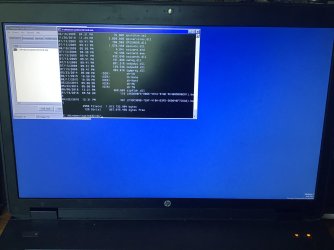
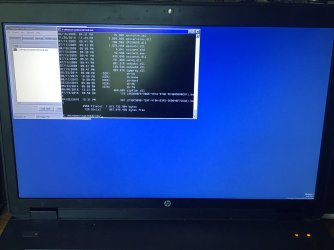
After trying to clone my hard drive my new hard drive had a bootmgr missing error, thats now irrelevant As I have reinstalled windows on that one , I have now tried to reuse my original hard drive And it goes to the login screen I enter my password it say preparing desktop. Screen is all blue and bottom right corner it says windows not genuine. I can only access the task manager. I have noticed that the portioned drive letters are not correct. See picture. I need to get my drive letter back to c: I think....
Im having the same issue. Unfortunately the link to steps 9 to 16 and so on to Microsofts page are not there. My drive is on e: and I need to get it to c: I only have command prompt access through task manager. Can anyone help walk me through the prompts? Thanks everyone!
Blkemp
1. In the dropdown select the letter the windows partition is on ( use the letter as seen from booted media)
2. click FIX
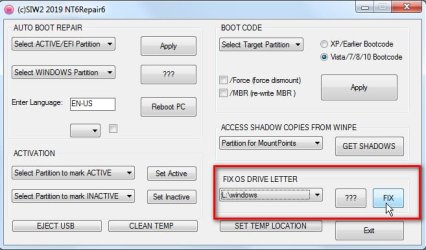
nt6repair is a little thing what i made. It is on the desktop of my boot media:
win7 17514x86.iso
win7 17514x64v15.iso
win10 183x64.iso
I have compiled a 32bit exe as well which can be used from within a running os to point at a differnet installation.View attachment NT6REPAIRx86.zip
I also used the installation disk on the new drive to format it and was able to get into windows and I noticed that there were 3 partitions made on the new drive. Drive c: was very small and full, d:was recovery drive 1 tb, and e was hp tools.
So I think the software changed the partition drives letters. First Id like to get my original drive corrected and then perhaps try the cloning process again. Thank you for help in advance.
After trying to clone my hard drive my new hard drive had a bootmgr missing error, thats now irrelevant As I have reinstalled windows on that one , I have now tried to reuse my original hard drive And it goes to the login screen I enter my password it say preparing desktop. Screen is all blue and bottom right corner it says windows not genuine. I can only access the task manager. I have noticed that the portioned drive letters are not correct. See picture. I need to get my drive letter back to c: I think....
Im having the same issue. Unfortunately the link to steps 9 to 16 and so on to Microsofts page are not there. My drive is on e: and I need to get it to c: I only have command prompt access through task manager. Can anyone help walk me through the prompts? Thanks everyone!
Blkemp
1. In the dropdown select the letter the windows partition is on ( use the letter as seen from booted media)
2. click FIX
nt6repair is a little thing what i made. It is on the desktop of my boot media:
win7 17514x86.iso
win7 17514x64v15.iso
win10 183x64.iso
I have compiled a 32bit exe as well which can be used from within a running os to point at a differnet installation.View attachment NT6REPAIRx86.zip
Attachments
Last edited by a moderator:
My Computer
- Computer type
- Laptop
- OS
- Windows 7


