AHCI : Enable in Windows 7 / Vista

AHCI : Enable in Vista and Windows 7 after OS install


   Information
AHCI Advanced Host Controller Interface makes NCQ Native Command Queing along with hot-plugging or hot swapping through SATA Serial-ATA host controllers possible; Vista was the first to offer this feature. The issue with AHCI is it needs to be enabled in the BIOS prior to OS installation; doing so after you have installed the OS will disable the PC. The reason why is Windows disables the AHCI drivers not needed durring installation.

This tutorial will show you how to enable AHCI after you have installed the OS if you didn't already have AHCI enable in the BIOS when you installed the OS.

   Warning
Changing values in the Windows registry can disable your machine; if you're not sure how to do this please post a question in this tutorial and someone will be glad to help you.
   Note
This method will also work for Windows Vista though the default DWORD string value in Vista will be "4" where it will be "3" in Windows 7.

As a precaution it would be a good idea to create a "System Restore Point" before you start this, the tutorial can be found at the link below.

System Restore Point - Create


Let's get started!
1) In the Windows start menu search box type regedit, right click the entry, click Run as Administrator, enter your user credentials for the UAC prompt, then click yes to open regedit.

Start_Regedit.jpg
UAC_Regedit.jpg

2) In regedit navigate to HKEY_LOCAL_MACHINE\SYSTEM\CurrentControlSet\services.

3) In the left pane, click on msahci, in the right pane double click on Start to modify it.
RegEdit1.jpg
RegEdit2.jpg
4) In the window that opens change the value to 0 (zero), and click OK.
RegEdit3.jpg
5) In the left pane, click on iaStorV (if there), in the right pane double click on Start to modify it. Repeat step 4, and go to step 6 below.

NOTE: From: Error message occurs after you change the SATA mode of the boot drive

6) Close Registry Editor.
7) Now you'll need to restart the PC and go into the BIOS and enable AHCI. When Windows boots up, it will finish installing the AHCI drivers.

AHCI Driver.jpg
AHCI Driver2.jpg

8) You will need one final restart to finish the process after the drivers are installed.

Restart.jpg
   Note
For those with nForce boards, have a look at the Information post below.

The method was worked out by Everlong and credit for that goes to him, thanks mate!


Enjoy! :)


Last edited by a moderator:
Looking for an assist.

I've done this procedure on different machines in the past. However, I have a recalcitrant machine right now.

I had to perform a Repair Install http://www.sevenforums.com/tutorials/3413-repair-install.html on my Win7/64 running on an Asus M5A88-M EVO motherboard https://www.asus.com/Motherboards/M5A88M_EVO/overview/ with an FX8350 cpu. BIOS is 1702, the latest.

When I did the repair install, I ensured that the ONLY drive connected was my Samsung 850 Evo SSD and the DVD drive (for the Win7 disk). I physically disconnected the other drive.

Per the mobo instruction manual, the SSD is connected to SATA6G_1. The DVD drive is connected to SATA6G_6. (The manual explains how the sata ports are split 1-4 and 5-6.)

As part of the cleanup process after the repair, I ran Samsung Magician. It showed that I was in IDE mode. Okay, no prob. This is easy.

I opened regedit and msahci start was 3: I changed it to 0, as I also did with IaStorV Start. Both were 0. Close regedit. Restart, get into the bios.

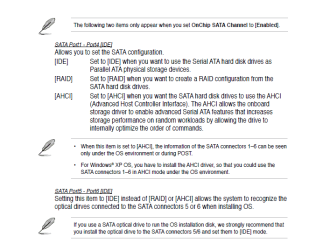
I changed the sata port 1-4 from IDE (which is what it WAS), to AHCI. That automatically changed ports 5 and 6 to AHCI, so I changed them back to IDE. See the image...

Saved and exited.

A POST screen, a flash of DOS-type writing, a flash of blue, another POST, and then a "Failed to start" windows screen with the option of startup repair or normal windows start.

Changing BIOS back to IDE allows a normal windows start.

I've tried several iterations of the above procedures with some variations (keeping sata 5 and 6 as AHCI, only changing registry msahci not iastorv, etc.) but the only way I can boot is with the Sata 1 set to IDE.

Any ideas?

Thanks,
Ken


(The Repair Install went great. Fixed my issues.)

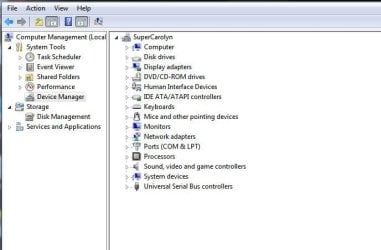
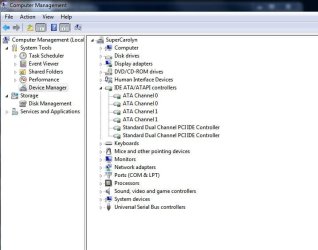
Edited to add: I've attached another image showing my Computer/Manage screen. This motherboard is an AMD mobo with a SB850 controller for the sata ports. Does the attached 2nd image look right? And the 3rd image, where I expanded the sata drives. I just cannot figure out why ahci is not working when the registry and the bios are both toggled to have it on. (after the edit, the images are now in the order 3,1,2)

Thanks.
 

Attachments

  • sata01.PNG
    sata01.PNG
    60.9 KB · Views: 1,764
  • sata02.JPG
    sata02.JPG
    51 KB · Views: 1,669
  • sata03.JPG
    sata03.JPG
    62.1 KB · Views: 853
Last edited:

My Computer

Computer type
PC/Desktop
Computer Manufacturer/Model Number
Custom build
OS
Microsoft Windows 7 Home Premium 64-bit 7601 Multiprocessor Free Service Pack 1
CPU
AMD FX(tm)-8350 Eight-Core Processor
Motherboard
ASUSTeK Computer INC. M5A88-M
Memory
16.00 GB
Graphics Card(s)
NVIDIA GeForce GTX 670
Sound Card
(1) Realtek High Definition Audio (2) NVIDIA Virtual Audio
Monitor(s) Displays
Through AVR to one of two TV/Projector
Screen Resolution
1920 x 1080 x 32 bits (4294967296 colors) @ 60 Hz
Hard Drives
Samsung SSD 850 PRO 256G SATA Disk Device
Case
Silverstone GD09
Cooling
Air
Antivirus
Kaspersky Internet Security, 2015
Restoring current win7 image backup to new ssd..Please help!!

Hello,

I hope someone can help me with my issue..Currently I have a windows 7 laptop and I have a system image backup of it on my external harddisk..

Now I want to install a new ssd to my laptop, So I need to remove my current hdd and install this ssd..So I thought of booting up from windows installation disk , restore my image saved on external harddisk to this new ssd which will make a replica of my current hdd in laptop..

In that case how do I change the ahci mode in registry..Should I change to ahci in bios once i connect the ssd..If I did that will windows automatically install drivers while restoring to ssd? because right now in my current hdd the ahci mode will be set to off in registry right?

Could someone please help? If my question is not clear pls let me know thanks..
 

My Computer

Computer type
PC/Desktop
OS
windows 10 32bit
Hello Josephm and welcome to Seven Forums. :)

What type of hard drive do you currently have, and what type of controller are you using now?

If you won't have any IDE drives connected along with the new SSD, then you could set to use AHCI in your BIOS, power off the PC, connect the new SSD, power on the PC, boot from your installation media, and proceed to restore the system image from the external drive to the SSD.
 

My Computer

Computer type
PC/Desktop
Computer Manufacturer/Model Number
Self built custom
OS
64-bit Windows 11 Pro for Workstations
CPU
Intel i7-8700K OC'd to 5 GHz
Motherboard
ASUS ROG Maximus XI Formula Z390
Memory
64 GB (4x16GB) G.SKILL TridentZ RGB DDR4 3600 MHz
Graphics Card(s)
ASUS ROG-STRIX-GTX1080TI-O11G-GAMING
Sound Card
Integrated
Monitor(s) Displays
2 x Samsung Odyssey G7 27"
Screen Resolution
2560x1440
Hard Drives
1TB Samsung 990 PRO M.2,
4TB Samsung 990 PRO PRO M.2,
TerraMaster F8 SSD Plus NAS
PSU
Seasonic Prime Titanium 850W
Case
Thermaltake Core P3
Cooling
Corsair Hydro H115i
Keyboard
Logitech wireless K800
Mouse
Logitech MX Master 4
Internet Speed
2 Gb/s Download and 100 Mb/s Upload
Antivirus
Malwarebyte Anti-Malware Premium
Browser
Google Chrome
Other Info
Logitech Z625 speaker system,
Logitech BRIO 4K Pro webcam,
HP Color LaserJet Pro MFP M477fdn,
APC SMART-UPS RT 1000 XL - SURT1000XLI,
Galaxy S23 Plus phone
Hello Josephm and welcome to Seven Forums. :)

What type of hard drive do you currently have, and what type of controller are you using now?

If you won't have any IDE drives connected along with the new SSD, then you could set to use AHCI in your BIOS, power off the PC, connect the new SSD, power on the PC, boot from your installation media, and proceed to restore the system image from the external drive to the SSD.

Thanks for the reply..Just figured out my current controller is SATA AHCI controller, And my laptop can connect only one hard drive..So I think your solution will work..

But on a sidenote my current hdd is 500gb where the ssd is 120gb samsung evo,,I use my laptop only for browsing..Do you think ill gain from ssd apart from bootup time? or just leave the hdd?
 

My Computer

Computer type
PC/Desktop
OS
windows 10 32bit
The size of the old HDD compared to the new SSD may be an issue when trying to restore the system image depending on what you used to create the system image.

If you used the built-in system image feature in Windows, then you will not be able to restore a system image created from a larger drive to a smaller drive.

If you used a 3rd party program (ex: Macrium Reflect), you may be able to.
 

My Computer

Computer type
PC/Desktop
Computer Manufacturer/Model Number
Self built custom
OS
64-bit Windows 11 Pro for Workstations
CPU
Intel i7-8700K OC'd to 5 GHz
Motherboard
ASUS ROG Maximus XI Formula Z390
Memory
64 GB (4x16GB) G.SKILL TridentZ RGB DDR4 3600 MHz
Graphics Card(s)
ASUS ROG-STRIX-GTX1080TI-O11G-GAMING
Sound Card
Integrated
Monitor(s) Displays
2 x Samsung Odyssey G7 27"
Screen Resolution
2560x1440
Hard Drives
1TB Samsung 990 PRO M.2,
4TB Samsung 990 PRO PRO M.2,
TerraMaster F8 SSD Plus NAS
PSU
Seasonic Prime Titanium 850W
Case
Thermaltake Core P3
Cooling
Corsair Hydro H115i
Keyboard
Logitech wireless K800
Mouse
Logitech MX Master 4
Internet Speed
2 Gb/s Download and 100 Mb/s Upload
Antivirus
Malwarebyte Anti-Malware Premium
Browser
Google Chrome
Other Info
Logitech Z625 speaker system,
Logitech BRIO 4K Pro webcam,
HP Color LaserJet Pro MFP M477fdn,
APC SMART-UPS RT 1000 XL - SURT1000XLI,
Galaxy S23 Plus phone
The size of the old HDD compared to the new SSD may be an issue when trying to restore the system image depending on what you used to create the system image.

If you used the built-in system image feature in Windows, then you will not be able to restore a system image created from a larger drive to a smaller drive.

If you used a 3rd party program (ex: Macrium Reflect), you may be able to.

My total image size is 45 gb, i just used only C drive, it excludes hiberation and pagefile..
 

My Computer

Computer type
PC/Desktop
OS
windows 10 32bit
What did you use to create the image with?
 

My Computer

Computer type
PC/Desktop
Computer Manufacturer/Model Number
Self built custom
OS
64-bit Windows 11 Pro for Workstations
CPU
Intel i7-8700K OC'd to 5 GHz
Motherboard
ASUS ROG Maximus XI Formula Z390
Memory
64 GB (4x16GB) G.SKILL TridentZ RGB DDR4 3600 MHz
Graphics Card(s)
ASUS ROG-STRIX-GTX1080TI-O11G-GAMING
Sound Card
Integrated
Monitor(s) Displays
2 x Samsung Odyssey G7 27"
Screen Resolution
2560x1440
Hard Drives
1TB Samsung 990 PRO M.2,
4TB Samsung 990 PRO PRO M.2,
TerraMaster F8 SSD Plus NAS
PSU
Seasonic Prime Titanium 850W
Case
Thermaltake Core P3
Cooling
Corsair Hydro H115i
Keyboard
Logitech wireless K800
Mouse
Logitech MX Master 4
Internet Speed
2 Gb/s Download and 100 Mb/s Upload
Antivirus
Malwarebyte Anti-Malware Premium
Browser
Google Chrome
Other Info
Logitech Z625 speaker system,
Logitech BRIO 4K Pro webcam,
HP Color LaserJet Pro MFP M477fdn,
APC SMART-UPS RT 1000 XL - SURT1000XLI,
Galaxy S23 Plus phone
In that case, you won't be able to restore the system image on a drive smaller than the one the image was created from. :(
 

My Computer

Computer type
PC/Desktop
Computer Manufacturer/Model Number
Self built custom
OS
64-bit Windows 11 Pro for Workstations
CPU
Intel i7-8700K OC'd to 5 GHz
Motherboard
ASUS ROG Maximus XI Formula Z390
Memory
64 GB (4x16GB) G.SKILL TridentZ RGB DDR4 3600 MHz
Graphics Card(s)
ASUS ROG-STRIX-GTX1080TI-O11G-GAMING
Sound Card
Integrated
Monitor(s) Displays
2 x Samsung Odyssey G7 27"
Screen Resolution
2560x1440
Hard Drives
1TB Samsung 990 PRO M.2,
4TB Samsung 990 PRO PRO M.2,
TerraMaster F8 SSD Plus NAS
PSU
Seasonic Prime Titanium 850W
Case
Thermaltake Core P3
Cooling
Corsair Hydro H115i
Keyboard
Logitech wireless K800
Mouse
Logitech MX Master 4
Internet Speed
2 Gb/s Download and 100 Mb/s Upload
Antivirus
Malwarebyte Anti-Malware Premium
Browser
Google Chrome
Other Info
Logitech Z625 speaker system,
Logitech BRIO 4K Pro webcam,
HP Color LaserJet Pro MFP M477fdn,
APC SMART-UPS RT 1000 XL - SURT1000XLI,
Galaxy S23 Plus phone
In that case, you won't be able to restore the system image on a drive smaller than the one the image was created from. :(

I use Partition Wizard. The free version.

Best Free Partition Manager for Windows | MiniTool Partition Free

When the HD is larger, I resize it first into smaller partitions (totaling less than the new HD) and then disk copy. You get prompted to either proportionally fill or leave unpartitioned space. You can even shift around the location of the partitions before performing the copy.
 

My Computer

Computer type
Laptop
Computer Manufacturer/Model Number
Dell
OS
Windows 7 32-bit
CPU
Intel T2600 @ 2.16GHz, dual core
Motherboard
Latitude D820
Memory
4G
Graphics Card(s)
NVIDIA Quadro NVS 120M
Sound Card
SigmaTel
Monitor(s) Displays
ASUS PA248Q
Screen Resolution
1920 x 1200
Internet Speed
~55M
Antivirus
AVG
Browser
Firefox / IE 8
I am frustrated beyond words trying to get AHCI enabled on my computer and could use your help.

Current Setup:
Dell Studio XPS 800
Win 7 Home Premium
Intel i5
Seagate 1TB HDD (Only about 50% used)
6GB Ram

My goal is to move everything to my new Samsung 850 Evo 1 TB SSD since my machine is older...
I have purchased the Samsung drive, mounting adapter and transfer cable but cannot get AHCI option
to appear in my BIOS.

After spending countless hours on what I thought would be a seemingly simple project I am ready to go postal.

I have done the regedit changes from 3 to 0 for the mcachi + mcachi and IastorV + mcachi+ Iastor + IastorV without success.

Then I read the my computer runs an Intel P55 controller which (I am lost at this point) means that I have to run Intel RST to be able to activate AHCI. However when I run the Intel RST I get a message that the platform isn't supported....

SSD install on XPS Studio 8000 ( no AHCI in BIOS ) - General Hardware - Desktop - Dell Community
xps8000 and SSD drive - General Hardware - Desktop - Dell Community


https://downloadcenter.intel.com/do...-Storage-Technology-Intel-RST-RAID-Driver?v=t


I am chasing my tail and could use some help.

If you would be kind enough to help me I would gladly pay you via paypal $25 or $50 for your time.
My spam email address is [email protected] if you want to chat offline.

Thank you.

Anthony
 

My Computer

Computer type
PC/Desktop
Computer Manufacturer/Model Number
Dell Studio XPS 8000
OS
Win 7 64 Bit Home Premium
CPU
Intel Core i5 CPU 750@ 2.67 Ghz
Motherboard
Board: Dell Inc. 0X231R A01
Memory
6GB
Graphics Card(s)
ATI Radeon HD 4300/4500 Series [Display adapter]
Hard Drives
Seagate Barracuda 7200.12 ST31000528AS 1TB
Antivirus
Norton
Browser
Chrome
I had a similar problem with an older desktop. I was also at wits end. It appeared to that I had done everything right but no AHCI.

If you haven't tried this, look to see if you can do a chipset update. I could turn on AHCI in win 7 (pro in my case) and in the bios but (if I recall correctly), the machine would start booting and then stall. Turn it off in the bios (not in windows) and it booted fine. Updating the chipset (again chipset, not bios) did the trick. After that, everything worked fine.

If you're stuck not using the machine, what I did was to install their magician software to run once a day until I had this solved.
 

My Computer

Computer type
Laptop
Computer Manufacturer/Model Number
Dell
OS
Windows 7 32-bit
CPU
Intel T2600 @ 2.16GHz, dual core
Motherboard
Latitude D820
Memory
4G
Graphics Card(s)
NVIDIA Quadro NVS 120M
Sound Card
SigmaTel
Monitor(s) Displays
ASUS PA248Q
Screen Resolution
1920 x 1200
Internet Speed
~55M
Antivirus
AVG
Browser
Firefox / IE 8
I had a similar problem with an older desktop. I was also at wits end. It appeared to that I had done everything right but no AHCI.

If you haven't tried this, look to see if you can do a chipset update. I could turn on AHCI in win 7 (pro in my case) and in the bios but (if I recall correctly), the machine would start booting and then stall. Turn it off in the bios (not in windows) and it booted fine. Updating the chipset (again chipset, not bios) did the trick. After that, everything worked fine.

If you're stuck not using the machine, what I did was to install their magician software to run once a day until I had this solved.

I did the chipset upgrade previously and have the latest....Thanks anyways....
Still stuck in purgatory.....
 

My Computer

Computer type
PC/Desktop
Computer Manufacturer/Model Number
Dell Studio XPS 8000
OS
Win 7 64 Bit Home Premium
CPU
Intel Core i5 CPU 750@ 2.67 Ghz
Motherboard
Board: Dell Inc. 0X231R A01
Memory
6GB
Graphics Card(s)
ATI Radeon HD 4300/4500 Series [Display adapter]
Hard Drives
Seagate Barracuda 7200.12 ST31000528AS 1TB
Antivirus
Norton
Browser
Chrome
It's been a LONG time since I did this, but here's what I remember:
There are prep 2 steps:

  1. Update the registry to ENABLE the AHCI mode. This has to be done via regedit.
  2. Change the access method in BIOS for that drive to AHCI
They MUST be done in that order. THEN you can attach the drive and it should boot.
You can do step 1 on your old drive, then clone your OS (with the registry change) to the SSD, then do step 2.
 

My Computer

Computer type
PC/Desktop
Computer Manufacturer/Model Number
Home built
OS
Windows 7 Pro 64-bit
CPU
Core I7-940 at 3.25 GHz
Motherboard
MSI Eclipse
Memory
12GB
Graphics Card(s)
ATI 6700
Sound Card
SB
Monitor(s) Displays
LG E2241
Screen Resolution
1920x1080
Hard Drives
Apricorn SOLO X2 PCIE2 adapter + Samsung 840 PRO 256GB drive
Seagate External (firewire)
WD 750GB external
WD 500 GB internal(7200 RPM)
WD 80GB internal (pagefile) (7200 RPM)
Case
Antec Sonata III
Antivirus
McAfee
It's been a LONG time since I did this, but here's what I remember:
There are prep 2 steps:

  1. Update the registry to ENABLE the AHCI mode. This has to be done via regedit.
  2. Change the access method in BIOS for that drive to AHCI
They MUST be done in that order. THEN you can attach the drive and it should boot.
You can do step 1 on your old drive, then clone your OS (with the registry change) to the SSD, then do step 2.

I assumed he has done that. I had done that when I had the problem. Everything looked cool except it didn't boot. No explanation and if I remember correctly, it would begin booting. I think I might have even gotten the four coloured panes. But then a black screen and nothing else. Having updated the chipset (not bios), then viola, just started working.
 

My Computer

Computer type
Laptop
Computer Manufacturer/Model Number
Dell
OS
Windows 7 32-bit
CPU
Intel T2600 @ 2.16GHz, dual core
Motherboard
Latitude D820
Memory
4G
Graphics Card(s)
NVIDIA Quadro NVS 120M
Sound Card
SigmaTel
Monitor(s) Displays
ASUS PA248Q
Screen Resolution
1920 x 1200
Internet Speed
~55M
Antivirus
AVG
Browser
Firefox / IE 8
Registry edits don't work in my HP Pavilion A6400f, Award BIOS 5.43, ASUS IPIBL-LB mobo.
On restart Windows logo doesn't even get one pane completed before the system reboots.
 

My Computer

Computer Manufacturer/Model Number
Home built
OS
Windows 7 Home Premium 64
CPU
AMD 64 X2 5400+ Black Edition
Motherboard
Gigabyte MA770-UD3
Memory
8 Gb
Graphics Card(s)
ATi Radeon HD 4600
Sound Card
Integrated
Thanks for the information about the IDE controller problem.
It is not only Nvidia cards that can do this but it can also happen with AMD !


Putting in those good old 2006 Microsoft drivers, as explained, can solve the problem,


Not only could you have problems with Trim but I had SSD firmware update issues.
My Kingston 300sv would not update from the Kingston SSD Manager until I changed those drivers..
 

My Computer

Computer type
PC/Desktop
Computer Manufacturer/Model Number
Custom
OS
Windows 7 Ultimate x64
CPU
AMD A10 5800k
Motherboard
Asrock FMA75 Pro 4
Memory
2x4GB GSkill Sniper 1866MHz
Graphics Card(s)
Sapphire HD7770
Hard Drives
Kingston 128GB SSD
WD Blue 1TB
Antivirus
MSE
Browser
Waterfox
Back
Top