
AIO Windows 7 setup loads Windows 10!

DrGhobar

New member
Local time
5:20 PM
Messages
38
Hello to Brink and all the other friends

I have a windows 7 setup on my hard drive. it is AIO.
When I tap on it, what loads is Windows 10. WHY??

(I had a Windows 10 iso in rar on my hard drive. When the above problem happened, I cut it from the hard drive. But the above problem still happens!)
I need your help.

Regards
DrGhobar
 

My Computer

Computer type
PC/Desktop
OS
windows 7 ultimate, a 32bit and a 64bit
Did you or anyone else ever upgrade this PC to Windows 10 ? Knowingly or not ??

Can you post a shot of Disk Management please.

And Welcome to Seven Forums :)
 

My Computer

Computer type
PC/Desktop
Computer Manufacturer/Model Number
Skylake Special #666
OS
Windows 10 Pro x64
CPU
Intel Core i7 6700K
Motherboard
Asus Sabertooth Z170 Mark 1
Memory
GSkill TridentZ RGB 16GB 3600 16-16-16-36
Graphics Card(s)
EVGA GTX 980 Ti SC x2
Sound Card
Realtek High Definition
Monitor(s) Displays
AOC G2460PG
Screen Resolution
1920 x 1080 144Hz
Hard Drives
Samsung 860 Pro 256GB, Seagate Barracuda 4TB x2
PSU
EVGA 1000 P2, EVGA White Custom Braided Cables
Case
Corsair Vengeance C70 Gunmetal Black
Cooling
Corsair H100i v2, Corsair ML120 x2, Thermal Grizzly Kryonaut
Keyboard
Logitech G910 Orion Spectrum
Mouse
Logitech G700s
Internet Speed
Verizon Fios Quantum Gateway 75/75
Antivirus
Windows Defender, Malwarebytes Free 3.8.3
Browser
Chrome
Other Info
Corsair SP120 x4, LG Blu-ray Drive, Durabrand HT-395 100 Watt Dolby Digital Amp, Corsair H2100 Wireless 7.1 Headset
Did you or anyone else ever upgrade this PC to Windows 10 ? Knowingly or not ??

Can you post a shot of Disk Management please.

And Welcome to Seven Forums :)

1. This PC has never been upgraded to Windows 10. I had downloaded a separate rar file of Windows 10 but never installed it. When the problem happened I cut it and pasted it to my usb flash and removed it.
2. Sure. After a couple of hours I will post a shot of disk management. I am away from that PC right now.
3. Thank youAddRAM.
4. How can this thread be moved to How to Do a Repair Install to Fix Windows 7? (I posted my first post a reply to that thread but it became a new thread!)
 

My Computer

Computer type
PC/Desktop
OS
windows 7 ultimate, a 32bit and a 64bit
OK post it when you can, that should help clear up the issue.
 

My Computer

Computer type
PC/Desktop
Computer Manufacturer/Model Number
Skylake Special #666
OS
Windows 10 Pro x64
CPU
Intel Core i7 6700K
Motherboard
Asus Sabertooth Z170 Mark 1
Memory
GSkill TridentZ RGB 16GB 3600 16-16-16-36
Graphics Card(s)
EVGA GTX 980 Ti SC x2
Sound Card
Realtek High Definition
Monitor(s) Displays
AOC G2460PG
Screen Resolution
1920 x 1080 144Hz
Hard Drives
Samsung 860 Pro 256GB, Seagate Barracuda 4TB x2
PSU
EVGA 1000 P2, EVGA White Custom Braided Cables
Case
Corsair Vengeance C70 Gunmetal Black
Cooling
Corsair H100i v2, Corsair ML120 x2, Thermal Grizzly Kryonaut
Keyboard
Logitech G910 Orion Spectrum
Mouse
Logitech G700s
Internet Speed
Verizon Fios Quantum Gateway 75/75
Antivirus
Windows Defender, Malwarebytes Free 3.8.3
Browser
Chrome
Other Info
Corsair SP120 x4, LG Blu-ray Drive, Durabrand HT-395 100 Watt Dolby Digital Amp, Corsair H2100 Wireless 7.1 Headset
4. How can this thread be moved to How to Do a Repair Install to Fix Windows 7? (I posted my first post to that thread but it became a new thread!)

It was moved because it doesn't fit in the tutorial you posted in, you'll get better help out here in installation.
 

My Computer

Computer type
PC/Desktop
Computer Manufacturer/Model Number
Self Built
OS
Win 10 Pro x64
CPU
Intel I5-2500K @3.3GHz
Motherboard
Asrock P67 Extreme4
Memory
16GB G.Skill Ripjaws X (4x4GB)
Graphics Card(s)
EVGA GeForce 750 Ti SC 2GB
Sound Card
ASUS Xonar DG 5.1 Channels 24-bit 96KHz PCI Interface Sound
Monitor(s) Displays
auria eq2367
Screen Resolution
1920 x 1080
Hard Drives
250GB Samsung 850 EVO SSD
1TB WD Blue
1TB Hitachi
PSU
SeaSonic X 650W 80 Plus Gold
Case
Corsair Obsidian 750D
Cooling
Corsair H60, Three 140mm case fans
Keyboard
Logitech Wireless Keyboard K520
Mouse
Logitech Wireless Mouse M310
Internet Speed
Wave Broadband ~ 100 dn 5 up
Antivirus
Windows Defender, Malwarebytes Premium
Browser
Edge, IE11, Chrome
Other Info
Laptop specs: HP g7-1365dx /
CPU: AMD A6-3420M APU with Radeon(tm) HD Graphics /
RAM: Crucial 8Gb (2x4Gb) /
SSD: Crucial M4-CT128M4SSD2 ATA Device/ FW 000F /
GFX: AMD Radeon HD 6520G /
OS: Windows 10 Pro x64
4. How can this thread be moved to How to Do a Repair Install to Fix Windows 7? (I posted my first post to that thread but it became a new thread!)

It was moved because it doesn't fit in the tutorial you posted in, you'll get better help out here in installation.

I wanted to do a Repair Install of Windows 7.

Does not that justify my post's remaining in that thread?
 

My Computer

Computer type
PC/Desktop
OS
windows 7 ultimate, a 32bit and a 64bit
It sounds like you don't have win 7 installed anymore,

When I tap on it, what loads is Windows 10. WHY??

If that is the case, you can't do a repair of win 7.

This section is better suited for your problem, you don't need to be in the repair install tutorial anyway to get help with one.
 

My Computer

Computer type
PC/Desktop
Computer Manufacturer/Model Number
Self Built
OS
Win 10 Pro x64
CPU
Intel I5-2500K @3.3GHz
Motherboard
Asrock P67 Extreme4
Memory
16GB G.Skill Ripjaws X (4x4GB)
Graphics Card(s)
EVGA GeForce 750 Ti SC 2GB
Sound Card
ASUS Xonar DG 5.1 Channels 24-bit 96KHz PCI Interface Sound
Monitor(s) Displays
auria eq2367
Screen Resolution
1920 x 1080
Hard Drives
250GB Samsung 850 EVO SSD
1TB WD Blue
1TB Hitachi
PSU
SeaSonic X 650W 80 Plus Gold
Case
Corsair Obsidian 750D
Cooling
Corsair H60, Three 140mm case fans
Keyboard
Logitech Wireless Keyboard K520
Mouse
Logitech Wireless Mouse M310
Internet Speed
Wave Broadband ~ 100 dn 5 up
Antivirus
Windows Defender, Malwarebytes Premium
Browser
Edge, IE11, Chrome
Other Info
Laptop specs: HP g7-1365dx /
CPU: AMD A6-3420M APU with Radeon(tm) HD Graphics /
RAM: Crucial 8Gb (2x4Gb) /
SSD: Crucial M4-CT128M4SSD2 ATA Device/ FW 000F /
GFX: AMD Radeon HD 6520G /
OS: Windows 10 Pro x64
DrGhobar, we honestly have no idea why your PC is now running Windows 10, we can only help you get it back to Windows 7

When you get home and can post some pictures of Disk Management and Computer Properties we will know more and can proceed to fix the issue :)

As Derek has stated you should get better help here.

If it is indeed running 10, you have 30 days to revert back to 7, if it has been longer, then you`ll have to reinstall 7.

But look over these links.

Going back to Windows 7 or Windows 8.1 - Windows Help -

How to downgrade Windows 10 after a month - How-To - PC Advisor

Change your mind about Windows 10? Here's how you can roll back - CNET

How to uninstall Windows 10 and go back to Windows 7 or 8.1
 

My Computer

Computer type
PC/Desktop
Computer Manufacturer/Model Number
Skylake Special #666
OS
Windows 10 Pro x64
CPU
Intel Core i7 6700K
Motherboard
Asus Sabertooth Z170 Mark 1
Memory
GSkill TridentZ RGB 16GB 3600 16-16-16-36
Graphics Card(s)
EVGA GTX 980 Ti SC x2
Sound Card
Realtek High Definition
Monitor(s) Displays
AOC G2460PG
Screen Resolution
1920 x 1080 144Hz
Hard Drives
Samsung 860 Pro 256GB, Seagate Barracuda 4TB x2
PSU
EVGA 1000 P2, EVGA White Custom Braided Cables
Case
Corsair Vengeance C70 Gunmetal Black
Cooling
Corsair H100i v2, Corsair ML120 x2, Thermal Grizzly Kryonaut
Keyboard
Logitech G910 Orion Spectrum
Mouse
Logitech G700s
Internet Speed
Verizon Fios Quantum Gateway 75/75
Antivirus
Windows Defender, Malwarebytes Free 3.8.3
Browser
Chrome
Other Info
Corsair SP120 x4, LG Blu-ray Drive, Durabrand HT-395 100 Watt Dolby Digital Amp, Corsair H2100 Wireless 7.1 Headset
It sounds like you don't have win 7 installed anymore,

When I tap on it, what loads is Windows 10. WHY??
If that is the case, you can't do a repair of win 7.

This section is better suited for your problem, you don't need to be in the repair install tutorial anyway to get help with one.

DrGhobar, we honestly have no idea why your PC is now running Windows 10, we can only help you get it back to Windows 7

When you get home and can post some pictures of Disk Management and Computer Properties we will know more and can proceed to fix the issue :)

As Derek has stated you should get better help here.

1. Thank you very much for your quick attention to my problem.
2. The two sentences I have made bold in your respective posts, shows that you think my problem is that I do not have Windows 7 now and my PC is running Windows 10.
This is not the case.
I have Windows 7 and my PC is not running Windows 10.

I only want to do an In-place/Repair Installation of Windows 7, to solve some of its problems.
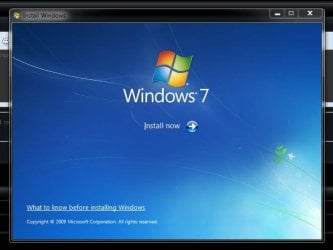
So I found Brink's thread. According to step 4 of his tutorial, I run the setup.exe file in the folder that I extracted Windows 7 ISO into. But instead of seeing Windows 7 "Install now" page (shown in step 8 of his tutorial), I see a Windows 10 "Install now" page! This is the problem I posted the first post for.
 

My Computer

Computer type
PC/Desktop
OS
windows 7 ultimate, a 32bit and a 64bit

OK, then you seem to have the wrong installer if you are getting the win 10 installation message.

I'm not the one that moved your thread, it really doesn't matter if your thread is here or in the tutorial as long as you get help.

You need to get a win 7 installer.
 

My Computer

Computer type
PC/Desktop
Computer Manufacturer/Model Number
Self Built
OS
Win 10 Pro x64
CPU
Intel I5-2500K @3.3GHz
Motherboard
Asrock P67 Extreme4
Memory
16GB G.Skill Ripjaws X (4x4GB)
Graphics Card(s)
EVGA GeForce 750 Ti SC 2GB
Sound Card
ASUS Xonar DG 5.1 Channels 24-bit 96KHz PCI Interface Sound
Monitor(s) Displays
auria eq2367
Screen Resolution
1920 x 1080
Hard Drives
250GB Samsung 850 EVO SSD
1TB WD Blue
1TB Hitachi
PSU
SeaSonic X 650W 80 Plus Gold
Case
Corsair Obsidian 750D
Cooling
Corsair H60, Three 140mm case fans
Keyboard
Logitech Wireless Keyboard K520
Mouse
Logitech Wireless Mouse M310
Internet Speed
Wave Broadband ~ 100 dn 5 up
Antivirus
Windows Defender, Malwarebytes Premium
Browser
Edge, IE11, Chrome
Other Info
Laptop specs: HP g7-1365dx /
CPU: AMD A6-3420M APU with Radeon(tm) HD Graphics /
RAM: Crucial 8Gb (2x4Gb) /
SSD: Crucial M4-CT128M4SSD2 ATA Device/ FW 000F /
GFX: AMD Radeon HD 6520G /
OS: Windows 10 Pro x64
OK, well many people use different terms and when I read this it sounds to me like Windows 10 is running on your PC and not Windows 7

I have a windows 7 setup on my hard drive. it is AIO.
When I tap on it, what loads is Windows 10. WHY??

So to me it sounds like you are clicking on a Windows 10 setup and not Windows 7, I would delete any folder/files of your windows 10 iso/rar file, (just double check) run ccleaner to cleanup the registry and download a fresh windows 7 iso file if you don`t have an install dvd.
 

My Computer

Computer type
PC/Desktop
Computer Manufacturer/Model Number
Skylake Special #666
OS
Windows 10 Pro x64
CPU
Intel Core i7 6700K
Motherboard
Asus Sabertooth Z170 Mark 1
Memory
GSkill TridentZ RGB 16GB 3600 16-16-16-36
Graphics Card(s)
EVGA GTX 980 Ti SC x2
Sound Card
Realtek High Definition
Monitor(s) Displays
AOC G2460PG
Screen Resolution
1920 x 1080 144Hz
Hard Drives
Samsung 860 Pro 256GB, Seagate Barracuda 4TB x2
PSU
EVGA 1000 P2, EVGA White Custom Braided Cables
Case
Corsair Vengeance C70 Gunmetal Black
Cooling
Corsair H100i v2, Corsair ML120 x2, Thermal Grizzly Kryonaut
Keyboard
Logitech G910 Orion Spectrum
Mouse
Logitech G700s
Internet Speed
Verizon Fios Quantum Gateway 75/75
Antivirus
Windows Defender, Malwarebytes Free 3.8.3
Browser
Chrome
Other Info
Corsair SP120 x4, LG Blu-ray Drive, Durabrand HT-395 100 Watt Dolby Digital Amp, Corsair H2100 Wireless 7.1 Headset
OK, then you seem to have the wrong installer if you are getting the win 10 installation message.

I'm not the one that moved your thread, it doesn't matter if your thread is here or in the tutorial as long as you get help.

You need to get a win 7 installer.

By this same installer, I have done a Clean/Replace Install of Windows 7 on another computer.
 

My Computer

Computer type
PC/Desktop
OS
windows 7 ultimate, a 32bit and a 64bit
Strange :huh:
 

My Computer

Computer type
PC/Desktop
Computer Manufacturer/Model Number
Skylake Special #666
OS
Windows 10 Pro x64
CPU
Intel Core i7 6700K
Motherboard
Asus Sabertooth Z170 Mark 1
Memory
GSkill TridentZ RGB 16GB 3600 16-16-16-36
Graphics Card(s)
EVGA GTX 980 Ti SC x2
Sound Card
Realtek High Definition
Monitor(s) Displays
AOC G2460PG
Screen Resolution
1920 x 1080 144Hz
Hard Drives
Samsung 860 Pro 256GB, Seagate Barracuda 4TB x2
PSU
EVGA 1000 P2, EVGA White Custom Braided Cables
Case
Corsair Vengeance C70 Gunmetal Black
Cooling
Corsair H100i v2, Corsair ML120 x2, Thermal Grizzly Kryonaut
Keyboard
Logitech G910 Orion Spectrum
Mouse
Logitech G700s
Internet Speed
Verizon Fios Quantum Gateway 75/75
Antivirus
Windows Defender, Malwarebytes Free 3.8.3
Browser
Chrome
Other Info
Corsair SP120 x4, LG Blu-ray Drive, Durabrand HT-395 100 Watt Dolby Digital Amp, Corsair H2100 Wireless 7.1 Headset
OK, well many people use different terms and when I read this it sounds to me like Windows 10 is running on your PC and not Windows 7

I have a windows 7 setup on my hard drive. it is AIO.
When I tap on it, what loads is Windows 10. WHY??

So to me it sounds like you are clicking on a Windows 10 setup and not Windows 7, I would delete any retirements of your windows 10 iso/rar file, run ccleaner to cleanup the registry and download a fresh windows 7 iso file if you don`t have an install dvd.

a) By this same installer, I have done a Clean/Replace Install of Windows 7 on another computer.
b) I have transferred Windows 10 folder out of the PC. By "delete any retirements of your windows 10 iso/rar file" do you mean anything else?
c) I will run ccleaner.
d) as I said in (a), by this same installer, I have done a Clean/Replace Install of Windows 7. Is it still necessary to download another Windows 7 ISO?
 

My Computer

Computer type
PC/Desktop
OS
windows 7 ultimate, a 32bit and a 64bit
Well I would, I wouldn`t keep trying to use what you have, you`ll get nowhere.

This is what you`re supposed to see and you`re not, so I would not continue beating your head on the wall.

It can`t be a windows 7 iso file or install dvd etc. if you don`t see this, or this, depending on your default iso program, I use PowerIso etc.
 

Attachments

  • Capture 1.JPG
    Capture 1.JPG
    34.1 KB · Views: 14
  • Capture.JPG
    Capture.JPG
    9.9 KB · Views: 14

My Computer

Computer type
PC/Desktop
Computer Manufacturer/Model Number
Skylake Special #666
OS
Windows 10 Pro x64
CPU
Intel Core i7 6700K
Motherboard
Asus Sabertooth Z170 Mark 1
Memory
GSkill TridentZ RGB 16GB 3600 16-16-16-36
Graphics Card(s)
EVGA GTX 980 Ti SC x2
Sound Card
Realtek High Definition
Monitor(s) Displays
AOC G2460PG
Screen Resolution
1920 x 1080 144Hz
Hard Drives
Samsung 860 Pro 256GB, Seagate Barracuda 4TB x2
PSU
EVGA 1000 P2, EVGA White Custom Braided Cables
Case
Corsair Vengeance C70 Gunmetal Black
Cooling
Corsair H100i v2, Corsair ML120 x2, Thermal Grizzly Kryonaut
Keyboard
Logitech G910 Orion Spectrum
Mouse
Logitech G700s
Internet Speed
Verizon Fios Quantum Gateway 75/75
Antivirus
Windows Defender, Malwarebytes Free 3.8.3
Browser
Chrome
Other Info
Corsair SP120 x4, LG Blu-ray Drive, Durabrand HT-395 100 Watt Dolby Digital Amp, Corsair H2100 Wireless 7.1 Headset
Well I would, I wouldn`t keep trying to use what you have, you`ll get nowhere.

This is what you`re supposed to see and you`re not, so I would not continue beating your head on the wall.

It can`t be a windows 7 iso file or install dvd etc. if you don`t see this, or this.

beating one's head on the wall is terrible! :D

But what make me doubt that the culprit is the downloaded iso, is that the first time I ran the setup.exe of Windows 7 I had also Windows 10 rar in a separate folder of my PC. The second time, I transferred Windows 10 rar folder out of PC, but when I ran the setup.exe of Windows 7, again Windows 10 page appeared. I think things like registry or other remains are causing this. Do you recommend any cleaning method in addition to ccleaner?
 

My Computer

Computer type
PC/Desktop
OS
windows 7 ultimate, a 32bit and a 64bit
No. And in no way would a windows 7 iso file run a windows 10 setup, no way.

May I ask, why are you using RAR ?????

Again, I would download a fresh iso file and put it in a folder on the desktop so you know exactly where it is and use that.

Get rid of what you have, it`s obviously corrupted, or not even a windows 7 iso file.

Some advice, if I may, you should be creating Disk Images so you never have to worry about this again, you continually make them so if you ever have problems with Windows 7, you can reinstall it with all your programs already installed in like 15 minutes.

http://www.sevenforums.com/tutorials/663-backup-complete-computer-create-image-backup.html
 

My Computer

Computer type
PC/Desktop
Computer Manufacturer/Model Number
Skylake Special #666
OS
Windows 10 Pro x64
CPU
Intel Core i7 6700K
Motherboard
Asus Sabertooth Z170 Mark 1
Memory
GSkill TridentZ RGB 16GB 3600 16-16-16-36
Graphics Card(s)
EVGA GTX 980 Ti SC x2
Sound Card
Realtek High Definition
Monitor(s) Displays
AOC G2460PG
Screen Resolution
1920 x 1080 144Hz
Hard Drives
Samsung 860 Pro 256GB, Seagate Barracuda 4TB x2
PSU
EVGA 1000 P2, EVGA White Custom Braided Cables
Case
Corsair Vengeance C70 Gunmetal Black
Cooling
Corsair H100i v2, Corsair ML120 x2, Thermal Grizzly Kryonaut
Keyboard
Logitech G910 Orion Spectrum
Mouse
Logitech G700s
Internet Speed
Verizon Fios Quantum Gateway 75/75
Antivirus
Windows Defender, Malwarebytes Free 3.8.3
Browser
Chrome
Other Info
Corsair SP120 x4, LG Blu-ray Drive, Durabrand HT-395 100 Watt Dolby Digital Amp, Corsair H2100 Wireless 7.1 Headset

My Computer

Computer type
PC/Desktop
Computer Manufacturer/Model Number
Self Built
OS
Win 10 Pro x64
CPU
Intel I5-2500K @3.3GHz
Motherboard
Asrock P67 Extreme4
Memory
16GB G.Skill Ripjaws X (4x4GB)
Graphics Card(s)
EVGA GeForce 750 Ti SC 2GB
Sound Card
ASUS Xonar DG 5.1 Channels 24-bit 96KHz PCI Interface Sound
Monitor(s) Displays
auria eq2367
Screen Resolution
1920 x 1080
Hard Drives
250GB Samsung 850 EVO SSD
1TB WD Blue
1TB Hitachi
PSU
SeaSonic X 650W 80 Plus Gold
Case
Corsair Obsidian 750D
Cooling
Corsair H60, Three 140mm case fans
Keyboard
Logitech Wireless Keyboard K520
Mouse
Logitech Wireless Mouse M310
Internet Speed
Wave Broadband ~ 100 dn 5 up
Antivirus
Windows Defender, Malwarebytes Premium
Browser
Edge, IE11, Chrome
Other Info
Laptop specs: HP g7-1365dx /
CPU: AMD A6-3420M APU with Radeon(tm) HD Graphics /
RAM: Crucial 8Gb (2x4Gb) /
SSD: Crucial M4-CT128M4SSD2 ATA Device/ FW 000F /
GFX: AMD Radeon HD 6520G /
OS: Windows 10 Pro x64
No. And in no way would a windows 7 iso file run a windows 10 setup, no way.

May I ask, why are you using RAR ?????

Again, I would download a fresh iso file and put it in a folder on the desktop so you know exactly where it is and use that.

Get rid of what you have, it`s obviously corrupted, or not even a windows 7 iso file.

Some advice, if I may, you should be creating Disk Images so you never have to worry about this again, you continually make them so if you ever have problems with Windows 7, you can reinstall it with all your programs already installed in like 15 minutes.

http://www.sevenforums.com/tutorials/663-backup-complete-computer-create-image-backup.html

1. I do not use rar. I downloaded windows iso in rar. then I extracted rar. Then I extracted iso into a folder. I have installed a 64bit windows 7 by this same setup. I will test it again on a pc other than mine and report the result.
2. disk images need much space.
 

My Computer

Computer type
PC/Desktop
OS
windows 7 ultimate, a 32bit and a 64bit

My Computer

Computer type
PC/Desktop
OS
windows 7 ultimate, a 32bit and a 64bit
Back
Top