Alienware M9700 problems..

Punkgi

New member
Local time
10:05 AM
Messages
22
Hey whats up everyone? Been around here before, just not signed up.

I have an Alienware M9700. I just upgraded to Windows 7 last night and I can't get all the drivers for this machiene. My prior OS was Vista 32 bit, and I had the same troubles, but I did manage to find everything.. I just don't remember what they were.

I don't have wireless internet. I think it is an Airgo adapter, I am not certain. I can't find anything on it.

What is PCI Modem? In my Device Manager it has an explination mark next to it. any help is needed, thanks.
 

My Computer

Computer Manufacturer/Model Number
Alienware
OS
Windows 7 Ultimate x64
Welcome to SF.

Since your computer was purchased prior to September 2009, you will need to go to the following site for drivers:

Alienware : The Ultimate Gaming Machine

If this computer was released in 2006 (not sure of this), you might have problems with Win 7.

A PCI modem is an internal modem, fitting in the PCI slot.
 

My Computer

Computer Manufacturer/Model Number
Dell and Custom
OS
Systems 1 and 2: Windows 7 Enterprise x64, Win 8 Developer
CPU
System 1: i7 [email protected], System 2: AMD FX-4100 Zambezi 3.6G
Motherboard
System 1:Dell 06NWYK System 2: ASUS M5A97 AM3+
Memory
System 1: 8GB System 2: 8GB
Graphics Card(s)
System 1: ATI FirePro V4800 System 2: Radeon HD 6850
Sound Card
System 1: onboard System 2: onboard
Monitor(s) Displays
System1: Viewsonic HDMI 24"
Screen Resolution
System 1: 1920x1080 System 2: 1920x1080
Hard Drives
System 1: Mirrored .5B drives System 2: Seagate Barracuda ST1000DM003 1TB 7200 RPM 64MB Cache SATA 6.0Gb/s
Case
System 1: Dell System 2: Cooler Master
Internet Speed
10 MBPS
Welcome to SF.

Since your computer was purchased prior to September 2009, you will need to go to the following site for drivers:

Alienware : The Ultimate Gaming Machine

If this computer was released in 2006 (not sure of this), you might have problems with Win 7.

A PCI modem is an internal modem, fitting in the PCI slot.

Yeah I figured out the PCI thing.. but anyone with the M9700, what wireless adapter do you have? I have everything else, I don't remember what adapter I had, to get the driver for it.
 

My Computer

Computer Manufacturer/Model Number
Alienware
OS
Windows 7 Ultimate x64
Educated guess:

Realtek RTL8185
 

My Computer

Computer Manufacturer/Model Number
Dell and Custom
OS
Systems 1 and 2: Windows 7 Enterprise x64, Win 8 Developer
CPU
System 1: i7 [email protected], System 2: AMD FX-4100 Zambezi 3.6G
Motherboard
System 1:Dell 06NWYK System 2: ASUS M5A97 AM3+
Memory
System 1: 8GB System 2: 8GB
Graphics Card(s)
System 1: ATI FirePro V4800 System 2: Radeon HD 6850
Sound Card
System 1: onboard System 2: onboard
Monitor(s) Displays
System1: Viewsonic HDMI 24"
Screen Resolution
System 1: 1920x1080 System 2: 1920x1080
Hard Drives
System 1: Mirrored .5B drives System 2: Seagate Barracuda ST1000DM003 1TB 7200 RPM 64MB Cache SATA 6.0Gb/s
Case
System 1: Dell System 2: Cooler Master
Internet Speed
10 MBPS
is there a listing for wireless adapter in the device manager, but no driver for it?
If so, we may be able to figure out the vendor for it...

when was the machine bought? Does it have a dell service tag to it?

Do you have a restore/drivers disc for the machine?
 

My Computer

Computer Manufacturer/Model Number
Custom
OS
Windows 7 Ultimate x64
CPU
Intel i5-2500k
Motherboard
ASUS P8Z68-V Pro/GEN3
Memory
16GB
Graphics Card(s)
2x Radeon HD7970 Crossfire
Sound Card
On-Board / Logitech G930
Monitor(s) Displays
3x Dell u2412m
Screen Resolution
5760x1200
Hard Drives
Toshiba thns064gg2bbaa SSD
Seagate Barracuda 7200.12 ST31000528AS 1TB
Intel RST SSD caching enabled
PSU
Corsair AX850
Case
Corsair Obsidian 650D
Cooling
Corsair H100
Keyboard
Logitech Illuminated
Mouse
Logitech M510 Wireless
Internet Speed
1Mb/s
Ageeb, good idea on the device manager info.

This computer was made around 2006. Dell was not involved with this model.

Take care.
 

My Computer

Computer Manufacturer/Model Number
Dell and Custom
OS
Systems 1 and 2: Windows 7 Enterprise x64, Win 8 Developer
CPU
System 1: i7 [email protected], System 2: AMD FX-4100 Zambezi 3.6G
Motherboard
System 1:Dell 06NWYK System 2: ASUS M5A97 AM3+
Memory
System 1: 8GB System 2: 8GB
Graphics Card(s)
System 1: ATI FirePro V4800 System 2: Radeon HD 6850
Sound Card
System 1: onboard System 2: onboard
Monitor(s) Displays
System1: Viewsonic HDMI 24"
Screen Resolution
System 1: 1920x1080 System 2: 1920x1080
Hard Drives
System 1: Mirrored .5B drives System 2: Seagate Barracuda ST1000DM003 1TB 7200 RPM 64MB Cache SATA 6.0Gb/s
Case
System 1: Dell System 2: Cooler Master
Internet Speed
10 MBPS
is there a listing for wireless adapter in the device manager, but no driver for it?
If so, we may be able to figure out the vendor for it...

when was the machine bought? Does it have a dell service tag to it?

Do you have a restore/drivers disc for the machine?


Yeah the listing for the wireless Adapter is actually my ethernet cable. I uninstalled it and tried to put other drivers in but it wouldn't let me.

It was bought around 2006. It has the tag but is unreadable anymore.
I don't have the disk either.
 

My Computer

Computer Manufacturer/Model Number
Alienware
OS
Windows 7 Ultimate x64
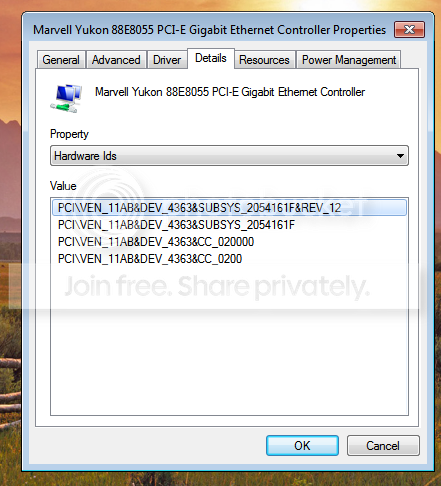
Write down, or screenshot the following for us:

Device Manager > Network Adapters > Right-Click the adapter listed and choose properties > Details Tab > Hardware Ids in the drop down menu

EDIT:
Get the same information for ALL cards listed in Network adapters please

example:
ethernet.jpg
 

My Computer

Computer Manufacturer/Model Number
Custom
OS
Windows 7 Ultimate x64
CPU
Intel i5-2500k
Motherboard
ASUS P8Z68-V Pro/GEN3
Memory
16GB
Graphics Card(s)
2x Radeon HD7970 Crossfire
Sound Card
On-Board / Logitech G930
Monitor(s) Displays
3x Dell u2412m
Screen Resolution
5760x1200
Hard Drives
Toshiba thns064gg2bbaa SSD
Seagate Barracuda 7200.12 ST31000528AS 1TB
Intel RST SSD caching enabled
PSU
Corsair AX850
Case
Corsair Obsidian 650D
Cooling
Corsair H100
Keyboard
Logitech Illuminated
Mouse
Logitech M510 Wireless
Internet Speed
1Mb/s
Write down, or screenshot the following for us:

Device Manager > Network Adapters > Right-Click the adapter listed and choose properties > Details Tab > Hardware Ids in the drop down menu

EDIT:
Get the same information for ALL cards listed in Network adapters please

example:
View attachment 123924


Okay, I only have 1 driver and here it is:

Untitled-8.png


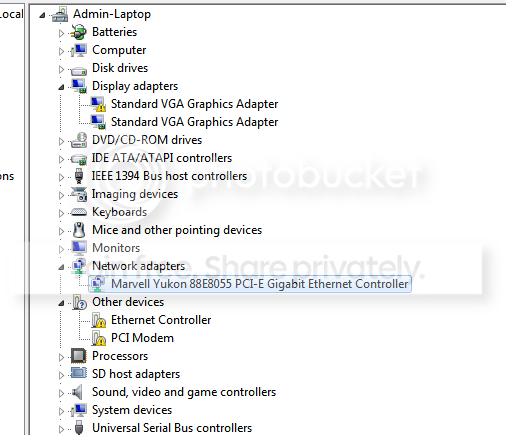
My whole device manager and my missing (unkown) drivers:

Untitled2.png
 
Last edited:

My Computer

Computer Manufacturer/Model Number
Alienware
OS
Windows 7 Ultimate x64
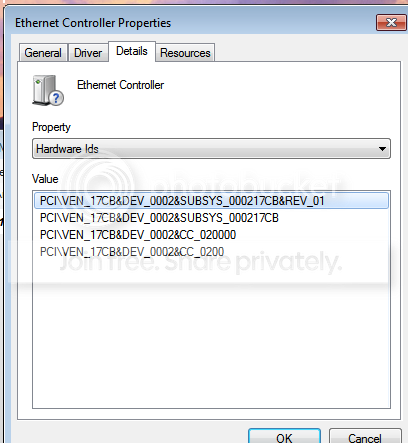
I'm sorry... do the same thing for 'Ethernet Controller' under 'other devices'. I was under the impression it was being recognized and installed improperly.
 

My Computer

Computer Manufacturer/Model Number
Custom
OS
Windows 7 Ultimate x64
CPU
Intel i5-2500k
Motherboard
ASUS P8Z68-V Pro/GEN3
Memory
16GB
Graphics Card(s)
2x Radeon HD7970 Crossfire
Sound Card
On-Board / Logitech G930
Monitor(s) Displays
3x Dell u2412m
Screen Resolution
5760x1200
Hard Drives
Toshiba thns064gg2bbaa SSD
Seagate Barracuda 7200.12 ST31000528AS 1TB
Intel RST SSD caching enabled
PSU
Corsair AX850
Case
Corsair Obsidian 650D
Cooling
Corsair H100
Keyboard
Logitech Illuminated
Mouse
Logitech M510 Wireless
Internet Speed
1Mb/s
okay.. here it is.

Untitled3.png
 

My Computer

Computer Manufacturer/Model Number
Alienware
OS
Windows 7 Ultimate x64
Update:

So why I had you post that particular information, is because out of the first line it's possible to extract the vendor and device to narrow down your driver search (and applies to most devices that may not be automatically discovered by Windows)

deviceid.jpg

In that line you need to look at two parts:
1) The part after Ven_ (up to ampersand)
2) The part after Dev_ (up to ampersand)

Using a site like pcidatabase you can usually track down what device you're looking at in device manager. In your case we'd plug in 17CB for Vendor, or 0002 for Device. You have a device that wasn't able to return anything (first time i've seen that).

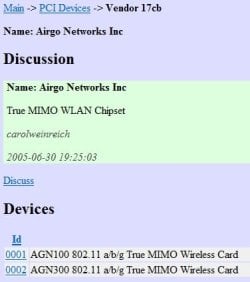
Using google and searching 'pci vendor 17CB' I was able to find:

airgo.jpg

So it seems we're looking for Airgo AGN300 True MIMO WLAN drivers.

Another dive into google ('airgo agn300 drivers') led me back to Sevenforums.
Airgo drivers
So at this point we have some research to do as to whether or not, any exist.
 

My Computer

Computer Manufacturer/Model Number
Custom
OS
Windows 7 Ultimate x64
CPU
Intel i5-2500k
Motherboard
ASUS P8Z68-V Pro/GEN3
Memory
16GB
Graphics Card(s)
2x Radeon HD7970 Crossfire
Sound Card
On-Board / Logitech G930
Monitor(s) Displays
3x Dell u2412m
Screen Resolution
5760x1200
Hard Drives
Toshiba thns064gg2bbaa SSD
Seagate Barracuda 7200.12 ST31000528AS 1TB
Intel RST SSD caching enabled
PSU
Corsair AX850
Case
Corsair Obsidian 650D
Cooling
Corsair H100
Keyboard
Logitech Illuminated
Mouse
Logitech M510 Wireless
Internet Speed
1Mb/s
Update:

So why I had you post that particular information, is because out of the first line it's possible to extract the vendor and device to narrow down your driver search (and applies to most devices that may not be automatically discovered by Windows)

View attachment 124001

In that line you need to look at two parts:
1) The part after Ven_ (up to ampersand)
2) The part after Dev_ (up to ampersand)

Using a site like pcidatabase you can usually track down what device you're looking at in device manager. In your case we'd plug in 17CB for Vendor, or 0002 for Device. You have a device that wasn't able to return anything (first time i've seen that).

Using google and searching 'pci vendor 17CB' I was able to find:

View attachment 124003

So it seems we're looking for Airgo AGN300 True MIMO WLAN drivers.

Another dive into google ('airgo agn300 drivers') led me back to Sevenforums.
Airgo drivers
So at this point we have some research to do as to whether or not, any exist.

Not only are you helping me find the drivers, thank you for explaining everything on how to do that. Ypu really are a huge help// Now I know there is a driver out there because I had the driver before my install onto windows 7.
 

My Computer

Computer Manufacturer/Model Number
Alienware
OS
Windows 7 Ultimate x64
Punkgi said:
Not only are you helping me find the drivers, thank you for explaining everything on how to do that. Ypu really are a huge help// Now I know there is a driver out there because I had the driver before my install onto windows 7.

You're welcome!

I'm not seeing Windows 7 drivers jump out at me yet, but if i HAD to try one right now, i probably try this. If you a have working system you're happy with right now, I suggest creating a restore point before you venture into experiments.

I'll keep poking around.
 

My Computer

Computer Manufacturer/Model Number
Custom
OS
Windows 7 Ultimate x64
CPU
Intel i5-2500k
Motherboard
ASUS P8Z68-V Pro/GEN3
Memory
16GB
Graphics Card(s)
2x Radeon HD7970 Crossfire
Sound Card
On-Board / Logitech G930
Monitor(s) Displays
3x Dell u2412m
Screen Resolution
5760x1200
Hard Drives
Toshiba thns064gg2bbaa SSD
Seagate Barracuda 7200.12 ST31000528AS 1TB
Intel RST SSD caching enabled
PSU
Corsair AX850
Case
Corsair Obsidian 650D
Cooling
Corsair H100
Keyboard
Logitech Illuminated
Mouse
Logitech M510 Wireless
Internet Speed
1Mb/s
Punkgi said:
Not only are you helping me find the drivers, thank you for explaining everything on how to do that. Ypu really are a huge help// Now I know there is a driver out there because I had the driver before my install onto windows 7.

You're welcome!

I'm not seeing Windows 7 drivers jump out at me yet, but if i HAD to try one right now, i probably try this. If you a have working system you're happy with right now, I suggest creating a restore point before you venture into experiments.

I'll keep poking around.

that link you gave me was the program DriverDetector, which I have installed in my computer already. that one doesn't work. :(

I'm poking around also. :D
 

My Computer

Computer Manufacturer/Model Number
Alienware
OS
Windows 7 Ultimate x64
Punkgi said:
that link you gave me was the program DriverDetector, which I have installed in my computer already. that one doesn't work. :(

Sorry about that. I didn't realize it was a program. I haven't used it and can not vouche for it. I'd personally remove it.

How about this? *knocks on wood*
 

My Computer

Computer Manufacturer/Model Number
Custom
OS
Windows 7 Ultimate x64
CPU
Intel i5-2500k
Motherboard
ASUS P8Z68-V Pro/GEN3
Memory
16GB
Graphics Card(s)
2x Radeon HD7970 Crossfire
Sound Card
On-Board / Logitech G930
Monitor(s) Displays
3x Dell u2412m
Screen Resolution
5760x1200
Hard Drives
Toshiba thns064gg2bbaa SSD
Seagate Barracuda 7200.12 ST31000528AS 1TB
Intel RST SSD caching enabled
PSU
Corsair AX850
Case
Corsair Obsidian 650D
Cooling
Corsair H100
Keyboard
Logitech Illuminated
Mouse
Logitech M510 Wireless
Internet Speed
1Mb/s
Punkgi said:
that link you gave me was the program DriverDetector, which I have installed in my computer already. that one doesn't work. :(

Sorry about that. I didn't realize it was a program. I haven't used it and can not vouche for it. I'd personally remove it.

How about this? *knocks on wood*


Okay I downloaded and installed with Vista Service Pack 2. I restarted my computer after completion and I haven't noticed a difference. That 'driver' didnt even change my device manager any. Unless I'm not supposed to just double click on setup, and Manually supposed to do it.
 

My Computer

Computer Manufacturer/Model Number
Alienware
OS
Windows 7 Ultimate x64
Ok, we need a clean slate here.

What OS do you have installed right now?
32bit or 64bit?

Edit:
Also, how much RAM do you have installed?
 

My Computer

Computer Manufacturer/Model Number
Custom
OS
Windows 7 Ultimate x64
CPU
Intel i5-2500k
Motherboard
ASUS P8Z68-V Pro/GEN3
Memory
16GB
Graphics Card(s)
2x Radeon HD7970 Crossfire
Sound Card
On-Board / Logitech G930
Monitor(s) Displays
3x Dell u2412m
Screen Resolution
5760x1200
Hard Drives
Toshiba thns064gg2bbaa SSD
Seagate Barracuda 7200.12 ST31000528AS 1TB
Intel RST SSD caching enabled
PSU
Corsair AX850
Case
Corsair Obsidian 650D
Cooling
Corsair H100
Keyboard
Logitech Illuminated
Mouse
Logitech M510 Wireless
Internet Speed
1Mb/s
Ok, we need a clean slate here.

What OS do you have installed right now?
32bit or 64bit?

Edit:
Also, how much RAM do you have installed?

64-bit and 2gig
 

My Computer

Computer Manufacturer/Model Number
Alienware
OS
Windows 7 Ultimate x64
Okay I downloaded and installed with Vista Service Pack 2. I restarted my computer after completion and I haven't noticed a difference. That 'driver' didnt even change my device manager any. Unless I'm not supposed to just double click on setup, and Manually supposed to do it.

I was wondering about 7 or Vista also.

Here's the thing. You aren't going to see much of an advantage (if any) by installing a 64 bit OS of Vista or 7 vs. 32 bit because of the fact you have 2 Gigs of RAM installed. 32 bit OS's can only address ~3.4GB of memory and it's an advantage for people with 4GB of RAM installed, or more, to migrate to a 64 bit OS.

In addition, a 64 bit OS with hardware pre-vista can be painstaking to find driver support for. I think your particular situation of downloading my last link, but it not working was based on it being a driver designed for 32bit OS. On alienware's website, there are VERY few x64 drivers available (for your model)

In my humble opinion, if you're interested in migrating to 7, you have a good chance to by using a 32bit option. Also, saying you had full driver support with 32bit Vista only adds more support to that idea.

So... in short (and without proofreading (sorry getting tired)), you need to choose 1 of the following:

1) Vista 32 bit
2) 7 32 bit

My appologies if you're not satisfied. I'm just out of ideas at this point.

Whichever you choose, I'd be more than happy to help further if you'd prefer.
 

My Computer

Computer Manufacturer/Model Number
Custom
OS
Windows 7 Ultimate x64
CPU
Intel i5-2500k
Motherboard
ASUS P8Z68-V Pro/GEN3
Memory
16GB
Graphics Card(s)
2x Radeon HD7970 Crossfire
Sound Card
On-Board / Logitech G930
Monitor(s) Displays
3x Dell u2412m
Screen Resolution
5760x1200
Hard Drives
Toshiba thns064gg2bbaa SSD
Seagate Barracuda 7200.12 ST31000528AS 1TB
Intel RST SSD caching enabled
PSU
Corsair AX850
Case
Corsair Obsidian 650D
Cooling
Corsair H100
Keyboard
Logitech Illuminated
Mouse
Logitech M510 Wireless
Internet Speed
1Mb/s
Back
Top