
You are using an out of date browser. It may not display this or other websites correctly.
You should upgrade or use an alternative browser.
You should upgrade or use an alternative browser.
all CPU meter showing lower clock speed?
- Thread starter rossmodel
- Start date


- Local time
- 2:33 AM
- Messages
- 7,146
you're right - most modern chips do clock themselves down when the full power isn't needed.
it reduces power (as in electricity) use and hence heat buildup, possibly extending lifespan and gives your fans an easier time.
try running a virus scan or something which uses cpu, and you should see it ramp up to max speed.
it reduces power (as in electricity) use and hence heat buildup, possibly extending lifespan and gives your fans an easier time.
try running a virus scan or something which uses cpu, and you should see it ramp up to max speed.
My Computer
- Computer Manufacturer/Model Number
- mickey megabyte 1234
- OS
- ultimate 64 sp1
- CPU
- i5 2500K [email protected]
- Motherboard
- MSI P67A-GD53
- Memory
- 8 gigs GSkill Ripjaws 1600
- Graphics Card(s)
- amd hd6950
- Sound Card
- creative x-fi gamer
- Monitor(s) Displays
- samsung 24"
- Screen Resolution
- 1920x1080
- Hard Drives
- ocz vertex 2e 60 gig, samsung f3 1tb, buffalo 2tb ext
- PSU
- antec 550
- Case
- antec three hundred
- Cooling
- i'm a cooling fan
- Keyboard
- saitek eclipse ii
- Mouse
- logitech g3
- Internet Speed
- about 4 Mbps
- Other Info
- i love win7

mickey is correct, and you can check this link for a little clarification - http://www.sevenforums.com/hardware-devices/87564-wrong-clock-speed-3.html#post756696
Good luck.
Good luck.
My Computer
- Computer type
- PC/Desktop
- Computer Manufacturer/Model Number
- Custom built by me.
- OS
- Windows 10 Pro
- CPU
- Intel Core i7-4770K (3.5Ghz)
- Motherboard
- Gigabyte G1 Sniper 5 (F10 Bios)
- Memory
- 32 gig Corsair Dominator Platinum (4x8Gig)
- Graphics Card(s)
- Sapphire Tri-X R9 Fury
- Sound Card
- Soundblaster ZXR
- Monitor(s) Displays
- NEC PA242W 24" LCD Monitor
- Screen Resolution
- 1920 x 1200
- Hard Drives
- Primary - Samsung 850 Pro (512gig), Samsung 840 Pro (256gig), 2TB WD Caviar Black.
- PSU
- EVGA Supernova 1000 G2
- Case
- Cooler Master HAF X
- Cooling
- Corsair H100i with Corsair Air Series SP120 Quiet Fans
- Keyboard
- Logitech Wireless Wave
- Mouse
- Logitech Performance MX
- Internet Speed
- High Speed Cable
- Antivirus
- Norton Security
- Browser
- IE11
- Other Info
- Memory Timings - 1866MHz @ 9-9-9-27-1T @ 1.5 volts
- Local time
- 2:33 AM
- Messages
- 7,146
your cpu should automagically crank itself up to normal top speed as soon as it senses that it's being used hard.
as i wrote above, try running a virus scan (not to look for viruses, but to make your chip work), you should see that it will be running at 2.1 Ghz, when it needs to.
as i wrote above, try running a virus scan (not to look for viruses, but to make your chip work), you should see that it will be running at 2.1 Ghz, when it needs to.
My Computer
- Computer Manufacturer/Model Number
- mickey megabyte 1234
- OS
- ultimate 64 sp1
- CPU
- i5 2500K [email protected]
- Motherboard
- MSI P67A-GD53
- Memory
- 8 gigs GSkill Ripjaws 1600
- Graphics Card(s)
- amd hd6950
- Sound Card
- creative x-fi gamer
- Monitor(s) Displays
- samsung 24"
- Screen Resolution
- 1920x1080
- Hard Drives
- ocz vertex 2e 60 gig, samsung f3 1tb, buffalo 2tb ext
- PSU
- antec 550
- Case
- antec three hundred
- Cooling
- i'm a cooling fan
- Keyboard
- saitek eclipse ii
- Mouse
- logitech g3
- Internet Speed
- about 4 Mbps
- Other Info
- i love win7

- Local time
- 1:33 AM
- Messages
- 287
You can also perform a speed test on your CPU to make sure it is able to run at it's full capacity.
My Computer
- Computer type
- PC/Desktop
- Computer Manufacturer/Model Number
- Custom
- OS
- Windows 7 Pro x64
- CPU
- Intel Core i7-5820k
- Motherboard
- ASUS X99-PRO
- Memory
- 32GB Kingston HyperX FURY DDR4-2400
- Graphics Card(s)
- EVGA Geforce GTX970
- Monitor(s) Displays
- ASUS VC239h
- Screen Resolution
- 1920x1080
- Hard Drives
- Samsung 850 EVO SSD 250GB x2
750 GB HDD
3TB HDD
- PSU
- Corsair RM750
- Case
- Fractal Design Define R5
- Cooling
- Noctua NH-D15
- Keyboard
- Corsair Strafe RGB
- Mouse
- Logitech G502
- Local time
- 2:33 AM
- Messages
- 7,146
ok - in your bios do you have any settings to do with EIST (Enhanced Intel SpeedStep® Technology), otherwise known as speedstep?
that is what is regulating your cpu speed. if you can turn it off in the bios, then your cpu should be running at full speed 100% of the time, wasting power, draining battery life, and making your machine hotter than necessary.
if you want to try a program which will definitely stress your cpu, try prime95
that is what is regulating your cpu speed. if you can turn it off in the bios, then your cpu should be running at full speed 100% of the time, wasting power, draining battery life, and making your machine hotter than necessary.
if you want to try a program which will definitely stress your cpu, try prime95
My Computer
- Computer Manufacturer/Model Number
- mickey megabyte 1234
- OS
- ultimate 64 sp1
- CPU
- i5 2500K [email protected]
- Motherboard
- MSI P67A-GD53
- Memory
- 8 gigs GSkill Ripjaws 1600
- Graphics Card(s)
- amd hd6950
- Sound Card
- creative x-fi gamer
- Monitor(s) Displays
- samsung 24"
- Screen Resolution
- 1920x1080
- Hard Drives
- ocz vertex 2e 60 gig, samsung f3 1tb, buffalo 2tb ext
- PSU
- antec 550
- Case
- antec three hundred
- Cooling
- i'm a cooling fan
- Keyboard
- saitek eclipse ii
- Mouse
- logitech g3
- Internet Speed
- about 4 Mbps
- Other Info
- i love win7
- Local time
- 2:33 AM
- Messages
- 7,146
do you have EIST settings in your bios?
and are you running off battery or mains?
also check your power settings: type power into the startmenu searchbox >> choose 'power options' from the search results >> change plan settings >> change advanced power settings >> scroll down to 'maximum processor state' and make sure it's 100%
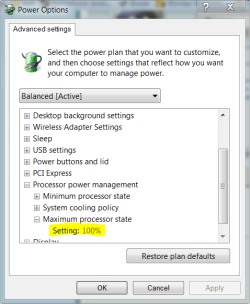
and are you running off battery or mains?
also check your power settings: type power into the startmenu searchbox >> choose 'power options' from the search results >> change plan settings >> change advanced power settings >> scroll down to 'maximum processor state' and make sure it's 100%
My Computer
- Computer Manufacturer/Model Number
- mickey megabyte 1234
- OS
- ultimate 64 sp1
- CPU
- i5 2500K [email protected]
- Motherboard
- MSI P67A-GD53
- Memory
- 8 gigs GSkill Ripjaws 1600
- Graphics Card(s)
- amd hd6950
- Sound Card
- creative x-fi gamer
- Monitor(s) Displays
- samsung 24"
- Screen Resolution
- 1920x1080
- Hard Drives
- ocz vertex 2e 60 gig, samsung f3 1tb, buffalo 2tb ext
- PSU
- antec 550
- Case
- antec three hundred
- Cooling
- i'm a cooling fan
- Keyboard
- saitek eclipse ii
- Mouse
- logitech g3
- Internet Speed
- about 4 Mbps
- Other Info
- i love win7
- Local time
- 2:33 AM
- Messages
- 7,146
did you see my edit about 'power options'?
My Computer
- Computer Manufacturer/Model Number
- mickey megabyte 1234
- OS
- ultimate 64 sp1
- CPU
- i5 2500K [email protected]
- Motherboard
- MSI P67A-GD53
- Memory
- 8 gigs GSkill Ripjaws 1600
- Graphics Card(s)
- amd hd6950
- Sound Card
- creative x-fi gamer
- Monitor(s) Displays
- samsung 24"
- Screen Resolution
- 1920x1080
- Hard Drives
- ocz vertex 2e 60 gig, samsung f3 1tb, buffalo 2tb ext
- PSU
- antec 550
- Case
- antec three hundred
- Cooling
- i'm a cooling fan
- Keyboard
- saitek eclipse ii
- Mouse
- logitech g3
- Internet Speed
- about 4 Mbps
- Other Info
- i love win7

- Local time
- 8:33 PM
- Messages
- 5,053
Try switching to high performance power plan and make sure max processor state is set to 100 % in the advanced options. Also, set the system cooling policy to active for both battery and plugged in.
My Computer
- Computer Manufacturer/Model Number
- Too many to describe...
- OS
- Windows 7 x64 pro/ Windows 7 x86 Pro/ XP SP3 x86
Similar threads
- Replies
- 3
- Views
- 2K


- Replies
- 5
- Views
- 3K
- Replies
- 24
- Views
- 47K
