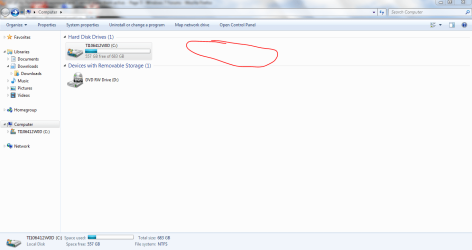
All of my Partitions disappeared and I cannot make them active.

The 13.33GB partition was called D prior to having problems... are you sure?
Disable restart on system failure in advanced systen settings to prevent system booting automatically after BSOD
 

My Computer My Computer

At a glance

Microsoft Windows 7 Home Premium 64-bits 7601...Intel(R) Core(TM) i3 CPU M 370 @ 2.40GHz4,00 GBATI Mobility Radeon HD 5400 Series
Computer type
Laptop
Computer Manufacturer/Model Number
ACER ASPIRE 5742G
OS
Microsoft Windows 7 Home Premium 64-bits 7601 Multiprocessor Free Service Pack 1
CPU
Intel(R) Core(TM) i3 CPU M 370 @ 2.40GHz
Motherboard
Acer Aspire 5742G
Memory
4,00 GB
Graphics Card(s)
ATI Mobility Radeon HD 5400 Series
Sound Card
(1) AMD High Definition Audio Device (2) Realtek High Defi
Screen Resolution
1366 x 768 x 32 bits (4294967296 colors) @ 60 Hz
Hard Drives
WDC WD5000BEVT-22ZAT0
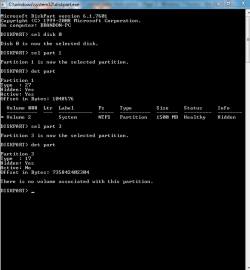
What's the problem? Partition table looks fine. It lists the two partitions as 100% free because it doesn't know it is a ntfs partition. Did it know before? Were drive letters assigned? Please do in elevated command prompt:
Code:
diskpart
sel  disk  0
sel part 1
det  part
sel part 3
det part
exit

Post output
Please post
 

My Computer My Computer

At a glance

Microsoft Windows 7 Home Premium 64-bits 7601...Intel(R) Core(TM) i3 CPU M 370 @ 2.40GHz4,00 GBATI Mobility Radeon HD 5400 Series
Computer type
Laptop
Computer Manufacturer/Model Number
ACER ASPIRE 5742G
OS
Microsoft Windows 7 Home Premium 64-bits 7601 Multiprocessor Free Service Pack 1
CPU
Intel(R) Core(TM) i3 CPU M 370 @ 2.40GHz
Motherboard
Acer Aspire 5742G
Memory
4,00 GB
Graphics Card(s)
ATI Mobility Radeon HD 5400 Series
Sound Card
(1) AMD High Definition Audio Device (2) Realtek High Defi
Screen Resolution
1366 x 768 x 32 bits (4294967296 colors) @ 60 Hz
Hard Drives
WDC WD5000BEVT-22ZAT0
kaktussoft, I'm sorry, I have no idea what your asking me to do, and to be honest, I am not 100% sure that it was marked a D: partition, but there was a partition next to my C: partition.

partition.PNG

If everything looks normal to you from the snips I posted, I'm okay with that, I do not want to try to fix something that is not broken. My computer has never given me any problems up until the point that my CD/DVD drive disappeared, and I got that back easy enough, so if I do not have to mess with anything else, thats good with me. But the post you put about the output, I have no idea how to do that, or what that is even. I can try if you walk me through it.
 

My Computer My Computer

At a glance

Windows 7 Home Premium 64bit.
Computer Manufacturer/Model Number
Toshibua Satellite Pro s850 series
OS
Windows 7 Home Premium 64bit.

My Computer My Computer

At a glance

Microsoft Windows 7 Home Premium 64-bits 7601...Intel(R) Core(TM) i3 CPU M 370 @ 2.40GHz4,00 GBATI Mobility Radeon HD 5400 Series
Computer type
Laptop
Computer Manufacturer/Model Number
ACER ASPIRE 5742G
OS
Microsoft Windows 7 Home Premium 64-bits 7601 Multiprocessor Free Service Pack 1
CPU
Intel(R) Core(TM) i3 CPU M 370 @ 2.40GHz
Motherboard
Acer Aspire 5742G
Memory
4,00 GB
Graphics Card(s)
ATI Mobility Radeon HD 5400 Series
Sound Card
(1) AMD High Definition Audio Device (2) Realtek High Defi
Screen Resolution
1366 x 768 x 32 bits (4294967296 colors) @ 60 Hz
Hard Drives
WDC WD5000BEVT-22ZAT0
Okay, I hope this is what you wanted:


comp.PNG
 

My Computer My Computer

At a glance

Windows 7 Home Premium 64bit.
Computer Manufacturer/Model Number
Toshibua Satellite Pro s850 series
OS
Windows 7 Home Premium 64bit.
Okay, I hope this is what you wanted:


View attachment 245203
partition 1 is type 27 (hidden NTFS)
partition 3 is type 17 (hidden [and also NTFS]... partition wizard told you)

Laptop manufactureer did that on purpose, so you can't mess around with it. That was always the case.... no problem at all.

Is drive you're missing something else???? usb stick, external disk drive?
 

My Computer My Computer

At a glance

Microsoft Windows 7 Home Premium 64-bits 7601...Intel(R) Core(TM) i3 CPU M 370 @ 2.40GHz4,00 GBATI Mobility Radeon HD 5400 Series
Computer type
Laptop
Computer Manufacturer/Model Number
ACER ASPIRE 5742G
OS
Microsoft Windows 7 Home Premium 64-bits 7601 Multiprocessor Free Service Pack 1
CPU
Intel(R) Core(TM) i3 CPU M 370 @ 2.40GHz
Motherboard
Acer Aspire 5742G
Memory
4,00 GB
Graphics Card(s)
ATI Mobility Radeon HD 5400 Series
Sound Card
(1) AMD High Definition Audio Device (2) Realtek High Defi
Screen Resolution
1366 x 768 x 32 bits (4294967296 colors) @ 60 Hz
Hard Drives
WDC WD5000BEVT-22ZAT0
Okay, I hope this is what you wanted:


View attachment 245203
partition 1 is type 27 (hidden NTFS)
partition 3 is type 17 (hidden [and also NTFS]... partition wizard told you)

Laptop manufactureer did that on purpose, so you can't mess around with it. That was always the case.... no problem at all.

Is drive you're missing something else???? usb stick, external disk drive?

No i'm not, I have two WD 3tb external hard drives, and one Toshiba 1tb external drive, plus a mini toshiba 500gb external and a 32gb flash, but none of them were plugged in the last few days.

It seems that I have overreacted, perhaps due to my extreme ignorance in these matters, and possible miscommunication with Greg, and I think my topic title was also naive. If you see nothing wrong here, I take your wisdom to truth. However, as I said, I have never had my computer blue screen on me before, I have norton 360 and run it regularly, and I downloaded malwarebytes and ran that, never had a virus detected, so why would Partition Recovery Wizard Mini-tool cause my computer to blue screen to prevent damage?
 

My Computer My Computer

At a glance

Windows 7 Home Premium 64bit.
Computer Manufacturer/Model Number
Toshibua Satellite Pro s850 series
OS
Windows 7 Home Premium 64bit.
We have no idea what your computer used to look like.

Are you missing any data ?
 

My Computer My Computer

At a glance

Windows 10 Pro x64Intel Core i7 6700KGSkill TridentZ RGB 16GB 3600 16-16-16-36EVGA GTX 980 Ti SC x2
Computer type
PC/Desktop
Computer Manufacturer/Model Number
Skylake Special #666
OS
Windows 10 Pro x64
CPU
Intel Core i7 6700K
Motherboard
Asus Sabertooth Z170 Mark 1
Memory
GSkill TridentZ RGB 16GB 3600 16-16-16-36
Graphics Card(s)
EVGA GTX 980 Ti SC x2
Sound Card
Realtek High Definition
Monitor(s) Displays
AOC G2460PG
Screen Resolution
1920 x 1080 144Hz
Hard Drives
Samsung 860 Pro 256GB, Seagate Barracuda 4TB x2
PSU
EVGA 1000 P2, EVGA White Custom Braided Cables
Case
Corsair Vengeance C70 Gunmetal Black
Cooling
Corsair H100i v2, Corsair ML120 x2, Thermal Grizzly Kryonaut
Keyboard
Logitech G910 Orion Spectrum
Mouse
Logitech G700s
Internet Speed
Verizon Fios Quantum Gateway 75/75
Antivirus
Windows Defender, Malwarebytes Free 3.8.3
Browser
Chrome
Other Info
Corsair SP120 x4, LG Blu-ray Drive, Durabrand HT-395 100 Watt Dolby Digital Amp, Corsair H2100 Wireless 7.1 Headset
Okay, I hope this is what you wanted:


View attachment 245203
partition 1 is type 27 (hidden NTFS)
partition 3 is type 17 (hidden [and also NTFS]... partition wizard told you)

Laptop manufactureer did that on purpose, so you can't mess around with it. That was always the case.... no problem at all.

Is drive you're missing something else???? usb stick, external disk drive?

No i'm not, I have two WD 3tb external hard drives, and one Toshiba 1tb external drive, plus a mini toshiba 500gb external and a 32gb flash, but none of them were plugged in the last few days.

It seems that I have overreacted, perhaps due to my extreme ignorance in these matters, and possible miscommunication with Greg, and I think my topic title was also naive. If you see nothing wrong here, I take your wisdom to truth. However, as I said, I have never had my computer blue screen on me before, I have norton 360 and run it regularly, and I downloaded malwarebytes and ran that, never had a virus detected, so why would Partition Recovery Wizard Mini-tool cause my computer to blue screen to prevent damage?
Did partition wizard cause a BSOD... how are you so sure? Disable automatic reboot on system crash, so you can see the bsod. Or look in eventlog what did cause it.
 

My Computer My Computer

At a glance

Microsoft Windows 7 Home Premium 64-bits 7601...Intel(R) Core(TM) i3 CPU M 370 @ 2.40GHz4,00 GBATI Mobility Radeon HD 5400 Series
Computer type
Laptop
Computer Manufacturer/Model Number
ACER ASPIRE 5742G
OS
Microsoft Windows 7 Home Premium 64-bits 7601 Multiprocessor Free Service Pack 1
CPU
Intel(R) Core(TM) i3 CPU M 370 @ 2.40GHz
Motherboard
Acer Aspire 5742G
Memory
4,00 GB
Graphics Card(s)
ATI Mobility Radeon HD 5400 Series
Sound Card
(1) AMD High Definition Audio Device (2) Realtek High Defi
Screen Resolution
1366 x 768 x 32 bits (4294967296 colors) @ 60 Hz
Hard Drives
WDC WD5000BEVT-22ZAT0
kattussoft, everything looks good, no BSOD, everything seems to be well in place. I was after a problem that was not really there. If anything comes up I'll give you guys a shout. I'm sorry to waste you and Greg's time over this issue, but I really appreciate the attention you guys gave.

I hope you and your family have a really nice holiday and new year. Thanks again,

Brandon
 

My Computer My Computer

At a glance

Windows 7 Home Premium 64bit.
Computer Manufacturer/Model Number
Toshibua Satellite Pro s850 series
OS
Windows 7 Home Premium 64bit.
Brandon, when you posted up the Partition Wizard screenshot, it became clear that the 13.3 gb partition is not missing but is the Recovery partition. For some reason it had lost its label in Disk Mgmt. But there is no reason to recover it now.

I don't know what was done to cause the loss of the drive letter on Recovery (if there was one) or why the System label doesn't appear in Disk Mgmt either, but I think you're safe for now. Just watch performance closely and report back any problems.

See if you can make your Recovery Disks if you haven't already, as shown in Toshiba HDD Recovery Utility .

If disks will not generate then it might indicate Recovery no longer functions. If that's the case in the future to reinstall you would need to either order your Recovery Disks from manufacturer or do a Clean Reinstall - Factory OEM Windows 7 which is a superior install that leaves out the preinstalled factory bloatware that throttles Win7. We can help you do this and get it perfect.
 
Hi Greg, yeah it seems as though the problem was not really a big issue, I'm almost certain it was lettered (D:) and when it disappeared I overreacted. It seems to be running fine, just hidden. I created the repair disk you told me to make and I'm about to make the recovery disks as well. In my computer its not showing recovery disk creator, its showing recovery media creator, but I'm assuming thats the exact same thing, if not I could look to download it online somewhere.

But now everything seems good, had a bsod scare right when partition recovery wizard reached 100%, but I restarted the system 3 times and it has not reoccurred again. If it does I will send you guys the error code. And if for some reason I do need to do a complete reinstall, I would definitely want to go the route of Factory OEM Windows 7, with your help.
 

My Computer My Computer

At a glance

Windows 7 Home Premium 64bit.
Computer Manufacturer/Model Number
Toshibua Satellite Pro s850 series
OS
Windows 7 Home Premium 64bit.
Back
Top