Solved All the gadgets are not working / user profile

saad3000

New member
Local time
9:00 AM
Messages
23
[SOLVED]All the gadgets are not working / user profile

Dears,

After restart the Clock, Calendar and the Large Notes Gadgets stopped working!! My problem was that I lost all the 8 notes used in LargeNotes :( now the second problem is non is working! they are there but they are not there!

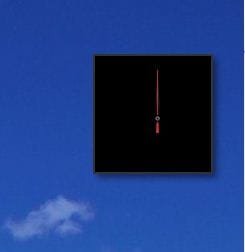
I created a new user profile and they appeared without a problem! How do I solve this issue many thanks regards! here is a how the clock gadget looks in my profile.


Windows 7 32bits.


Solution:

http://www.sevenforums.com/tutorials/140358-gadgets-not-displaying-correctly-windows-7-fix.html
 

Attachments
  • clock.JPG
    clock.JPG
    10.6 KB · Views: 915
Last edited by a moderator:

My Computer My Computer

At a glance

7
OS
7

My Computer My Computer

At a glance

Windows 10, Home Clean InstallIntel Core2 processsor Q8200(2.33Ghz 1333FSB)...6 gbATI Radeon 256MB HD3650
Computer type
PC/Desktop
Computer Manufacturer/Model Number
Dell XPS 420
OS
Windows 10, Home Clean Install
CPU
Intel Core2 processsor Q8200(2.33Ghz 1333FSB) Quad Core Tech
Motherboard
Dell
Memory
6 gb
Graphics Card(s)
ATI Radeon 256MB HD3650
Sound Card
Intergrated 7.1 Channel Audio
Monitor(s) Displays
Dell SP2009W 20"
Hard Drives
640 GB Serial ATA Hard drive
Cooling
Fan
Keyboard
Dell USB Keyboard
Mouse
Dell Premium Optical USB
Internet Speed
DSL 2.85
Hello, I followed what you said and there is nothing to restore.
 

Attachments

  • gadgets2.JPG
    gadgets2.JPG
    17.4 KB · Views: 4

My Computer My Computer

At a glance

7
OS
7
I am having this same problem. absolutely no gadgets are working. I've tried restoring the old ones and also downloading new ones. Neither worked.
 

Attachments

  • not working.png
    not working.png
    39.2 KB · Views: 4

My Computer My Computer

At a glance

Windows 7 Home Premium 64bit
OS
Windows 7 Home Premium 64bit

My Computer My Computer

At a glance

Windows 10, Home Clean InstallIntel Core2 processsor Q8200(2.33Ghz 1333FSB)...6 gbATI Radeon 256MB HD3650
Computer type
PC/Desktop
Computer Manufacturer/Model Number
Dell XPS 420
OS
Windows 10, Home Clean Install
CPU
Intel Core2 processsor Q8200(2.33Ghz 1333FSB) Quad Core Tech
Motherboard
Dell
Memory
6 gb
Graphics Card(s)
ATI Radeon 256MB HD3650
Sound Card
Intergrated 7.1 Channel Audio
Monitor(s) Displays
Dell SP2009W 20"
Hard Drives
640 GB Serial ATA Hard drive
Cooling
Fan
Keyboard
Dell USB Keyboard
Mouse
Dell Premium Optical USB
Internet Speed
DSL 2.85
Just had a thought. Gadgets do not work if UAC is off.
 

My Computer My Computer

At a glance

Windows 10, Home Clean InstallIntel Core2 processsor Q8200(2.33Ghz 1333FSB)...6 gbATI Radeon 256MB HD3650
Computer type
PC/Desktop
Computer Manufacturer/Model Number
Dell XPS 420
OS
Windows 10, Home Clean Install
CPU
Intel Core2 processsor Q8200(2.33Ghz 1333FSB) Quad Core Tech
Motherboard
Dell
Memory
6 gb
Graphics Card(s)
ATI Radeon 256MB HD3650
Sound Card
Intergrated 7.1 Channel Audio
Monitor(s) Displays
Dell SP2009W 20"
Hard Drives
640 GB Serial ATA Hard drive
Cooling
Fan
Keyboard
Dell USB Keyboard
Mouse
Dell Premium Optical USB
Internet Speed
DSL 2.85
I got the same case here, it seems that this happened after installing the new updates of windows 7. I have my UAC set at default level.
screenah.jpg
 

My Computer My Computer

At a glance

Windows 7 Professional 32bit
OS
Windows 7 Professional 32bit
the scan said everything was fine and my UAC is also default.
(p.s. I'm on home premium 64 not 32 like saad3000)
 

My Computer My Computer

At a glance

Windows 7 Home Premium 64bit
OS
Windows 7 Home Premium 64bit
The only thing u can get it to work is to create a new account. :( This is pain... And the only reason this happened is because one of the updates got installed and screwed everything up. I haven't restarted windows 7 since last week and today was the day that I lost upto 8 notes filled with lots of info :< no backup... Guys if anyone solves this problem let me know.

The things I did: System restore = problem still exist..
SFC = problem still exist
Safemode + removing the settings / gadgets under user profile/appdata/microsoft/windows sidebar = problem still exist
Restoring sidebar/gadgets to defaults = problem still exist
Registering alot of DLLs related to gadgets = problem still exist.
UAC both ways off and On / Notify and Do not Notify = problem still exist

Only solution I found is to create a new account, which i really don't want.

Regards,
Saad
 

My Computer My Computer

At a glance

7
OS
7
Well how about a system restore?
 

My Computer My Computer

At a glance

Windows 10, Home Clean InstallIntel Core2 processsor Q8200(2.33Ghz 1333FSB)...6 gbATI Radeon 256MB HD3650
Computer type
PC/Desktop
Computer Manufacturer/Model Number
Dell XPS 420
OS
Windows 10, Home Clean Install
CPU
Intel Core2 processsor Q8200(2.33Ghz 1333FSB) Quad Core Tech
Motherboard
Dell
Memory
6 gb
Graphics Card(s)
ATI Radeon 256MB HD3650
Sound Card
Intergrated 7.1 Channel Audio
Monitor(s) Displays
Dell SP2009W 20"
Hard Drives
640 GB Serial ATA Hard drive
Cooling
Fan
Keyboard
Dell USB Keyboard
Mouse
Dell Premium Optical USB
Internet Speed
DSL 2.85
I just tried that about four times. it keeps saying it wasn't successful because I have antivirus running even after I turned it off then completely deleted it.
 

My Computer My Computer

At a glance

Windows 7 Home Premium 64bit
OS
Windows 7 Home Premium 64bit
Try in safe mode
 

My Computer My Computer

At a glance

Windows 10, Home Clean InstallIntel Core2 processsor Q8200(2.33Ghz 1333FSB)...6 gbATI Radeon 256MB HD3650
Computer type
PC/Desktop
Computer Manufacturer/Model Number
Dell XPS 420
OS
Windows 10, Home Clean Install
CPU
Intel Core2 processsor Q8200(2.33Ghz 1333FSB) Quad Core Tech
Motherboard
Dell
Memory
6 gb
Graphics Card(s)
ATI Radeon 256MB HD3650
Sound Card
Intergrated 7.1 Channel Audio
Monitor(s) Displays
Dell SP2009W 20"
Hard Drives
640 GB Serial ATA Hard drive
Cooling
Fan
Keyboard
Dell USB Keyboard
Mouse
Dell Premium Optical USB
Internet Speed
DSL 2.85
safe mode didn't work =\
now I'm *also* having this problem.
 

Attachments

  • more problems.png
    more problems.png
    5.7 KB · Views: 1

My Computer My Computer

At a glance

Windows 7 Home Premium 64bit
OS
Windows 7 Home Premium 64bit
Just had a thought. Gadgets do not work if UAC is off.

Yes they do rich, you are thinking of the older builds which had a problem with gadgets when UAC was turned off. That bug was fixed with build 7022 I believe.

The only problems I see with gadgets lately is that sometimes they don't load up correctly at start up but it always seems to fix itself with a restart for me.
 

My Computer My Computer

At a glance

Windows 7 Ult, Windows 8.1 Pro,Q9650-4.275GHz, E8600 4.5GHz, E6750-3.8GHzG.Skill PC2 9600 1200Mhz 5 5 5 15 2TGTX480
Computer type
PC/Desktop
Computer Manufacturer/Model Number
Home built
OS
Windows 7 Ult, Windows 8.1 Pro,
CPU
Q9650-4.275GHz, E8600 4.5GHz, E6750-3.8GHz
Motherboard
Evga 780i FTW
Memory
G.Skill PC2 9600 1200Mhz 5 5 5 15 2T
Graphics Card(s)
GTX480
Sound Card
Asus Xonar D2
Monitor(s) Displays
HannsG
Screen Resolution
1680X1050
Hard Drives
GSkill Phoenix Pro 120GB SSD
PSU
ThermalTake Toughpower 1000Watt modular
Case
ThermalTake XaserV
Cooling
Xigmatek S1283
Keyboard
Logitech G15
Mouse
Logitech G9
Internet Speed
T1
Close Windows Sidebar

Open task manager Ctrl+Shift+Esc

Processes tab> Right click on sidebar.exe and choose End Process

Open an advanced command prompt

Start> Type cmd in search box> Right click on cmd.exe in results above> choose Run as administrator

Type the following and press Enter after each:

regsvr32 msxml3.dll

regsvr32 scrrun.dll

regsvr32 jscript.dll

Restart your PC and see if that has fixed it. A Guy
 

My Computer My Computer

At a glance

Windows 10 Home x64INTEL Core i5-750 Quad-Core 3.37GHzHyperX Fury Black Series 8GB (2 x 4GB) 1866MhzEVGA GeForce GTX 750 Superclocked 1GB 128-Bit...
Computer type
PC/Desktop
OS
Windows 10 Home x64
CPU
INTEL Core i5-750 Quad-Core 3.37GHz
Motherboard
ASUS P7P55D
Memory
HyperX Fury Black Series 8GB (2 x 4GB) 1866Mhz
Graphics Card(s)
EVGA GeForce GTX 750 Superclocked 1GB 128-Bit GDDR5
Monitor(s) Displays
LG 32MA68HY 32" IPS
Screen Resolution
1920 x 1080
Hard Drives
Samsung 840 Evo 120GB, SEAGATE 500GB Barracuda® 7200.12, SATA 3 Gb/s, 7200 RPM, 16MB cache
PSU
ANTEC TruePower New TP-550, 80 PLUS, 550W
Case
ANTEC Three Hundred Illusion
Cooling
COOLER MASTER Hyper 212 Plus, 4 x 120mm 1 x 140mm Noctua's
Internet Speed
85 + Mbps
Antivirus
Avast
Browser
Vivaldi
Close Windows Sidebar

Open task manager Ctrl+Shift+Esc

Processes tab> Right click on sidebar.exe and choose End Process

Open an advanced command prompt

Start> Type cmd in search box> Right click on cmd.exe in results above> choose Run as administrator

Type the following and press Enter after each:

regsvr32 msxml3.dll

regsvr32 scrrun.dll

regsvr32 jscript.dll

Restart your PC and see if that has fixed it. A Guy

Did not work. Its something with the profile which I can't figure it out.
 

My Computer My Computer

At a glance

7
OS
7

My Computer My Computer

At a glance

Windows 10 Home x64INTEL Core i5-750 Quad-Core 3.37GHzHyperX Fury Black Series 8GB (2 x 4GB) 1866MhzEVGA GeForce GTX 750 Superclocked 1GB 128-Bit...
Computer type
PC/Desktop
OS
Windows 10 Home x64
CPU
INTEL Core i5-750 Quad-Core 3.37GHz
Motherboard
ASUS P7P55D
Memory
HyperX Fury Black Series 8GB (2 x 4GB) 1866Mhz
Graphics Card(s)
EVGA GeForce GTX 750 Superclocked 1GB 128-Bit GDDR5
Monitor(s) Displays
LG 32MA68HY 32" IPS
Screen Resolution
1920 x 1080
Hard Drives
Samsung 840 Evo 120GB, SEAGATE 500GB Barracuda® 7200.12, SATA 3 Gb/s, 7200 RPM, 16MB cache
PSU
ANTEC TruePower New TP-550, 80 PLUS, 550W
Case
ANTEC Three Hundred Illusion
Cooling
COOLER MASTER Hyper 212 Plus, 4 x 120mm 1 x 140mm Noctua's
Internet Speed
85 + Mbps
Antivirus
Avast
Browser
Vivaldi
Thanks, I did not want to end creating and transferring to a new profile but that was the only solution I guess.
 

My Computer My Computer

At a glance

7
OS
7
Thanks, I did not want to end creating and transferring to a new profile but that was the only solution I guess.

Well, if you are patient, you may get more ideas on this from others. A Guy
 

My Computer My Computer

At a glance

Windows 10 Home x64INTEL Core i5-750 Quad-Core 3.37GHzHyperX Fury Black Series 8GB (2 x 4GB) 1866MhzEVGA GeForce GTX 750 Superclocked 1GB 128-Bit...
Computer type
PC/Desktop
OS
Windows 10 Home x64
CPU
INTEL Core i5-750 Quad-Core 3.37GHz
Motherboard
ASUS P7P55D
Memory
HyperX Fury Black Series 8GB (2 x 4GB) 1866Mhz
Graphics Card(s)
EVGA GeForce GTX 750 Superclocked 1GB 128-Bit GDDR5
Monitor(s) Displays
LG 32MA68HY 32" IPS
Screen Resolution
1920 x 1080
Hard Drives
Samsung 840 Evo 120GB, SEAGATE 500GB Barracuda® 7200.12, SATA 3 Gb/s, 7200 RPM, 16MB cache
PSU
ANTEC TruePower New TP-550, 80 PLUS, 550W
Case
ANTEC Three Hundred Illusion
Cooling
COOLER MASTER Hyper 212 Plus, 4 x 120mm 1 x 140mm Noctua's
Internet Speed
85 + Mbps
Antivirus
Avast
Browser
Vivaldi
I will migrate to a new profile and leave my damaged profile for future investigation :) thanks.
 

My Computer My Computer

At a glance

7
OS
7
Back
Top