
ismail1092
New member
- Local time
- 5:16 PM
- Messages
- 2
Hello, so i recently installed windows 7 Ultimate x64 on my HP Pavilion g4-2235dx Notebook PC. The laptop originally came with windows 8 but i prefer windows 7 so i decided to install that. Anyways my issue is this on the left side of the laptop their are 2 usb ports and on the right side there is 1 usb port. The usb port on the right works without issue while the two on the left side refuse to work. When i go into device manager i see this.
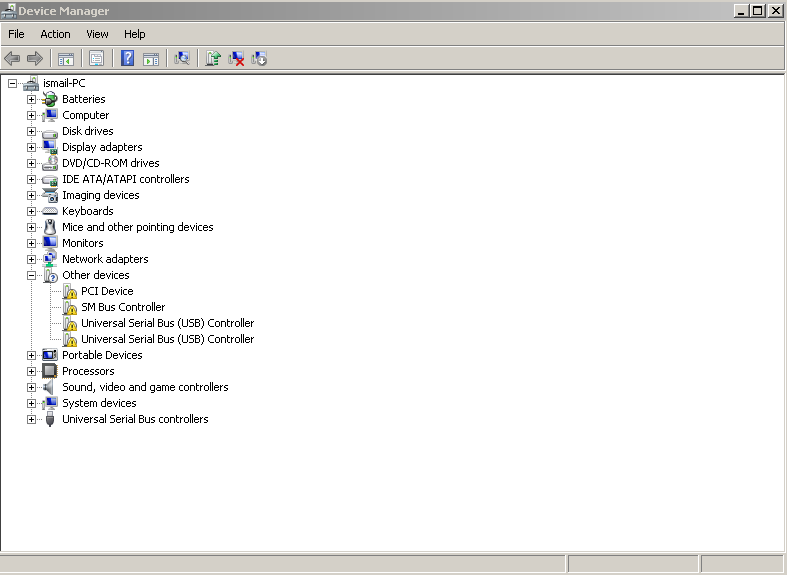
(I use the classic theme so that's why it looks like an older version of windows)
I looked into this issue and did multiple things to try to fix it but they all failed. Here is what i tried. I tried uninstalling the two universal serial buses that had the exclamation point next to them. I installed all the optional and regular windows updates. I tried Microsoft's fix it for USB issues. I tried removing my battery and holding on the power button for 30 minutes then restarting the laptop after letting it rest for 30 minutes. I downloaded a couple of drivers from my manufacturer from this link HP Software and Driver Downloads for HP Printers, Laptops, Desktops and More | HP® Support the drivers include updating the Bios as well as installing the UEFI driver i even tried installing this driver "HP 2005pr USB 2.0 Port Replicator Driver". I also disabled and re enabled the universal serial bus's that have the exclamation point. Another thing i tried was the usb selective suspend setting and disabling it from there then enabling it, this is supposed to remove power from going to the USB ports then give it back. None of these things worked and all of this started when i went from windows 8 to windows 7. The only USB port that works is the one on the right. Also nothing that i plug in works like a flash drive and a mini usb mouse but it does power the devices and i see a light under the mouse and my phone is able to charge on those two ports that don't work. The phone can charge but it will not allow me to access the phones files. Anyways if you know of any solutions that would be greatly appreciated and if you know of any driver i can try that might work. One other thing to mention is that the two usb ports that aren't working are USB 2.0 ports.
(I use the classic theme so that's why it looks like an older version of windows)
I looked into this issue and did multiple things to try to fix it but they all failed. Here is what i tried. I tried uninstalling the two universal serial buses that had the exclamation point next to them. I installed all the optional and regular windows updates. I tried Microsoft's fix it for USB issues. I tried removing my battery and holding on the power button for 30 minutes then restarting the laptop after letting it rest for 30 minutes. I downloaded a couple of drivers from my manufacturer from this link HP Software and Driver Downloads for HP Printers, Laptops, Desktops and More | HP® Support the drivers include updating the Bios as well as installing the UEFI driver i even tried installing this driver "HP 2005pr USB 2.0 Port Replicator Driver". I also disabled and re enabled the universal serial bus's that have the exclamation point. Another thing i tried was the usb selective suspend setting and disabling it from there then enabling it, this is supposed to remove power from going to the USB ports then give it back. None of these things worked and all of this started when i went from windows 8 to windows 7. The only USB port that works is the one on the right. Also nothing that i plug in works like a flash drive and a mini usb mouse but it does power the devices and i see a light under the mouse and my phone is able to charge on those two ports that don't work. The phone can charge but it will not allow me to access the phones files. Anyways if you know of any solutions that would be greatly appreciated and if you know of any driver i can try that might work. One other thing to mention is that the two usb ports that aren't working are USB 2.0 ports.
My Computer
At a glance
Windows 7 Ultimate x64
- Computer type
- Laptop
- Computer Manufacturer/Model Number
- HP Pavilion g4-2235dx Notebook PC
- OS
- Windows 7 Ultimate x64

 i can't believe it was that simple this whole time lol.
