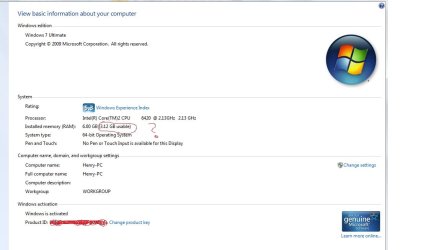
all the installed memory (RAM) not usable??

Doesn't a graphics card use up ram as well, i'm sure i read that somewhere.
 

My Computer

OS
7, XP
CPU
Intel C2Q 6600
Memory
2 GB
Graphics Card(s)
ATi HD 4850
Monitor(s) Displays
22" LCD
Hard Drives
500GB Internal
Internet Speed
10mb
2.87 RAM usable out of 4 GB

moz-screenshot.png
I have this same problem. People are saying under 4 GB needs to be a x86 Windows 7 operating and over 4 gb needs to be a 64 bit system. How bout right at 4bg? 64 bit I'm guessing because I have 4 gb on a 32 bit and it's not all usable?
thanks,
chris
 

My Computer

Computer Manufacturer/Model Number
Toshiba Satellite L305-S5919
OS
Windows 7 32-bit
Memory
4 GB
Hard Drives
640 GB Western Digital
Cougs837:

There are many many posts on the 32/64 issue, including at the level of 4 GB RAM.

Nothing has been resolved, just as nothing has been resolved in 80 years of Ford or Chevy. And for the same reason.

You can Google and find page after page about the wonders of 64-bit---none of which may mean the slightest thing in your case.

The "proper" choice is based on a complicated algorithm involving what you do on the PC, what hardware you have, what software you use most frequently, the value you place on your time, your degree of obsessiveness, your inclination to take advice from total strangers on the Internet, how often you upgrade, yada yada yada, ad nauseum.

I think most newly manufactured systems with 4 GB of RAM have 64-bit installed. I suspect that is mostly for purposes of standardization by OEM builders and that the majority of users justifiably could not care less.

 

My Computer

Computer type
PC/Desktop
Computer Manufacturer/Model Number
Ignatz Special; 4 speed manual gearbox; factory air conditioning; one of one
OS
Windows 7 Home Premium SP1, 64-bit
CPU
Intel Skylake i5-6600K, not overclocked
Motherboard
AsRock Z170M Extreme 4, micro ATX
Memory
8 GB HyperX DDR4-2666 (2 x 4 GB)
Graphics Card(s)
none; graphics are integrated on CPU
Sound Card
onboard: Realtek ALC1150; external: USB Behringer UF0-202
Monitor(s) Displays
Dell S2340M 23 inch IPS
Screen Resolution
1600 x 900
Hard Drives
System: Crucial MX100 series SSD, 128 GB;
Data: Samsung Spinpoint 103SJ, 1 TB;
Backup: WD Caviar Green WD30EZRX-00D8PB0, 3 TB
PSU
Rosewill SilentNight 500 watt fanless, semi-modular
Case
Antec Solo II
Cooling
Noctua NH-U12S; Noctua F12 intake, Noctua S12A exhaust
Keyboard
Microsoft 200 6JH-00001 USB
Mouse
Dell or Microsoft optical wired; USB
Antivirus
Microsoft Security Essentials and Malwarebytes Premium
Browser
Pale Moon
Other Info
All fans PWM; speeds at idle: CPU circa 500 rpm; intake circa 600 rpm; exhaust circa 600 rpm; CPU temps 27 idle and 47 C load in a warm room (27 C/81 F) when running Intel Extreme Tuning Utility stress test.
moz-screenshot.png
I have this same problem. People are saying under 4 GB needs to be a x86 Windows 7 operating and over 4 gb needs to be a 64 bit system. How bout right at 4bg? 64 bit I'm guessing because I have 4 gb on a 32 bit and it's not all usable?
thanks,
chris

That is true.

In order to move your video memory out of the 4 gig space, you need to have the 64bit version of WIndows installed. Now there are some motherboards that are not exactly 64bit friendly and even if you put 64bit windows on it may not have the capability of routing the video memory outside that limit. But most decent boards in the last 3 years or so should.

Otherwise with 32bit windows the hardware has to live in the same 4 gig as the OS/Programs.
 

My Computer

Computer Manufacturer/Model Number
Scratch built
OS
Windows 7 x64 Ultimate
CPU
i7 960
Motherboard
Asus P6X58D
Memory
12 Gig Corsair Dominator
Graphics Card(s)
Nvidia 480
Sound Card
Maudio Delta 44 + breakout box
Monitor(s) Displays
Dell UltraSharp U2410 24in and Samsung 21 dual monitors
Screen Resolution
1920x1200 and 1280x1024
Hard Drives
Primary: Intel X-25M G2 160G SSD
Secondary: Segate baracuda 1.0 TB
HDs in AHCI mode.
PSU
Corasair TX850
Case
Cooler Master HAF
Cooling
Corsair H50
Keyboard
Logitech G15 + N52 game pad
Mouse
Logitech MX518
Internet Speed
15kbs down 4.5kbps up
Other Info
WEI 7.6
CPU & RAM 7.6
Graphics 7.9
Hard disk 7.7
Cool thanks guys. I just ordered a new hard drive to upgrade my 160 gb. When I get it I'm going to reinstall a 64 bit windows 7 and see how the ram looks. I'll let you know.

Thanks, Chris
 

My Computer

Computer Manufacturer/Model Number
Toshiba Satellite L305-S5919
OS
Windows 7 32-bit
Memory
4 GB
Hard Drives
640 GB Western Digital
Hey Guys,
Please Please help!
this is really doing my head in.. :-(
i have just installed windows ultimate X64
Windows shows i have 6GB installed memory but only 3.12GB is avaliable.
i have looked over the last week to find an answer but to no avail...

I checked in my Bios (After updating through ASUS website) but i cant seem to find any memory setting to change? or that would limit my memory.
Under system info in bios it says
6 GB of Memory
2.9GB Perpetuated
3.2GB avaliable.....?

i have an ASUS P5L-VM 1394 and it says it will take up to 8GB of memory on there website.

I have checked though CPU ID and it registers the 6 gig of ram.
I though it might be my Graphics card (Geforce8800 GTS 640) but surly it shouldn't effect the memory this much should it?

Guys im really baking my head over this , please any help i would be greatly appreciate.
:cry:
 

Attachments

  • memory prob.jpg
    memory prob.jpg
    101.9 KB · Views: 807
  • memory prob2.png
    memory prob2.png
    31 KB · Views: 170

My Computer

OS
Windows 7 Ultimate X64
CPU
INtel Core Duo E6420 - 6420 @2.12GHz
Motherboard
Asus - P5L-VM 1394
Memory
6GB (3.12GB Usable) !!! Please why is only 3.12 avaliable?!!
Graphics Card(s)
Geforce 8800 GTS
Monitor(s) Displays
47" 1080P Sharp Aquos
Hard Drives
2 x 1 TB
Well i do feel stupid now....
I read 2 reviews on the spec for this mother board and they b0th said this board can take up to 8GB of memory... i have just read off Google shopping..... it cant :o
Its Maximum of 4GB
:(
but I think as it was showing up in the bios and in windows, this just baffled me?!
anyway i think im going to try and upgrade a stage at a time.
I just read you can buy motherboard that support bother DDR2 Memory and DDR3 Memory >
Gigabyte GA-P35C-DS3R - motherboard - ATX - iP35 - LGA775 Socket
 

My Computer

OS
Windows 7 Ultimate X64
CPU
INtel Core Duo E6420 - 6420 @2.12GHz
Motherboard
Asus - P5L-VM 1394
Memory
6GB (3.12GB Usable) !!! Please why is only 3.12 avaliable?!!
Graphics Card(s)
Geforce 8800 GTS
Monitor(s) Displays
47" 1080P Sharp Aquos
Hard Drives
2 x 1 TB
Solved

I just installed the 64-bit windows 7 and all 4gb are in and useable now. So it for sure is due to 32-bit only having ability to run 2gb or so.
 

My Computer

Computer Manufacturer/Model Number
Toshiba Satellite L305-S5919
OS
Windows 7 32-bit
Memory
4 GB
Hard Drives
640 GB Western Digital
I could not find in the Bios where to max out the memory. Can someone attach a screenshot of theirs and maybe I can figure it out from there. Thanks

I got 8 gig installed with 3.25 available, W7/64, i7950, Gigabyte X58A-UD3R
 

My Computer

Computer Manufacturer/Model Number
Homemade
OS
Windows 7 Home Premium 64 bit
CPU
i7 950
Motherboard
Gigabyte X58A-UD3R 1366
Memory
Corsair 8 Gig DDR3 1600
Graphics Card(s)
GeForce GT 220 1 Gig DDR3
Sound Card
on board
Monitor(s) Displays
Acer 22 inch
Screen Resolution
1440 x 900
Hard Drives
WD 500 Gig
PSU
Coolmax 500 watt
Case
Coolmax Gladiator 600
Cooling
Stock fans
My problem is **Solved**

I could not find in the Bios where to max out the memory. Can someone attach a screenshot of theirs and maybe I can figure it out from there. Thanks

I got 8 gig installed with 3.25 available, W7/64, i7950, Gigabyte X58A-UD3R

====================

**Solved**

I did 2 things Not sure which did the trick.

First I updated the bios. Then I restarted and checked again. Still had the same (8 gig installed with 3.25 available)

Second I reinstalled Win 7 Then checked again. BINGO it said 8 gig installed. With no mention of "available".

So I'm not sure which fixed it or if it needed both to fix it but it's fixed.
 

My Computer

Computer Manufacturer/Model Number
Homemade
OS
Windows 7 Home Premium 64 bit
CPU
i7 950
Motherboard
Gigabyte X58A-UD3R 1366
Memory
Corsair 8 Gig DDR3 1600
Graphics Card(s)
GeForce GT 220 1 Gig DDR3
Sound Card
on board
Monitor(s) Displays
Acer 22 inch
Screen Resolution
1440 x 900
Hard Drives
WD 500 Gig
PSU
Coolmax 500 watt
Case
Coolmax Gladiator 600
Cooling
Stock fans
Updating the bios you have probably enabled memory remap in the chipset settings.

I had the same problem: Windows 7 6 gigas installed 3.1 usable
I went to the motherboard settings (pressing supr or del while restarting) and in the chipset setings, choosed the option ENABLE MEMORY REMAP

Result: 6 gigas installed, nothing more mentioned.
 

My Computer

OS
windows 7
Other than the standard 32 / 64 bit limits for windows, Windows 7 basic is 8GB limit, Windows 7 Home Prem. ib 16GB limit, you need Windows 7 Pro to Ultimate to Use anything from 16GB to 192GB
 

My Computer

Computer Manufacturer/Model Number
Built
OS
Windows 7 64Bit Ultimate
CPU
3.2 Ghz i7 970
Motherboard
Asus P6X58D-E
Memory
24GB DDR 3/PC3 1333/10666
Graphics Card(s)
Ati Radeon HD5670 GDDR5 1Gig PCIe
Sound Card
Sound Blaster Audigy ZS 7.1
Monitor(s) Displays
24in LG WD
Hard Drives
1 TB WD Black Sata 3/6MB 64 Cache
1 TB Seagate Barracuda Sata 2
1.5 TB Seatgate Barracuda Sata 2
2 TB Seagate Barracuda Sata 2
Other Info
Why???........ Because I could
Back
Top