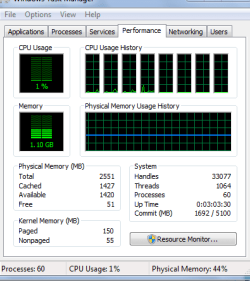
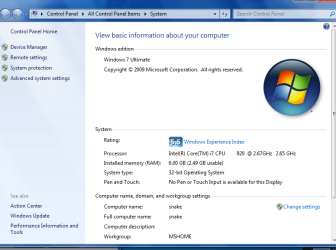
all the installed memory (RAM) not usable??

robertglenrobert

New member
Local time
8:18 AM
Messages
5
I have a Evga X58 MOBO w/ the i7 proc and 6 gb of ram and now that i have win 7 installed its saying Insatalled memory (RAM) 6.00 GB (2.49) usable. ???? now does that mean that its only registering 2.49 of RAM and if that is so how do i get it to read all my RAM??? when i had vista installed on my box it wasn't showing this problem... any and all help will be greatly aprecatied. thanks
 

My Computer

OS
Windows 7
I have a Evga X58 MOBO w/ the i7 proc and 6 gb of ram and now that i have win 7 installed its saying Insatalled memory (RAM) 6.00 GB (2.49) usable. ???? now does that mean that its only registering 2.49 of RAM and if that is so how do i get it to read all my RAM??? when i had vista installed on my box it wasn't showing this problem... any and all help will be greatly aprecatied. thanks
Are you using a build of Windows 7 that is x86 (32-bit)?
 

My Computer

Computer Manufacturer/Model Number
Compal JFT02 (Custom Build Laptop)
OS
Windows 7 Home Premium x64 - Mac OS X 10.6.4 x64
CPU
Intel Core 2 Duo T9300 2.5 GHz
Motherboard
JFT02
Memory
4GB Kingston DDR2-800
Graphics Card(s)
NVIDIA Geforce 8600M GT (512MB Model)
Sound Card
Realtek HD Audio
Monitor(s) Displays
WUXGA Standard Laptop Display
Screen Resolution
1680*1050
Hard Drives
Toshiba 320GB 5400RPM Laptop HD
PSU
Standard Laptop Power Supply
Case
Standard Laptop Case
Cooling
Standard Laptop Cooling
Keyboard
Standard Laptop 105 Key-Keyboard
Mouse
Synaptics Touchpad
Internet Speed
Verizion Online DSL 3360/864 kbs (dl/up)
win 7 mem mgmt

I have a Evga X58 MOBO w/ the i7 proc and 6 gb of ram and now that i have win 7 installed its saying Insatalled memory (RAM) 6.00 GB (2.49) usable. ???? now does that mean that its only registering 2.49 of RAM and if that is so how do i get it to read all my RAM??? when i had vista installed on my box it wasn't showing this problem... any and all help will be greatly aprecatied. thanks

RGR

Its just the way win 7 manages memory. If you have 6 and windows sees it then whats happening is win is taking 3gig as a primary superfetch. makes apps load faster and other things. Just look in task manager (right click taskbar) if total is 6 gigs then its correct

Hope this helps

Ken
 
Last edited:

My Computer

Computer Manufacturer/Model Number
HP Pavillion dv-7 1005 Tx
OS
Win 8 Release candidate 8400
CPU
[email protected]
Memory
4 gigs
Graphics Card(s)
Nvidia 9600M
Sound Card
HD built-in
Monitor(s) Displays
17" Wxga
Screen Resolution
1440x900
Cooling
none
Internet Speed
45Mb down 5Mb up
Win 7 32 bit and in the task man. it says 1.09
 
Last edited:

My Computer

OS
Windows 7
Win 7 32 bit
Look Ken that is why...you will need to acquire a build of 7 that is 64-bit to use more than 4GB of RAM...do that and your issue will be solved...


BTW You will have to format and install the 64-bit version...it is not possible to go from 32-bit to 64-bit (upgrade)
 

My Computer

Computer Manufacturer/Model Number
Compal JFT02 (Custom Build Laptop)
OS
Windows 7 Home Premium x64 - Mac OS X 10.6.4 x64
CPU
Intel Core 2 Duo T9300 2.5 GHz
Motherboard
JFT02
Memory
4GB Kingston DDR2-800
Graphics Card(s)
NVIDIA Geforce 8600M GT (512MB Model)
Sound Card
Realtek HD Audio
Monitor(s) Displays
WUXGA Standard Laptop Display
Screen Resolution
1680*1050
Hard Drives
Toshiba 320GB 5400RPM Laptop HD
PSU
Standard Laptop Power Supply
Case
Standard Laptop Case
Cooling
Standard Laptop Cooling
Keyboard
Standard Laptop 105 Key-Keyboard
Mouse
Synaptics Touchpad
Internet Speed
Verizion Online DSL 3360/864 kbs (dl/up)
hope this infor helps
 

Attachments

  • Capture.PNG
    Capture.PNG
    28.7 KB · Views: 3,053
  • Capture1.PNG
    Capture1.PNG
    142.3 KB · Views: 6,718

My Computer

OS
Windows 7

My Computer

Computer Manufacturer/Model Number
Compal JFT02 (Custom Build Laptop)
OS
Windows 7 Home Premium x64 - Mac OS X 10.6.4 x64
CPU
Intel Core 2 Duo T9300 2.5 GHz
Motherboard
JFT02
Memory
4GB Kingston DDR2-800
Graphics Card(s)
NVIDIA Geforce 8600M GT (512MB Model)
Sound Card
Realtek HD Audio
Monitor(s) Displays
WUXGA Standard Laptop Display
Screen Resolution
1680*1050
Hard Drives
Toshiba 320GB 5400RPM Laptop HD
PSU
Standard Laptop Power Supply
Case
Standard Laptop Case
Cooling
Standard Laptop Cooling
Keyboard
Standard Laptop 105 Key-Keyboard
Mouse
Synaptics Touchpad
Internet Speed
Verizion Online DSL 3360/864 kbs (dl/up)
Robert,

Like the other members said, you are running a 32-bit OS which can address at most 4GB of RAM. Since you have more RAM than this, you have to switch over to a 64-bit version of the OS or forgo using some of your RAM. Once you make the switch, you will likely see all 6GB usable.
 

My Computer

Computer Manufacturer/Model Number
Self-Built in July 2009
OS
Windows 7 Ultimate x64
CPU
Intel Q9550 2.83Ghz OC'd to 3.40Ghz
Motherboard
Gigabyte GA-EP45-UD3R rev. 1.1, F12 BIOS
Memory
8GB G.Skill PI DDR2-800, 4-4-4-12 timings
Graphics Card(s)
EVGA 1280MB Nvidia GeForce GTX570
Sound Card
Realtek ALC899A 8 channel onboard audio
Monitor(s) Displays
23" Acer x233H
Screen Resolution
1920x1080
Hard Drives
Intel X25-M 80GB Gen 2 SSD
Western Digital 1TB Caviar Black, 32MB cache. WD1001FALS
PSU
Corsair 620HX modular
Case
Antec P182
Cooling
stock
Keyboard
ABS M1 Mechanical
Mouse
Logitech G9 Laser Mouse
Internet Speed
15/2 cable modem
Other Info
Windows and Linux enthusiast. Logitech G35 Headset.
crap i didn't have this issue w/ vista when i had that installed..... will that problem be fixed when its released do you think??
 

My Computer

OS
Windows 7
crap i didn't have this issue w/ vista when i had that installed..... will that problem be fixed when its released do you think??
It isn't a problem per-see...it is because you chose the wrong flavor of windows...in XP, Vista and 7 there are x86 (32-bit) and x64 (64-bit) versions of windows...x86 is for people with less than 4 GB or RAM and whose processor cannot run it...x64 is for people with more than 4 GB of RAM and a processor who can handle it (both are true for you)...just acquire a 64-bit version of 7 and reformat/install...problem solved
 

My Computer

Computer Manufacturer/Model Number
Compal JFT02 (Custom Build Laptop)
OS
Windows 7 Home Premium x64 - Mac OS X 10.6.4 x64
CPU
Intel Core 2 Duo T9300 2.5 GHz
Motherboard
JFT02
Memory
4GB Kingston DDR2-800
Graphics Card(s)
NVIDIA Geforce 8600M GT (512MB Model)
Sound Card
Realtek HD Audio
Monitor(s) Displays
WUXGA Standard Laptop Display
Screen Resolution
1680*1050
Hard Drives
Toshiba 320GB 5400RPM Laptop HD
PSU
Standard Laptop Power Supply
Case
Standard Laptop Case
Cooling
Standard Laptop Cooling
Keyboard
Standard Laptop 105 Key-Keyboard
Mouse
Synaptics Touchpad
Internet Speed
Verizion Online DSL 3360/864 kbs (dl/up)
ok i will give that a try thanks for all your guys quick help and responce to it... so i have one last ? being that i preorded win 7 already do you know if they are releasing both versions on the one disk ?
 

My Computer

OS
Windows 7
32 bit limit

yep...there is your proof...read my post above

Didn't even cross my mind that someone would have 6gigs in 32 bit and that it would work as he said in vista "when i had vista installed on my box it wasn't showing this problem...

Ken
 

My Computer

Computer Manufacturer/Model Number
HP Pavillion dv-7 1005 Tx
OS
Win 8 Release candidate 8400
CPU
[email protected]
Memory
4 gigs
Graphics Card(s)
Nvidia 9600M
Sound Card
HD built-in
Monitor(s) Displays
17" Wxga
Screen Resolution
1440x900
Cooling
none
Internet Speed
45Mb down 5Mb up
ok i will give that a try thanks for all your guys quick help and responce to it... so i have one last ? being that i preorded win 7 already do you know if they are releasing both versions on the one disk ?
Indeed you will get both
 

My Computer

Computer Manufacturer/Model Number
Compal JFT02 (Custom Build Laptop)
OS
Windows 7 Home Premium x64 - Mac OS X 10.6.4 x64
CPU
Intel Core 2 Duo T9300 2.5 GHz
Motherboard
JFT02
Memory
4GB Kingston DDR2-800
Graphics Card(s)
NVIDIA Geforce 8600M GT (512MB Model)
Sound Card
Realtek HD Audio
Monitor(s) Displays
WUXGA Standard Laptop Display
Screen Resolution
1680*1050
Hard Drives
Toshiba 320GB 5400RPM Laptop HD
PSU
Standard Laptop Power Supply
Case
Standard Laptop Case
Cooling
Standard Laptop Cooling
Keyboard
Standard Laptop 105 Key-Keyboard
Mouse
Synaptics Touchpad
Internet Speed
Verizion Online DSL 3360/864 kbs (dl/up)
Didn't even cross my mind that someone would have 6gigs in 32 bit and that it would work as he said in vista "when i had vista installed on my box it wasn't showing this problem...

Ken
Maybe he had Vista x64 ?
Then clean install of Win 7 x86 ?

Hard to imagine 32 bit Vista originally installed, to run 8 cpus with 6 gigs...

Did Vista support the IA64 architecture ?
 

My Computer

Computer Manufacturer/Model Number
Gateway GT5056
OS
XP_Pro, W7_7201, W7RC.vhd, SciLinux5.3, Fedora12, Fedora9_2x, OpenSolaris_09-06
CPU
AMD 64x2
Motherboard
Yes
Memory
1 gig
Graphics Card(s)
Dunno
Sound Card
Realtek something
Monitor(s) Displays
Samsung SyncMaster 940MW w/TV
Screen Resolution
1280x1024
Hard Drives
250 GB WD, USB Seagate Freedesk 1.5 T
Internet Speed
Cable modem
Other Info
1 + 1 = 10b,
7 + 7 = 16o,
a + b = 15h.
Windows 7 64 bit not reading my 6GB

I just installed Windows 7 64bit and it's not reading my 6GB.

In the system info - it reads: 6.00 GB (3.12 GB usable)

In the Task Manager it reads: Physical Memory, Total: 3199

My mobo is Asus P5W Deluxe.

Would like to find out if I can access the other 3 GB!
 

My Computer

OS
Windows 7 64 bit
CPU
Core 2 Quad 2.4 GHz
Motherboard
Asus P5W Deluxe
Memory
6 GB Corsair
Graphics Card(s)
Sapphire X1950XT
Monitor(s) Displays
Samsung SyncMaster 960BF
Hard Drives
Western Digital 250 + 320
PSU
Seasonic 600W
Case
Gigabyte 3DAURORA
Cooling
Tunic
I just installed Windows 7 64bit and it's not reading my 6GB.

In the system info - it reads: 6.00 GB (3.12 GB usable)

In the Task Manager it reads: Physical Memory, Total: 3199

My mobo is Asus P5W Deluxe.

Would like to find out if I can access the other 3 GB!

yw

Try the bios setting for max memory it should be unchecked.

Ken
 

My Computer

Computer Manufacturer/Model Number
HP Pavillion dv-7 1005 Tx
OS
Win 8 Release candidate 8400
CPU
[email protected]
Memory
4 gigs
Graphics Card(s)
Nvidia 9600M
Sound Card
HD built-in
Monitor(s) Displays
17" Wxga
Screen Resolution
1440x900
Cooling
none
Internet Speed
45Mb down 5Mb up
Maybe he had Vista x64 ?
Then clean install of Win 7 x86 ?

Hard to imagine 32 bit Vista originally installed, to run 8 cpus with 6 gigs...

Did Vista support the IA64 architecture ?

IA64 only runs on Itanium CPUs. Which only run apps written for that.
 

My Computer

OS
Windows 7 RTM
CPU
Intel Core 2 Quad QX9770 @ 3.2GHZ
Motherboard
Dell XPS 730 H2C
Memory
Corsair 1600MHZ DDR2
Graphics Card(s)
Dual Nvidia GTX280 in SLI
Sound Card
Creative X-Fi
Monitor(s) Displays
Dell 30inch 3007WFP left - right Acer 19inch
Screen Resolution
2560x1600 - 1280x1024
Hard Drives
1 x OCZ Agility 64GB SSD (OS)
2 x 1TB in Raid Stripe = 2TB
1 x 1TB in External eSata = 1TB
PSU
1KW
Case
Dell XPS 730 H2C w/X-Panel
Cooling
Dell H2C Liquid Cooling Unit.
Keyboard
Saitek Eclipse II
Mouse
Logitech MX518
Internet Speed
20Mb Down/2Mb Up
Other Info
Homepage: http://www.digitalnowhere.com
IRC: irc.efnet.net #winsupport
Having JUST been laptop shopping... A lot of laptops and even some desktops are sold with Vista 64 on them. I bet most people don't even realize they are running it unless they specifically look for it. It was surprising.
 

My Computer

Computer Manufacturer/Model Number
Scratch built
OS
Windows 7 x64 Ultimate
CPU
i7 960
Motherboard
Asus P6X58D
Memory
12 Gig Corsair Dominator
Graphics Card(s)
Nvidia 480
Sound Card
Maudio Delta 44 + breakout box
Monitor(s) Displays
Dell UltraSharp U2410 24in and Samsung 21 dual monitors
Screen Resolution
1920x1200 and 1280x1024
Hard Drives
Primary: Intel X-25M G2 160G SSD
Secondary: Segate baracuda 1.0 TB
HDs in AHCI mode.
PSU
Corasair TX850
Case
Cooler Master HAF
Cooling
Corsair H50
Keyboard
Logitech G15 + N52 game pad
Mouse
Logitech MX518
Internet Speed
15kbs down 4.5kbps up
Other Info
WEI 7.6
CPU & RAM 7.6
Graphics 7.9
Hard disk 7.7
Thanks

changed the settings in my bios and the 6GB are working.

Thanks!
 

My Computer

OS
Windows 7 64 bit
CPU
Core 2 Quad 2.4 GHz
Motherboard
Asus P5W Deluxe
Memory
6 GB Corsair
Graphics Card(s)
Sapphire X1950XT
Monitor(s) Displays
Samsung SyncMaster 960BF
Hard Drives
Western Digital 250 + 320
PSU
Seasonic 600W
Case
Gigabyte 3DAURORA
Cooling
Tunic
hey im having some issues. i have 4gb of ddr3 1600 mhz (i would have but 1 stick of my trip channel doesnt work :() but my version of windows x64bit, build 1700 reads only using 1.99gb of the 4gb total memory.
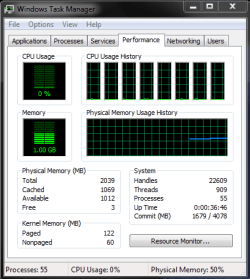
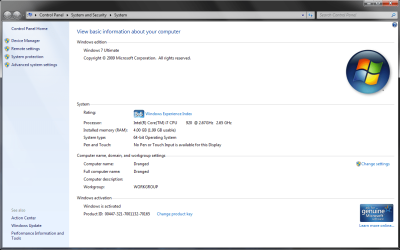
i know it registers 4gb 'cos it all checks out in the bios. AND because it says total memory is 4gb. but when i go into task manager it only reads 2gb being used.

is this just windows 7 doing some wierd "im only gonna TELL you im using less ram" thing or is there a fix or an update to fix this.

thanks
 

Attachments

  • TM performance tab.png
    TM performance tab.png
    30.6 KB · Views: 365
  • System information.png
    System information.png
    153.6 KB · Views: 1,214

My Computer

Computer Manufacturer/Model Number
Custom
OS
windows 7 x64bit build 7100
CPU
intel i7 920 2.66ghz
Motherboard
EVGA X58 SLI LE
Memory
6gb ddr3 corsair 1600 (TR3X6G16006D)
Graphics Card(s)
EVGA GTX-285 IGB
Sound Card
Creative soundblaster extreme fidelity - fatality edition
Monitor(s) Displays
24" benq G2400WDLCD
Hard Drives
1x WD veloci-raptor 160gb
5x WD 500gb AKYS
PSU
Corsair 850w (hx850)
Case
Antec 900
Cooling
(cpu: thermalright ultra 120 black + fan kit)
Keyboard
Logitech G19
Mouse
Razer Deathadder
Internet Speed
24m
Back
Top