Allowing a non-administrator to manage scheduled tasks?

magmabladez

New member
Local time
1:02 AM
Messages
2
My dad recently made it so I'm not an administrator on this computer, and now I can't run Combat Arms, because the program needs to manage scheduled tasks, and we've already tried allowing me full access to the program. Any help?
 

My Computer My Computer

At a glance

Windows 7
OS
Windows 7
My dad recently made it so I'm not an administrator on this computer, and now I can't run Combat Arms, because the program needs to manage scheduled tasks, and we've already tried allowing me full access to the program. Any help?

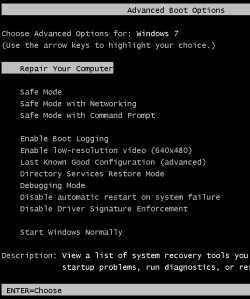
Hit f8 while starting your computer, and select repair your computer in advance boot options...
4-7.png

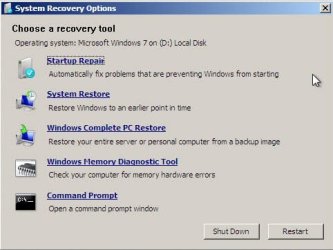
then select system restore to restore your system to earlier date when you are the administrator of your system..

5-7.jpg

Once the restoration completed you will be able to launch the game and you will be the administrator as well
 

My Computer My Computer

At a glance

windows 7wipro8 gb
Computer Manufacturer/Model Number
wipro
OS
windows 7
CPU
wipro
Motherboard
intel
Memory
8 gb
Hard Drives
580 gb
Lol I thought about doing that but then my dad would ask what's up with the comp and i'd be grounded from the computer for months lol. Is there any way to make it so that the program is always allowed, even though it has to manage scheduled tasks and windows cant identify the publisher?
 

My Computer My Computer

At a glance

Windows 7
OS
Windows 7
Back
Top