Allowing neighbor to connect wirelessly...

RaDiCaL1ab

New member
Member
Local time
5:01 AM
Messages
19
Location
CO
through my Cisco wireless router, which is unsecured, while I am using LAN,but he is able to connect through the host therefore causing me slow downs on my speed. My question is this...how do I allow him guest access but block from using my host connection? I know I shouldn't be doing this in the first place but he is struggling to make ends meet and I saw no reason to let him access my internet as he has no tv or radio. any help with this issue would be greatly appreciated.
 

My Computer My Computer

Computer Manufacturer/Model Number
HP Pavilion 1615
OS
Windows 7 Ult 64bit
CPU
2.4ghz amd athalon 64 3800+
Motherboard
asus a8n-la (nagami2)
Memory
2048 pc3200
Graphics Card(s)
ati radeon hd 4600 1024mb
Sound Card
ATI Radeon HDMI @ ATI RV710/730/740 - High Def
Monitor(s) Displays
HP L1506 [15" LCD] (CNC632NX7S)
Screen Resolution
1024x768
Hard Drives
ST320082 7AS SCSI Disk Device (200 GB, 7200 RPM, SATA-II)
Seagate FreeAgent Go USB Device (250 GB)
PSU
TR2 430W
Case
ATX
Cooling
CPU 2254 RPM Chassis 1281 RPM
Keyboard
HP us
Mouse
usb optical
Internet Speed
cable 512
Other Info
Optical Drive HL-DT-ST DVDRAM GP08NU6B USB Device
only way i can think of is throttling but that is quite advanced and usually requires customized firmware for your router the easier option is time limits so you can block him out so you can do ur downloading
 

My Computer My Computer

OS
windows 7 professional 32bit
I don't understand what this means: he is able to connect through the host

Can you explain please?
 

My Computer My Computer

Computer type
PC/Desktop
Computer Manufacturer/Model Number
Lenovo IdeaCenter 450
OS
Windows 10 Pro X64
CPU
Intel Quad Core i7-4770 @ 3.4Ghz
Memory
16.0GB PC3-12800 DDR3 SDRAM 1600 MHz
Graphics Card(s)
Intel Integrated HD Graphics
Sound Card
Realtek HD Audio
Monitor(s) Displays
HP 22" LCD
Screen Resolution
1680 x 1050
Hard Drives
250GB Samsung EVO SATA-3 SSD
2TB Seagate ST2000DM001 SATA-2
1.5TB Seagate ST3150041AS SATA
Keyboard
Dell USB
Mouse
Lenovo USB
Internet Speed
Cable via Road Runner 3MB Upload, 30MB Download
Antivirus
Windows Defender, MBAM Pro, MBAE
Browser
Seamonkey
Other Info
UEFI/GPT
PLDS DVD-RW DH16AERSH
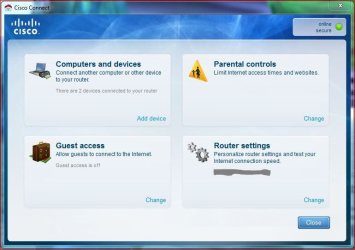
Not a big network guy here but if your router has something like Cisco Connect you could set him up as a guest while maintaining some security yourself.

What this allows you to do is to set up the Guest account, then give him the password to allow access. Note that the Guest account password is seperate from the primary network password.

Cisco Connect.JPG

If you router allows something like that, then that's what I'd do if you want to help him out. My other advice and suggestion is to secure your network, you probably have more then one house guess on it now ;)

My two cents
 

My Computer My Computer

Computer type
PC/Desktop
Computer Manufacturer/Model Number
Custom built by me.
OS
Windows 10 Pro
CPU
Intel Core i7-4770K (3.5Ghz)
Motherboard
Gigabyte G1 Sniper 5 (F10 Bios)
Memory
32 gig Corsair Dominator Platinum (4x8Gig)
Graphics Card(s)
Sapphire Tri-X R9 Fury
Sound Card
Soundblaster ZXR
Monitor(s) Displays
NEC PA242W 24" LCD Monitor
Screen Resolution
1920 x 1200
Hard Drives
Primary - Samsung 850 Pro (512gig), Samsung 840 Pro (256gig), 2TB WD Caviar Black.
PSU
EVGA Supernova 1000 G2
Case
Cooler Master HAF X
Cooling
Corsair H100i with Corsair Air Series SP120 Quiet Fans
Keyboard
Logitech Wireless Wave
Mouse
Logitech Performance MX
Internet Speed
High Speed Cable
Antivirus
Norton Security
Browser
IE11
Other Info
Memory Timings - 1866MHz @ 9-9-9-27-1T @ 1.5 volts
I do have Cisco Connect and do have a guest setup with a passphrase...which is different from mine...but he was sitting here and couldn't connect to guest but was allowed on mine (host) which is a desktop and connected through LAN. I was sure I had set it up right but was confused when he was able to use it. I have since changed the routers passphrase and will see what happens. I'll post back with an update. Thanks guys for responding and trying to help me out.
 

My Computer My Computer

Computer Manufacturer/Model Number
HP Pavilion 1615
OS
Windows 7 Ult 64bit
CPU
2.4ghz amd athalon 64 3800+
Motherboard
asus a8n-la (nagami2)
Memory
2048 pc3200
Graphics Card(s)
ati radeon hd 4600 1024mb
Sound Card
ATI Radeon HDMI @ ATI RV710/730/740 - High Def
Monitor(s) Displays
HP L1506 [15" LCD] (CNC632NX7S)
Screen Resolution
1024x768
Hard Drives
ST320082 7AS SCSI Disk Device (200 GB, 7200 RPM, SATA-II)
Seagate FreeAgent Go USB Device (250 GB)
PSU
TR2 430W
Case
ATX
Cooling
CPU 2254 RPM Chassis 1281 RPM
Keyboard
HP us
Mouse
usb optical
Internet Speed
cable 512
Other Info
Optical Drive HL-DT-ST DVDRAM GP08NU6B USB Device
Remember the Guest network name and pasword is going to be different from the router's name and passphrase. So, you don't even have to let him know the router's name if you don't want, just give him the Guest name and password and he should be good to go.

Good luck.
 

My Computer My Computer

Computer type
PC/Desktop
Computer Manufacturer/Model Number
Custom built by me.
OS
Windows 10 Pro
CPU
Intel Core i7-4770K (3.5Ghz)
Motherboard
Gigabyte G1 Sniper 5 (F10 Bios)
Memory
32 gig Corsair Dominator Platinum (4x8Gig)
Graphics Card(s)
Sapphire Tri-X R9 Fury
Sound Card
Soundblaster ZXR
Monitor(s) Displays
NEC PA242W 24" LCD Monitor
Screen Resolution
1920 x 1200
Hard Drives
Primary - Samsung 850 Pro (512gig), Samsung 840 Pro (256gig), 2TB WD Caviar Black.
PSU
EVGA Supernova 1000 G2
Case
Cooler Master HAF X
Cooling
Corsair H100i with Corsair Air Series SP120 Quiet Fans
Keyboard
Logitech Wireless Wave
Mouse
Logitech Performance MX
Internet Speed
High Speed Cable
Antivirus
Norton Security
Browser
IE11
Other Info
Memory Timings - 1866MHz @ 9-9-9-27-1T @ 1.5 volts
RaDiCaL1ab,

I've Repped you for being kind hearted and public spirited.
 

My Computer My Computer

OS
windows 7 ultimate
try changing the security settings in your router and create mulitple ssid accounts. e.g a zone for your house primarily and a guest zone for your neighbour... you will then have full control over his/her access. what they can and cant do and when they can and cant use your internet connection... if your router doesnt support multiple ssid and creating guest zones then simply set up the router with security.... wpa2 is the best therefore not allowing him/her to hog your bandwidth therefore not slowing you down... (that is if you do not want them to be using your internet connection) otherwise if you do give them the password and learn how to configure your router so that you can control there internet connecion
 

My Computer My Computer

Computer Manufacturer/Model Number
lenovo3000 c200
OS
windows 7 32bit
CPU
intel centrino duo
Motherboard
lenovo
Memory
3gb
Graphics Card(s)
integrated
Sound Card
integrated on-board
Monitor(s) Displays
1
Hard Drives
1 250gb sata
PSU
integrated
Case
intregated laptop form
Cooling
integrated laptop cooling
If you are using a Linksys Router then more than likely you will have a feature under Applications and Gaming called QOS (Quality of Service). You can throttle the bandwidth there either by Application or MAC Address and Port.

JUST GET THE GUYS MAC ADDRESS AND THROTTLE HIS INTERNET FOR APPLICATIONS.
YOU CAN SEE WHAT HE IS USING BY DOWNLOADING WIRESHARK.
 

My Computer My Computer

Computer Manufacturer/Model Number
HP Pavilion Elite HPE-410f
OS
Windows 7 Ultimate x64
CPU
AMD Phenom x6 1045t
Motherboard
N/A
Memory
8 GB
Graphics Card(s)
ATI Radeon HD 5570
Sound Card
Realtek Highdefinition Audio / 5.1 Dolby Setup
Monitor(s) Displays
HP w2207h Widescreen
Screen Resolution
1680*1050
Hard Drives
1 TB (fixed), 320 Portable maxtor, Server Hard drives
PSU
350 Watt
Case
HP CASE
Cooling
Bass
Keyboard
Logitech MX 5500
Mouse
Logitech MX 5500
Internet Speed
ROAD RUNNER 16MB D/512 U
Back
Top