
How to Use Classic Icons or Thumbnail Previews with ALT+TAB Keyboard Shortcut
Information
Normally, you could press and hold right Alt key, press left Alt+Tab keys, tap Tab key to select a window, and release right Alt key to switch to the window in Classic Windows Switcher.
This will show you how to ether have classic icons or the default thumbnails previews of opened windows and programs always displayed when you use the ALT+TAB keyboard shortcut in Windows 7 or Vista.
This will show you how to ether have classic icons or the default thumbnails previews of opened windows and programs always displayed when you use the ALT+TAB keyboard shortcut in Windows 7 or Vista.
Note
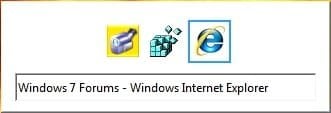
When your press ALT+TAB, press the TAB key to cycle through the open windows and programs. The selected item (icon or thumbail preview) is what will be displayed on the desktop when you release the keys.
EXAMPLE: ALT+TAB with Classic Icons or Thumbnail Previews

Option One
Using a REG File Download
1. To Have ALT+TAB with Classic Icons
A) Click on the Download button below to download the file below.
Alt+Tab_Classic_Icon.reg
Download
B) Go to step 3.
2. To Have ALT+TAB with Thumbnail Previews
NOTE: This is the default setting.
A) Click on the Download button below to download the file below.
Alt+Tab_Thumbnail_Previews.reg
Download
3. Click on Save, and save the .reg file to the desktop.
4. Right click the downloaded .reg file and click on Merge.
5. Click on Run, Yes, Yes, and OK when prompted.
6. Log off and log on, or restart the computer to apply the changes.
7.When done, you can delete the downloaded .reg files on the desktop if you like.
Option Two
Manually in Registry Editor
1. Open the Start Menu, then type regedit in the search boxand press Enter.
2. If prompted by UAC, click on Yes.
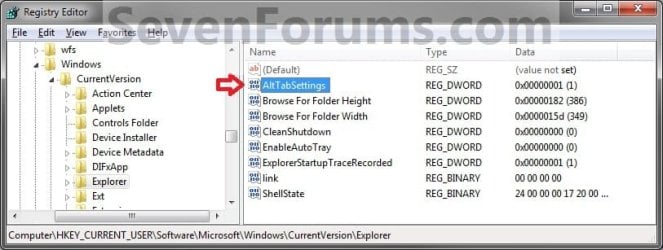
3. In regedit, go to the location below. (see screenshot below)
HKEY_CURRENT_USER\Software\Microsoft\Windows\CurrentVersion\Explorer
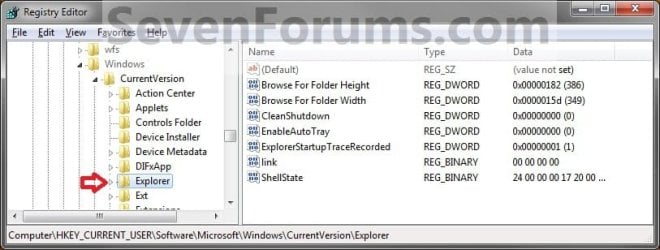
4. To Have ALT+TAB with Classic Icons
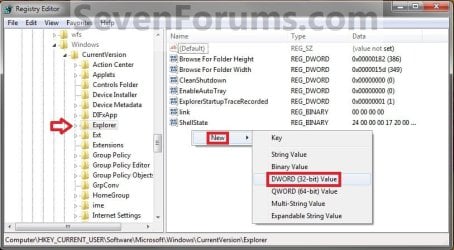
A) In the right pane of Explorer, right click on a empty space and click on New and DWORD (32-bit) Value. (see screenshot below)
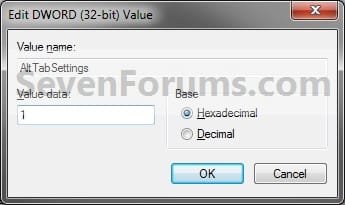
B) Type in AltTabSettings and press enter. Right click on AltTabSettings and click on Modify. (see screenshot below)
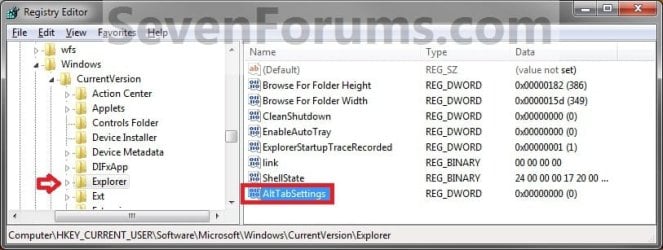
C) Type in 1 and click on OK. (see screenshot below)
D) Go to step 6.
5. To Have ALT+TAB with Thumbnail Previews
NOTE: This is the default setting.
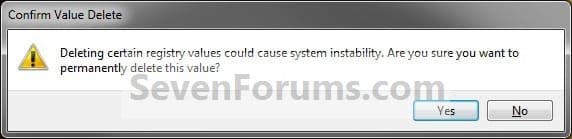
A) In the right pane of Explorer, right click on AltTabSettings and click on Delete. (see screenshot below)
B) Click on Yes to confirm deletion. (see screenshot below)
6. Close regedit.
7. Log off and log on, or restart the computer to apply the changes.
That's it,
Shawn
Attachments
Last edited:


